


 技術(shù)貼|如何在【RK3588】ELF 2開發(fā)板上部署小龍蝦OpenClaw

2026全國大學生嵌入式芯片與系統(tǒng)設計競賽應用賽道報名正在火熱進行中,其中瑞芯微&飛凌嵌入式賽題重磅選用基于旗艦芯片RK3588設計的ELF 2開發(fā)板以及ELF-RV1126B開發(fā)板、ELF-RK3506開發(fā)板作為參賽平臺。
所有的選題都是采用開放和半開放的方式設定,核心宗旨絕非簡單的技術(shù)驗證,而是重點考察同學們對特定行業(yè)的洞察力與實際問題解決能力。我們鼓勵參賽團隊立足真實行業(yè)場景,深挖場景痛點,把所學的嵌入式專業(yè)知識轉(zhuǎn)化為切實可行的解決方案,最終打磨出可落地、可現(xiàn)場演示的完整作品,真正實現(xiàn)從理論知識到工程實踐的轉(zhuǎn)化。
近期,AI圈現(xiàn)象級開源項目OpenClaw刷屏全網(wǎng),憑借 “能動手執(zhí)行” 的硬核能力,徹底打破傳統(tǒng)AI“只說不做”的局限。基于RK3588設計的ELF 2開發(fā)板搭載6TOPS NPU,正是OpenClaw落地邊緣智能的絕佳平臺。
今天我們就帶來實戰(zhàn)教程:如何在ELF 2開發(fā)板上部署 OpenClaw,為你的競賽項目解鎖AI自動執(zhí)行新能力,助力創(chuàng)意快速落地!
1.1.網(wǎng)絡配置
需要確保開發(fā)板具備聯(lián)網(wǎng)能力。此處開發(fā)板通過以太網(wǎng)卡接入網(wǎng)絡(亦可使用無線通信模塊)執(zhí)行ping www.elfboard.com -c 5命令后,成功收到回包且無丟包,表明網(wǎng)絡連接正常。
elf@elf2-desktop:~$ sudo nmcli con mod 'Wired connection 1' ipv4.method manual ipv4.addresses 172.20.8.7/24 ipv4.gateway 172.20.8.254 ipv4.dns 8.8.8.8 connection.autoconnect yes
[sudo] password for elf:
elf@elf2-desktop:~$ sudo nmcli con up 'Wired connection 1'
Connection successfully activated (D-Bus active path: /org/freedesktop/NetworkManager/ActiveConnection/3)
elf@elf2-desktop:~$ ping www.elfboard.com -c 5
PING www.elfboard.com (211.149.236.219) 56(84) bytes of data.
64 bytes from 211.149.236.219 (211.149.236.219): icmp_seq=1 ttl=54 time=36.2 ms
64 bytes from 211.149.236.219 (211.149.236.219): icmp_seq=2 ttl=54 time=36.9 ms
64 bytes from 211.149.236.219 (211.149.236.219): icmp_seq=3 ttl=54 time=35.1 ms
64 bytes from 211.149.236.219: icmp_seq=4 ttl=54 time=43.5 ms
64 bytes from 211.149.236.219: icmp_seq=5 ttl=54 time=35.3 ms
--- www.elfboard.com ping statistics ---
5 packets transmitted, 5 received, 0% packet loss, time 14515ms
rtt min/avg/max/mdev = 35.054/37.380/43.513/3.136 ms
1.2.OpenClaw安裝及配置
OpenClaw官方提供了一種安裝腳本的方式來安裝OpenClaw,會自動升級Node.js等配置。
elf@elf2-desktop:~$ curl -fsSL https://openclaw.ai/install.sh | bash
   OpenClaw Installer
  I'm not magic—I'm just extremely persistent with retries and coping strategies.
? Detected: linux
Install plan
OS: linux
Install method: npm
Requested version: latest
[1/3] Preparing environment
· Node.js not found, installing it now
· Installing Node.js via NodeSource
· Installing Linux build tools (make/g++/cmake/python3)
? Build tools installed
? Node.js v22 installed
· Active Node.js: v22.22.1 (/usr/bin/node)
· Active npm: 10.9.4 (/usr/bin/npm)
[2/3] Installing OpenClaw
? Git already installed
· Configuring npm for user-local installs
? npm configured for user installs
· Installing OpenClaw v2026.3.13
? OpenClaw npm package installed
? OpenClaw installed
[3/3] Finalizing setup
! PATH missing npm global bin dir: /home/elf/.npm-global/bin
  This can make openclaw show as "command not found" in new terminals.
  Fix (zsh: ~/.zshrc, bash: ~/.bashrc):
    export PATH="/home/elf/.npm-global/bin:$PATH"
 OpenClaw installed successfully (OpenClaw 2026.3.13 (61d171a))!
The lobster has landed. Your terminal will never be the same.
· Starting setup
安裝完成之后,就會進入新手引導界面:
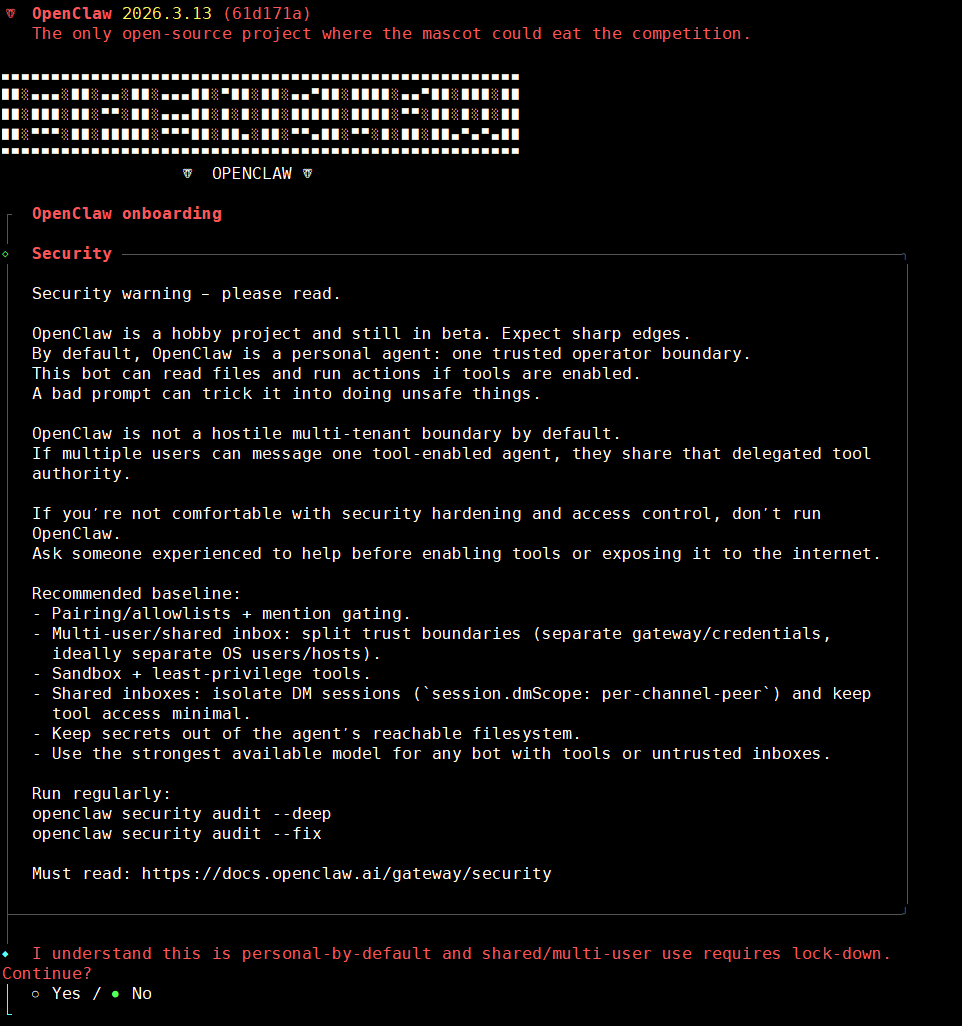
在引導配置界面中,我們需要進行一些基礎的配置來讓OpenClaw能夠正常使用,其他的都可以后續(xù)再進行更改,在引導頁面操作主要依靠鍵盤的上下左右
鍵來進行選擇,空格選中,回車鍵來確認選擇。這個過程不小心退出了,可以使用openclaw onboard重新向?qū)А?/p>
- 風險提示,選擇yes
◆  I understand this is personal-by-default and shared/multi-user use requires lock-down. Continue?
│  ● Yes / ○ No
└
快速開始,選擇QuickStart
◆  Onboarding mode
│  ● QuickStart (Configure details later via openclaw configure.)
│  ○ Manual
└
模型配置,先跳過后續(xù)再配置
◆  Model/auth provider
......
│  ● Skip for now
└
模型供應商選擇所有供應商
◆  Filter models by provider
│  ● All providers
.....
└
默認模型,默認保持不動,后續(xù)再配置
◆  Default model
│  ● Keep current (default: anthropic/claude-opus-4-6)
......
└
連接頻道設置,先跳過,后續(xù)再單獨配置
◆  Select channel (QuickStart)
......
│  ● Skip for now (You can add channels later via `openclaw channels add`)
└
聯(lián)網(wǎng)搜索提供商設置,先跳過
Search provider
│  ○
Brave Search
│  ○
Gemini (Google Search)
│  ○
Grok (xAI)
│  ○
Kimi (Moonshot)
│  ○
Perplexity Search
│  ●
Skip for now (Configure later with openclaw configure --section web)
當前不配置Skills,后續(xù)可以讓openclaw自己配置
◆  Configure skills now? (recommended)
│  ○ Yes / ● No
└
使能hooks,將所有的配置全部使用空格選中,然后回車確認
◆  Enable hooks?
│  ? Skip for now
│  ?  boot-md (Run BOOT.md on gateway startup)
│  ?  bootstrap-extra-files (Inject additional workspace bootstrap files via glob/path patterns)
│  ?  command-logger (Log all command events to a centralized audit file)
│  ?  session-memory (Save session context to memory when /new or /reset command is issued)
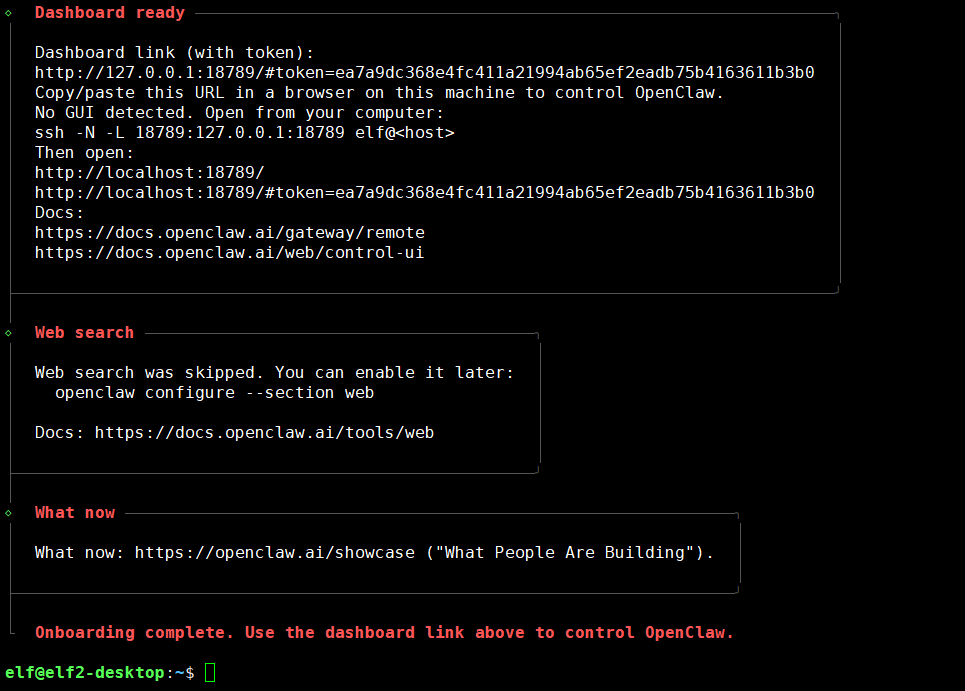
完成安裝
1.3.模型配置
1.3.1.獲取模型的APIKEY
APIKEY可以理解為是身份證,配置OpenClaw時會綁定API Key,每次調(diào)用api運行模型時都會從該API Key的賬戶中扣錢。
MiniMax網(wǎng)站:https://platform.minimaxi.com/
注冊賬號,并進行實名認證,只有進行實名認證才會獲得15元額度。
打開個人賬戶,接口密鑰,創(chuàng)建新的API Key。
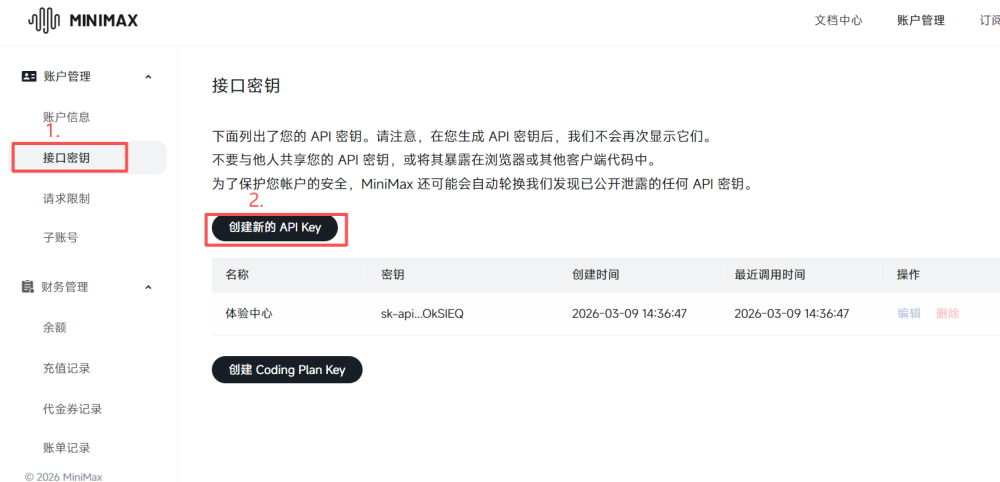
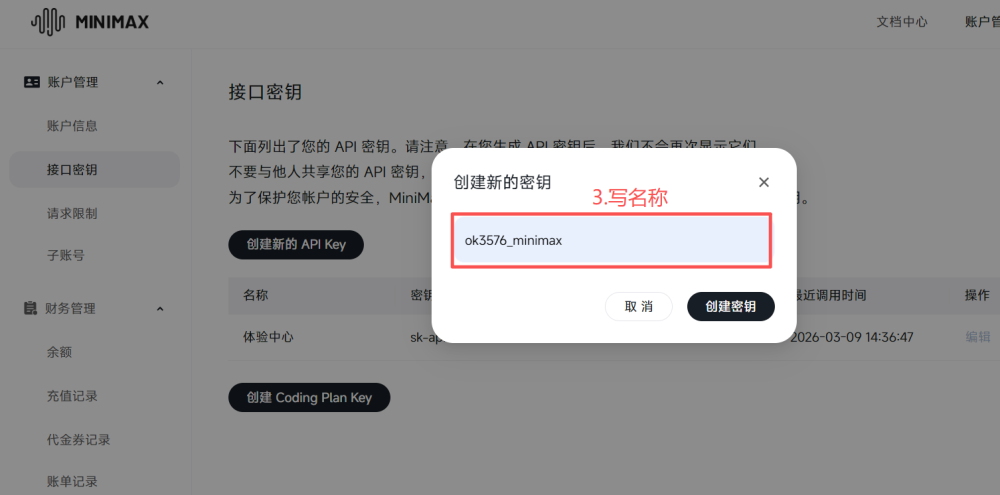
密鑰界面關了就無法再次進入查看了,可以先不關閉,泄露密鑰可能會導致余額損失。
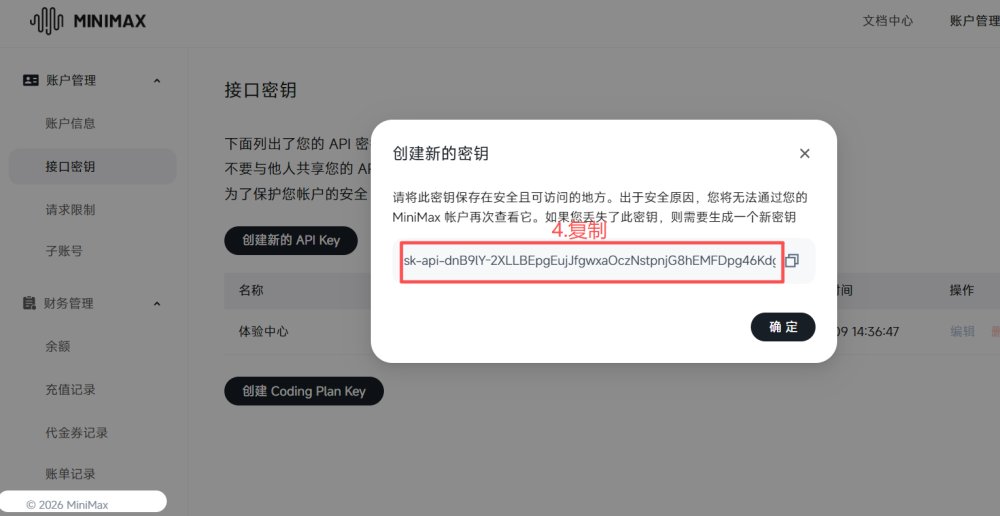
1.3.2.配置模型API Key
打開界面配置
elf@elf2-desktop:~$ source ~/.bashrc
elf@elf2-desktop:~$ openclaw config
選擇Local
◆  Where will the Gateway run?
│  ● Local (this machine) (No gateway detected (ws://127.0.0.1:18789))
│  ○ Remote (info-only)
└
選擇模型
◆  Select sections to configure
│  ○ Workspace
│  ● Model (Pick provider + credentials)
│  ○ Web tools
│  ○ Gateway
│  ○ Daemon
│  ○ Channels
│  ○ Skills
│  ○ Health check
│  ○ Continue
└
這里以選擇MinMax為例進行操作,這是個國內(nèi)的模型,并且注冊新用戶會有15元的額度。
◆  Model/auth provider
│  ○ OpenAI
│  ○ Anthropic
│  ○ Chutes
│  ● MiniMax (M2.5 (recommended))
│  ○ Moonshot AI (Kimi K2.5)
│  ○ Google
│  ○ xAI (Grok)
│  ○ Mistral AI
│  ○ Volcano Engine
│  ...
└
選擇MiniMax CN — API Key
◆  MiniMax auth method
│  ○ MiniMax Global — OAuth (minimax.io)
│  ○ MiniMax Global — API Key (minimax.io)
│  ○ MiniMax CN — OAuth (minimaxi.com)
│  ● MiniMax CN — API Key (minimaxi.com) (sk-api- or sk-cp- keys supported)
│  ○ Back
└
選擇Paste API key now
◆  How do you want to provide this API key?
│  ● Paste API key now (Stores the key directly in OpenClaw config)
│  ○ Use external secret provider
└
粘貼API Key
◆  Enter MiniMax CN API key (sk-api- or sk-cp-)
https://platform.minimaxi.com/user-center/basic-information/interface-key
│
└
接下來選擇模型,已選擇MiniMax-M2.5為例
◆  Models in /model picker (multi-select)
│
│  Search: _
│  ...
│  ? huggingface/zai-org/GLM-4.7-Flash
│  ? huggingface/zai-org/GLM-5
│  ? huggingface/moonshotai/Kimi-K2-Instruct
│  ? huggingface/moonshotai/Kimi-K2-Instruct-0905
│  ? huggingface/moonshotai/Kimi-K2-Thinking
│  ? huggingface/moonshotai/Kimi-K2.5
│  ? huggingface/XiaomiMiMo/MiMo-V2-Flash
│  ? huggingface/MiniMaxAI/MiniMax-M2.1
│  ? huggingface/MiniMaxAI/MiniMax-M2.5
│  ? huggingface/Qwen/Qwen3-235B-A22B-Thinking-2507
│  ? huggingface/Qwen/Qwen3-Coder-480B-A35B-Instruct
│  ? huggingface/Qwen/Qwen3-Coder-Next
│  ? huggingface/Qwen/Qwen3-Next-80B-A3B-Instruct
│  ? huggingface/Qwen/Qwen3-Next-80B-A3B-Thinking
│  ? huggingface/Qwen/Qwen3.5-397B-A17B
│  ? kimi-coding/kimi-k2-thinking
│  ? kimi-coding/k2p5
│  ? minimax/MiniMax-M2.5 (MiniMax M2.5 · ctx 195k · reasoning · alias: Minimax)
│  ? minimax/MiniMax-M2.5-highspeed
│  ...
│  ↑/↓ to navigate ? Tab: select ? Enter: confirm ? Type: to search
└
1.3.3.測試
開發(fā)板端啟用網(wǎng)關
elf@elf2-desktop:~$ openclaw gateway
 OpenClaw 2026.3.13 (61d171a)
   If it works, it's automation; if it breaks, it's a "learning opportunity."
13:01:05 [canvas] host mounted at http://0.0.0.0:18789/__openclaw__/canvas/ (root /home/elf/.openclaw/canvas)
13:01:05 [gateway] ??  Gateway is binding to a non-loopback address. Ensure authentication is configured before exposing to public networks.
13:01:05 [gateway] ??  gateway.controlUi.dangerouslyAllowHostHeaderOriginFallback=true is enabled. Host-header origin fallback weakens origin checks and should only be used as break-glass.
13:01:05 [heartbeat] started
13:01:05 [health-monitor] started (interval: 300s, startup-grace: 60s, channel-connect-grace: 120s)
13:01:05 [gateway] agent model: minimax/MiniMax-M2.5
13:01:05 [gateway] listening on ws://0.0.0.0:18789 (PID 6807)
13:01:05 [gateway] log file: /tmp/openclaw/openclaw-2026-03-20.log
13:01:05 [gateway] security warning: dangerous config flags enabled: gateway.controlUi.allowInsecureAuth=true, gateway.controlUi.dangerouslyAllowHostHeaderOriginFallback=true, gateway.controlUi.dangerouslyDisableDeviceAuth=true. Run `openclaw security audit`.
13:01:05 [browser/server] Browser control listening on http://127.0.0.1:18791/ (auth=token)
13:01:06 [hooks:loader] Registered hook: boot-md -> gateway:startup
13:01:06 [hooks:loader] Registered hook: bootstrap-extra-files -> agent:bootstrap
13:01:06 [hooks:loader] Registered hook: command-logger -> command
13:01:06 [hooks:loader] Registered hook: session-memory -> command:new, command:reset
13:01:06 [hooks] loaded 4 internal hook handlers
13:01:08 [ws] security warning: websocket origin accepted via Host-header fallback conn=2d7442a3-61c7-4165-9b3f-b373559d5061 count=1 host=localhost:18789 origin=http://localhost:18789
13:01:08 [gateway] security metric: gateway.controlUi.dangerouslyAllowHostHeaderOriginFallback accepted a websocket connect request
13:01:08 [ws] webchat connected conn=2d7442a3-61c7-4165-9b3f-b373559d5061 remote=127.0.0.1 client=openclaw-control-ui webchat v2026.3.13
13:01:14 [ws] webchat disconnected code=1006 reason=n/a conn=2d7442a3-61c7-4165-9b3f-b373559d5061在本地電腦執(zhí)行:
#ssh
 -N -L 18789:127.0.0.1:18789 <用戶名>@<服務器公網(wǎng)IP>
PS C:\Users\Administrator> ssh -N -L 18789:127.0.0.1:18789 elf@172.20.8.7
elf@172.20.8.7's password:
在本地瀏覽器訪問:
http://localhost:18789
http://localhost:18789/#token=<你的Token>
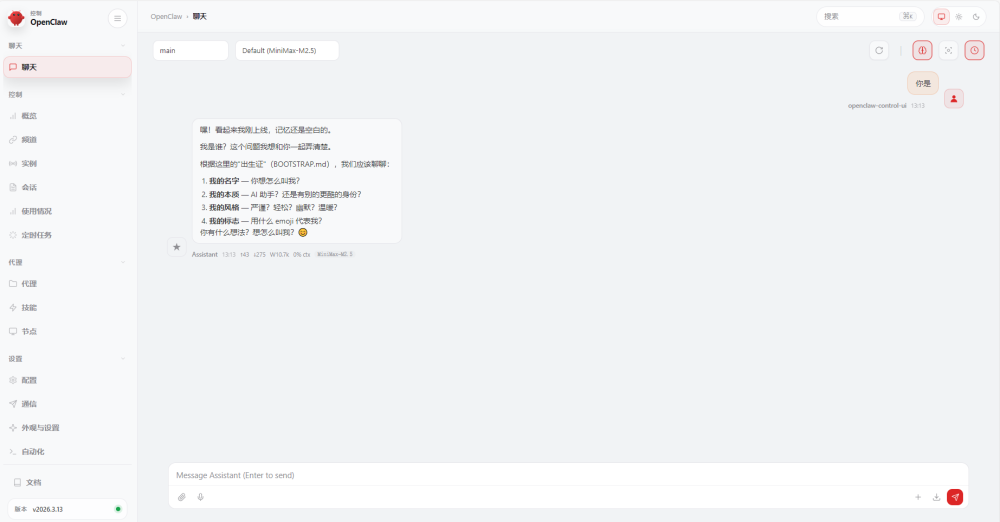
1.4.接入飛書
打開飛書的開發(fā)者后臺,并注冊賬號,
網(wǎng)址:https://open.feishu.cn/
1.4.1.創(chuàng)建企業(yè)自建應用
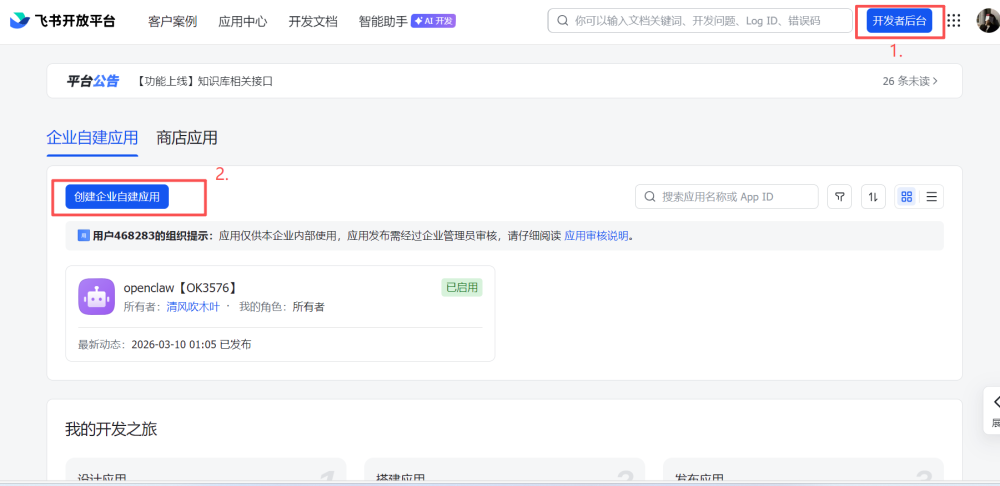
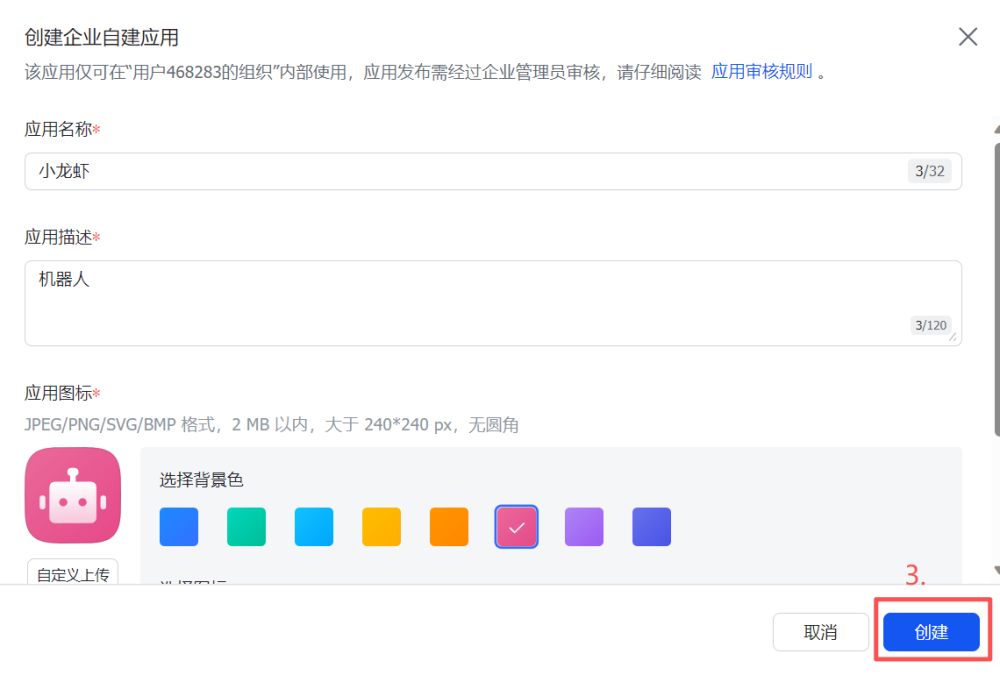
1.4.2.添加機器人
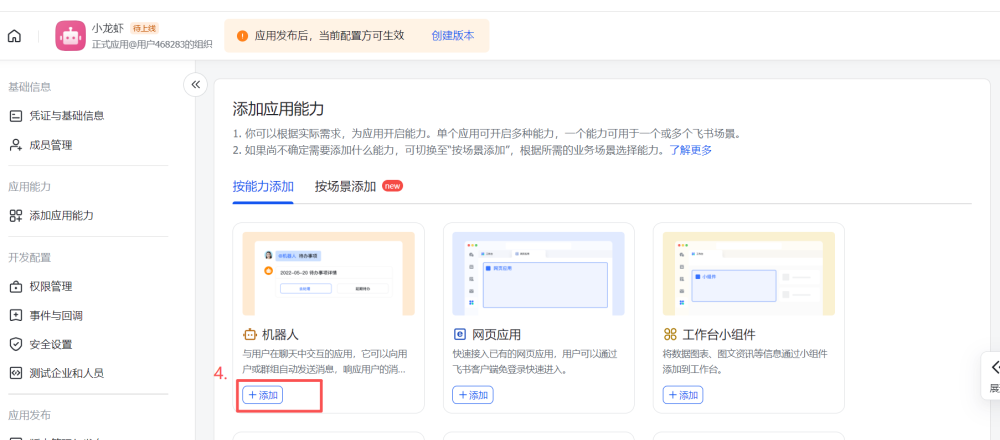
1.4.3.開通權(quán)限
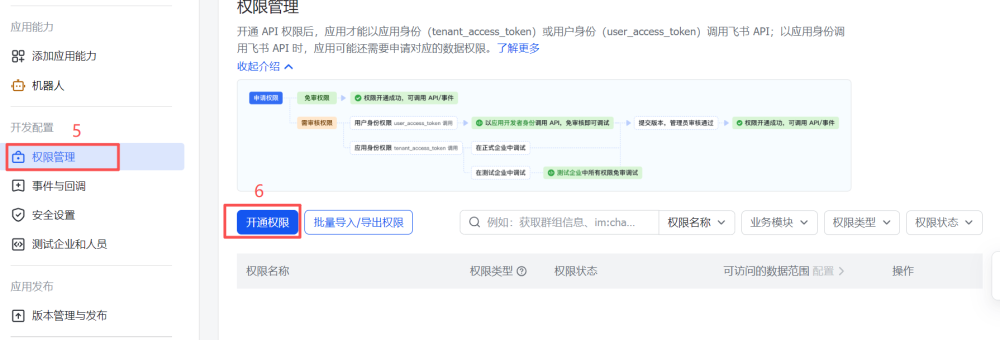
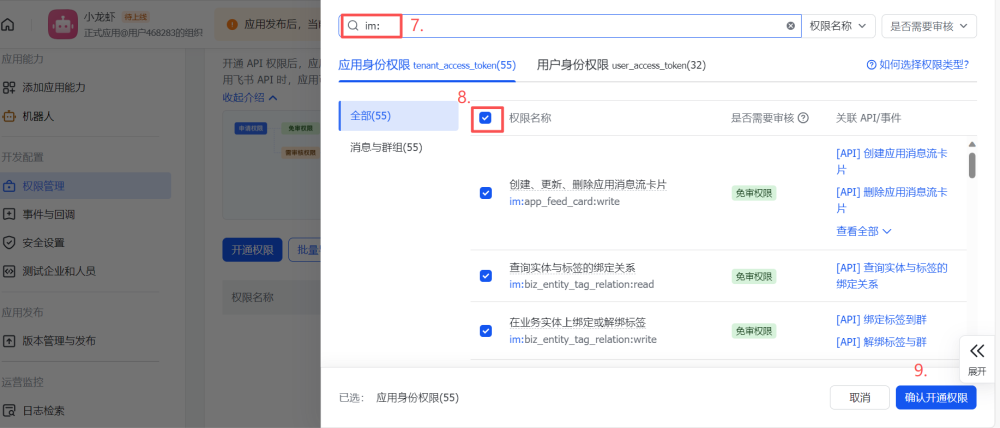
1.4.4.創(chuàng)建版本
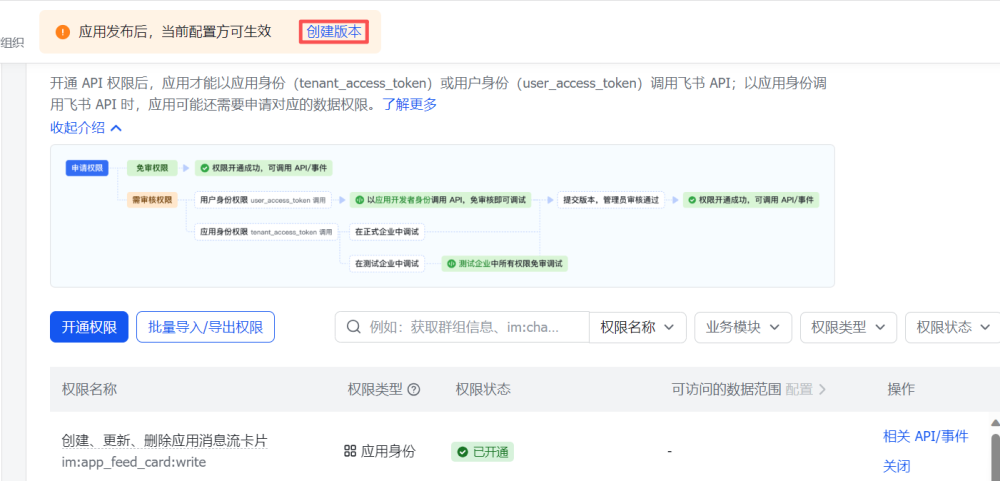
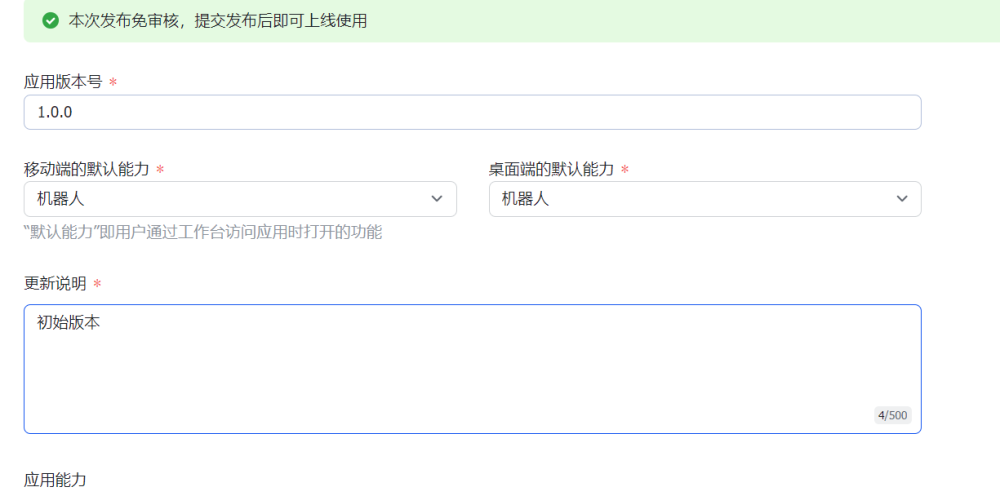
填寫內(nèi)容,拉到最下面,點擊保存,確認發(fā)布
1.4.5.配置Channels
打開OpenClaw的配置界面,選擇Channels
◆  Select sections to configure
│  ○ Workspace
│  ○ Model
│  ○ Web tools
│  ○ Gateway
│  ○ Daemon
│  ● Channels (Link WhatsApp/Telegram/etc and defaults)
│  ○ Skills
│  ○ Health check
│  ○ Continue
└
選擇Configure/link
◆  Channels
│  ● Configure/link (Add/update channels; disable unselected accounts)
│  ○ Remove channel config
└
選擇Feishu/Lark (飛書)
◆  Select a channel
│  ○ Telegram (Bot API)
│  ○ WhatsApp (QR link)
│  ○ Discord (Bot API)
│  ○ IRC (Server + Nick)
│  ○ Google Chat (Chat API)
│  ○ Slack (Socket Mode)
│  ○ Signal (signal-cli)
│  ○ iMessage (imsg)
│  ○ LINE (Messaging API)
│  ● Feishu/Lark (飛書) (plugin · install)
│  ○ Nostr (NIP-04 DMs)
│  ○ Microsoft Teams (Bot Framework)
│  ○ Mattermost (plugin)
│  ○ Nextcloud Talk (self-hosted)
│  ○ Matrix (plugin)
│  ○ BlueBubbles (macOS app)
│  ○ Zalo (Bot API)
│  ○ Zalo (Personal Account)
│  ○ Synology Chat (Webhook)
│  ○ Tlon (Urbit)
│  ○ Finished
└
選擇Download from npm
◆  Install Feishu plugin?
│  ● Download from npm (@openclaw/feishu)
│  ○ Use local plugin path
│  ○ Skip for now
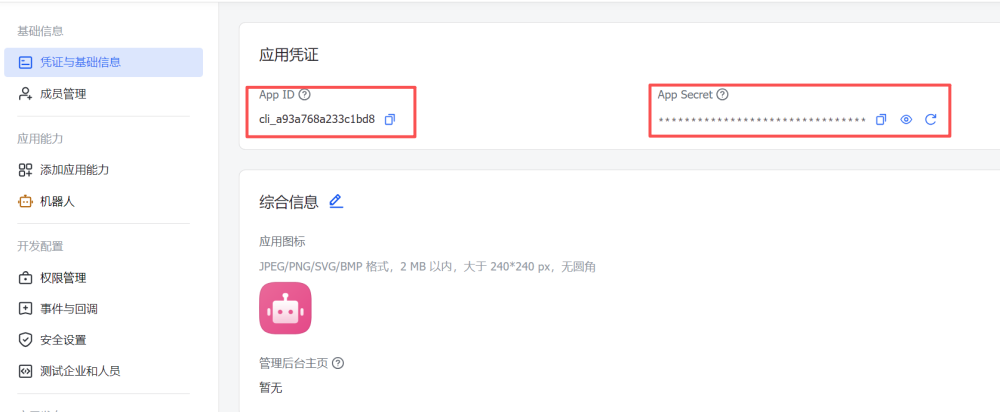
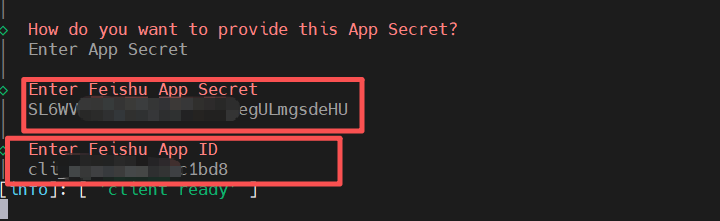
配置APP secret和 APP ID,選擇Enter App Secret
◆  How do you want to provide this App Secret?
│  ● Enter App Secret (Stores the credential directly in OpenClaw config)
│  ○ Use external secret provider
└
打開飛書的憑證與基礎信息,依次粘貼到openclaw的配置中
選擇實時通信
◆  Feishu connection mode
│  ● WebSocket (default)
│  ○ Webhook
└
選擇國內(nèi)飛書
◆  Which Feishu domain?
│  ● Feishu (feishu.cn) - China
│  ○ Lark (larksuite.com) - International
└
選擇所有群聊都可以使用機器人
◆  Group chat policy
│  ○ Allowlist - only respond in specific groups
│  ● Open - respond in all groups (requires mention)
│  ○ Disabled - don't respond in groups
└
退出配置
◆  Select a channel
│  ○ Telegram (Bot API)
│  ○ WhatsApp (QR link)
│  ○ Discord (Bot API)
│  ○ IRC (Server + Nick)
│  ○ Google Chat (Chat API)
│  ○ Slack (Socket Mode)
│  ○ Signal (signal-cli)
│  ○ iMessage (imsg)
│  ○ LINE (Messaging API)
│  ○ Feishu/Lark (飛書)
│  ○ Nostr (NIP-04 DMs)
│  ○ Microsoft Teams (Bot Framework)
│  ○ Mattermost (plugin)
│  ○ Nextcloud Talk (self-hosted)
│  ○ Matrix (plugin)
│  ○ BlueBubbles (macOS app)
│  ○ Zalo (Bot API)
│  ○ Zalo (Personal Account)
│  ○ Synology Chat (Webhook)
│  ○ Tlon (Urbit)
│  ● Finished (Done)
└
同意私聊訪問策略
◆  Configure DM access policies now? (default: pairing)
│  ● Yes / ○ No
└
便于測試,選擇open不需要進行配對,正式使用選擇Pairing
◆  Feishu DM policy
│  ○ Pairing (recommended)
│  ○ Allowlist (specific users only)
│  ● Open (public inbound DMs)
│  ○ Disabled (ignore DMs)
└
退出
◆  Select sections to configure
│  ○ Workspace
│  ○ Model
│  ○ Web tools
│  ○ Gateway
│  ○ Daemon
│  ○ Channels
│  ○ Skills
│  ○ Health check
│  ● Continue (Done)
└
啟用網(wǎng)關
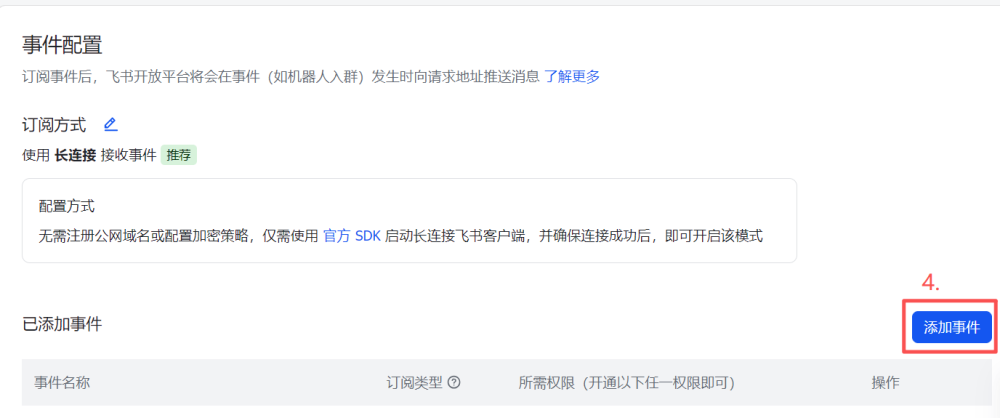
elf@elf2-desktop:~$ openclaw gateway1.4.6. 事件配置
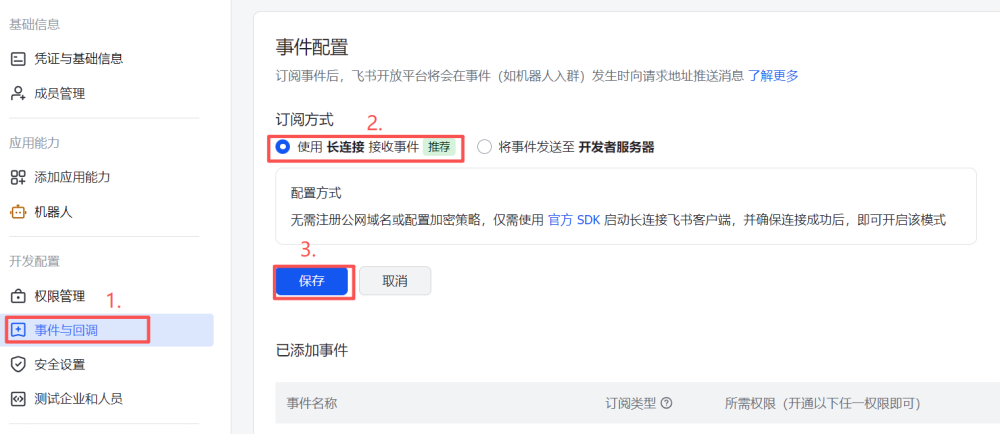
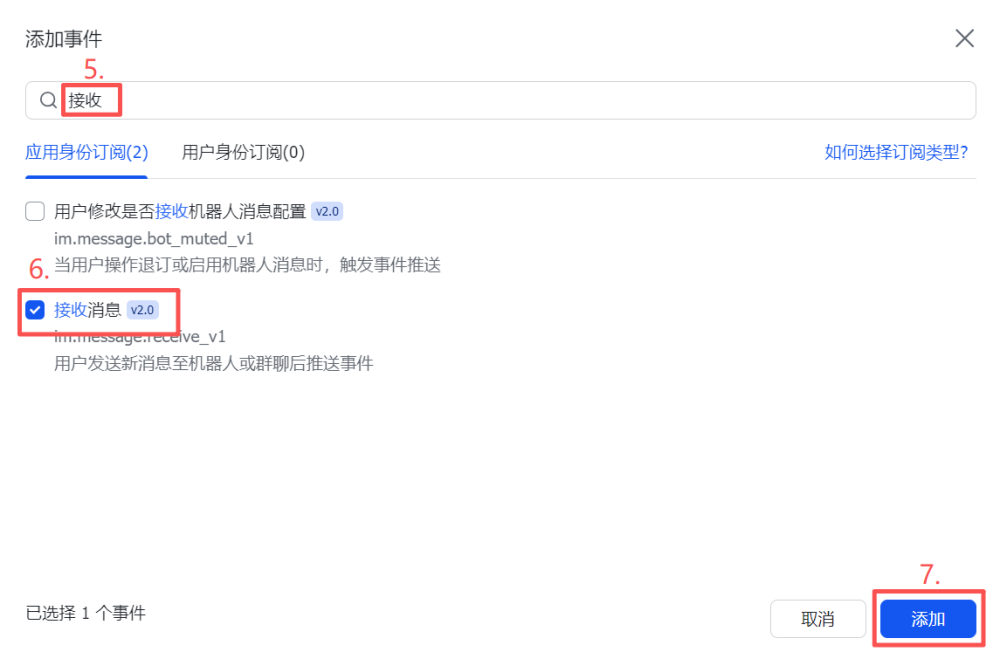
1.4.7. 添加事件
選擇接收消息的訂閱
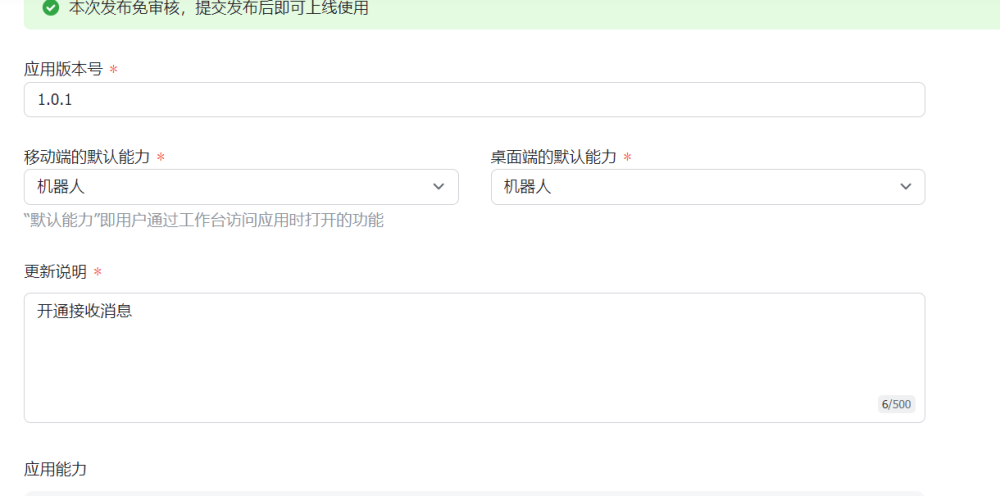
1.4.8. 更新版本
1.4.9. 測試
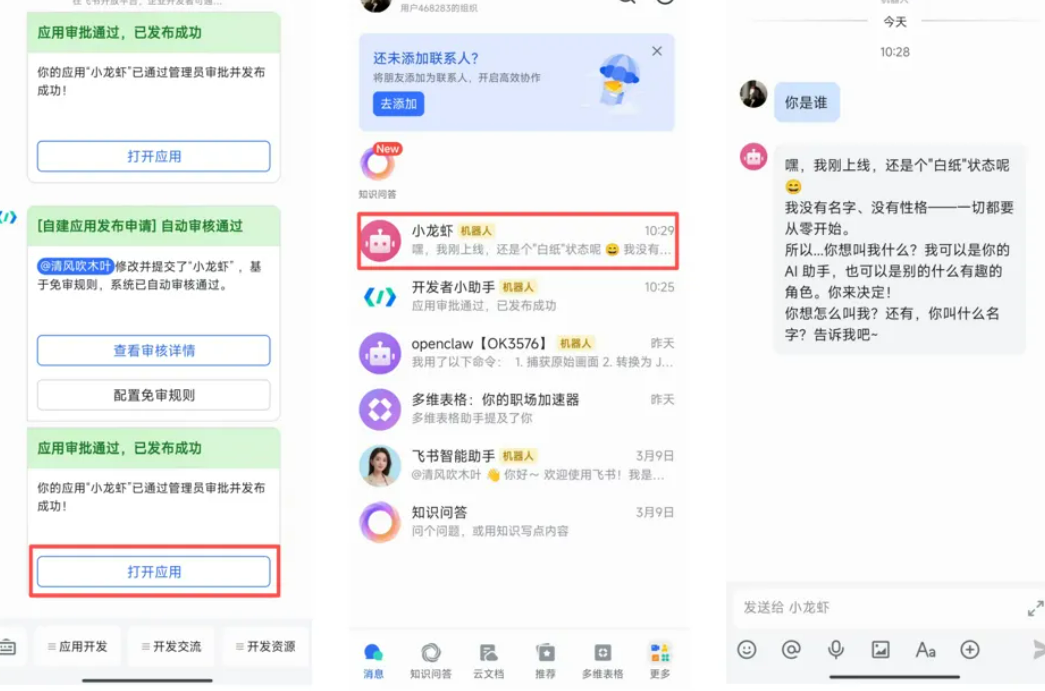
手機下載飛書app,打開應用進行對話測試
以上就是在基于【RK3588】ELF 2開發(fā)板上部署OpenClaw的完整流程,希望能為大家的開發(fā)與參賽項目帶來實際幫助。如有任何問題,歡迎在后臺私信交流。同時也誠摯推薦各位參賽同學選擇瑞芯微 & 飛凌嵌入式賽題。下方附選題指南與大賽報名鏈接,預祝各位同學在競賽中取得理想成績!
全國大學生嵌入式芯片與系統(tǒng)設計競賽報名鏈接:
https://www.socchina.net/home?trackType=2
瑞芯微&飛凌嵌入式選題指南下載地址:
https://www.socchina.net/details?id=6ad88fd486ee4626a2fd7d172b53a68f
-
嵌入式
+關注
關注
5204文章
20560瀏覽量
335875 -
Linux開發(fā)
+關注
關注
0文章
47瀏覽量
7724 -
OpenClaw
+關注
關注
0文章
26瀏覽量
10
發(fā)布評論請先 登錄
瑞芯微RK3588開發(fā)板RK3588 EVB和RK3588S EVB解讀
分享 |迅為基于RK3588開發(fā)板部署測試DeepSeek模型
ElfBoard技術(shù)貼|如何在【RK3588】ELF 2開發(fā)板上進行UART引腳復用配置

ElfBoard技術(shù)貼|如何在【RK3588】ELF 2開發(fā)板實現(xiàn)I2C功能復用

添越智創(chuàng)基于 RK3588 開發(fā)板部署測試 DeepSeek 模型全攻略
OPi RK3588/RK3588S系列產(chǎn)品全面適配Openclaw,智能體“人人可及”時代正式開啟
【飛凌嵌入式RV1126B開發(fā)板試用體驗】+ 3. “小龍蝦”openClaw部署(1)--openClaw下載與編譯
【飛凌嵌入式RV1126B開發(fā)板試用體驗】+ 4. “小龍蝦”openClaw部署(2)--openClaw部署和測試
rk3588有哪些開發(fā)板?
技術(shù)分享|iTOP-RK3588開發(fā)板Ubuntu20系統(tǒng)旋轉(zhuǎn)屏幕方案
ElfBoard技術(shù)貼|如何在【RK3588】ELF 2開發(fā)板實現(xiàn)GPIO功能復用

你的專屬“數(shù)字員工”已到崗!迅為RK3588系列開發(fā)板適配OpenClaw
本地部署OpenClaw,只要500元的開發(fā)板?




 工商網(wǎng)監(jiān)
評論