


 基于AS32X601使用shell命令行終端詳解

一、引言
Letter shell是一個C語言編寫的,可以嵌入在程序中的嵌入式shell,主要面向嵌入式設備。簡單來說是一個命令行交互軟件,可以讀取用戶輸入的命令,找到并執行命令對應的函數。本文基于國科安芯AS32A601開發板,實現輕量化的shell。
二、文件概述
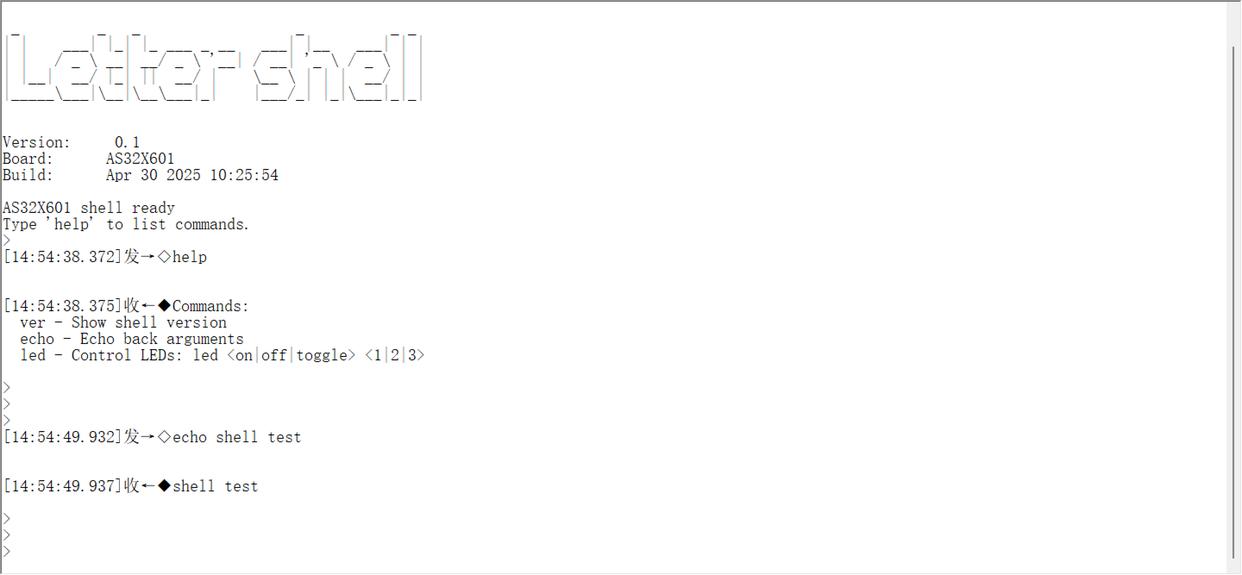
本項目集成了一個輕量級串口命令行 Shell,支持通過 USART0 與主機交互,以 printf 為統一輸出通道。
-Shell 提供基礎命令( help 、 ver 、 echo 、 led ),可按需擴展到 ADC、SPI 等外設。
目錄與文件
shell.h :Shell 對外 API 與類型。
shell.c :Shell 核心實現(輸入緩沖、命令解析、調度)。
shell_cmds.c :示例命令注冊與實現。
print.c :將 printf 輸出重定向到 USART0 。
main.c :Shell 初始化與主循環集成。
serial_cli.ps1 :Windows 交互腳本,便捷串口調試。
2.1****shell.c
#include "shell.h"
#include
#include
#include
/* RX ring buffer */
static****volatile uint8_t rx_buf[256];
static****volatile uint16_t rx_head = 0; /* write index */
static****volatile uint16_t rx_tail = 0; /* read index */
/* Line buffer */
static****char line_buf[SHELL_MAX_LINE];
static uint16_t line_len = 0;
/* Command registry */
static****const ShellCmd *cmd_table[8];
static****int cmd_table_count[8];
static****int table_used = 0;
void shell_init(void (writer)(**const***char** *buf, int len)) {
rx_head = rx_tail = 0;
line_len = 0;
table_used = 0;
( void )writer; /* output uses printf directly */
}
void shell_register(const ShellCmd *cmds, int count) {
__asm volatile ("fence.i");
if (!cmds || count <= 0) return ;
if (table_used < ( int )( sizeof (cmd_table)/ sizeof (cmd_table[0]))) {
cmd_table[table_used] = cmds;
cmd_table_count[table_used] = count;
table_used++;
}
}
void shell_input_byte(uint8_t b) {
uint16_t next = (uint16_t)((rx_head + 1) & 0xFF);
if (next == rx_tail) {
/* overflow, drop byte */
return ;
}
rx_buf[rx_head] = b;
rx_head = next;
}
static****int tokenize(char *line, char **argv, int max_args) {
int argc = 0;
char *p = line;
while (*p && argc < max_args) {
while (*p == ' ' || *p == 't') p++;
if (!*p) break ;
argv[argc++] = p;
while (*p && *p != ' ' && *p != 't') p++;
if (!*p) break ;
*p++ = '?';
}
return argc;
}
static****void print_prompt( void ) {
printf("rn> ");
}
static****int dispatch(int argc, char **argv) {
if (argc <= 0) return 0;
const****char *name = argv[0];
__asm volatile ("fence.i");
if (strcmp(name, "help") == 0) {
printf("Commands:rn");
for (int t = 0; t < table_used; ++t) {
for (int i = 0; i < cmd_table_count[t]; ++i) {
const ShellCmd *c = &cmd_table[t][i];
printf(" %s - %srn", c->name, c->desc ? c->desc : "");
__asm volatile ("fence.i");
}
}
return 0;
}
for (int t = 0; t < table_used; ++t) {
for (int i = 0; i < cmd_table_count[t]; ++i) {
const ShellCmd *c = &cmd_table[t][i];
if (strcmp(name, c->name) == 0) {
return c->handler(argc, argv);
}
}
}
printf("Unknown command: %srn", name);
return -1;
}
void shell_poll( void ) {
/* Read bytes from ring and build lines */
while (rx_tail != rx_head) {
uint8_t b = rx_buf[rx_tail];
rx_tail = (uint16_t)((rx_tail + 1) & 0xFF);
if (b == 'r') {
/* ignore CR */
continue ;
}
if (b == 'n') {
/* complete line */
line_buf[line_len] = '?';
char *argv[SHELL_MAX_ARGS];
int argc = tokenize(line_buf, argv, SHELL_MAX_ARGS);
if (argc > 0) {
( void )dispatch(argc, argv);
}
line_len = 0;
print_prompt();
continue ;
}
if (b == 'b' || b == 0x7F) {
/* backspace */
if (line_len > 0) line_len--;
continue ;
}
if (line_len < SHELL_MAX_LINE - 1) {
line_buf[line_len++] = ( char )b;
} else {
/* truncate on overflow */
}
}
}
主要函數分析
**1. **初始化函數
void shell_init(void (*writer)(const char *buf, int len));
- 初始化緩沖區指針
- writer 參數當前未使用(直接使用 printf)
**2. **命令注冊函數
void shell_register(const ShellCmd *cmds, int count);
- 注冊一組命令
- fence.i 指令:RISC-V 內存屏障,確保指令緩存一致性
**3. **字節輸入處理
void shell_input_byte(uint8_t b);
- 從串口接收單個字節
- 存入環形緩沖區
- 處理緩沖區溢出(丟棄字節)
**4. **主輪詢函數
void shell_poll(void);
核心處理邏輯 :
- 從環形緩沖區讀取字節
- 處理特殊字符:
- 普通字符存入行緩沖區
- 行完成后,分詞并調度執行
**5. **分詞函數
static int tokenize(char *line, char **argv, int max_args);
- 空格/制表符分割命令行
- 支持最大 SHELL_MAX_ARGS 個參數
- 原地修改字符串(添加 ? 終止符)
**6. **命令分發
static int dispatch(int argc, char **argv);
- 內置 help 命令:顯示所有注冊命令
- 遍歷所有命令表查找匹配命令
- 調用對應的 handler 函數
2.2 ** shell_cmds.c**
用戶可在該文件中定義函數,并注冊到命令列表中
#include "shell.h"
#include "led.h"
#include
#include
static****int cmd_ver(int argc, char **argv) {
( void )argc; ( void )argv;
printf("AS32X601 usart_eflash shell v0.1rn");
return 0;
}
static****int cmd_echo(int argc, char **argv) {
for (int i = 1; i < argc; ++i) {
printf("%s%s", argv[i], (i == argc - 1) ? "" : " ");
}
printf("rn");
return 0;
}
static****int cmd_led(int argc, char **argv) {
if (argc < 3) {
printf("Usage: led <1|2|3>rn");
return -1;
}
int idx = argv[2][0] - '0';
if (idx < 1 || idx > 3) {
printf("Invalid LED index: %srn", argv[2]);
return -1;
}
int toggle = (strcmp(argv[1], "toggle") == 0);
int on = (strcmp(argv[1], "on") == 0);
int off = (strcmp(argv[1], "off") == 0);
if (!(toggle || on || off)) {
printf("Invalid action: %srn", argv[1]);
return -1;
}
switch (idx) {
case 1:
if (toggle) LED1_TOGGLE(); else****if (on) LED1_ON(); else****if (off) LED1_OFF();
break ;
case 2:
if (toggle) LED2_TOGGLE(); else****if (on) LED2_ON(); else****if (off) LED2_OFF();
break ;
case 3:
if (toggle) LED3_TOGGLE(); else****if (on) LED3_ON(); else****if (off) LED3_OFF();
break ;
default :
break ;
}
printf("led %s %drn", argv[1], idx);
return 0;
}
static****const ShellCmd default_cmds[] = {
{"ver", "Show shell version", cmd_ver},
{"echo", "Echo back arguments", cmd_echo},
{"led", "Control LEDs: led <1|2|3>", cmd_led},
};
void shell_cmds_init( void ) {
shell_register(default_cmds, ( int )( sizeof (default_cmds)/ sizeof (default_cmds[0])));
}
void shell_info()
{
printf("rn");
printf("rn");
printf (" _ _ _ _ _ _ rn");
printf( "| | _* | | | |* ___ _ __ _| | ___| | |rn");
printf("| | / _ __| / _ ' | / _| ' / _ | |rn");
printf("| |__| __/ |_| || **/ | ** | | | __/ | |rn");
printf("| | | | | | * * / | |* |* * | |* |rn");
printf ("rn");
printf("rn");
printf("Version: 0.1n");
printf("Board: AS32X601n");
printf("Build: " DATE " " TIME "n");
printf("n");
}
- 版本信息命令
static int cmd_ver(int argc, char **argv)
- 顯示固件版本信息
2.回顯命令
static int cmd_echo(int argc, char **argv)
- 打印所有參數(argv[0] 是命令名本身)
- 正確處理參數間的空格
3. ** LED **控制命令
static int cmd_led(int argc, char **argv)
- 完整的參數驗證 :參數數量、范圍、合法性
- 清晰的錯誤提示
- 執行反饋 :操作成功后打印確認信息
**4. **命令表定義
static const ShellCmd default_cmds
- 結構清晰:命令名、描述、處理函數
- 包含使用示例(led命令)
**5. **初始化函數
void shell_cmds_init(void)
- 自動計算命令數量,避免硬編碼
- 提供清晰的模塊初始化接口
2.3 main.c****部分流程
shell_init(NULL);
shell_cmds_init();
shell_info();
printf("AS32X601 shell readyrnType 'help' to list commands.rn> ");
while (1)
{
if (SET == USART_GetFlagStatus(USART0, USART_FLAG_RXFNE))
{
usart_data = USART_ReceiveData(USART0);
ClearCache();
/* feed incoming byte to shell */
shell_input_byte(usart_data);
}
/* process any pending input and run commands */
shell_poll();
}
輸入路徑:串口接收中斷或輪詢將字節喂給 shell_input_byte ,Shell維護環形緩沖與狀態機。
解析執行:按行解析命令,匹配已注冊的命令表或函數指針,執行對應處理例程。
主循環:周期性調用 shell_poll 以處理緩沖區中的數據與命令
三、開發板驗證:
該項目實現通過串口分別控制led 1,2,3翻轉和回顯功能
審核編輯 黃宇
-
命令行
+關注
關注
0文章
83瀏覽量
10759 -
Shell
+關注
關注
1文章
375瀏覽量
25372
發布評論請先 登錄
Kubernetes kubectl命令行工具詳解
AS32X601的I2C模塊操作EEPROM詳解
基于 AS32X601 微控制器的定時器模塊(TIM)技術研究與應用實踐
AS32X601芯片Flash擦寫調試技術解析
AS32X601系列MCU硬件最小系統設計與調試方案探析
【RA-Eco-RA6M4開發板評測】移植shell實現命令交互
淺談wsl --update` 命令行選項無效的解決方案
AS32X601驅動系列教程 GPIO_點亮LED詳解
AS32X601驅動系列教程 SMU_系統時鐘詳解
樹莓派新手必看!在樹莓派上編寫和運行 Shell 腳本!




 工商網監
工商網監
評論