


 【開源鴻蒙】下載OpenHarmony 4.1 Release源代碼

本文介紹了如何下載開源鴻蒙(OpenHarmony)操作系統 4.1 Release版本的源代碼,該方法同樣可以用于下載OpenHarmony最新開發版本(master分支)或者4.0 Release、3.2 Release等發布版本的源代碼。
本文基于Ubuntu 22.04操作,主要考慮到官方推薦使用Ubuntu發行版進行OpenHarmony源碼編譯構建。使用Ubuntu 20.04也可以,更老的版本就不推薦了;因為Ubuntu偶數年份的04版本是LTS版,官方維護時間通常是5年。
3月底(2024年3月30日晚),OpenHarmony發布了最新穩定版本——OpenHarmony 4.1 Realse,官方代碼倉的公告內容如下(詳細內容可以看鏈接):
社區已于2024-03-30發布OpenHarmony-v4.1-Release版本, 詳情請參考https://gitee.com/openharmony/docs/blob/master/zh-cn/release-notes/OpenHarmony-v4.1-release.md
一、準備命令工具
本節介紹如何準備命令行工具,具體包括git/repo/python。
OpenHarmony代碼托管在碼云服務器上,下載單個代碼倉通常使用git命令行工具,下載所有代碼倉需要使用repo命令行工具。repo命令行工具是由Python開發的,因此開始之前,需要線安裝git/git-lfs/python等命令行工具。
安裝git/git-lfs/python/curl,執行如下命令:
sudo apt install git git-lfs python3-pip curl
安裝repo命令,執行如下命令:
# 創建目錄
mkdir ~/bin

# 下載repo腳本
curl https://gitee.com/oschina/repo/raw/fork_flow/repo-py3 > ~/bin/repo

# 下載repo依賴的軟件包
pip3 install -i https://repo.huaweicloud.com/repository/pypi/simple requests
二、配置用戶信息
本節介紹如何配置本地git用戶名和郵箱,以及如何配置碼云SSH公鑰(使用ssh協議下載必須配置):
- 注冊碼云gitee帳號。
- 注冊碼云SSH公鑰,請參考[碼云幫助中心]。
- 配置git用戶信息,執行如下命令:
git config --global user.name "yourname" git config --global user.email "your-email-address" git config --global credential.helper store - 創建目錄,用于存放OpenHarmony源碼,執行如下命令:
mkdir -p ~/ohos/openharmony
cd ~/ohos/openharmony
三、下載OpenHarmony源碼
3.1 使用ssh協議下載(推薦)
通過repo + ssh 下載(需注冊公鑰,請參考[碼云幫助中心])。
- 從版本分支獲取源碼。可獲取該版本分支的最新源碼,包括版本發布后在該分支的合入。
repo init -u git@gitee.com:openharmony/manifest.git -b OpenHarmony-4.1-Release --no-repo-verify repo sync -c repo forall -c 'git lfs pull' - 從版本發布Tag節點獲取源碼。可獲取與版本發布時完全一致的源碼。
repo init -u git@gitee.com:openharmony/manifest.git -b refs/tags/OpenHarmony-v4.1-Release --no-repo-verify
repo sync -c
repo forall -c 'git lfs pull'
3.2 使用https協議下載
通過repo + https 下載。
- 從版本分支獲取源碼。可獲取該版本分支的最新源碼,包括版本發布后在該分支的合入。
repo init -u https://gitee.com/openharmony/manifest -b OpenHarmony-4.0-Release --no-repo-verify repo sync -c repo forall -c 'git lfs pull' - 從版本發布Tag節點獲取源碼。可獲取與版本發布時完全一致的源碼。
repo init -u https://gitee.com/openharmony/manifest -b refs/tags/OpenHarmony-v4.0-Release --no-repo-verify
repo sync -c
repo forall -c 'git lfs pull'
四、下載編譯工具鏈
代碼下載完成后,還需要執行prebuilts_download.sh腳本,下載編譯工具鏈,執行如下命令:
bash build/prebuilts_download.sh
這個腳本會創建prebuilts目錄,并將邊回憶工具鏈下載、解壓到這個目錄下。
以上全部完成后,磁盤空間占用52G: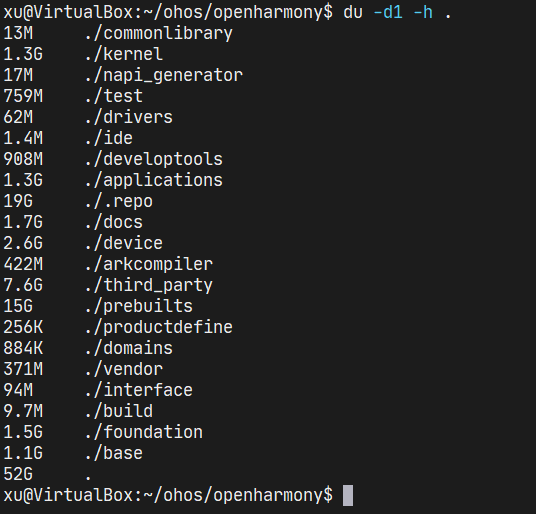
五、參考鏈接
本文主要參考了OpenHarmony文檔倉,里面由其他版本的發布說明(Release Note),根據其他版本的發布說明,也可以下載其他版本的源代碼。
- [https://gitee.com/openharmony/docs/tree/master/zh-cn/release-notes]
- [https://gitee.com/openharmony/docs/blob/master/zh-cn/release-notes/OpenHarmony-v4.1-release.md]
審核編輯 黃宇
-
開源
+關注
關注
3文章
4260瀏覽量
46316 -
源代碼
+關注
關注
96文章
2953瀏覽量
70483 -
Git
+關注
關注
0文章
207瀏覽量
16994 -
鴻蒙
+關注
關注
60文章
2986瀏覽量
46071 -
OpenHarmony
+關注
關注
33文章
3962瀏覽量
21225
發布評論請先 登錄
【貝啟科技BQ3568HM開源鴻蒙開發板深度試用報告】系統鏡像編譯和燒錄
基于 OpenHarmony,國內首個輕鴻蒙手表 OS 發行版出爐
openharmony是什么 OpenHarmony開源代碼在哪下載
openharmony代碼質量如何 openharmony源代碼下載地址
鴻蒙操作系統開源代碼
華為openharmony鴻蒙 2.0
openharmony 開源 openharmony l2代碼開源
openharmony分支代碼開源
OpenAtom OpenHarmony 4.1 Release版本正式發布
如何在開源鴻蒙OpenHarmony開啟SELinux模式?RK3566鴻蒙開發板演示

開源鴻蒙操作系統5.0 Release版本發布
鴻蒙北向開發OpenHarmony4.1 DevEco Studio開發工具安裝與配置

OpenHarmony4.1系統WiFi藍牙打不開時,教你如何排查解決問題

開源鴻蒙6.0 Release版本重磅發布
開源鴻蒙6.1 Release版本正式發布,在鴻OS 6.1率先完成升級適配!




 工商網監
工商網監
評論