


 LLM推理上的DeepSpeed Inference優化實踐方案

一、 DeepSpeed Inference 的優化點
概括來說,DeepSpeed Inference 的優化點主要有以下幾點:
多 GPU 的并行優化
小batch的算子融合
INT8 模型量化
推理的 pipeline 方案
1.1 DeepSpeed 的算子融合
對于 Transformer layer,可分為以下4個主要部分:
Input Layer-Norm plus Query, Key, and Value GeMMs and their bias adds.
Intermediate FF, Layer-Norm, Bias-add, Residual, and Gaussian Error Linear Unit (GELU).
Bias-add plus Residual.
如圖所示,每一部分可分別進行融合,與未融合相比,以上幾個部分的加速比可分別達到 1.5x, 2.9x, 3x, 1.2x 。
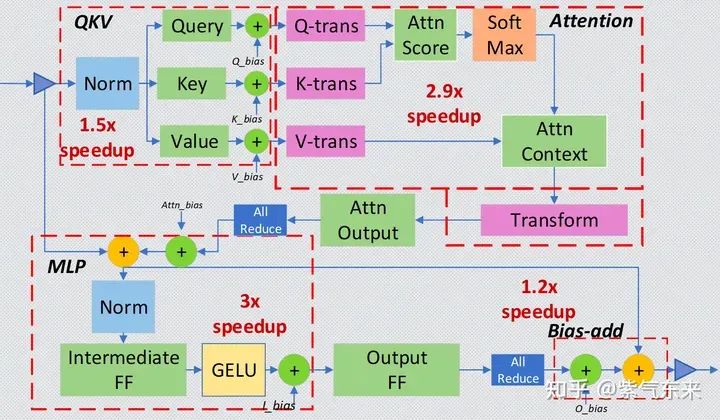
Deep-Fusion strategy for the small-batch inference
1.2 inference pipeline
與訓練不同,對于生成式的大模型,主要有以下挑戰:
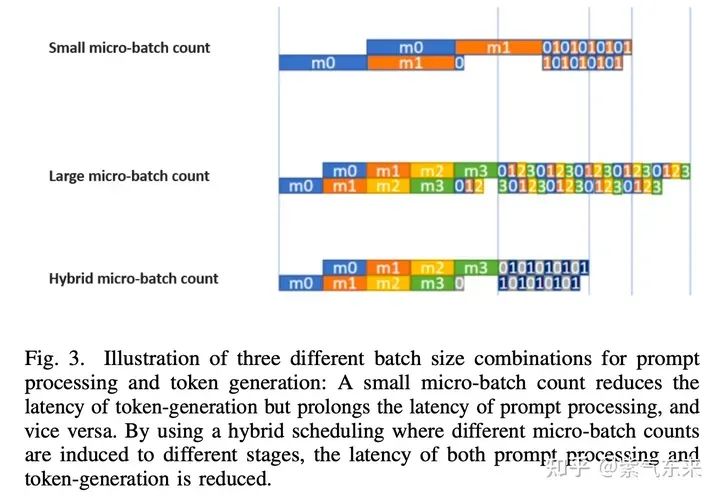
prompt processing phase,該階段是 compute-bound 的, bubble 數量越少算力利用越充分
token generation phase,該階段是 bandwidth-bound的,micro-batch 越少對帶寬要求越低
decoder 是自回歸的,需要多 stage 間的高效調度
自回歸生成式模型有兩個階段
pipeline 中多序列的 KV cache 會占用大量顯存
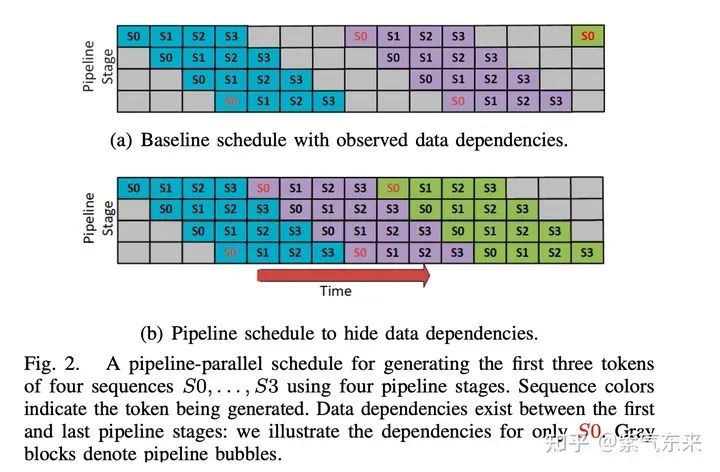
對于上述問題,DeepSpeed 主要通過以下3種方式進行優化:
1. 隱藏數據依賴及復合時序安排
首先將 batch 拆分為 micro-batch,其中 micro-batch 數等于 pipeline 深度,micro-batch通過動態隊列的順序產生token 并避免 bubbles。另外另外由于兩個階段的耗時不同,使用混合時序可以同時減少兩個階段的延時。
2. 將 KV cache 存到 CPU 內存上
3. 通信優化
二、DeepSpeed Inference 實踐
2.1 DeepSpeed Inference 的基本用法
首先構造一個基本的 6B GPT-J 文本生成任務,并測量其延時性能
import torch
from transformers import AutoTokenizer, AutoModelForCausalLM
from time import perf_counter
import numpy as np
import transformers
# hide generation warnings
transformers.logging.set_verbosity_error()

def measure_latency(model, tokenizer, payload, generation_args, device):
  input_ids = tokenizer(payload, return_tensors="pt").input_ids.to(device)
  latencies = []
  # warm up
  for _ in range(2):
    _ = model.generate(input_ids, **generation_args)
  # Timed run
  for _ in range(10):
    start_time = perf_counter()
    _ = model.generate(input_ids, **generation_args)
    latency = perf_counter() - start_time
    latencies.append(latency)
  # Compute run statistics
  time_avg_ms = 1000 * np.mean(latencies)
  time_std_ms = 1000 * np.std(latencies)
  time_p95_ms = 1000 * np.percentile(latencies,95)
  return f"P95 latency (ms) - {time_p95_ms}; Average latency (ms) - {time_avg_ms:.2f} +- {time_std_ms:.2f};", time_p95_ms

# Model Repository on huggingface.co
model_id = "philschmid/gpt-j-6B-fp16-sharded"

# load model and tokenizer
tokenizer = AutoTokenizer.from_pretrained(model_id)
model = AutoModelForCausalLM.from_pretrained(model_id, torch_dtype=torch.float16).cuda()

payload = "Hello my name is Philipp. I am getting in touch with you because i didn't get a response from you. What do I need to do to get my new card which I have requested 2 weeks ago? Please help me and answer this email in the next 7 days. Best regards and have a nice weekend but it"
input_ids = tokenizer(payload,return_tensors="pt").input_ids.to(model.device)
print(f"input payload:

{payload}")
logits = model.generate(input_ids, do_sample=True, num_beams=1, min_length=128, max_new_tokens=128)
print(f"prediction:

 {tokenizer.decode(logits[0].tolist()[len(input_ids[0]):])}")

payload="Hello my name is Philipp. I am getting in touch with you because i didn't get a response from you. What do I need to do to get my new card which I have requested 2 weeks ago? Please help me and answer this email in the next 7 days. Best regards and have a nice weekend but it"*2
print(f'Payload sequence length is: {len(tokenizer(payload)["input_ids"])}')

# generation arguments
generation_args = dict(
 do_sample=False,
 num_beams=1,
 min_length=128,
 max_new_tokens=128
)
vanilla_results = measure_latency(model, tokenizer, payload, generation_args, model.device)

print(f"Vanilla model: {vanilla_results[0]}")
其性能結果輸出如下:
Vanilla model: P95 latency (ms) - 5369.078720011748; Average latency (ms) - 5357.65 +- 12.07;
加下來使用 DeepSpeed 的 init_inference 函數包裝模型,可以看到之后的模型層變成了 DeepSpeedTransformerInference 類,代碼如下:
import deepspeed
# init deepspeed inference engine
ds_model = deepspeed.init_inference(
  model=model,   # Transformers models
  mp_size=1,    # Number of GPU
  dtype=torch.float16, # dtype of the weights (fp16)
  replace_method="auto", # Lets DS autmatically identify the layer to replace
  replace_with_kernel_inject=True, # replace the model with the kernel injector
)
print(f"model is loaded on device {ds_model.module.device}")

from deepspeed.ops.transformer.inference import DeepSpeedTransformerInference
assert isinstance(ds_model.module.transformer.h[0], DeepSpeedTransformerInference) == True, "Model not sucessfully initalized"

# Test model
example = "My name is Philipp and I"
input_ids = tokenizer(example,return_tensors="pt").input_ids.to(model.device)
logits = ds_model.generate(input_ids, do_sample=True, max_length=100)
tokenizer.decode(logits[0].tolist())

payload = (
  "Hello my name is Philipp. I am getting in touch with you because i didn't get a response from you. What do I need to do to get my new card which I have requested 2 weeks ago? Please help me and answer this email in the next 7 days. Best regards and have a nice weekend but it"
  * 2
)
print(f'Payload sequence length is: {len(tokenizer(payload)["input_ids"])}')

# generation arguments
generation_args = dict(do_sample=False, num_beams=1, min_length=128, max_new_tokens=128)
ds_results = measure_latency(ds_model, tokenizer, payload, generation_args, ds_model.module.device)

print(f"DeepSpeed model: {ds_results[0]}")
性能結果如下,跟未優化的相比,性能提升2倍以上
DeepSpeed model: P95 latency (ms) - 2415.4563972260803; Average latency (ms) - 2413.18 +- 1.47;
2.2 inference pipeline 的效果分析
使用 transformers 默認的 pipeline 進行 6B GPT-J 文本生成任務,并測量延時性能
import osfrom time import perf_counterimport numpy as npfrom transformers import pipeline, set_seeddef measure_pipeline_latency(generator, prompt, max_length, num_return_sequences):
  latencies = []
  # warm up
  for _ in range(2):
    output = generator(prompt, max_length=max_length, num_return_sequences=num_return_sequences)
  # Timed run
  for _ in range(10):
    start_time = perf_counter()
    output = generator(prompt, max_length=max_length, num_return_sequences=num_return_sequences)
    latency = perf_counter() - start_time
    latencies.append(latency)
  # Compute run statistics
  time_avg_ms = 1000 * np.mean(latencies)
  time_std_ms = 1000 * np.std(latencies)
  time_p95_ms = 1000 * np.percentile(latencies,95)
  return f"P95 latency (ms) - {time_p95_ms}; Average latency (ms) - {time_avg_ms:.2f} +- {time_std_ms:.2f};", time_p95_msmodel_id = "philschmid/gpt-j-6B-fp16-sharded"local_rank = int(os.getenv('LOCAL_RANK', '0'))generator = pipeline('text-generation', model=model_id, device=local_rank)set_seed(42)output = generator("Hello, I'm a language model,", max_length=50, num_return_sequences=4)print(output)vanilla_results = measure_pipeline_latency(generator, "Hello, I'm a language model,", 50, 4)print(f"Vanilla model: {vanilla_results[0]}")
首先會生成4段不同的結果,如下所示:
[{'generated_text': "Hello, I'm a language model, for the question that is being asked, and I have 2 vectors, and it's not going to start with a verb (ex. I love this movie) what is the best classifier to see if I"},
{'generated_text': "Hello, I'm a language model, and I'm at the beginning of my study of LSTMs. I'm following https://medium.com/@LSTMJiaLiu/understanding-lstms-for-nlp"},
{'generated_text': "Hello, I'm a language model, I'm a language model. I talk all the time, and I help teach people. That's my only purpose. That's what this is about. I'm doing this, I'm just letting you know"},
{'generated_text': "Hello, I'm a language model, a sequence-to-sequence model for generating natural language. I've been
learning all about it, and the more I learn the more awesome it becomes.
I have a couple of questions regarding it."}]
延時性能結果如下:
Vanilla model: P95 latency (ms) - 2417.524548433721; Average latency (ms) - 2409.83 +- 5.28;
使用 Nsight Systems 分析其 profiling,如下:

單GPU HF pipeline 的 profiling
接下來可以使用 deepspeed 對原模型進行處理,之后可采用相同的方式生成文本,并測量性能
import torch
import deepspeed
world_size = int(os.getenv('WORLD_SIZE', '4'))
generator.model = deepspeed.init_inference(generator.model,
                      mp_size=world_size,
                      dtype=torch.float,
                      replace_with_kernel_inject=True)

string = generator("DeepSpeed is", do_sample=True, max_length=50, num_return_sequences=4)
if not torch.distributed.is_initialized() or torch.distributed.get_rank() == 0:
  print(string)

ds_results = measure_pipeline_latency(generator, "Hello, I'm a language model,", 50, 4)
print(f"DS model: {ds_results[0]}")
當 world_size=1 時相當于只使用了一個GPU,其延時結果如下,與原始版本相比性能提高了62.6%:
DS model: P95 latency (ms) - 1482.9604600323364; Average latency (ms) - 1482.22 +- 0.51;
當 world_size=4 時并使用deepspeed --num_gpus 4 test.py運行代碼,此時使用了4塊 GPU,性能如下所示,延時約為 單GPU 性能的 37.2%:
DS model: P95 latency (ms) - 553.2004246022552; Average latency (ms) - 551.79 +- 0.86;
使用 Nsight Systems 分析4卡 profiling,可以看到,盡管模型加載到卡上的過程不一致,但最終計算的過程是一致的,如下:
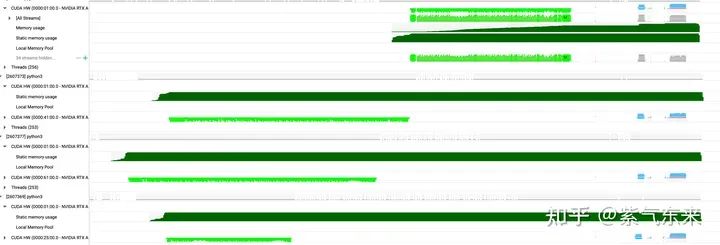
4*GPU DeepSpeed pipeline 的 profiling
2.3 DeepSpeed 與 Accelerate 的比較
使用 HuggingFace 的 huggingface/transformers-bloom-inference: Fast Inference Solutions for BLOOM (github.com)的例子來比較 DeepSpeed 與 Accelerate。
下表是分別用 DeepSpeed 與 Accelerate 在 8xA6000 上對bigscience/bloom-7b1模型的 Latency(ms/token) 實測結果:
| project bs | 1 | 8 | 16 | 32 | 64 | 128 |
|---|---|---|---|---|---|---|
| accelerate fp16 | 34.04 | 7.41 | 5.12 | 3.69 | 3.54 | 3.38 |
| accelerate int8 | 89.64 | 15.41 | 9.16 | 5.83 | 4.52 | 3.82 |
| ds-inference fp16 | 19.33 | 2.42 | 1.20 | 0.63 | 0.38 | 0.27 |
| ds-zero bf16 | 145.60 | 18.56 | 9.26 | 4.62 | 2.35 | 1.17 |
Accelerate 運行示例如下:
python3 bloom-inference-scripts/bloom-accelerate-inference.py --name bigscience/bloom-7b1 --batch_size 1 --benchmark
其輸出日志為:
Using 8 gpus
Loading model bigscience/bloom-7b1
Loading checkpoint shards: 100%|████████████████████████████████████████████████████████████████████████████████████████████████████| 2/2 [00:08<00:00, ?4.46s/it]
*** Starting to generate 100 tokens with bs=1
Generate args {'max_new_tokens': 100, 'do_sample': False}
*** Running generate
------------------------------------------------------------
in=DeepSpeed is a machine learning framework
out=DeepSpeed is a machine learning framework for deep learning models. It is designed to be easy to use and flexible. DeepSpeed is a Python library that provides a high-level API for training and inference on deep learning models. DeepSpeed is a Python library that provides a high-level API for training and inference on deep learning models. DeepSpeed is a Python library that provides a high-level API for training and inference on deep learning models. DeepSpeed is a Python library that provides a high-level API for training and inference on deep learning models. DeepSpeed is a

*** Running benchmark

*** Performance stats:
Throughput per token including tokenize: 34.04 msecs
Start to ready to generate: 21.959 secs
Tokenize and generate 500 (bs=1) tokens: 6.832 secs
Start to finish: 28.791 secs
DeepSpeed Inference 運行示例如下:
deepspeed --num_gpus 8 bloom-inference-scripts/bloom-ds-inference.py --name bigscience/bloom-7b1 --batch_size 8 --benchmark
其輸出日志為:
[2023-05-17 0830,648] [INFO] [launch.pymain] WORLD INFO DICT: {'localhost': [0, 1, 2, 3, 4, 5, 6, 7]}
[2023-05-17 0830,648] [INFO] [launch.pymain] nnodes=1, num_local_procs=8, node_rank=0
[2023-05-17 0830,648] [INFO] [launch.pymain] global_rank_mapping=defaultdict(, {'localhost': [0, 1, 2, 3, 4, 5, 6, 7]})
[2023-05-17 0830,648] [INFO] [launch.pymain] dist_world_size=8
[2023-05-17 0830,648] [INFO] [launch.pymain] Setting CUDA_VISIBLE_DEVICES=0,1,2,3,4,5,6,7
[2023-05-17 0833,029] [INFO] [comm.pyinit_distributed] Initializing TorchBackend in DeepSpeed with backend nccl
*** Loading the model bigscience/bloom-7b1
[2023-05-17 0836,668] [INFO] [utils.pysee_memory_usage] pre-ds-inference-init
[2023-05-17 0836,669] [INFO] [utils.pysee_memory_usage] MA 0.0 GB     Max_MA 0.0 GB     CA 0.0 GB     Max_CA 0 GB
[2023-05-17 0836,669] [INFO] [utils.pysee_memory_usage] CPU Virtual Memory: used = 14.64 GB, percent = 5.8%
[2023-05-17 0840,881] [WARNING] [config_utils.py_process_deprecated_field] Config parameter mp_size is deprecated use tensor_parallel.tp_size instead
[2023-05-17 0840,881] [INFO] [logging.pylog_dist] [Rank 0] quantize_bits = 8 mlp_extra_grouping = False, quantize_groups = 1
Detected CUDA files, patching ldflags
Emitting ninja build file /root/.cache/torch_extensions/py38_cu117/transformer_inference/build.ninja...
Building extension module transformer_inference...
Allowing ninja to set a default number of workers... (overridable by setting the environment variable MAX_JOBS=N)
ninja: no work to do.
Loading extension module transformer_inference...
Loading extension module transformer_inference...
Time to load transformer_inference op: 0.3437182903289795 seconds
[2023-05-17 0841,920] [INFO] [logging.pylog_dist] [Rank 0] DeepSpeed-Inference config: {'layer_id': 0, 'hidden_size': 4096, 'intermediate_size': 16384, 'heads': 32, 'num_hidden_layers': -1, 'fp16': True, 'pre_layer_norm': True, 'local_rank': -1, 'stochastic_mode': False, 'epsilon': 1e-05, 'mp_size': 8, 'q_int8': False, 'scale_attention': True, 'triangular_masking': True, 'local_attention': False, 'window_size': 1, 'rotary_dim': -1, 'rotate_half': False, 'rotate_every_two': True, 'return_tuple': True, 'mlp_after_attn': True, 'mlp_act_func_type': , 'specialized_mode': False, 'training_mp_size': 1, 'bigscience_bloom': True, 'max_out_tokens': 1024, 'min_out_tokens': 1, 'scale_attn_by_inverse_layer_idx': False, 'enable_qkv_quantization': False, 'use_mup': False, 'return_single_tuple': False, 'set_empty_params': False, 'transposed_mode': False}
Loading extension module transformer_inference...
Time to load transformer_inference op: 0.06054544448852539 seconds
Loading 2 checkpoint shards: 100%|████████████████████████████████████████████████████████████████████████████████| 2/2 [00:21<00:00, 11.46s/it]check
*** Starting to generate 100 tokens with bs=8
Generate args {'max_new_tokens': 100, 'do_sample': False}
*** Running generate warmup
Loading 2 checkpoint shards: 100%|████████████████████████████████████████████████████████████████████████████████| 2/2 [00:26<00:00, 14.34s/it]checkpoint loading time at rank 2: 26.608989238739014 sec
Loading 2 checkpoint shards: 100%|████████████████████████████████████████████████████████████████████████████████| 2/2 [00:26<00:00, 13.30s/it]
------------------------------------------------------
Free memory : 42.997620 (GigaBytes) ?
Total memory: 47.544250 (GigaBytes) ?
Requested memory: 0.687500 (GigaBytes)
Setting maximum total tokens (input + output) to 1024
WorkSpace: 0x7f3ab4000000
------------------------------------------------------
*** Running generate
------------------------------------------------------------
in=DeepSpeed is a machine learning framework
out=DeepSpeed is a machine learning framework for deep learning models. It is designed to be easy to use and flexible. DeepSpeed is a Python library that provides a high-level API for training and inference on deep learning models. DeepSpeed is a Python library that provides a high-level API for training and inference on deep learning models. DeepSpeed is a Python library that provides a high-level API for training and inference on deep learning models. DeepSpeed is a Python library that provides a high-level API for training and inference on deep learning models. DeepSpeed is a
------------------------------------------------------------
...
[2023-05-17 0814,933] [INFO] [utils.pysee_memory_usage] end-of-run
[2023-05-17 0814,934] [INFO] [utils.pysee_memory_usage] MA 3.33 GB ? ? ? ? Max_MA 3.44 GB ? ? ? ? CA 3.33 GB ? ? ? ? Max_CA 4 GB
[2023-05-17 0814,934] [INFO] [utils.pysee_memory_usage] CPU Virtual Memory: ?used = 30.16 GB, percent = 12.0%
*** Running benchmark

*** Performance stats:
Throughput per token including tokenize: 2.42 msecs
Start to ready to generate: 35.592 secs
Tokenize and generate 4000 (bs=8) tokens: 1.946 secs
Start to finish: 37.537 secs
編輯:黃飛
-
cpu
+關注
關注
68文章
11279瀏覽量
224964 -
gpu
+關注
關注
28文章
5194瀏覽量
135436 -
內存
+關注
關注
9文章
3210瀏覽量
76361 -
LLM
+關注
關注
1文章
346瀏覽量
1329
原文標題:DeepSpeed Inference 在 LLM 推理上的優化探究
文章出處:【微信號:GiantPandaCV,微信公眾號:GiantPandaCV】歡迎添加關注!文章轉載請注明出處。
發布評論請先 登錄
DeepSeek R1 MTP在TensorRT-LLM中的實現與優化

使用NVIDIA Triton和TensorRT-LLM部署TTS應用的最佳實踐
如何在魔搭社區使用TensorRT-LLM加速優化Qwen3系列模型推理部署
深度剖析OpenHarmony AI調度管理與推理接口
mlc-llm對大模型推理的流程及優化方案
周四研討會預告 | 注冊報名 NVIDIA AI Inference Day - 大模型推理線上研討會
現已公開發布!歡迎使用 NVIDIA TensorRT-LLM 優化大語言模型推理

Hugging Face LLM部署大語言模型到亞馬遜云科技Amazon SageMaker推理示例
自然語言處理應用LLM推理優化綜述
LLM大模型推理加速的關鍵技術
解鎖NVIDIA TensorRT-LLM的卓越性能
新品| LLM630 Compute Kit,AI 大語言模型推理開發平臺

詳解 LLM 推理模型的現狀

NVIDIA TensorRT LLM 1.0推理框架正式上線
LLM推理模型是如何推理的?



 工商網監
工商網監
評論