


 如何把文件系統燒到EMMC并從EMMC加載

之前文章介紹了如何下載并從SD卡加載文件系統,提到過可以從EMMC引導系統,本篇將為您介紹如何把文件系統燒到EMMC,并從EMMC加載。
接之前操作,系統已經從SD卡正常啟動(本文方案需要借助SD卡):
Version: 3.0.3
smarc-rzg2l login: root
Last login: Sun Sep 20 1003 UTC 2020
root@smarc-rzg2l:~#
已經可以接上網線,并借助網路(如ssh服務)把相關文件拷貝到SD卡,為后邊做準備。
需要的文件如下:
root@smarc-rzg2l:~# ls
Image-r9a07g044l2-smarc.dtb Image-smarc-rzg2l.bin core-image-qt-smarc-rzg2l.tar.bz2
EMMC創建分區:
左右滑動查看完整內容
root@smarc-rzg2l:~# fdisk /dev/mmcblk0


Welcome to fdisk (util-linux 2.35.1).
Changes will remain in memory only, until you decide to write them.
Be careful before using the write command.


Command (m for help): o
Created a new DOS disklabel with disk identifier 0xf23e9318.


Command (m for help): n
Partition type
  p  primary (0 primary, 0 extended, 4 free)
  e  extended (container for logical partitions)
Select (default p): (Push the enter key)


Using default response p.
Partition number (1-4, default 1): (Push the enter key)
First sector (2048-124321791, default 2048): (Push the enter key)
Last sector, +/-sectors or +/-size{K,M,G,T,P} (2048-124321791, default 124321791): +500M


Created a new partition 1 of type 'Linux' and of size 500 MiB.


Command (m for help): n
Partition type
  p  primary (1 primary, 0 extended, 3 free)
  e  extended (container for logical partitions)
Select (default p): (Push the enter key)


Using default response p.
Partition number (2-4, default 2): (Push the enter key)
First sector (1026048-124321791, default 1026048): (Push the enter key)
Last sector, +/-sectors or +/-size{K,M,G,T,P} (1026048-124321791, default 124321791): (Push the enter key)


Created a new partition 2 of type 'Linux' and of size 58.8 GiB.


Command (m for help): p
Disk /dev/mmcblk0: 59.29 GiB, 63652757504 bytes, 124321792 sectors
Units: sectors of 1 * 512 = 512 bytes
Sector size (logical/physical): 512 bytes / 512 bytes
I/O size (minimum/optimal): 512 bytes / 512 bytes
Disklabel type: dos
Disk identifier: 0xf23e9318


Device     Boot  Start    End  Sectors Size Id Type
/dev/mmcblk0p1     2048  1026047  1024000 500M 83 Linux
/dev/mmcblk0p2   1026048 124321791 123295744 58.8G 83 Linux


Command (m for help): w
The partition table has been altered.
Calling ioctl() to re-read partition table.
Syncing disks.
root@smarc-rzg2l:~#
格式化EMMC:
左右滑動查看完整內容
root@smarc-rzg2l:~# mkfs.ext4 /dev/mmcblk0p1
mke2fs 1.45.7 (28-Jan-2021)
Discarding device blocks: done
Creating filesystem with 512000 1k blocks and 128016 inodes
Filesystem UUID: cd3a51a9-ef38-4399-888e-9773fcc41ecc
Superblock backups stored on blocks:
    8193, 24577, 40961, 57345, 73729, 204801, 221185, 401409


Allocating group tables: done
Writing inode tables: done
Creating journal (8192 blocks): done
Writing superblocks and filesystem accounting information: done


root@smarc-rzg2l:~# mkfs.ext4 /dev/mmcblk0p2
mke2fs 1.45.7 (28-Jan-2021)
Discarding device blocks: done
Creating filesystem with 15411968 4k blocks and 3858432 inodes
Filesystem UUID: 07d98391-d70c-4eed-a3af-4227a7460a32
Superblock backups stored on blocks:
    32768, 98304, 163840, 229376, 294912, 819200, 884736, 1605632, 2654208,
    4096000, 7962624, 11239424


Allocating group tables: done
Writing inode tables: done
Creating journal (65536 blocks): done
Writing superblocks and filesystem accounting information: done


root@smarc-rzg2l:~#
掛載EMMC,拷貝內核、設備樹、文件系統:
左右滑動查看完整內容
root@smarc-rzg2l:~# mount /dev/mmcblk0p1 /mnt/
root@smarc-rzg2l:~# cp Image-smarc-rzg2l.bin /mnt/
root@smarc-rzg2l:~# cp Image-r9a07g044l2-smarc.dtb /mnt/
root@smarc-rzg2l:~# umount /dev/mmcblk0p1
root@smarc-rzg2l:~# mount /dev/mmcblk0p2 /mnt/
root@smarc-rzg2l:~# tar xf core-image-qt-smarc-rzg2l.tar.bz2 -C /mnt/
root@smarc-rzg2l:~# umount /dev/mmcblk0p2
關機,設置開發板SW11/SW1撥碼開關模式:
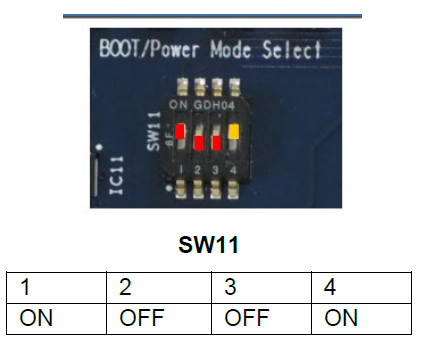
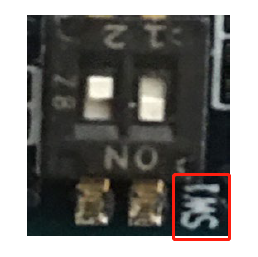
重啟開發板,設置環境變量:
左右滑動查看完整內容
NOTICE: BL2: v2.7(release):203c783-dirty
NOTICE: BL2: Built : 06:57:02, Nov 10 2022
NOTICE: BL2: eMMC boot from partition 1
NOTICE: BL2: Load dst=0x1f840 src=(p:1)0x20000(256) len=0x10(1)
NOTICE: BL2: eMMC boot from partition 1
NOTICE: BL2: Load dst=0x1f9a0 src=(p:1)0x20010(256) len=0x28(1)
NOTICE: BL2: eMMC boot from partition 1
NOTICE: BL2: Load dst=0x44000000 src=(p:1)0x20090(256) len=0x6069(49)
NOTICE: BL2: eMMC boot from partition 1
NOTICE: BL2: Load dst=0x1f840 src=(p:1)0x20000(256) len=0x10(1)
NOTICE: BL2: eMMC boot from partition 1
NOTICE: BL2: Load dst=0x1f9a0 src=(p:1)0x20010(256) len=0x28(1)
NOTICE: BL2: Load dst=0x1f9a0 src=(p:1)0x20038(256) len=0x28(1)
NOTICE: BL2: eMMC boot from partition 1
NOTICE: BL2: Load dst=0x50000000 src=(p:1)0x26100(304) len=0xb0238(1410)
NOTICE: BL2: Booting BL31
NOTICE: BL31: v2.7(release):203c783-dirty
NOTICE: BL31: Built : 06:57:02, Nov 10 2022


U-Boot 2021.10 (Mar 15 2023 - 07:34:17 +0000)


CPU:  Renesas Electronics K rev 2.1
Model: smarc-rzg2l
DRAM: 1.9 GiB
WDT:  watchdog@0000000012800800
WDT:  Started with servicing (60s timeout)
MMC:  sd@11c00000: 0, sd@11c10000: 1
Loading Environment from MMC... OK
In:  serial@1004b800
Out:  serial@1004b800
Err:  serial@1004b800
U-boot WDT started!
Net:
Error: ethernet@11c20000 address not set.
No ethernet found.


Hit any key to stop autoboot: 0
Hit any key to stop autoboot: 0
=> env default -a
## Resetting to default environment
=> setenv bootargs 'root=/dev/mmcblk0p2 rootwait'
=> setenv bootcmd 'mmc dev 1; ext4load mmc 0:1 0x48080000 Image-smarc-rzg2l.bin; ext4load mmc 0:1 0x48000000 Image-r9a07g044l2-smarc.dtb; booti 0x48080000 - 0x48000000'
=> saveenv
Saving Environment to MMC... Writing to MMC(0)... OK
重啟開發板,從emmc成功加載:
BSP: RZG2L/RZG2L-SMARC-EVK/3.0.3
LSI: RZG2L
Version: 3.0.3
smarc-rzg2l login: root
Last login: Mon Sep 18 02:29:32 UTC 2023
root@smarc-rzg2l:~# df -h
Filesystem      Size Used Avail Use% Mounted on
/dev/root       58G 1.2G  54G  3% /
devtmpfs       740M   0 740M  0% /dev
tmpfs         933M   0 933M  0% /dev/shm
tmpfs         933M 9.7M 924M  2% /run
tmpfs         933M   0 933M  0% /sys/fs/cgroup
tmpfs         933M   0 933M  0% /tmp
tmpfs         933M  28K 933M  1% /var/volatile
tmpfs         187M   0 187M  0% /run/user/0
root@smarc-rzg2l:~#
審核編輯:湯梓紅
聲明:本文內容及配圖由入駐作者撰寫或者入駐合作網站授權轉載。文章觀點僅代表作者本人,不代表電子發燒友網立場。文章及其配圖僅供工程師學習之用,如有內容侵權或者其他違規問題,請聯系本站處理。
舉報投訴
-
SD卡
+關注
關注
2文章
589瀏覽量
69366 -
文件系統
+關注
關注
0文章
305瀏覽量
21014 -
開發板
+關注
關注
26文章
6336瀏覽量
119273 -
emmc
+關注
關注
7文章
265瀏覽量
56159
發布評論請先 登錄
相關推薦
熱點推薦
無法從 emmc 啟動怎么解決?
嗨,我先把映像69刷入SD卡,正常開機,
在我啟動到 tfcard 上的系統后,我使用dd將圖像寫入 emmc 模塊的命令。
然后我彈出 tfcard 以嘗試從 emmc 啟動
我無法啟動。
發表于 03-23 06:49
可以通過將系統映像數據從 sdcard 復制到 emmc 來從 emmc 啟動嗎?
我們可以通過將系統映像數據從 sdcard 復制到 emmc 來從 emmc 啟動嗎?
發表于 03-17 07:37
基于瑞芯微平臺的 eMMC 顆粒驗證全流程指南
卻啟動慢如蝸牛不同批次顆粒混用,穩定性像開盲盒別再只用dd隨便測一下了!眺望電子基于RK平臺產線經驗,整理出一套【eMMC三工具聯合驗證法】,從文件系統到塊設備再到極限壓力,形成完整驗證閉環。腳本全開源,拿來改改就能跑。一

DR1 系列評估板 eMMC 健康管理案例開發手冊:信息查詢與壽命監控
本文為創龍科技DR1 系列評估板 eMMC 健康管理案例指南,核心是通過 emmc_get_info 程序讀取 eMMC 健康信息。內容涵蓋 EXT_CSD 寄存器查詢、擦寫次數統計、壽命預估及日志
三星eMMC憑借寬溫特性增強電視環境適應性
三星128GB eMMC 5.1以350MB/s讀取速度和-25℃~85℃寬溫工作范圍,為智能電視提供高速穩定的系統存儲。其3000次擦寫壽命與智能磨損均衡算法保障長期運行可靠性,顯著提升開機速度與應用加載流暢度。
基于易靈思eMMC IP的Linux系統加載方案
eMMC全稱為 embedded Multi Media Card,主要用于非易失性存儲,它彌補了 FPGA 芯片自身存儲能力的不足,為 FPGA 提供一個高集成度、大容量、低成本、且易于使用的“硬盤”或“固態硬盤”解決方案。
模擬器新紀元:晶存EMMC技術突破
晶存128GB EMMC AT70BT7G3Y05G憑借620MB/s讀取速度、工業級寬溫(-40℃~85℃)及3000次擦寫壽命,為模擬器提供高速穩定的存儲解決方案,確保大型場景流暢加載與長期穩定運行。
江波龍eMMC保障車載導航系統穩定運行
江波龍128GB eMMC以車規級可靠性和高速讀寫性能,為智能中控導航系統提供大容量存儲支持。其eMMC 5.1接口與高耐久特性保障了系統快速啟動、流暢運行及OTA升級穩定性。
國產!全志T113-i 雙核Cortex-A7@1.2GHz 工業開發板—eMMC配置核心板使用說明(二)
本文為創龍科技eMMC 配置核心板官方使用指南,聚焦 Linux 系統在該核心板上的應用。主要內容包括啟動卡與 “量產卡” 制作、兩種 eMMC 固化方式、分區與 OTA 升級說明、全量及局部鏡像編譯、
工業網關的emmc是什么
工業網關中的eMMC(Embedded Multi Media Card)是一種 嵌入式存儲解決方案 ,結合了閃存芯片(NAND Flash)和存儲控制器,專為工業環境中的數據存儲需求設計。以下
使用K230 BurningTool 燒錄 EMMC鏡像報錯怎么解決?
誤刪了文件,故重新燒錄SD卡鏡像,還是發生如上報錯。然后又想重新燒錄EMMC鏡像,突然發現無法燒錄。
想求解的第一個問題是 dev下的文件是保存在SD卡內還是開發板EMMC內
第二個問
發表于 07-23 06:03
如何寫入eMMC中的正確區域?
我正在使用一個定制的 FX3S 設備,該設備有一個連接到 S0 端口的 eMMC。在我的固件項目中,我使用 FATFS 作為嵌入式文件系統,并且它運行成功。
為了安裝新固件,我將 PMODE 引腳
發表于 07-17 07:21
如何將kmodel放置到鏡像內部,用于emmc燒錄?
之前采用的方法是sd卡燒錄,也就是鏈接板子后,把kmodel放置到虛擬u盤中的kmodel路徑,并且增加main文件作為開機自啟,進行識別,這個流程目前是沒問題的。
現在需要的是進行emmc
發表于 06-20 06:03
飛凌嵌入式ElfBoard ELF 1板卡-uboot常用命令之文件系統命令
[]
interface 表示接口,比如 mmc,dev是查詢的設備號,part 是要查詢的分區。比如我們要查詢eMMC Flash邏輯分區1 (fat分區)的文件系統信息,命令如下:
=>
發表于 05-26 17:32
硬件電路設計:深度解析eMMC的性能與應用
eMMC(Embedded Multi Media Card)是一種專為嵌入式系統設計的非易失性存儲解決方案,它將NAND閃存、主控芯片和接口協議封裝在一個BGA(Ball Grid Array



 工商網監
工商網監
評論