


 跨機房ES同步實戰

背景眾所周知單個機房在出現不可抗拒的問題(如斷電、斷網等因素)時,會導致無法正常提供服務,會對業務造成潛在的損失。所以在協同辦公領域,一種可以基于同城或異地多活機制的高可用設計,在保障數據一致性的同時,能夠最大程度降低由于機房的僅單點可用所導致的潛在高可用問題,最大程度上保障業務的用戶體驗,降低單點問題對業務造成的潛在損失顯得尤為重要。同城雙活,對于生產的高可用保障,重大的意義和價值是不可言喻的。表面上同城雙活只是簡單的部署了一套生產環境而已,但是在架構上,這個改變的影響是巨大的,無狀態應用的高可用管理、請求流量的管理、版本發布的管理、網絡架構的管理等,其提升的架構復雜度巨大。結合真實的協同辦公產品:京辦(為北京市政府提供協同辦公服務的綜合性平臺)生產環境面對的復雜的政務網絡以及京辦同城雙活架構演進的案例,給大家介紹下京辦持續改進、分階段演進過程中的一些思考和實踐經驗的總結。本文僅針對 ES 集群在跨機房同步過程中的方案和經驗進行介紹和總結。
架構
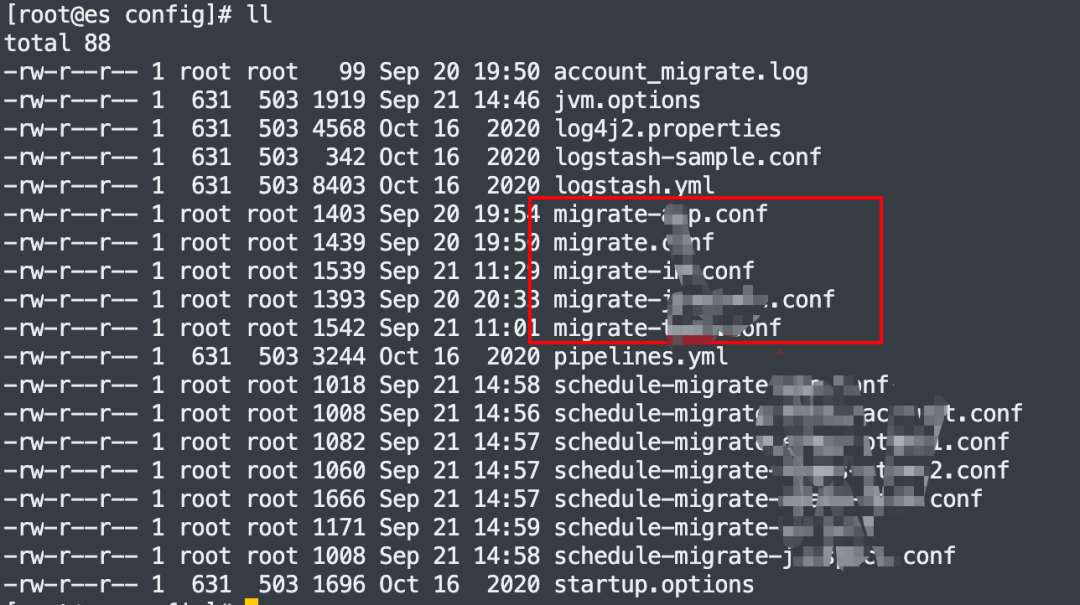
1.部署 Logstash 在金山云機房上,Logstash 啟動多個實例(按不同的類型分類,提高同步效率),并且和金山云機房的 ES 集群在相同的 VPC2.Logstash 需要配置大網訪問權限,保證 Logstash 和 ES 原集群和目標集群互通。3.數據遷移可以全量遷移和增量遷移,首次遷移都是全量遷移后續的增加數據選擇增量遷移。4.增量遷移需要改造增加識別的增量數據的標識,具體方法后續進行介紹。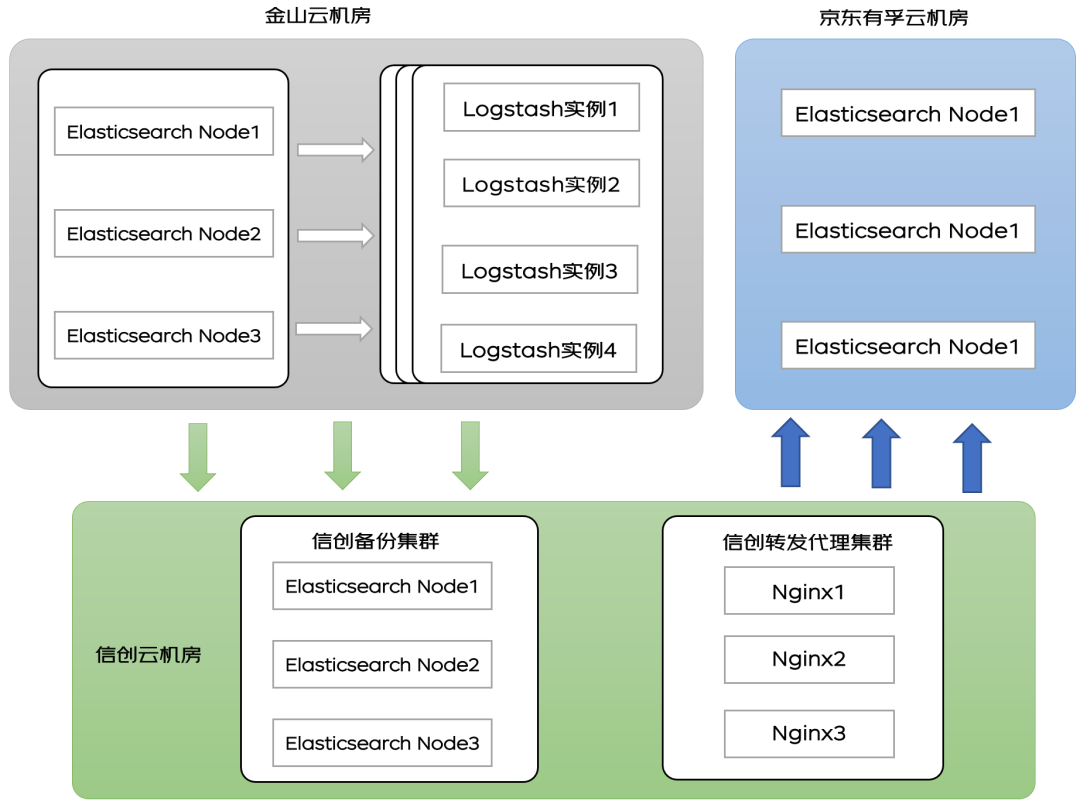 ?原理
?原理Logstash 工作原理
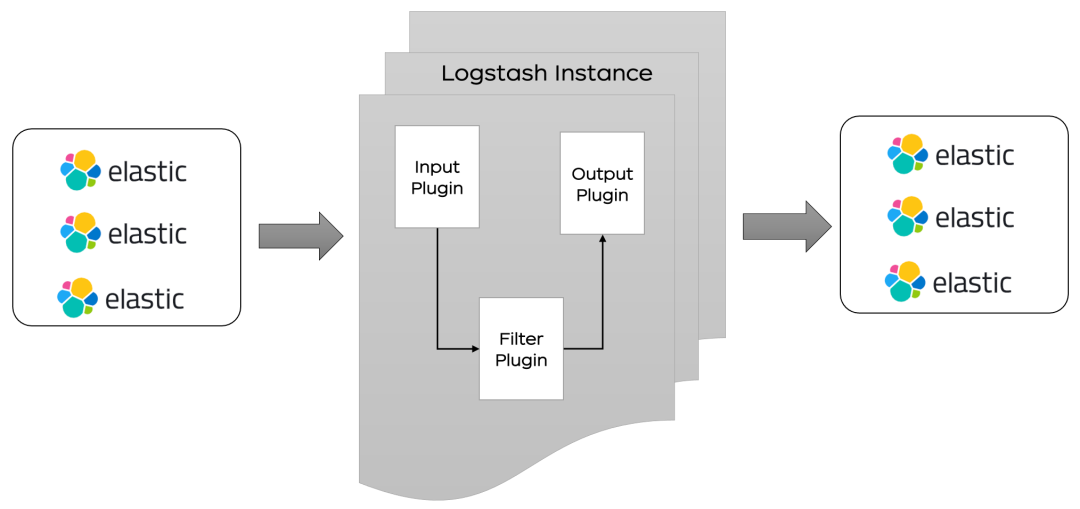 ??Logstash 分為三個部分 input 、filter、ouput:1.input 處理接收數據,數據可以來源 ES,日志文件,kafka 等通道.2.filter 對數據進行過濾,清洗。3.ouput 輸出數據到目標設備,可以輸出到 ES,kafka,文件等。
增量同步原理
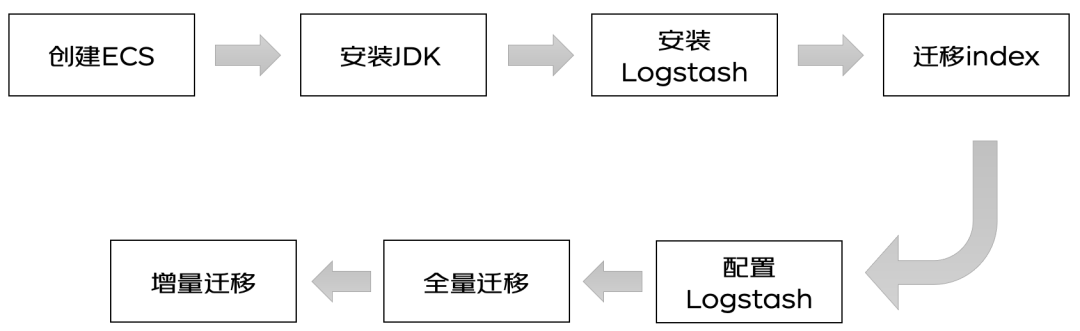
1. 對于 T 時刻的數據,先使用 Logstash 將 T 以前的所有數據遷移到有孚機房京東云 ES,假設用時?T2. 對于 T 到 T+?T 的增量數據,再次使用 logstash 將數據導入到有孚機房京東云的 ES 集群3. 重復上述步驟 2,直到?T 足夠小,此時將業務切換到華為云,最后完成新增數據的遷移適用范圍:ES 的數據中帶有時間戳或者其他能夠區分新舊數據的標簽流程
? ?
?準備工作
1.創建 ECS 和安裝 JDK 忽略,自行安裝即可2.下載對應版本的 Logstash,盡量選擇與 Elasticsearch 版本一致,或接近的版本安裝即可https://www.elastic.co/cn/downloads/logstash1)源碼下載直接解壓安裝包,開箱即用
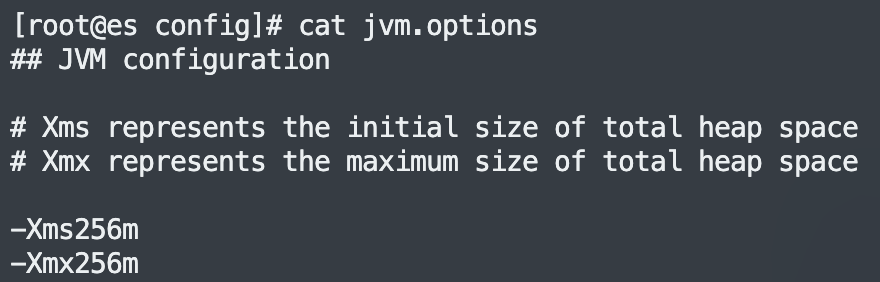
2)修改對內存使用,logstash 默認的堆內存是 1G,根據 ECS 集群選擇合適的內存,可以加快集群數據的遷移效率。
?3. 遷移索引
Logstash 會幫助用戶自動創建索引,但是自動創建的索引和用戶本身的索引會有些許差異,導致最終數據的搜索格式不一致,一般索引需要手動創建,保證索引的數據完全一致。
以下提供創建索引的 python 腳本,用戶可以使用該腳本創建需要的索引。
create_mapping.py 文件是同步索引的 python 腳本,config.yaml 是集群地址配置文件。
注:使用該腳本需要安裝相關依賴
yum install -y PyYAML
yum install -y python-requests
拷貝以下代碼保存為 create_mapping.py:
import yaml
import requests
import json
import getopt
import sys

defhelp():
    print
    """
    usage:
    -h/--help print this help.
    -c/--config config file path, default is config.yaml

    example:
    python create_mapping.py -c config.yaml
    """
defprocess_mapping(index_mapping, dest_index):
    print(index_mapping)
    # remove unnecessary keys
    del index_mapping["settings"]["index"]["provided_name"]
    del index_mapping["settings"]["index"]["uuid"]
    del index_mapping["settings"]["index"]["creation_date"]
    del index_mapping["settings"]["index"]["version"]

    # check alias
    aliases = index_mapping["aliases"]
    for alias inlist(aliases.keys()):
        if alias == dest_index:
            print(
                "source index "+ dest_index +" alias "+ alias +" is the same as dest_index name, will remove this alias.")
            del index_mapping["aliases"][alias]
    if index_mapping["settings"]["index"].has_key("lifecycle"):
        lifecycle = index_mapping["settings"]["index"]["lifecycle"]
        opendistro ={"opendistro":{"index_state_management":
                                         {"policy_id": lifecycle["name"],
                                          "rollover_alias": lifecycle["rollover_alias"]}}}
        index_mapping["settings"].update(opendistro)
        # index_mapping["settings"]["opendistro"]["index_state_management"]["rollover_alias"] = lifecycle["rollover_alias"]
        del index_mapping["settings"]["index"]["lifecycle"]
    print(index_mapping)
    return index_mapping
defput_mapping_to_target(url, mapping, source_index, dest_auth=None):
    headers ={'Content-Type':'application/json'}
    create_resp = requests.put(url, headers=headers, data=json.dumps(mapping), auth=dest_auth)
    if create_resp.status_code !=200:
        print(
            "create index "+ url +" failed with response: "+str(create_resp)+", source index is "+ source_index)
        print(create_resp.text)
        withopen(source_index +".json","w")as f:
            json.dump(mapping, f)
defmain():
    config_yaml ="config.yaml"
    opts, args = getopt.getopt(sys.argv[1:],'-h-c:',['help','config='])
    for opt_name, opt_value in opts:
        if opt_name in('-h','--help'):
            help()
            exit()
        if opt_name in('-c','--config'):
            config_yaml = opt_value

    config_file =open(config_yaml)
    config = yaml.load(config_file)
    source = config["source"]
    source_user = config["source_user"]
    source_passwd = config["source_passwd"]
    source_auth =None
    if source_user !="":
        source_auth =(source_user, source_passwd)
    dest = config["destination"]
    dest_user = config["destination_user"]
    dest_passwd = config["destination_passwd"]
    dest_auth =None
    if dest_user !="":
        dest_auth =(dest_user, dest_passwd)
    print(source_auth)
    print(dest_auth)

    # only deal with mapping list
    if config["only_mapping"]:
        for source_index, dest_index in config["mapping"].iteritems():
            print("start to process source index"+ source_index +", target index: "+ dest_index)
            source_url = source +"/"+ source_index
            response = requests.get(source_url, auth=source_auth)
            if response.status_code !=200:
                print("*** get ElasticSearch message failed. resp statusCode:"+str(
                    response.status_code)+" response is "+ response.text)
                continue
            mapping = response.json()
            index_mapping = process_mapping(mapping[source_index], dest_index)

            dest_url = dest +"/"+ dest_index
            put_mapping_to_target(dest_url, index_mapping, source_index, dest_auth)
            print("process source index "+ source_index +" to target index "+ dest_index +" successed.")
    else:
        # get all indices
        response = requests.get(source +"/_alias", auth=source_auth)
        if response.status_code !=200:
            print("*** get all index failed. resp statusCode:"+str(
                response.status_code)+" response is "+ response.text)
            exit()
        all_index = response.json()
        for index inlist(all_index.keys()):
            if"."in index:
                continue
            print("start to process source index"+ index)
            source_url = source +"/"+ index
            index_response = requests.get(source_url, auth=source_auth)
            if index_response.status_code !=200:
                print("*** get ElasticSearch message failed. resp statusCode:"+str(
                    index_response.status_code)+" response is "+ index_response.text)
                continue
            mapping = index_response.json()

            dest_index = index
            if index in config["mapping"].keys():
                dest_index = config["mapping"][index]
            index_mapping = process_mapping(mapping[index], dest_index)

            dest_url = dest +"/"+ dest_index
            put_mapping_to_target(dest_url, index_mapping, index, dest_auth)
            print("process source index "+ index +" to target index "+ dest_index +" successed.")

if __name__ =='__main__':
    main()
配置文件保存為 config.yaml:
# 源端ES集群地址,加上http://
source: http://ip:port
source_user: "username"
source_passwd: "password"
# 目的端ES集群地址,加上http://
destination: http://ip:port
destination_user: "username"
destination_passwd: "password"

# 是否只處理這個文件中mapping地址的索引
# 如果設置成true,則只會將下面的mapping中的索引獲取到并在目的端創建
# 如果設置成false,則會取源端集群的所有索引,除去(.kibana)
# 并且將索引名稱與下面的mapping匹配,如果匹配到使用mapping的value作為目的端的索引名稱
# 如果匹配不到,則使用源端原始的索引名稱
only_mapping: true

# 要遷移的索引,key為源端的索引名字,value為目的端的索引名字
mapping:
    source_index: dest_index
以上代碼和配置文件準備完成,直接執行 python create_mapping.py 即可完成索引同步。
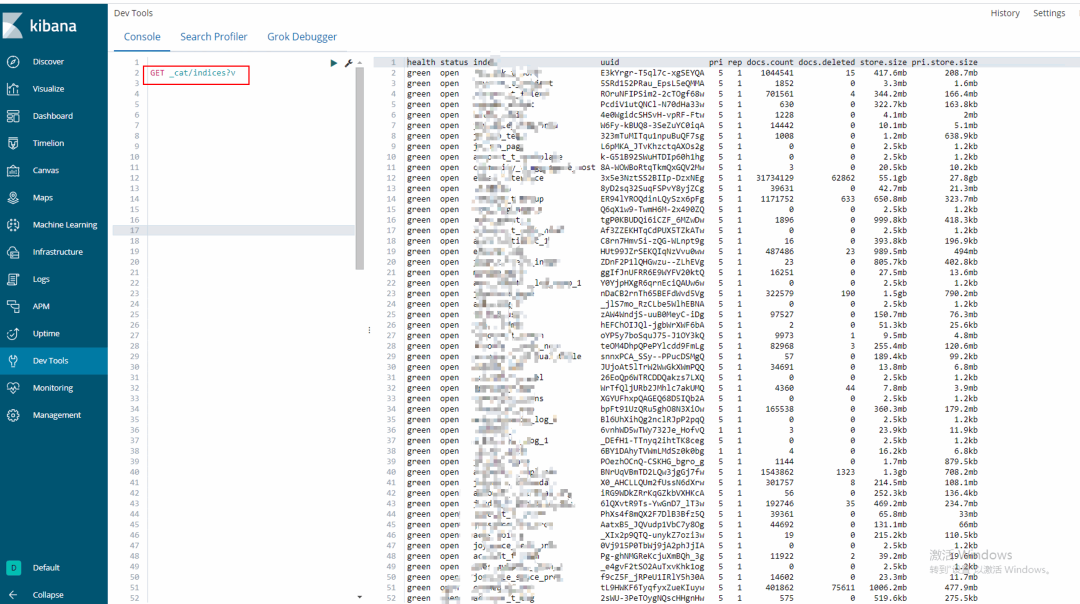
索引同步完成可以取目標集群的 kibana 上查看或者執行 curl 查看索引遷移情況:
GET _cat/indices?v
?
?
input{
    elasticsearch{
        # 源端地址
        hosts =>  ["ip1:port1","ip2:port2"]
        # 安全集群配置登錄用戶名密碼
        user => "username"
        password => "password"
        # 需要遷移的索引列表,以逗號分隔,支持通配符
        index => "a_*,b_*"
        # 以下三項保持默認即可,包含線程數和遷移數據大小和logstash jvm配置相關
        docinfo=>true
        slices => 10
        size => 2000
        scroll => "60m"
    }
}

filter {
  # 去掉一些logstash自己加的字段
  mutate {
    remove_field => ["@timestamp", "@version"]
  }
}

output{
    elasticsearch{
        # 目的端es地址
        hosts => ["http://ip:port"]
        # 安全集群配置登錄用戶名密碼
        user => "username"
        password => "password"
 # 目的端索引名稱,以下配置為和源端保持一致
        index => "%{[@metadata][_index]}"
        # 目的端索引type,以下配置為和源端保持一致
        document_type => "%{[@metadata][_type]}"
        # 目標端數據的_id,如果不需要保留原_id,可以刪除以下這行,刪除后性能會更好
        document_id => "%{[@metadata][_id]}"
        ilm_enabled => false
        manage_template => false
    }

    # 調試信息,正式遷移去掉
    stdout { codec => rubydebug { metadata => true }}
}
增量遷移
預處理:
1.@timestamp在 elasticsearch2.0.0beta 版本后棄用
https://www.elastic.co/guide/en/elasticsearch/reference/2.4/mapping-timestamp-field.html
2. 本次對于京辦從金山云機房遷移到京東有孚機房,所涉及到的業務領域多,各個業務線中所代表新增記錄的時間戳字段不統一,所涉及到的兼容工作量大,于是考慮通過 elasticsearch 中預處理功能 pipeline 進行預處理添加統一增量標記字段:gmt_created_at,以減少遷移工作的復雜度(各自業務線可自行評估是否需要此步驟)。
PUT _ingest/pipeline/gmt_created_at
{
  "description":"Adds gmt_created_at timestamp to documents",
  "processors":[
    {
      "set":{
        "field":"_source.gmt_created_at",
        "value":"{{_ingest.timestamp}}"
      }
    }
  ]
}
3. 檢查 pipeline 是否生效
GET _ingest/pipeline/*
4. 各個 index 設置對應 settings 增加 pipeline 為默認預處理
PUT index_xxxx/_settings
{
  "settings": {
    "index.default_pipeline": "gmt_created_at"
  }
}
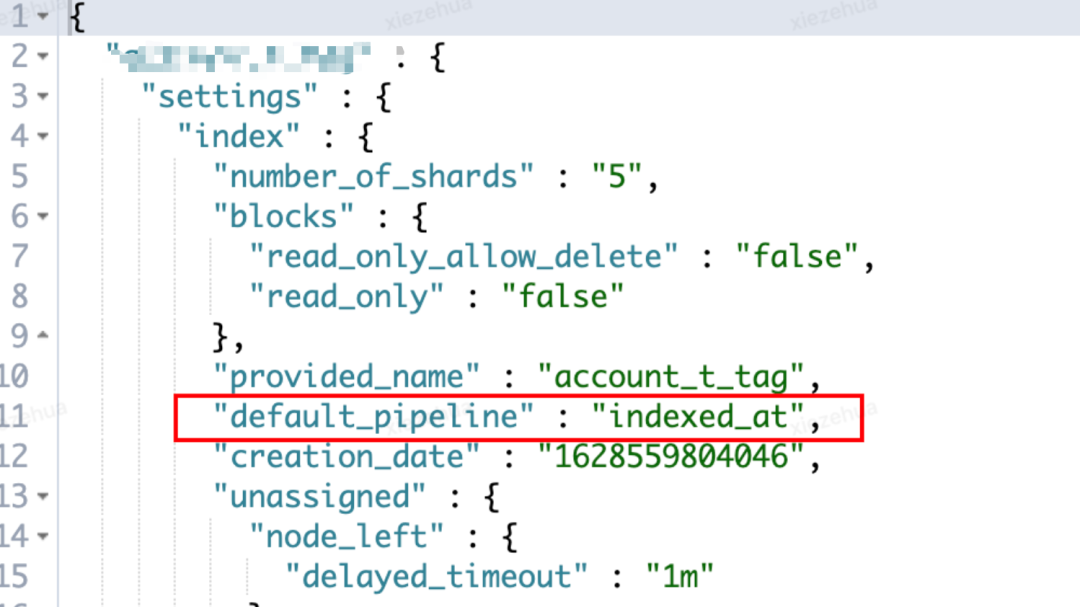
5. 檢查新增 settings 是否生效
GET index_xxxx/_settings
?
??增量遷移腳本
schedule-migrate.conf
index:可以使用通配符的方式
query: 增量同步的 DSL,統一 gmt_create_at 為增量同步的特殊標記
schedule: 每分鐘同步一把,"* * * * *"
input {
elasticsearch {
        hosts =>["ip:port"]
        # 安全集群配置登錄用戶名密碼
        user =>"username"
        password =>"password"
        index =>"index_*"
        query =>'{"query":{"range":{"gmt_create_at":{"gte":"now-1m","lte":"now/m"}}}}'
        size =>5000
        scroll =>"5m"
        docinfo =>true
        schedule =>"* * * * *"
      }
}
filter {
     mutate {
      remove_field =>["source", "@version"]
   }
}
output {
    elasticsearch {
        # 目的端es地址
        hosts =>["http://ip:port"]
        # 安全集群配置登錄用戶名密碼
        user =>"username"
        password =>"password"
        index =>"%{[@metadata][_index]}"
        document_type =>"%{[@metadata][_type]}"
        document_id =>"%{[@metadata][_id]}"
        ilm_enabled =>false
        manage_template =>false
    }

# 調試信息,正式遷移去掉
stdout { codec => rubydebug { metadata =>true}}
}
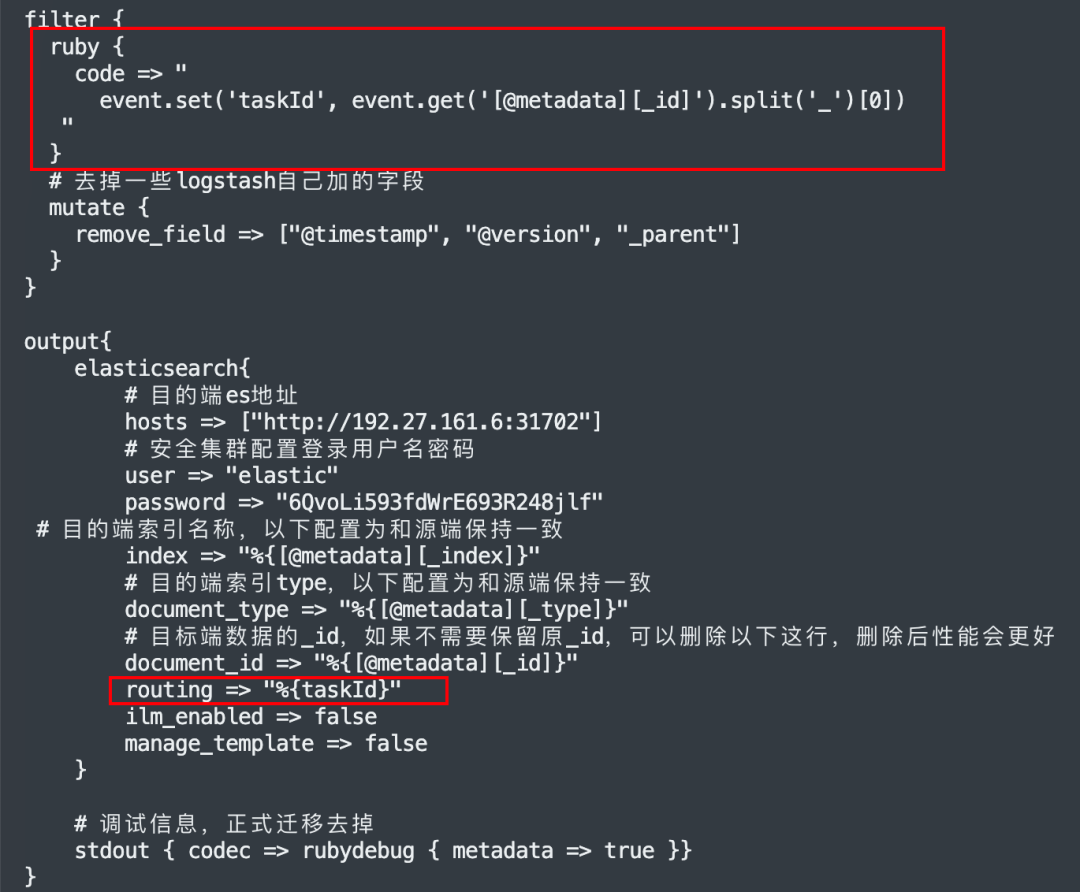
問題:
mapping 中存在 join 父子類型的字段,直接遷移報 400 異常?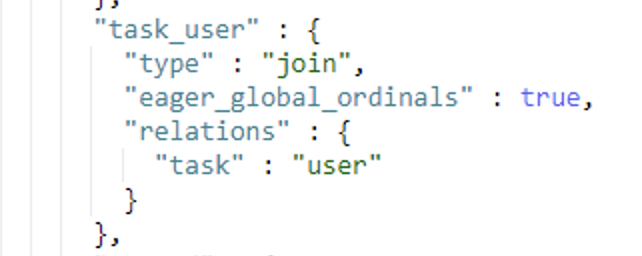 ?
?
[2022-09-20T20:02:16,404][WARN ][logstash.outputs.elasticsearch] Could not index event to Elasticsearch. {:status=>400,
:action=>["index", {:_id=>"xxx", :_index=>"xxx", :_type=>"joywork_t_work", :routing=>nil}, #],
:response=>{"index"=>{"_index"=>"xxx", "_type"=>"xxx", "_id"=>"xxx", "status"=>400,
"error"=>{"type"=>"mapper_parsing_exception", "reason"=>"failed to parse",
"caused_by"=>{"type"=>"illegal_argument_exception", "reason"=>"[routing] is missing for join field [task_user]"}}}}}
解決方法:
https://discuss.elastic.co/t/an-routing-missing-exception-is-obtained-when-reindex-sets-the-routing-value/155140https://github.com/elastic/elasticsearch/issues/26183
結合業務特征,通過在 filter 中加入小量的 ruby 代碼,將_routing 的值取出來,放回 logstah event 中,由此問題得以解決。
示例:
審核編輯 :李倩
-
數據
+關注
關注
8文章
7335瀏覽量
94774 -
數據遷移
+關注
關注
0文章
89瀏覽量
7258
原文標題:跨機房 ES 同步實戰
文章出處:【微信號:OSC開源社區,微信公眾號:OSC開源社區】歡迎添加關注!文章轉載請注明出處。
發布評論請先 登錄
ES7243E+ES8311音頻錄制與播放電路資料
深度解析ES8389/ES8390/音頻芯片Linux驅動(Linux6.1內核)
機房項目中的時間系統:從忽視到謹慎的十年體會
機房如何搬遷?有哪些步驟與規范?

基于PXIe總線的多板卡通道同步機制研究

屏蔽機房建設圖解,與非屏蔽機房有何區別?

在恩智浦i.MX RT1180跨界處理器上如何實現1588協議同步

蔚來全新ES8掉頭能有多敏捷
手機板 layout 走線跨分割問題
淘寶API跨平臺數據同步,多店管理一屏搞定!

黑芝麻智能跨域時間同步技術:消除多域計算單元的時鐘信任鴻溝




 工商網監
工商網監
評論