


 ESP32/ESP8266開發板單向一對多ESP-NOW無線通信

簡介
本實驗通過ESP-NOW無線通信協議實現ESP32開發板向多個ESP32/ESP 8266開發板發送數據。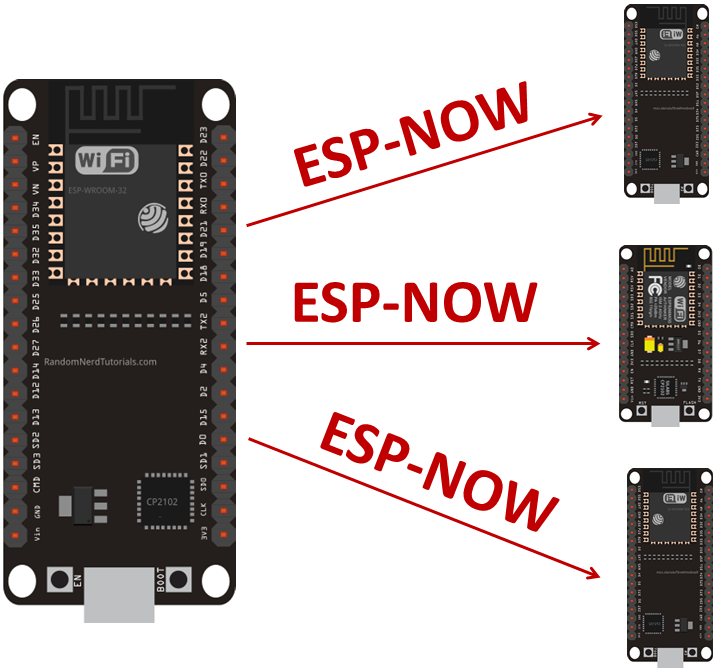
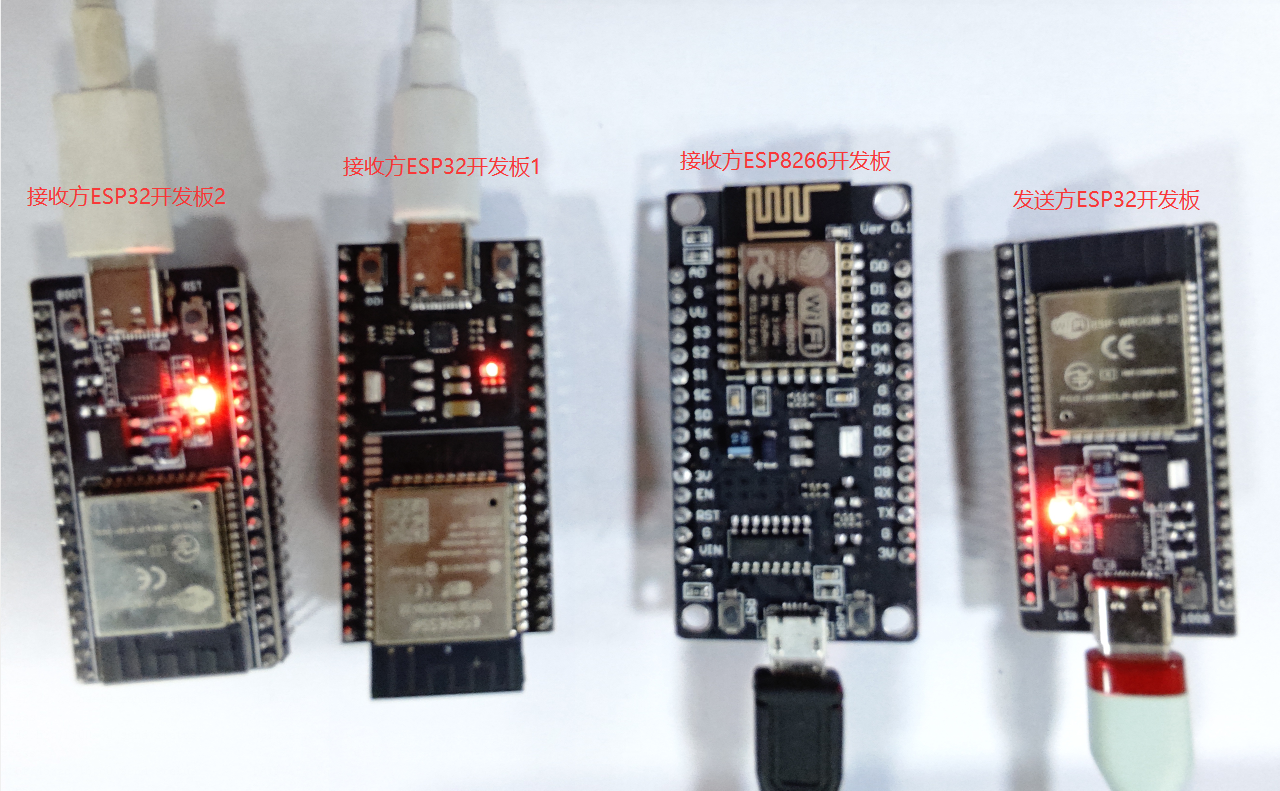
讀取ESP32/ESP8266接收方Receiver的MAC地址
讀取ESP32開發板的代碼
#include < WiFi.h >
#include < esp_wifi.h >

void readMacAddress(){
  uint8_t baseMac[6];
  esp_err_t ret = esp_wifi_get_mac(WIFI_IF_STA, baseMac);
  if (ret == ESP_OK) {
    Serial.printf("%02x:%02x:%02x:%02x:%02x:%02xn",
                  baseMac[0], baseMac[1], baseMac[2],
                  baseMac[3], baseMac[4], baseMac[5]);
  } else {
    Serial.println("Failed to read MAC address");
  }
}

void setup(){
  Serial.begin(115200);

  WiFi.mode(WIFI_STA);
  WiFi.STA.begin();

  Serial.print("[DEFAULT] ESP32 Board MAC Address: ");
  readMacAddress();
}

void loop(){

}
通過串口讀取到接收方ESP32開發板1的MAC地址為: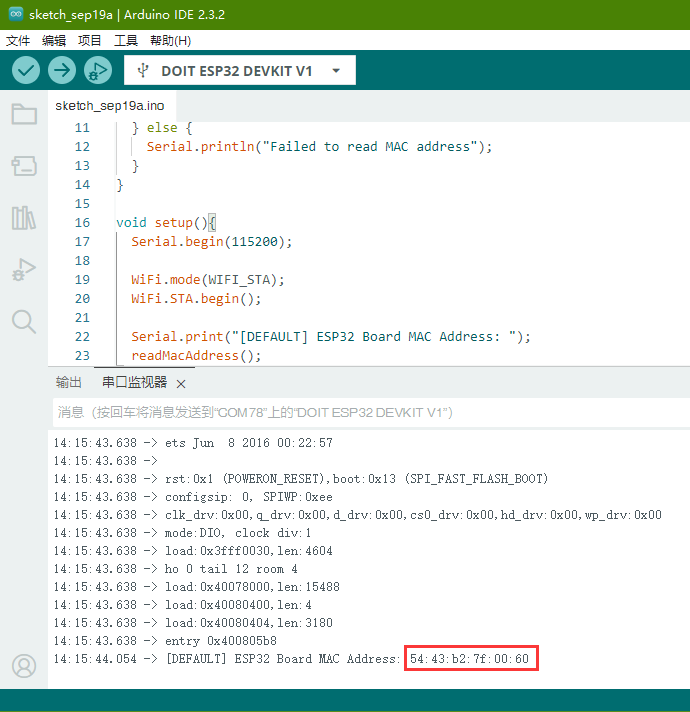
同樣的方式讀取到接收方ESP32開發板2的MAC地址為: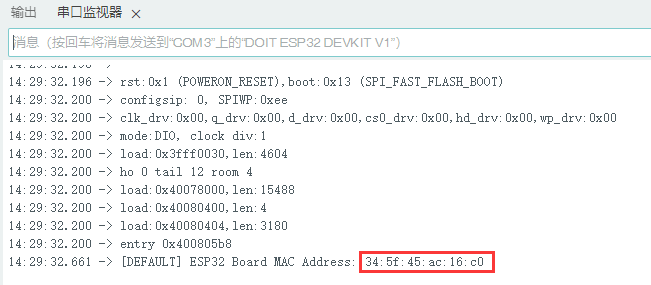
讀取ESP8266開發板的代碼
#include < ESP8266WiFi.h >

void setup(){
  Serial.begin(115200);
  Serial.println();
  Serial.print("ESP Board MAC Address:  ");
  Serial.println(WiFi.macAddress());
}

void loop(){

}
讀取到接收方ESP8266開發板的MAC地址為: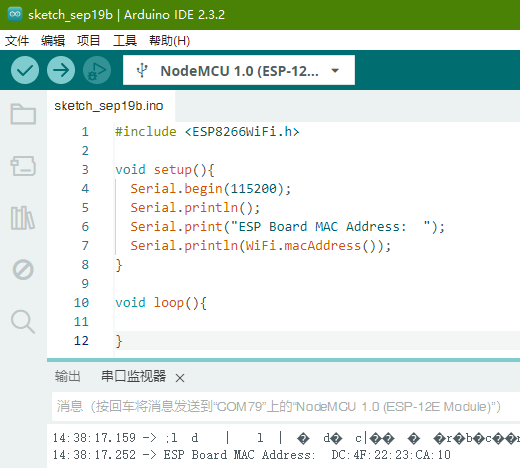
ESP32發送方Sender程序
把ESP32開發板1,ESP開發板2,ESP8266開發板的MAC地址分別填入到下列代碼的broadcastAddress1[ ],broadcastAddress2[ ],broadcastAddress3[ ]數組中
#include < esp_now.h >
#include < WiFi.h >

// REPLACE WITH YOUR ESP RECEIVER'S MAC ADDRESS
uint8_t broadcastAddress1[] = {0x54, 0x43, 0xb2, 0x7f, 0x00, 0x60};
uint8_t broadcastAddress2[] = {0x34, 0x5f, 0x45, 0xac, 0x16, 0xc0};
uint8_t broadcastAddress3[] = {0xdc, 0x4f, 0x22, 0x23, 0xca, 0x10};

typedef struct test_struct {
  int x;
  int y;
} test_struct;

esp_now_peer_info_t peerInfo;

void OnDataSent(const uint8_t *mac_addr, esp_now_send_status_t status) {
  char macStr[18];
  Serial.print("Packet to: ");
  // Copies the sender mac address to a string
  snprintf(macStr, sizeof(macStr), "%02x:%02x:%02x:%02x:%02x:%02x",
           mac_addr[0], mac_addr[1], mac_addr[2], mac_addr[3], mac_addr[4], mac_addr[5]);
  Serial.print(macStr);
  Serial.print(" send status:t");
  Serial.println(status == ESP_NOW_SEND_SUCCESS ? "Delivery Success" : "Delivery Fail");
}

void setup() {

  Serial.begin(115200);

  WiFi.mode(WIFI_STA);

  if (esp_now_init() != ESP_OK) {
    Serial.println("Error initializing ESP-NOW");
    return;
  }

  esp_now_register_send_cb(OnDataSent);

  // register peer
  peerInfo.channel = 0;
  peerInfo.encrypt = false;

  memcpy(peerInfo.peer_addr, broadcastAddress1, 6);
  if (esp_now_add_peer(&peerInfo) != ESP_OK){
    Serial.println("Failed to add peer");
    return;
  }

  memcpy(peerInfo.peer_addr, broadcastAddress2, 6);
  if (esp_now_add_peer(&peerInfo) != ESP_OK){
    Serial.println("Failed to add peer");
    return;
  }
  memcpy(peerInfo.peer_addr, broadcastAddress3, 6);
  if (esp_now_add_peer(&peerInfo) != ESP_OK){
    Serial.println("Failed to add peer");
    return;
  }
}

void loop() {
  test_struct test;
  test_struct test2;
  test_struct test3;
  test.x = random(0,20);
  test.y = random(0,20);
  test2.x = random(0,20);
  test2.y = random(0,20);
  test3.x = random(0,20);
  test3.y = random(0,20);

  esp_err_t result1 = esp_now_send(
    broadcastAddress1,
    (uint8_t *) &test,
    sizeof(test_struct));

  if (result1 == ESP_OK) {
    Serial.println("Sent with success");
  }
  else {
    Serial.println("Error sending the data");
  }
  delay(500);
  esp_err_t result2 = esp_now_send(
    broadcastAddress2,
    (uint8_t *) &test2,
    sizeof(test_struct));

  if (result2 == ESP_OK) {
    Serial.println("Sent with success");
  }
  else {
    Serial.println("Error sending the data");
  }

  delay(500);
  esp_err_t result3 = esp_now_send(
    broadcastAddress3,
    (uint8_t *) &test3,
    sizeof(test_struct));

  if (result3 == ESP_OK) {
    Serial.println("Sent with success");
  }
  else {
    Serial.println("Error sending the data");
  }
  delay(2000);
}
ESP32/ESP8266接收方Receiver程序
上傳代碼到ESP32開發板1和ESP3開發板2
#include < esp_now.h >
#include < WiFi.h >

//Structure example to receive data
//Must match the sender structure
typedef struct test_struct {
  int x;
  int y;
} test_struct;

//Create a struct_message called myData
test_struct myData;

//callback function that will be executed when data is received
void OnDataRecv(const uint8_t * mac, const uint8_t *incomingData, int len) {
  memcpy(&myData, incomingData, sizeof(myData));
  Serial.print("Bytes received: ");
  Serial.println(len);
  Serial.print("x: ");
  Serial.println(myData.x);
  Serial.print("y: ");
  Serial.println(myData.y);
  Serial.println();
}

void setup() {
  //Initialize Serial Monitor
  Serial.begin(115200);

  //Set device as a Wi-Fi Station
  WiFi.mode(WIFI_STA);

  //Init ESP-NOW
  if (esp_now_init() != ESP_OK) {
    Serial.println("Error initializing ESP-NOW");
    return;
  }

  // Once ESPNow is successfully Init, we will register for recv CB to
  // get recv packer info
  esp_now_register_recv_cb(esp_now_recv_cb_t(OnDataRecv));
}

void loop() {

}
ESP8266開發板接收代碼
#include < ESP8266WiFi.h >
#include < espnow.h >

//Structure example to receive data
//Must match the sender structure
typedef struct test_struct {
  int x;
  int y;
} test_struct;

//Create a struct_message called myData
test_struct myData;

//callback function that will be executed when data is received
void OnDataRecv(uint8_t * mac, uint8_t *incomingData, uint8_t len) {
  memcpy(&myData, incomingData, sizeof(myData));
  Serial.print("Bytes received: ");
  Serial.println(len);
  Serial.print("x: ");
  Serial.println(myData.x);
  Serial.print("y: ");
  Serial.println(myData.y);
  Serial.println();
}

void setup() {
  //Initialize Serial Monitor
  Serial.begin(115200);

  //Set device as a Wi-Fi Station
  WiFi.mode(WIFI_STA);

  //Init ESP-NOW
  if (esp_now_init() != 0) {
    Serial.println("Error initializing ESP-NOW");
    return;
  }

  // Once ESPNow is successfully Init, we will register for recv CB to
  // get recv packer info
  esp_now_set_self_role(ESP_NOW_ROLE_SLAVE);
  esp_now_register_recv_cb(OnDataRecv);
}

void loop() {

}
ESP-NOW通信驗證
同時給發送方ESP32開發板,接收方ESP32開發板1,接收方ESP32開發板2,接收方ESP8266開發板供電,并打開四個串口助手觀察四個開發板的數據收發情況
若接收方都收到數據,發送方ESP32開發板會收到應答信息,串口打印各個MAC地址的接收方數據分發成功: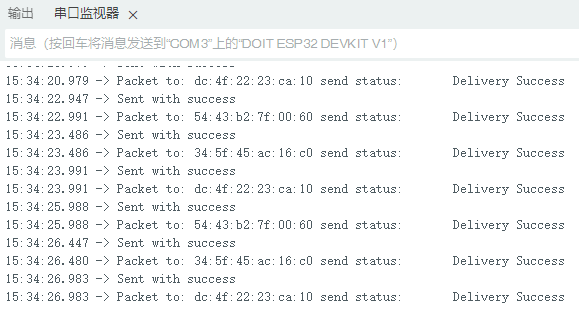
若有接收方沒有收到數據,發送方ESP32開發板會收到應答信息,串口打印對應的MAC地址的接收方數據分發失敗: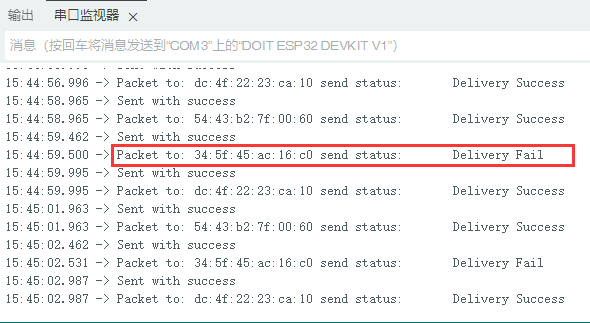
接收方ESP32開發板1串口打印接收到發送方發過來的隨機數據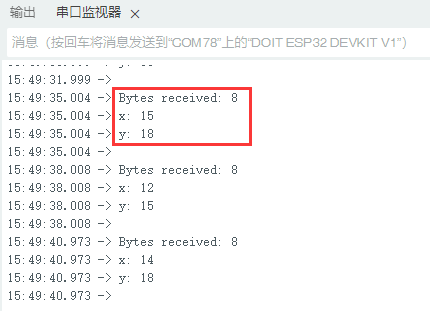
接收方ESP32開發板2串口打印接收到發送方發過來的隨機數據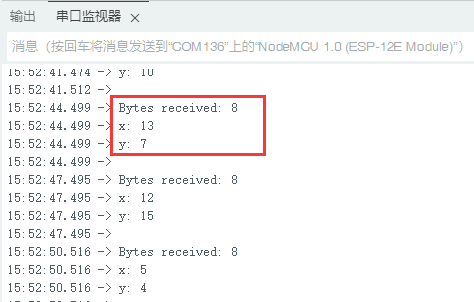
接收方ESP8266開發板串口打印接收到發送方發過來的隨機數據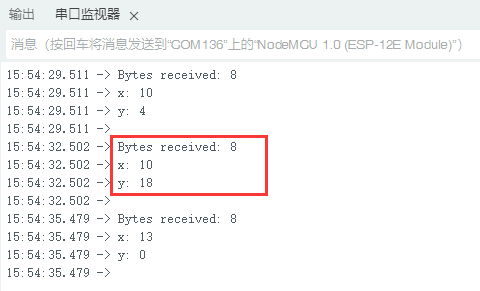
總結
通過以上例程驗證了ESP32/ESP開發板之間單向一對多的ESP-NOW無線通信,接下來的篇章將繼續驗證多個的ESP32開發板之間實現多對一的ESP-NOW無線通信。
審核編輯 黃宇
聲明:本文內容及配圖由入駐作者撰寫或者入駐合作網站授權轉載。文章觀點僅代表作者本人,不代表電子發燒友網立場。文章及其配圖僅供工程師學習之用,如有內容侵權或者其他違規問題,請聯系本站處理。
舉報投訴
-
開發板
+關注
關注
26文章
6307瀏覽量
118538 -
ESP8266
+關注
關注
51文章
971瀏覽量
49545 -
ESP32
+關注
關注
26文章
1201瀏覽量
21888
發布評論請先 登錄
相關推薦
熱點推薦
ESP32/ESP8266開發板ESP-NOW無線通信
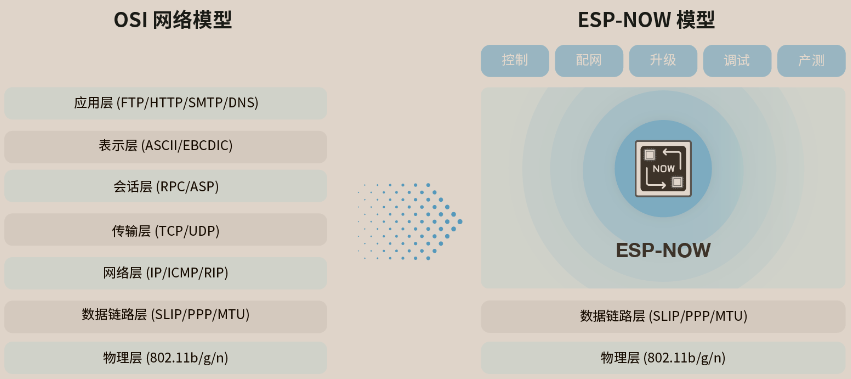
ESP-NOW 是由Espressif開發的基于數據鏈路層的無線通信協議,它將五層 OSI 上層協議精簡為一層,數據傳輸時無需依次經過網絡層、傳輸層、會話層、表示層、應用層等復雜的層級
【ESP32-C5系列】WT9932C5-TINY開發板上手指南
實現了強勁性能與豐富功能的平衡。開發板主頻高達240MHz,依托ESP32-C5升級的無線能力,支持Wi-Fi6(802.11ax)與藍牙5.3雙模通信,相比前代

【ESP32-P4系列】WT9932P4-MINI開發板上手指南
開發板介紹ESP32-P4-MINI開發板是深圳市啟明云端有限公司推出的,基于WT0132P4-A1核心板設計的多媒體開發板。WT0132P
【ESP32-P4系列】WT9932P4-MINI開發板規格書
開發板介紹ESP32-P4-MINI開發板是深圳市啟明云端有限公司推出的,基于WT0132P4-A1核心板設計的多媒體開發板。WT0132P
無需安裝!在瀏覽器里就能玩轉ESP32/ESP8266,這個神器絕了!
無需安裝!在瀏覽器里就能玩轉ESP32/ESP8266,這個神器絕了!【往期精選】十年嵌入式最深的痛,不是Bug,而是抓不到日志!vivo宣布原生支持HomeAssistant生態設備接入(含

樂鑫科技ESP-AMP框架詳解!兩款已支持的ESP32-P4C5開發板推薦!啟明云端樂鑫科技代理
操作系統,并提供完整的核間通信機制。啟明云端旗兩款高性能開發板——WT99P4C5-S1與WTDKP4C5-S1,搭載樂鑫科技ESP32-P4芯片和ESP32-C5芯
ESP32-P4全功能開發板和ESP32-P4-TINY開發板該怎么選?看這篇就夠了!
啟明云端基于樂鑫科技ESP32-P4芯片設計了多款開發板,這些開發板有什么區別?基于應用場景如何選擇?本期,我們聚焦兩款代表性產品:WT99P4C5-S1開發板與WT9932P4-TI
晶科鑫 | 國產26MHz晶振匹配Espressif(樂鑫) ESP8285/ESP8266芯片案例
本,兩者可以共用同一套SDK,只是ESP8285內部集成了1MBFlash,SPIMode設置為DOUT,而ESP8266則需要外接Flash,并且是Din模式。除此之外,ESP828

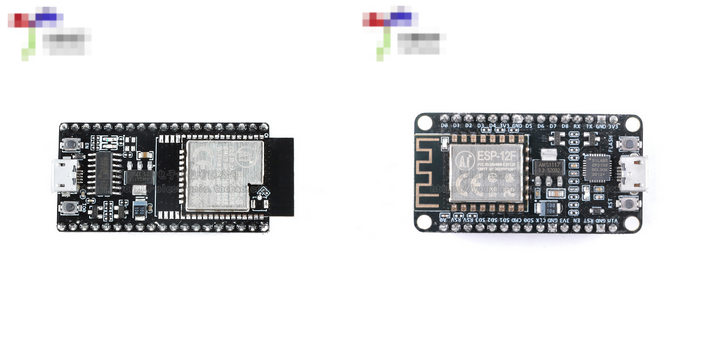
ESP8266和ESP32開發板常見的2種下載方式
ESP32和ESP8266是性價比很高而且使用較為廣泛的的Wi-Fi模塊,在物聯網(IoT)領域的DIY項目中可以首先考慮這2款產品。
兩款芯片都屬于32位處理器。ESP32是低功耗雙核80MHz
ESP8266和ESP32開發板常見的2種下載方式
ESP8266全IO口引出,直接下載無需復位!
ESP32功能框圖
基于arduino的ESP32/ESP8266開發環境搭建
1.在a
發表于 10-24 18:04
ESP32的ESP-NOW通訊踩坑記
1、背景前段時間看到樂鑫推出了一種很有意思的Wi-Fi通訊協議,它允許設備在無連接的時候進行直接通訊。樂鑫對它的概述如下:“ESP-NOW是一種由樂鑫公司定義的無連接Wi-Fi通信協議
ESP32-P4-MINI開發板開箱和上手指南來了!速速碼住!
上期“夢中情板”ESP32-P4-MINI開發板一出就備受青睞這期我們立馬就端著開箱和上手指南來了!不用驚嘆,我們就是這么迅速,請把“啟明云端權威”打在公屏上好嘛!開箱展示拿到
ESP32-P4 C5開發板燒錄小智全流程!速看!
沒錯,你沒有看錯!我們帶著WT99P4C5-S1開發板燒錄小智全流程走來了!開發板搭載樂鑫科技ESP32-P4和ESP32-C5芯片,代碼完全開源,支持靈活二次
ESP32-S3開發板燒錄小智AI系統全流程指南
在AI語音交互領域不斷發展的今天,開發者們對于功能強大、開源靈活的開發板需求日益增長。今天,我們就來詳細了解一下ESP32AgentDevKit燒錄小智的全流程,這款搭載樂鑫科技



 工商網監
工商網監
評論