


 HarmonyOS應用圖像stride處理方案

概述
在計算機圖形學和圖像處理中,stride通常指的是在內存中存儲多維數組(如圖像或紋理)時,行與行之間的字節間隔,即每一行的起始地址與下一行的起始地址之間的距離,在本文中stride指的是圖像的一行數據在內存中實際占用的字節數,為了內存對齊和提高讀取效率的要求,通常大于圖像的寬度。在解析圖像內容時,如果未考慮stride,直接通過使用width*height讀取圖像內容去解析圖像,會導致相機預覽異常;當預覽流圖像stride與width不一致時,需要對stride進行無效像素去除處理。
實現原理
當圖像存儲在內存中時,內存緩沖區可能在每行像素之后包含額外的填充字節。填充字節會影響圖像在內存中的存儲方式,但不會影響圖像的顯示方式。stride是內存中一行像素到內存中下一行像素的字節數;如果存在填充字節,則步幅比圖像的寬度寬。
說明:stride在不同的平臺底層上報的值不同,開發者需根據實際業務獲取stride后做處理適配。在本文中通過預覽流幀數據的返回值image.Component.rowStride獲取stride。
如下圖:在一個width為3,height為3,stride為4的圖片上(例如定義了一個480*480分辨率的圖像),實際分配內存并不是width*height即3*3(此處為定義的預覽流分辨率的寬高比,即實際分配內存不是480*480),而是stride*height即4*3,這樣實現了內存對齊,方便硬件處理。
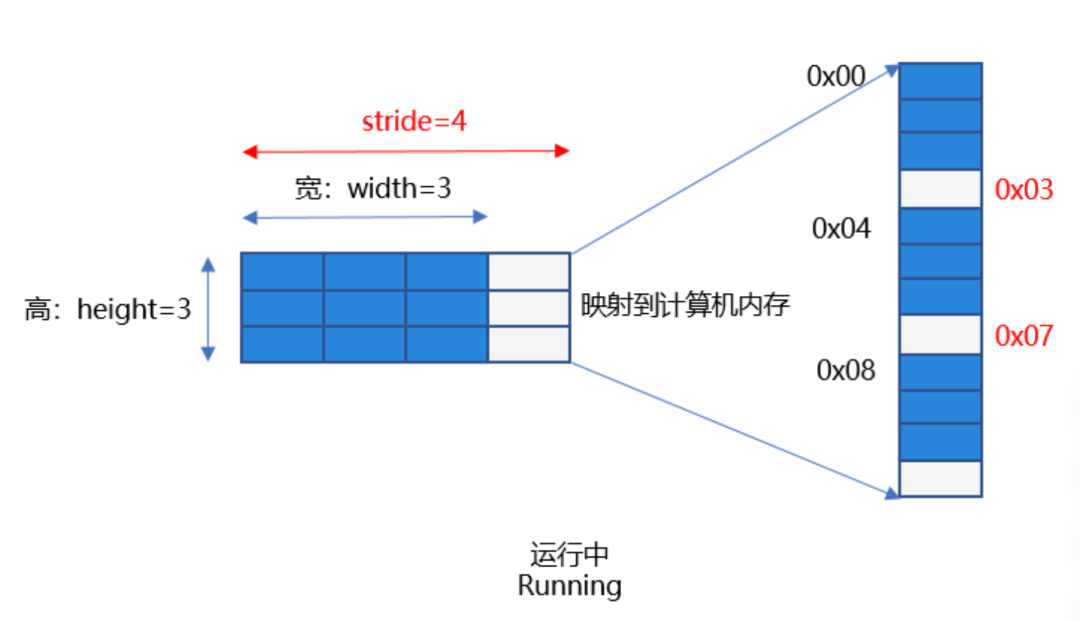
圖1:需正確處理stride
如果開發者根據width和height數據去處理像素數據,即把0x00-0x09地址的數據當做像素去處理,就會出現解析了錯誤的像素數據的問題,并且使用了無效的像素0x03,0x07,會導致圖片無法正常顯示導致“相機花屏”現象。因此,要根據stride值處理預覽數據流,去除無效的像素后送顯,才能獲取正確的預覽流圖像。
場景案例
以一種高頻的用戶使用場景為例,應用需要定義一個1080*1080分辨率的預覽流圖像,此時的stride在相關平臺的返回值為1088,此時需要對stride進行處理,處理無效像素后解析出正確的像素數據,避免出現預覽流花屏。
【反例】未處理stride:當開發者創建PixelMap解析buffer時,直接按照寬去讀取每行數據,沒有處理stride,此時若解析了無效像素數據并傳給Image組件直接送顯,可能會出現預覽流花屏現象。
以下為部分示例代碼:
1. 應用通過image.ImageReceiver注冊imageArrival圖像回調方法,獲取每幀圖像數據實例image.Image,應用通過定義一個width為1080*height為1080分辨率的預覽流直接創建pixelMap,此時獲取到的stride的值為1088,解析buffer時若直接按照寬去讀取每行數據(使用了無效像素數據)并存儲到全局變量stridePixel中,傳給Image送顯,會導致預覽流花屏。
onImageArrival(receiver: image.ImageReceiver):void{
receiver.on('imageArrival',() =>{
  receiver.readNextImage((err: BusinessError, nextImage: image.Image) =>{
 if(err || nextImage ===undefined) {
   Logger.error(TAG,`requestPermissionsFromUser call Failed! error:${err.code}`);
   return;
  }
 if(nextImage) {
    nextImage.getComponent(image.ComponentType.JPEG,async(_err,component: image.Component) => {
   letwidth =1080;// width為應用創建預覽流分辨率對應的寬
   letheight =1080;// height為應用創建預覽流分辨率對應的高
   // component.byteBuffer為相機返回的預覽流數據,其中包含了stride對齊數據
   letpixelMap =awaitimage.createPixelMap(component.byteBuffer, {
     size: {
     height: height,
     width: width
      },
     // 反例:width沒有處理stride值,創建PixelMap解析buffer時直接按照寬去讀取每行數據,可能使用了無效像素數據,導致預覽流花屏。
     srcPixelFormat: image.PixelMapFormat.NV21
    })
   AppStorage.setOrCreate('stridePixel', pixelMap);// 將創建出的PixelMap存儲到全局變量stridePixel中并傳給Image組件送顯。
    nextImage.release();
    })
  }
  });
})
}
2. 在初始相機模塊時,調用onImageArrival(),將未處理的width和height作為size,創建PixelMap,通過在Image中傳入被@StorageLink修飾的變量stridePixel進行數據刷新,圖片送顯。
@Component
exportstructPageThree{
pathStack:NavPathStack=newNavPathStack();
@StateisShowStridePixel:boolean=false;
@StorageLink('stridePixel')@Watch('onStridePixel')stridePixel: image.PixelMap|undefined=undefined;
@StateimageWidth:number=1080;
@StateimageHeight:number=1080;
@StorageLink('previewRotation')previewRotate:number=0;
onStridePixel():void{
 this.isShowStridePixel=true;
}
aboutToAppear():void{
 CameraService.initCamera(0);
}
aboutToDisappear():void{
 CameraService.releaseCamera();
}
// ...
build() {
 NavDestination() {
 // ...
 Column() {
   if(this.isShowStridePixel) {
   Image(this.stridePixel)// 反例:解析了錯誤的像素數據,并存儲到全局變量stridePixel中,傳給Image送顯,會導致相機預覽流花屏。
      .width(px2vp(this.imageWidth))
      .height(px2vp(this.imageHeight))
      .margin({top:150})
      .rotate({
     z:0.5,
     angle:this.previewRotate
      })
    }
   // ...
  }
  .justifyContent(FlexAlign.Center)
  .height('90%')
  .width('100%')
  }
  .backgroundColor(Color.White)
  .hideTitleBar(true)
  .onBackPressed(() =>{
 this.pathStack.pop();
 returntrue;
  })
  .onReady((context: NavDestinationContext) =>{
 this.pathStack= context.pathStack;
  })
}
}
【正例一】開發者使用width,height,stride三個值,處理相機預覽流數據,處理stride方法一如下。分兩種情況:
1. 當stride和width相等時,按寬讀取buffer不影響結果。
2. 當stride和width不等時,將相機返回的預覽流數據即component.byteBuffer的數據去除stride,拷貝得到新的dstArr數據進行數據處理,將處理后的dstArr數組buffer,通過width和height直接創建pixelMap, 并存儲到全局變量stridePixel中,傳給Image送顯。
onImageArrival(receiver: image.ImageReceiver):void{
receiver.on('imageArrival',() =>{
  receiver.readNextImage((err: BusinessError, nextImage: image.Image) =>{
 // ...
 if(nextImage) {
    nextImage.getComponent(image.ComponentType.JPEG,
   async(err,component: image.Component) => {
     letwidth =1080;// width為應用創建預覽流分辨率對應的寬
     letheight =1080;// height為應用創建預覽流分辨率對應的高
     letstride = component.rowStride;// 通過component.rowStride獲取stride
     // 正例:情況1. 當圖片的width等于相機預覽流返回的行跨距stride,此時無需處理stride,通過width和height直接創建pixelMap,
     // 并存儲到全局變量stridePixel中,傳給Image送顯。
     if(stride === width) {
     letpixelMap =awaitimage.createPixelMap(component.byteBuffer, {
       size: {height: height,width: width },
       srcPixelFormat: image.PixelMapFormat.NV21,
      })
     AppStorage.setOrCreate('stridePixel', pixelMap);
      }else{
     // 正例:情況2. 當圖片的width不等于相機預覽流返回的行跨距stride,
     // 此時將相機返回的預覽流數據component.byteBuffer去除掉stride,拷貝得到新的dstArr數據,數據處理后傳給其他不支持stride的接口處理。
     constdstBufferSize = width * height *1.5;// 創建一個width * height * 1.5的dstBufferSize空間,此處為NV21數據格式。
     constdstArr =newUint8Array(dstBufferSize);// 存放去掉stride后的buffer。
     // 讀取每行數據,相機支持的profile寬高均為偶數,不涉及取整問題。
     for(letj =0; j < height *?1.5; j++) {?// 循環dstArr的每一行數據。
? ? ? ? ? ? ? ??// 拷貝component.byteBuffer的每行數據前width個字節到dstArr中(去除無效像素,剛好每行得到一個width*height的八字節數組空間)。
? ? ? ? ? ? ? ??const?srcBuf =?new?Uint8Array(component.byteBuffer, j * stride,
? ? ? ? ? ? ? ? width);?// 將component.byteBuffer返回的buffer,每行遍歷,從首位開始,每行截取出width字節。
? ? ? ? ? ? ? ? dstArr.set(srcBuf, j * width);?// 將width*height大小的數據存儲到dstArr中。
? ? ? ? ? ? }
? ? ? ? ? ??let?pixelMap =?await?image.createPixelMap(dstArr.buffer, {
? ? ? ? ? ? ? ??// 將處理后的dstArr數組buffer,通過width和height直接創建pixelMap,并存儲到全局變量stridePixel中,傳給Image送顯。
? ? ? ? ? ? ? ??size: {?height: height,?width: width },
? ? ? ? ? ? ? ??srcPixelFormat: image.PixelMapFormat.NV21,
? ? ? ? ? ? })
? ? ? ? ? ??AppStorage.setOrCreate('stridePixel', pixelMap);
? ? ? ? ? ? }
? ? ? ? ? ? nextImage.release();
? ? ? ? })
? ? }
? ? });
})
}
【正例二】開發者使用width,height,stride三個值,處理相機預覽流數據,處理stride方法二如下。分兩種情況:
1. 當stride和width相等時,與正例一情況一致,此處不再贅述。
2. 當stride和width不等時,如果應用想使用byteBuffer預覽流數據創建pixelMap直接顯示,可以根據stride*height字節的大小先創建pixelMap,然后調用PixelMap的cropSync方法裁剪掉多余的像素,從而正確處理stride,解決預覽流花屏問題。
onImageArrival(receiver: image.ImageReceiver):void{
receiver.on('imageArrival',() =>{
  receiver.readNextImage((err: BusinessError, nextImage: image.Image) =>{
 // ...
 if(nextImage) {
    nextImage.getComponent(image.ComponentType.JPEG,async(_err,component: image.Component) => {
   letwidth =1080;// width為應用創建預覽流分辨率對應的寬
   letheight =1080;// height為應用創建預覽流分辨率對應的高
   letstride = component.rowStride;// 通過component.rowStride獲取stride
   Logger.info(TAG,`receiver getComponent width:${width}height:${height}stride:${stride}`);
   // stride和width相等,按寬讀取buffer不影響結果
   if(stride === width) {
     letpixelMap =awaitimage.createPixelMap(component.byteBuffer, {
     size: {height: height,width: width },
     srcPixelFormat: image.PixelMapFormat.NV21,
      })
     AppStorage.setOrCreate('stridePixel', pixelMap);
    }else{
     letpixelMap =awaitimage.createPixelMap(component.byteBuffer, {
     // 正例:1、創建PixelMap時width傳stride,
     size: {height: height,width: stride },
     srcPixelFormat:8,
      })
     // 2、然后調用PixelMap的cropSync方法裁剪掉多余的像素。
      pixelMap.cropSync({
     size: {width: width,height: height },
     x:0,
     y:0
      })// 根據輸入的尺寸裁剪圖片,從(0,0)開始,裁剪width*height字節的區域。
     letpixelBefore:PixelMap|undefined=AppStorage.get('stridePixel');
     awaitpixelBefore?.release();
     AppStorage.setOrCreate('stridePixel', pixelMap);
    }
    nextImage.release();
    })
  }
  });
})
}
常見問題
如何獲取相機預覽流幀數據
通過ImageReceiver中imageArrival事件監聽獲取底層返回的圖像數據。
如何獲取預覽流圖像的stride的值
可以通過預覽流幀數據的返回值image.Component.rowStride獲取stride。
-
計算機
+關注
關注
19文章
7806瀏覽量
93188 -
內存
+關注
關注
9文章
3209瀏覽量
76354 -
圖像
+關注
關注
2文章
1096瀏覽量
42325 -
HarmonyOS
+關注
關注
80文章
2153瀏覽量
36037
原文標題:HarmonyOS應用圖像stride處理方案
文章出處:【微信號:HarmonyOS_Dev,微信公眾號:HarmonyOS開發者】歡迎添加關注!文章轉載請注明出處。
發布評論請先 登錄
《DNK210使用指南 -CanMV版 V1.0》第三十五章 image圖像特征檢測實驗
ADAS方案設計成功關鍵:圖像處理技術
如何使用Stride模式?
Altera的視頻和圖像處理解決方案
HarmonyOS的組件化設計方案
HarmonyOS測試技術與實戰-分布式應用測試解決方案





 工商網監
工商網監
評論