


 VSCode插件的安裝和使用

來源 | 嵌入式應用研究院
整理&排版| 嵌入式應用研究院
今天介紹一款我工作上經常用到的一款VSCode的插件-VsCode Action Buttons,這個插件可以釋放手敲命令行清除、編譯、運行、部署到目標機等操作,具體功能可由開發者自由定義,詳細功能的使用可以參考官網。
安裝插件并使用
選擇擴展設置:
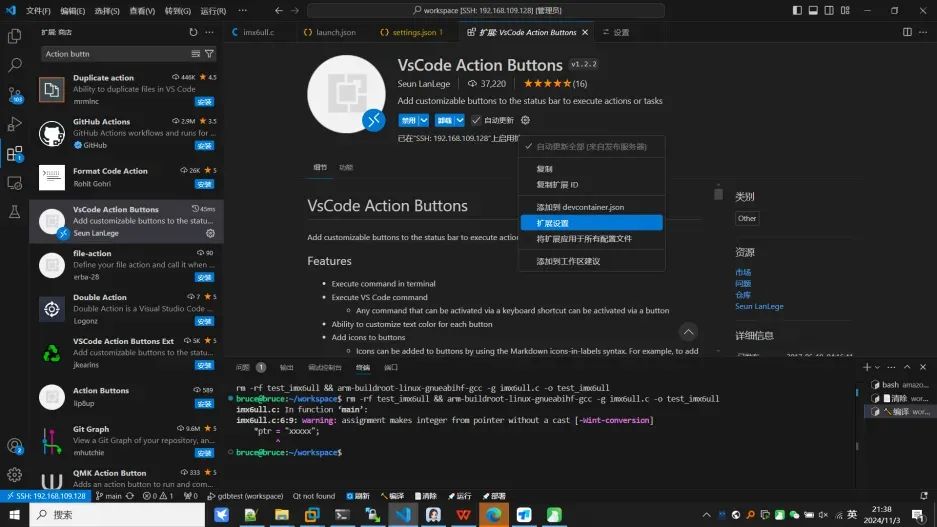
在settings.json中編輯:
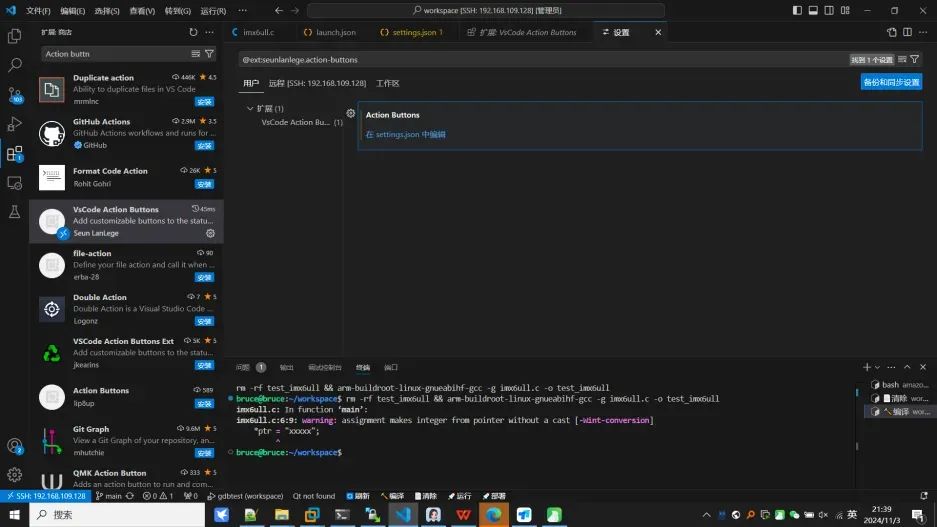
根據個人的需求定制功能:
以下是我經常用來編譯應用設置的腳本:
{
"actionButtons":{

"align":"left",
"defaultColor":"White",
"loadNpmCommands":false,
"reloadButton":"刷新",
"commands":[
{
"cwd":"${workspaceFolder}",
"name":"編譯",
"color":"white",
"singleInstance":true,
"command":"rm-rftest_imx6ull&&arm-buildroot-linux-gnueabihf-gcc-gimx6ull.c-otest_imx6ull"
},
{
"cwd":"${workspaceFolder}",
"name":"清除",
"color":"white",
"singleInstance":true,
"command":"rm-rftest_imx6ull"
},
{
"cwd":"${workspaceFolder}",
"name":"運行",
"color":"white",
"singleInstance":true,
"command":"cdbuild&&./test&"
},
{
"cwd":"${workspaceFolder}",
"name":"部署",
"color":"white",
"singleInstance":true,
"command":"scp/home/bruce/workspace/test_imx6ullroot@192.168.31.173:/root"
}
]
},
"local-history.path":"/opt/workspace/.history",
"security.allowedUNCHosts":[
"192.168.31.173"
],
"security.workspace.trust.untrustedFiles":"open",
"remote.SSH.remotePlatform":{
"192.168.31.173":"linux"
},
"workbench.iconTheme":"material-icon-theme",
}
然后底部狀態欄處右鍵將插件使能后將可以愉快的使用類似IDE一樣的功能了:
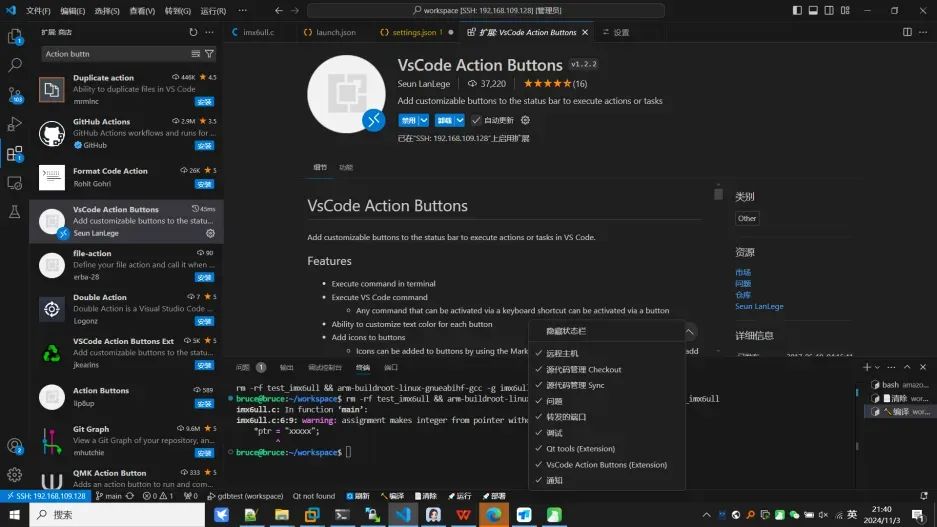
點擊清除:

點擊編譯:
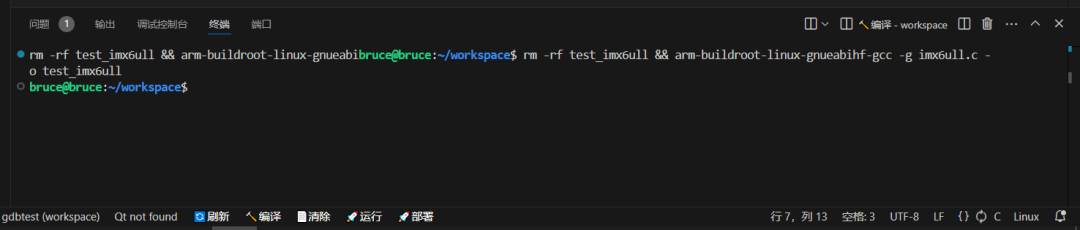
點擊部署:

在目標機上運行:

以上還可以將gdb遠程調試部署上去,基于目標機的遠程調試就更容易定位問題找Bug了,非常方便!大家在工作中有哪些好用的生產力工具呢?歡迎分享!
聲明:本文內容及配圖由入駐作者撰寫或者入駐合作網站授權轉載。文章觀點僅代表作者本人,不代表電子發燒友網立場。文章及其配圖僅供工程師學習之用,如有內容侵權或者其他違規問題,請聯系本站處理。
舉報投訴
-
嵌入式
+關注
關注
5198文章
20442瀏覽量
333975 -
代碼
+關注
關注
30文章
4967瀏覽量
73954 -
vscode
+關注
關注
1文章
172瀏覽量
9152
原文標題:工欲善其事,必先利其器-讓Vscode調試代碼就像IDE一樣好用
文章出處:【微信號:嵌入式應用研究院,微信公眾號:嵌入式應用研究院】歡迎添加關注!文章轉載請注明出處。
發布評論請先 登錄
相關推薦
熱點推薦
WSL2下VSCode插件安裝失敗的原因?
Collecting gevent<2.0,>=1.2.2 (from gdbgui==0.13.2.0->-r /home/qinge/esp/esp-idf/requirements.txt (line 26))
Using cached gevent-1.5.0.tar.gz (5.3 MB)
Installing build dependencies: started
Installing build dependencies: still running...
Installing build dependencies: finished with status \'done\'
Getting requirements to build wheel: started
Getting requirements to build wheel: finished with status \'error\'
Installing Python packages from /home/qinge/esp/esp-idf/requirements.txt
error: subprocess-exited-with-error
× Getting requirements to build wheel did not run successfully.
│ exit code: 1
╰─> [315 lines of output]
Compiling src/gevent/resolver/cares.pyx because it changed.
[1/1] Cythonizing src/gevent/resolver/cares.pyx
performance hint: src/gevent/libev/corecext.pyx:1291:5: Exception check on \'_syserr_cb\' will always require the GIL to be acquired.
Possible solutions:
1. Declare \'_syserr_cb\' as \'noexcept\' if you control the definition and you\'re sure you don\'t want the function to raise exceptions.
2. Use an \'int\' return type on \'_syserr_cb\' to allow an error code to be returned.
warning: src/gevent/libev/corecext.pyx:1288:0: Global name __SYSERR_CALLBACK matched from within class scope in contradiction to to Python \'class private name\' rules. This may change in a future release.
warning: src/gevent/libev/corecext.pyx:1288:0: Global name __SYSERR_CALLBACK matched from within class scope in contradiction to to Python \'class private name\' rules. This may change in a future release.
warning: src/gevent/libev/corecext.pyx:1288:0: Global name __SYSERR_CALLBACK matched from within class scope in contradiction to to Python \'class private name\' rules. This may change in a future release.
warning: src/gevent/libev/corecext.pyx:1288:0: Global name __SYSERR_CALLBACK matched from within class scope in contradiction to to Python \'class private name\' rules. This may change in a future release.
Error compiling Cython file:
------------------------------------------------------------
...
if events & ~(libev.EV__IOFDSET | libev.EV_READ | libev.EV_WRITE):
raise ValueError(\'illegal event mask: %r\' % events)
# All the vfd_functions are no-ops on POSIX
cdef int vfd = libev.vfd_open(fd)
libev.ev_io_init(&self._watcher, gevent_callback_io, vfd, events)
self.__watcher = &self._watcher
^
------------------------------------------------------------
src/gevent/libev/corecext.pyx:1027:25: Cannot convert \'ev_watcher *\' to Python object
Error compiling Cython file:
------------------------------------------------------------
...
raise ValueError(\'illegal event mask: %r\' % events)
# All the vfd_functions are no-ops on POSIX
cdef int vfd = libev.vfd_open(fd)
libev.ev_io_init(&self._watcher, gevent_callback_io, vfd, events)
self.__watcher = &self._watcher
self.__ss = &io_ss
^
------------------------------------------------------------
src/gevent/libev/corecext.pyx:1028:20: Cannot convert \'start_and_stop *\' to Python object
發表于 06-06 08:07
用離線安裝器安裝的idf,其創建的Python虛擬環境無激活腳本是怎么回事?
如題,用離線安裝器安裝的idf,其創建的Python虛擬環境無激活腳本,具體如下圖所示:
反而用vscode插件安裝的idf有,如下圖:
發表于 06-11 06:49
VSCode關閉重啟后插件就會失效,提示重新安裝怎么解決?
安裝完esp-idf離線版后,使用Use existing setup安裝插件,可以成功編譯運行hello world。
關閉VScode并重新打開,就會提示以下
發表于 06-19 08:28
ubuntu下的vscode插件安裝idf時,總是找不到git,為什么?
總是提示:Git is not found in current environment
但是我已經在setting.json下設置了\"git.path\": \"/bin/git\"
同行,命令行里查看git版本和路徑都是可以的。為什么還是不行呢?
發表于 06-21 07:16

【合宙Air551G雙頻定位開發板試用體驗】之b站視頻
?https://www.bilibili.com/video/BV1si4y1y7eC/這個是視頻的鏈接。按照文檔中的提示,我進行相關vscode插件的安裝,并繼續隨后的調試工作。但是這個是
發表于 03-30 07:35
如何在RT-THREAD上生成doxygen呢
vscode 插件安裝我們先講講doxygen怎么寫。傳統方法直接用文本編輯器來寫,這個我這邊就不多介紹了。這邊我們用一個工具來幫助我們來寫常用的doxygen。打開vscode,
發表于 08-09 10:50
ubuntu下的vscode插件安裝idf時,總是找不到git的原因?
總是提示:Git is not found in current environment但是我已經在setting.json下設置了"git.path": "/bin/git"同行,命令行里查看git版本和路徑都是可以的。為什么還是不行呢?
發表于 02-20 06:24
vscode常用插件有哪些
vscode是一個不錯的開源IDE,可以完全替代sublime,又是跨平臺,使用起來還比較方便。使用一段時間后,我覺得有些插件,值得推薦一下。我這里的開發環境是win10下vscode+node.在
發表于 12-23 10:42
?2.2w次閱讀
ubuntu18安裝vscode搭建嵌入式linux開發環境
ubuntu18安裝vscode搭建嵌入式linux開發環境安裝vscode配置vscode(安裝
發表于 11-01 16:57
?10次下載

VSCODE如何安裝ChatGPT插件
zh1:首先在插件商店搜索ChatGPT中文版。然后點擊安裝就可以
chatGPT插件目前需要登陸賬號才能使用,官方介紹下一個版本會有升級(不需要登陸)
a:前往
發表于 02-13 10:02
?0次下載
VSCode批量遷移插件
代碼的路
打開之前電腦,找到原電腦VS Code的插件安裝目錄:
如:
C:\\\\Users\\\\用戶名\\\\.vscode\\\\extensions
將extensions文件夾拷貝到





 工商網監
工商網監
評論