


 matlab學(xué)習(xí)技巧之semilogx和semilogy函數(shù)

對(duì)數(shù)轉(zhuǎn)換有雙對(duì)數(shù)坐標(biāo)轉(zhuǎn)換和單軸對(duì)數(shù)坐標(biāo)轉(zhuǎn)換兩種。用loglog函數(shù)可以實(shí)現(xiàn)雙對(duì)數(shù)坐標(biāo)轉(zhuǎn)換,用semilogx和semilogy函數(shù)可以實(shí)現(xiàn)單軸對(duì)數(shù)坐標(biāo)轉(zhuǎn)換。
loglog(Y) 表示 x、y坐標(biāo)都是對(duì)數(shù)坐標(biāo)系
semilogx(Y) 表示 x坐標(biāo)軸是對(duì)數(shù)坐標(biāo)系
semilogy(…) 表示y坐標(biāo)軸是對(duì)數(shù)坐標(biāo)系
plotyy 有兩個(gè)y坐標(biāo)軸,一個(gè)在左邊,一個(gè)在右邊
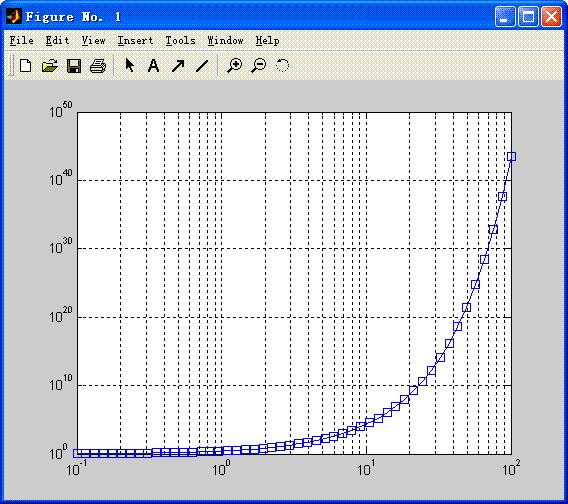
例1:用方形標(biāo)記創(chuàng)建一個(gè)簡(jiǎn)單的loglog.
解: 輸入命令
x=logspace(-1,2);
loglog(x,exp(x),'-s')
grid on %標(biāo)注格柵
所制圖形為:
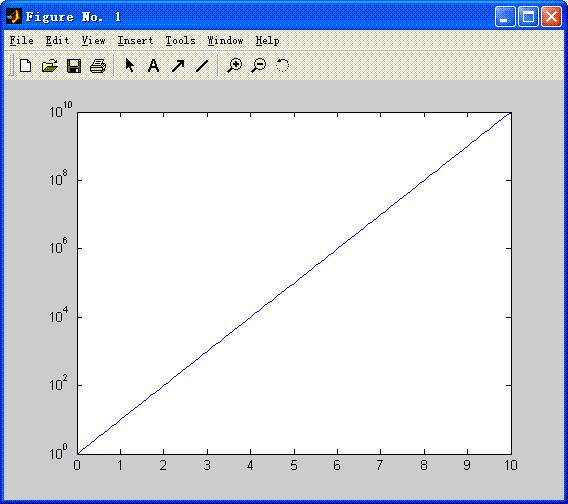
例2:創(chuàng)建一個(gè)簡(jiǎn)單的半對(duì)數(shù)坐標(biāo)圖.
解 輸入命令:
x=0:.1:10;
semilogy(x,10.^x)
所制圖形為:
 例3:繪制y=x^3的函數(shù)圖、對(duì)數(shù)坐標(biāo)圖、半對(duì)數(shù)坐標(biāo)圖.
解:在窗口中輸入:
x=[1:1:100];
subplot(2,3,1);
plot(x,x.^3);
grid on;
title 'plot-y=x^3';
subplot(2,3,2);
loglog(x,x.^3);
grid on;
title 'loglog-logy=3logx';
subplot(2,3,3);
plotyy(x,x.^3,x,x);
grid on;
title 'plotyy-y=x^3,logy=3logx';
subplot(2,3,4);
semilogx(x,x.^3);
grid on;
title 'semilogx-y=3logx';
subplot(2,3,5);
semilogy(x,x.^3);
grid on;
title 'semilogy-logy=x^3';
所制圖形為:

-
semilogx函數(shù)
+關(guān)注
關(guān)注
0文章
1瀏覽量
1582 -
semilogy函數(shù)
+關(guān)注
關(guān)注
0文章
1瀏覽量
2097
原文標(biāo)題:matlab畫對(duì)數(shù)坐標(biāo)!
文章出處:【微信號(hào):mcu168,微信公眾號(hào):硬件攻城獅】歡迎添加關(guān)注!文章轉(zhuǎn)載請(qǐng)注明出處。
發(fā)布評(píng)論請(qǐng)先 登錄
MATLAB圖形繪制基本技術(shù)教程
MATLAB基本X—Y圖形和特殊X—Y圖形命令
MATLAB圖形繪制基本技術(shù)
函數(shù)的可視化與Matlab作
matlab取整函數(shù)命令代碼
matlab牛逼函數(shù)總結(jié)
MATLAB常用函數(shù)總結(jié)(表格)
Labview之函數(shù)計(jì)算與繪圖
matlab中subplot函數(shù)的功能



 工商網(wǎng)監(jiān)
評(píng)論