


 如何手擼一個自有知識庫的RAG系統

RAG通常指的是"Retrieval-Augmented Generation",即“檢索增強的生成”。這是一種結合了檢索(Retrieval)和生成(Generation)的機器學習模型,通常用于自然語言處理任務,如文本生成、問答系統等。
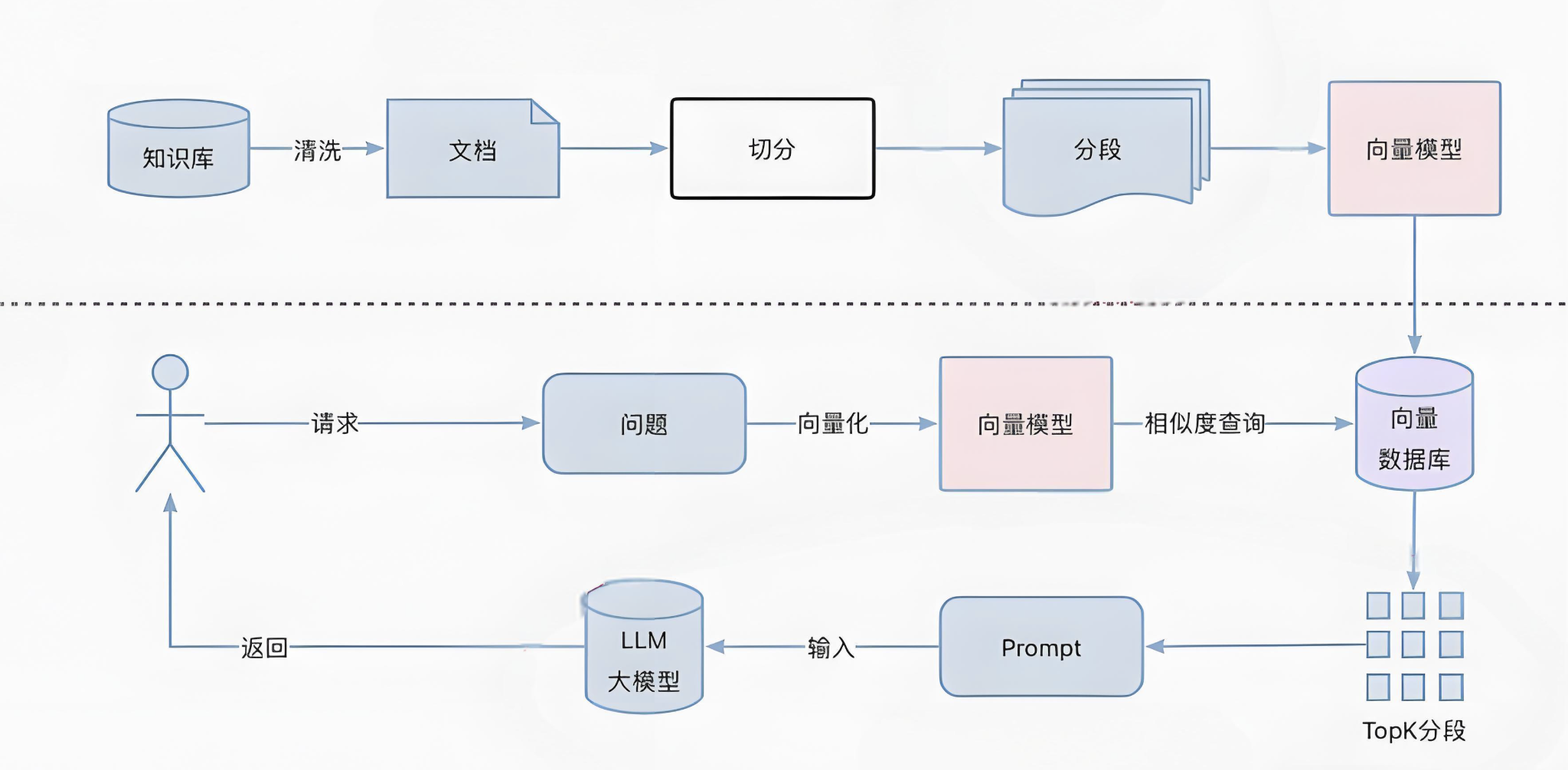
我們通過一下幾個步驟來完成一個基于京東云官網文檔的RAG系統
數據收集
建立知識庫
向量檢索
提示詞與模型
數據收集
數據的收集再整個RAG實施過程中無疑是最耗人工的,涉及到收集、清洗、格式化、切分等過程。這里我們使用京東云的官方文檔作為知識庫的基礎。文檔格式大概這樣:
{
"content": "DDoS IP高防結合Web應用防火墻方案說明n=======================nnnDDoS IP高防+Web應用防火墻提供三層到七層安全防護體系,應用場景包括游戲、金融、電商、互聯網、政企等京東云內和云外的各類型用戶。nnn部署架構n====nnn[]("https://jdcloud-portal.oss.cn-north-1.jcloudcs.com/cn/image/Advanced%20Anti-DDoS/Best-Practice02.png") nnDDoS IP高防+Web應用防火墻的最佳部署架構如下:nnn* 京東云的安全調度中心,通過DNS解析,將用戶域名解析到DDoS IP高防CNAME。n* 用戶正常訪問流量和DDoS攻擊流量經過DDoS IP高防清洗,回源至Web應用防火墻。n* 攻擊者惡意請求被Web應用防火墻過濾后返回用戶源站。n* Web應用防火墻可以保護任何公網的服務器,包括但不限于京東云,其他廠商的云,IDC等nnn方案優勢n====nnn1. 用戶源站在DDoS IP高防和Web應用防火墻之后,起到隱藏源站IP的作用。n2. CNAME接入,配置簡單,減少運維人員工作。nnn",
"title": "DDoS IP高防結合Web應用防火墻方案說明",
"product": "DDoS IP高防",
"url": "https://docs.jdcloud.com/cn/anti-ddos-pro/anti-ddos-pro-and-waf"
}
每條數據是一個包含四個字段的json,這四個字段分別是"content":文檔內容;"title":文檔標題;"product":相關產品;"url":文檔在線地址
向量數據庫的選擇與Retriever實現
向量數據庫是RAG系統的記憶中心。目前市面上開源的向量數據庫很多,那個向量庫比較好也是見仁見智。本項目中筆者選擇則了clickhouse作為向量數據庫。選擇ck主要有一下幾個方面的考慮:
ck再langchain社區的集成實現比較好,入庫比較平滑
向量查詢支持sql,學習成本較低,上手容易
京東云有相關產品且有專業團隊支持,用著放心
文檔向量化及入庫過程
為了簡化文檔向量化和檢索過程,我們使用了longchain的Retriever工具集
首先將文檔向量化,代碼如下:
from libs.jd_doc_json_loader import JD_DOC_Loader
from langchain_community.document_loaders import DirectoryLoader

root_dir = "/root/jd_docs"
loader = DirectoryLoader(
    '/root/jd_docs', glob="**/*.json", loader_cls=JD_DOC_Loader)
docs = loader.load()
langchain 社區里并沒有提供針對特定格式的裝載器,為此,我們自定義了JD_DOC_Loader來實現加載過程
import json
import logging
from pathlib import Path
from typing import Iterator, Optional, Union

from langchain_core.documents import Document

from langchain_community.document_loaders.base import BaseLoader
from langchain_community.document_loaders.helpers import detect_file_encodings

logger = logging.getLogger(__name__)


class JD_DOC_Loader(BaseLoader):
    """Load text file.


    Args:
        file_path: Path to the file to load.

        encoding: File encoding to use. If `None`, the file will be loaded
        with the default system encoding.

        autodetect_encoding: Whether to try to autodetect the file encoding
            if the specified encoding fails.
    """

    def __init__(
        self,
        file_path: Union[str, Path],
        encoding: Optional[str] = None,
        autodetect_encoding: bool = False,
    ):
        """Initialize with file path."""
        self.file_path = file_path
        self.encoding = encoding
        self.autodetect_encoding = autodetect_encoding

    def lazy_load(self) -> Iterator[Document]:
        """Load from file path."""
        text = ""
        from_url = ""
        try:
            with open(self.file_path, encoding=self.encoding) as f:
                doc_data = json.load(f)
                text = doc_data["content"]
                title = doc_data["title"]
                product = doc_data["product"]
                from_url = doc_data["url"]

                # text = f.read()
        except UnicodeDecodeError as e:
            if self.autodetect_encoding:
                detected_encodings = detect_file_encodings(self.file_path)
                for encoding in detected_encodings:
                    logger.debug(f"Trying encoding: {encoding.encoding}")
                    try:
                        with open(self.file_path, encoding=encoding.encoding) as f:
                            text = f.read()
                        break
                    except UnicodeDecodeError:
                        continue
            else:
                raise RuntimeError(f"Error loading {self.file_path}") from e
        except Exception as e:
            raise RuntimeError(f"Error loading {self.file_path}") from e
        # metadata = {"source": str(self.file_path)}
        metadata = {"source": from_url, "title": title, "product": product}
        yield Document(page_content=text, metadata=metadata)
以上代碼功能主要是解析json文件,填充Document的page_content字段和metadata字段。
接下來使用langchain 的 clickhouse 向量工具集進行文檔入庫
import langchain_community.vectorstores.clickhouse as clickhouse
from langchain.embeddings import HuggingFaceEmbeddings

model_kwargs = {"device": "cuda"}
embeddings = HuggingFaceEmbeddings(
    model_name="/root/models/moka-ai-m3e-large", model_kwargs=model_kwargs)

settings = clickhouse.ClickhouseSettings(
    table="jd_docs_m3e_with_url", username="default", password="xxxxxx", host="10.0.1.94")

docsearch = clickhouse.Clickhouse.from_documents(
    docs, embeddings, config=settings)
入庫成功后,進行一下檢驗
import langchain_community.vectorstores.clickhouse as clickhouse
from langchain.embeddings import HuggingFaceEmbeddings

model_kwargs = {"device": "cuda"}~~~~
embeddings = HuggingFaceEmbeddings(
    model_name="/root/models/moka-ai-m3e-large", model_kwargs=model_kwargs)

settings = clickhouse.ClickhouseSettings(
    table="jd_docs_m3e_with_url_splited", username="default", password="xxxx", host="10.0.1.94")
ck_db = clickhouse.Clickhouse(embeddings, config=settings)
ck_retriever = ck_db.as_retriever(
    search_type="similarity_score_threshold", search_kwargs={'score_threshold': 0.9})
ck_retriever.get_relevant_documents("如何創建mysql rds")
有了知識庫以后,可以構建一個簡單的restful 服務,我們這里使用fastapi做這個事兒
from fastapi import FastAPI
from pydantic import BaseModel
from singleton_decorator import singleton
from langchain_community.embeddings import HuggingFaceEmbeddings
import langchain_community.vectorstores.clickhouse as clickhouse
import uvicorn
import json

app = FastAPI()
app = FastAPI(docs_url=None)
app.host = "0.0.0.0"

model_kwargs = {"device": "cuda"}
embeddings = HuggingFaceEmbeddings(
    model_name="/root/models/moka-ai-m3e-large", model_kwargs=model_kwargs)
settings = clickhouse.ClickhouseSettings(
    table="jd_docs_m3e_with_url_splited", username="default", password="xxxx", host="10.0.1.94")
ck_db = clickhouse.Clickhouse(embeddings, config=settings)
ck_retriever = ck_db.as_retriever(
    search_type="similarity", search_kwargs={"k": 3})


class question(BaseModel):
    content: str


@app.get("/")
async def root():
    return {"ok"}


@app.post("/retriever")
async def retriver(question: question):
    global ck_retriever
    result = ck_retriever.invoke(question.content)
    return result


if __name__ == '__main__':
    uvicorn.run(app='retriever_api:app', host="0.0.0.0",
                port=8000, reload=True)
返回結構大概這樣:
[
  {
    "page_content": "云緩存 Redis--Redis遷移解決方案n###RedisSyncer 操作步驟n####數據校驗n```nwget   https://github.com/TraceNature/rediscompare/releases/download/v1.0.0/rediscompare-1.0.0-linux-amd64.tar.gznrediscompare compare single2single --saddr "10.0.1.101:6479" --spassword "redistest0102" --taddr "10.0.1.102:6479" --tpassword  "redistest0102" --comparetimes 3nn```  n**Github 地址:** [https://github.com/TraceNature/redissyncer-server]("https://github.com/TraceNature/redissyncer-server")",
    "metadata": {
      "product": "云緩存 Redis",
      "source": "https://docs.jdcloud.com/cn/jcs-for-redis/doc-2",
      "title": "Redis遷移解決方案"
    },
    "type": "Document"
  },
  {
    "page_content": "云緩存 Redis--Redis遷移解決方案n###RedisSyncer 操作步驟n####數據校驗n```nwget   https://github.com/TraceNature/rediscompare/releases/download/v1.0.0/rediscompare-1.0.0-linux-amd64.tar.gznrediscompare compare single2single --saddr "10.0.1.101:6479" --spassword "redistest0102" --taddr "10.0.1.102:6479" --tpassword  "redistest0102" --comparetimes 3nn```  n**Github 地址:** [https://github.com/TraceNature/redissyncer-server]("https://github.com/TraceNature/redissyncer-server")",
    "metadata": {
      "product": "云緩存 Redis",
      "source": "https://docs.jdcloud.com/cn/jcs-for-redis/doc-2",
      "title": "Redis遷移解決方案"
    },
    "type": "Document"
  },
  {
    "page_content": "云緩存 Redis--Redis遷移解決方案n###RedisSyncer 操作步驟n####數據校驗n```nwget   https://github.com/TraceNature/rediscompare/releases/download/v1.0.0/rediscompare-1.0.0-linux-amd64.tar.gznrediscompare compare single2single --saddr "10.0.1.101:6479" --spassword "redistest0102" --taddr "10.0.1.102:6479" --tpassword  "redistest0102" --comparetimes 3nn```  n**Github 地址:** [https://github.com/TraceNature/redissyncer-server]("https://github.com/TraceNature/redissyncer-server")",
    "metadata": {
      "product": "云緩存 Redis",
      "source": "https://docs.jdcloud.com/cn/jcs-for-redis/doc-2",
      "title": "Redis遷移解決方案"
    },
    "type": "Document"
  }
]
返回一個向量距離最小的list
結合模型和prompt,回答問題
為了節約算力資源,我們選擇qwen 1.8B模型,一張v100卡剛好可以容納一個qwen模型和一個m3e-large embedding 模型
answer 服務
from fastapi import FastAPI
from pydantic import BaseModel
from langchain_community.llms import VLLM
from transformers import AutoTokenizer
from langchain.prompts import PromptTemplate
import requests
import uvicorn
import json
import logging

app = FastAPI()
app = FastAPI(docs_url=None)
app.host = "0.0.0.0"

logger = logging.getLogger()
logger.setLevel(logging.INFO)
to_console = logging.StreamHandler()
logger.addHandler(to_console)


# load model
# model_name = "/root/models/Llama3-Chinese-8B-Instruct"
model_name = "/root/models/Qwen1.5-1.8B-Chat"
tokenizer = AutoTokenizer.from_pretrained(model_name)
llm_llama3 = VLLM(
    model=model_name,
    tokenizer=tokenizer,
    task="text-generation",
    temperature=0.2,
    do_sample=True,
    repetition_penalty=1.1,
    return_full_text=False,
    max_new_tokens=900,
)

# prompt
prompt_template = """
你是一個云技術專家
使用以下檢索到的Context回答問題。
如果不知道答案,就說不知道。
用中文回答問題。
Question: {question}
Context: {context}
Answer:
"""

prompt = PromptTemplate(
    input_variables=["context", "question"],
    template=prompt_template,
)


def get_context_list(q: str):
    url = "http://10.0.0.7:8000/retriever"
    payload = {"content": q}
    res = requests.post(url, json=payload)
    return res.text


class question(BaseModel):
    content: str


@app.get("/")
async def root():
    return {"ok"}


@app.post("/answer")
async def answer(q: question):
    logger.info("invoke!!!")
    global prompt
    global llm_llama3
    context_list_str = get_context_list(q.content)

    context_list = json.loads(context_list_str)
    context = ""
    source_list = []

    for context_json in context_list:
        context = context+context_json["page_content"]
        source_list.append(context_json["metadata"]["source"])
    p = prompt.format(context=context, question=q.content)
    answer = llm_llama3(p)
    result = {
        "answer": answer,
        "sources": source_list
    }
    return result


if __name__ == '__main__':
    uvicorn.run(app='retriever_api:app', host="0.0.0.0",
                port=8888, reload=True)
代碼通過使用Retriever接口查找與問題相似的文檔,作為context組合prompt推送給模型生成答案。
主要服務就緒后可以開始畫一張臉了,使用gradio做個簡易對話界面
gradio 服務
import json
import gradio as gr
import requests


def greet(name, intensity):
    return "Hello, " + name + "!" * int(intensity)


def answer(question):
    url = "http://127.0.0.1:8888/answer"
    payload = {"content": question}
    res = requests.post(url, json=payload)
    res_json = json.loads(res.text)
    return [res_json["answer"], res_json["sources"]]


demo = gr.Interface(
    fn=answer,
    # inputs=["text", "slider"],
    inputs=[gr.Textbox(label="question", lines=5)],
    # outputs=[gr.TextArea(label="answer", lines=5),
    #          gr.JSON(label="urls", value=list)]
    outputs=[gr.Markdown(label="answer"),
             gr.JSON(label="urls", value=list)]
)


demo.launch(server_name="0.0.0.0")


審核編輯 黃宇
-
SQL
+關注
關注
1文章
789瀏覽量
46694 -
數據庫
+關注
關注
7文章
4019瀏覽量
68331
發布評論請先 登錄
HPM知識庫 | 力位混合控制庫使用指南

RAG(檢索增強生成)原理與實踐
設備維修總踩坑?故障知識庫 + AI 診斷,新手也能修復雜機

openDACS 2025 開源EDA與芯片賽項 賽題七:基于大模型的生成式原理圖設計
經緯恒潤亮相AICC人工智能計算大會,以智能體技術助推汽車電子研發創新

RAG實踐:一文掌握大模型RAG過程
零基礎在智能硬件上克隆原神可莉實現桌面陪伴(提供人設提示詞、知識庫、固件下載)

使用 llm-agent-rag-llamaindex 筆記本時收到的 NPU 錯誤怎么解決?
【「零基礎開發AI Agent」閱讀體驗】操作實戰,開發一個編程助手智能體
HarmonyOS5云服務技術分享--自有賬號對接AGC認證
在Cherry Studio中快速使用markitdown MCP Server?




 工商網監
工商網監
評論