


 樹莓派-GPIO功能及復用功能表

GPIO
板上有兩個5V引腳和兩個3.3V引腳,以及一些不可配置的接地引腳(0V)。其余引腳都是通用3.3V引腳,意味著輸出設置為3.3V,輸入為3.3V容差。
OUTPUTS
指定為輸出引腳的GPIO引腳可以設置為高電平(3.3V)或低電平(0V)。
INPUTS
指定為輸入引腳的GPIO引腳可以讀取為高電平(3.3V)或低電平(0V)。使用內部上拉或下拉電阻更容易做到這一點。引腳GPIO2和GPIO3具有固定的上拉電阻,但對于其他引腳,這可以在軟件中配置。
MORE
除了簡單的輸入和輸出設備,GPIO引腳還可以用于各種替代功能,有些可用于所有引腳,有些可用于特定引腳。
PWM (脈沖寬度調制)
Software PWM available on all pins
Hardware PWM available on GPIO12, GPIO13, GPIO18, GPIO19
SPI
SPI0: MOSI (GPIO10); MISO (GPIO9); SCLK (GPIO11); CE0 (GPIO8), CE1 (GPIO7)
SPI1: MOSI (GPIO20); MISO (GPIO19); SCLK (GPIO21); CE0 (GPIO18); CE1 (GPIO17); CE2 (GPIO16)
Data: (GPIO2); Clock (GPIO3)
EEPROM Data: (GPIO0); EEPROM Clock (GPIO1)
Serial
TX (GPIO14); RX (GPIO15)
有關GPIO引腳高級功能的更多信息,請參見interactive pinout diagram
raspi-gpio
raspi-gpio是一個在樹莓派上使用的GPIO控制工具,可以獲取GPIO狀態以及設置GPIO
安裝
sudo apt -y install raspi-gpio
使用說明
Use:
raspi-gpio get [GPIO]
OR
raspi-gpio set [options]
OR
raspi-gpio funcs [GPIO]
OR
raspi-gpio raw
GPIO is a comma-separated list of pin numbers or ranges (without spaces),
e.g. 4 or 18-21 or 7,9-11
Note that omitting [GPIO] from raspi-gpio get prints all GPIOs.
raspi-gpio funcs will dump all the possible GPIO alt funcions in CSV format
or if [GPIO] is specified the alternate funcs just for that specific GPIO.
Valid [options] for raspi-gpio set are:
ip set GPIO as input
op set GPIO as output
a0-a5 set GPIO to alternate function alt0-alt5
pu set GPIO in-pad pull up
pd set GPIO pin-pad pull down
pn set GPIO pull none (no pull)
dh set GPIO to drive to high (1) level (only valid if set to be an output)
dl set GPIO to drive low (0) level (only valid if set to be an output)
Examples:
raspi-gpio get Prints state of all GPIOs one per line
raspi-gpio get 20 Prints state of GPIO20
raspi-gpio get 20,21 Prints state of GPIO20 and GPIO21
raspi-gpio set 20 a5 Set GPIO20 to ALT5 function (GPCLK0)
raspi-gpio set 20 pu Enable GPIO20 ~50k in-pad pull up
raspi-gpio set 20 pd Enable GPIO20 ~50k in-pad pull down
raspi-gpio set 20 op Set GPIO20 to be an output
raspi-gpio set 20 dl Set GPIO20 to output low/zero (must already be set as an output)
raspi-gpio set 20 ip pd Set GPIO20 to input with pull down
raspi-gpio set 35 a0 pu Set GPIO35 to ALT0 function (SPI_CE1_N) with pull up
raspi-gpio set 20 op pn dh Set GPIO20 to ouput with no pull and driving high
GPIO功能及復用功能表
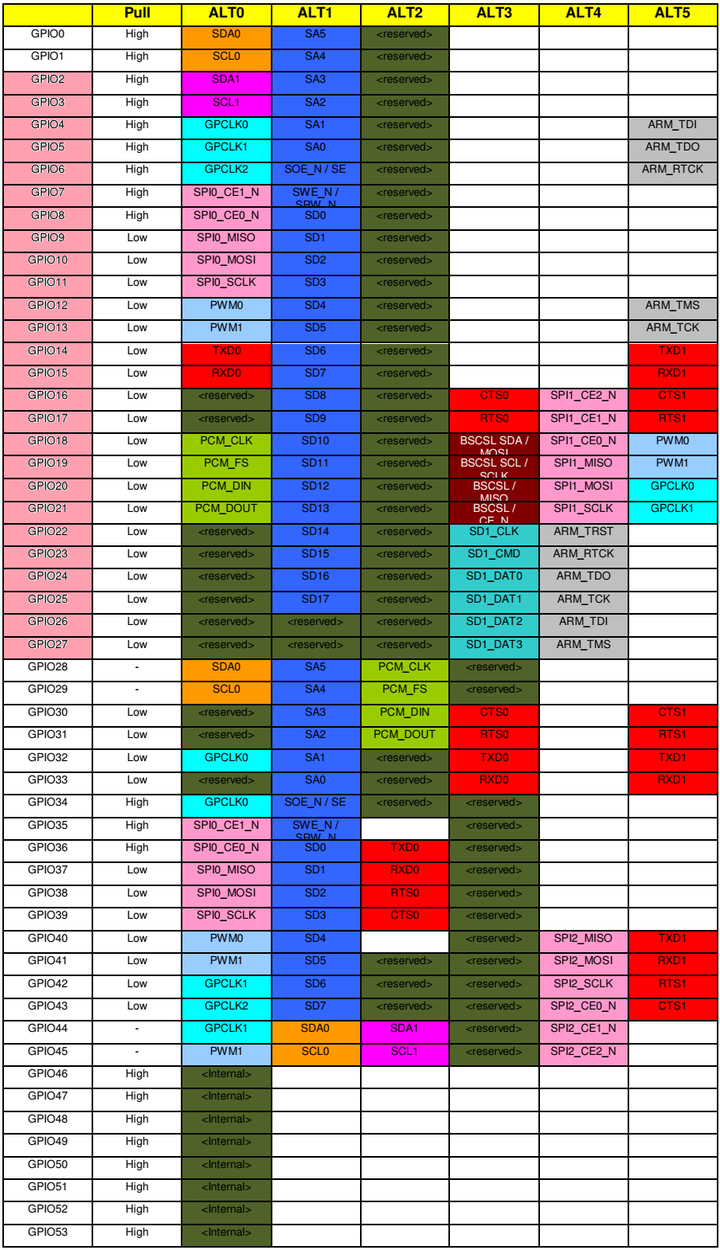
轉載來自:https://rpideveloper.com/topic/34/gpio
-
物聯網
+關注
關注
2945文章
47820瀏覽量
415016 -
工控機
+關注
關注
10文章
2079瀏覽量
53323 -
GPIO
+關注
關注
16文章
1328瀏覽量
56231 -
樹莓派
+關注
關注
122文章
2078瀏覽量
110474
發布評論請先 登錄
掌握 LuatIO:GPIO 復用模式初始化配置全流程解析
如何使用樹莓派與OpenCV實現面部和運動追蹤的云臺系統?

技能+1!如何在樹莓派上使用C++控制GPIO?
樹莓派 Connect 更新,增加三個實用新功能!
樹莓派6 傳聞:發布日期與規格!
你真的懂樹莓派5嘛?樹莓派5引腳圖全面指南:理解GPIO引腳及其功能!
精通遠程控制:借助樹莓派釋放 SSH 的強大功能!
樹莓派小技巧:無需鍵盤或顯示器,如何通過WiFi設置樹莓派?
樹莓派分類器:用樹莓派識別不同型號的樹莓派!
樹莓派“吉尼斯世界記錄”:將樹莓派的性能發揮到極致的項目!
樹莓派5 與 樹莓派4:深度對比與獨特優勢!
用 樹莓派 Zero 打造的智能漫游車!



 工商網監
工商網監
評論