


 全志V85x內G2D模塊實現圖片格式步驟方法

G2D主要功能:
1)旋轉:支持90、180、270旋轉;
2)scale:放縮;
3)鏡像反轉:H / V;
4)透明疊加:實現兩個rgb圖片疊加;
5)格式轉換:yuv轉rgb等多種格式相互間轉換;
6)矩形填充,等諸多功能;
G2D配置
源碼目錄
tina-v853-docker/kernel/linux-4.9/drivers/char/sunxi_g2d
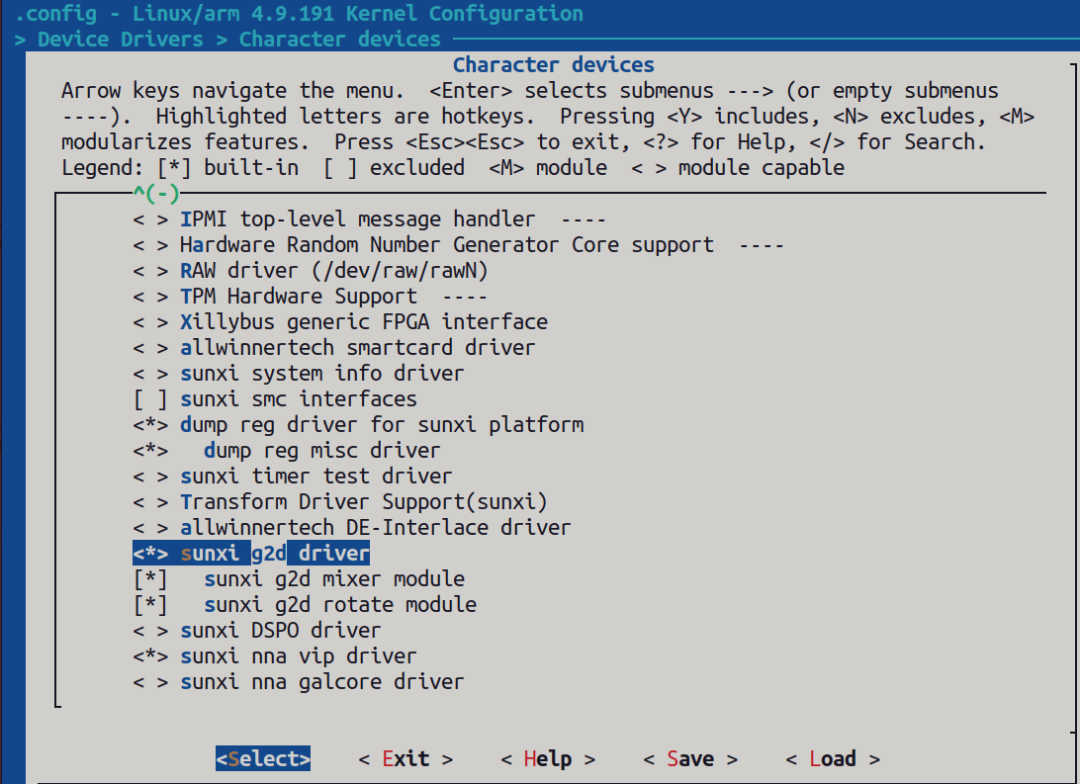
make kernel_menuconfig 配置
Device Drivers > Character devices > sunxi g2d driver
Device Tree 設備樹配置
sun8iw21p1.dtsi路徑:
tina-v853-docker/kernel/linux-4.9/arch/arm/boot/dts/sun8iw21p1.dtsi
 g2d: g2d@05410000 {
   compatible = "allwinner,sunxi-g2d";
   reg = <0x0 0x05410000 0x0 0xbffff>;
   interrupts = ;
   clocks = <&clk_g2d>;
   iommus = <&mmu_aw 3 1>;
   status = "okay";
  };
注:status 要設定為“okay” 狀態。
重新編譯內核
使用燒錄工具PhoenixSuit 將編譯打包好的img鏡像燒錄到開發板。
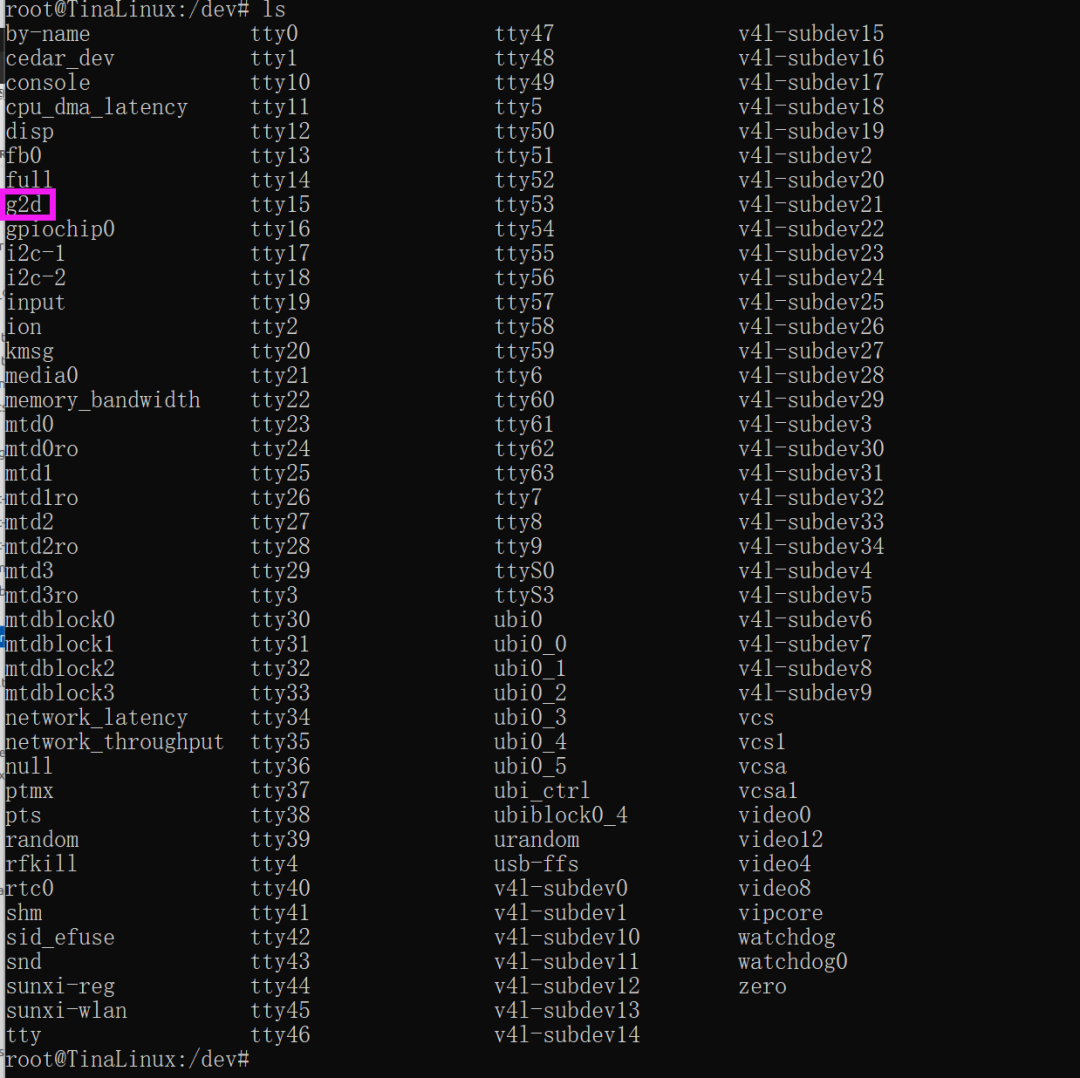
adb shell 打開控制終端查看設備節點G2D:
通過G2D設備節點進行操作
static int SampleG2d_G2dOpen(SAMPLE_G2D_CTX *p_g2d_ctx)
{
  int ret = 0;
  p_g2d_ctx->mG2dFd = open("/dev/g2d", O_RDWR, 0);
  if (p_g2d_ctx->mG2dFd < 0)
 ? ?{
 ? ? ? ?aloge("fatal error! open /dev/g2d failed");
 ? ? ? ?ret = -1;
 ? ?}
 ? ?return ret;
}
G2D sample具體應用
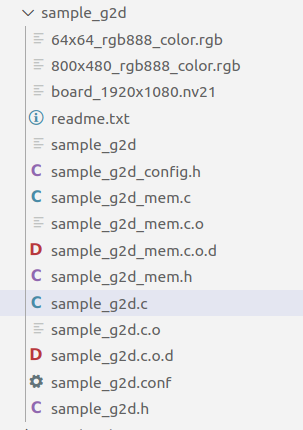
G2D sample目錄
進行rotation,scale,格式轉換
具體實現:將 nv21 格式的1920x1080圖轉換成rgb888 格式并放縮為640x360 大小。具體用到兩個功能,格式轉換和放縮。
首先根據1920x1080 nv21 格式以及 640x360 rgb888 格式申請虛擬地址空間以及轉換成物理地址(注意:g2d 轉換是在物理地址中完成的)
1920x1080 nv21 格式空間大小(輸入文件):
Y 占 19201080 = 2073600 字節
UV 占 19201080 / 2 = 1036800 字節

640x360 rgb888 格式空間大小(輸出文件):
RGB 占 6403603 = 691200 字節
另外:虛擬地址轉換成物理地址使用如下函數:
g2d_getPhyAddrByVirAddr()
申請虛擬空間并轉換成物理空間完整函數如下:
static int PrepareFrmBuff(SAMPLE_G2D_CTX *p_g2d_ctx)
{
  SampleG2dConfig *pConfig = NULL;
  unsigned int size = 0;


  pConfig = &p_g2d_ctx->mConfigPara;

  p_g2d_ctx->src_frm_info.frm_width = pConfig->mSrcWidth;
  p_g2d_ctx->src_frm_info.frm_height = pConfig->mSrcHeight;


  p_g2d_ctx->dst_frm_info.frm_width = pConfig->mDstWidth;
  p_g2d_ctx->dst_frm_info.frm_height = pConfig->mDstHeight;


  size = ALIGN(p_g2d_ctx->src_frm_info.frm_width, 16)*ALIGN(p_g2d_ctx->src_frm_info.frm_height, 16);
  if(pConfig->mPicFormat == MM_PIXEL_FORMAT_YVU_SEMIPLANAR_420 || pConfig->mPicFormat == MM_PIXEL_FORMAT_YUV_SEMIPLANAR_420)
  {
    p_g2d_ctx->src_frm_info.p_vir_addr[0] = (void *)g2d_allocMem(size);
    if(NULL == p_g2d_ctx->src_frm_info.p_vir_addr[0])
    {
      aloge("malloc_src_frm_y_mem_failed");
      return -1;
    }


    p_g2d_ctx->src_frm_info.p_vir_addr[1] = (void *)g2d_allocMem(size/2);
    if(NULL == p_g2d_ctx->src_frm_info.p_vir_addr[1])
    {
      g2d_freeMem(p_g2d_ctx->src_frm_info.p_vir_addr[0]);
      aloge("malloc_src_frm_c_mem_failed");
      return -1;
    }


    p_g2d_ctx->src_frm_info.p_phy_addr[0] = (void *)g2d_getPhyAddrByVirAddr(p_g2d_ctx->src_frm_info.p_vir_addr[0]);
    p_g2d_ctx->src_frm_info.p_phy_addr[1] = (void *)g2d_getPhyAddrByVirAddr(p_g2d_ctx->src_frm_info.p_vir_addr[1]);
  }


 if(pConfig->mDstPicFormat == MM_PIXEL_FORMAT_RGB_888)
 {
  size = p_g2d_ctx->dst_frm_info.frm_width * p_g2d_ctx->dst_frm_info.frm_height * 3;
  p_g2d_ctx->dst_frm_info.p_vir_addr[0] = (void *)g2d_allocMem(size);
  if(NULL == p_g2d_ctx->dst_frm_info.p_vir_addr[0])
  {
   if(p_g2d_ctx->src_frm_info.p_vir_addr[0] != NULL)
   {
    g2d_freeMem(p_g2d_ctx->src_frm_info.p_vir_addr[0]);
   }
   if(p_g2d_ctx->src_frm_info.p_vir_addr[1] != NULL)
   {
    g2d_freeMem(p_g2d_ctx->src_frm_info.p_vir_addr[1]);
   }
   aloge("malloc_dst_frm_y_mem_failed");
   return -1;
  }
  p_g2d_ctx->dst_frm_info.p_phy_addr[0] = (void *)g2d_getPhyAddrByVirAddr(p_g2d_ctx->dst_frm_info.p_vir_addr[0]);
 }


  return 0;
}
通過fopen 傳菜間兩個文件句柄,fd_in fd_out 用來操作輸入輸出兩個文件資源。
    p_g2d_ctx->fd_in = fopen(p_g2d_ctx->mConfigPara.SrcFile,"r");
    if(NULL == p_g2d_ctx->fd_in)
    {
      aloge("open src file failed");
      ret = -1;
      goto _err2;
    }
    fseek(p_g2d_ctx->fd_in, 0, SEEK_SET);


      p_g2d_ctx->fd_out = fopen(p_g2d_ctx->mConfigPara.DstFile, "wb");
      if (NULL == p_g2d_ctx->fd_out)
      {
        aloge("open out file failed");
        ret = -1;
        goto _err2;
      }
      fseek(p_g2d_ctx->fd_out, 0, SEEK_SET);
讀出 1920x1080 nv21 圖資放入 虛擬空間
read_len = p_g2d_ctx->src_frm_info.frm_width * p_g2d_ctx->src_frm_info.frm_height;
    if(pConfig->mPicFormat == MM_PIXEL_FORMAT_YVU_SEMIPLANAR_420|| pConfig->mPicFormat == MM_PIXEL_FORMAT_YUV_SEMIPLANAR_420)
    {
      size1 = fread(p_g2d_ctx->src_frm_info.p_vir_addr[0] , 1, read_len, p_g2d_ctx->fd_in);
      if(size1 != read_len)
      {
        aloge("read_y_data_frm_src_file_invalid");
      }
      size2 = fread(p_g2d_ctx->src_frm_info.p_vir_addr[1], 1, read_len /2, p_g2d_ctx->fd_in);
      if(size2 != read_len/2)
      {
        aloge("read_c_data_frm_src_file_invalid");
      }


      fclose(p_g2d_ctx->fd_in);


      g2d_flushCache((void *)p_g2d_ctx->src_frm_info.p_vir_addr[0], read_len);
      g2d_flushCache((void *)p_g2d_ctx->src_frm_info.p_vir_addr[1], read_len/2);
    }
打開g2d 初始化,并開始轉換
ret = SampleG2d_G2dOpen(p_g2d_ctx);
  if (ret < 0)
 ? ?{
 ? ? ? ?aloge("fatal error! open /dev/g2d fail!");
 ? ? ? ?goto _err2;
 ? ?}
 ? ?ret = SampleG2d_G2dConvert(p_g2d_ctx);
 ? ?if (ret < 0)
 ? ?{
 ? ? ? ?aloge("fatal error! g2d convert fail!");
 ? ? ? ?goto _close_g2d;
 ? ?}
//具體轉化函數:


static int SampleG2d_G2dConvert_scale(SAMPLE_G2D_CTX *p_g2d_ctx)
{
 ? ?int ret = 0;
 ? ?g2d_blt_h blit;
 ? ?g2d_fmt_enh eSrcFormat, eDstFormat;
 ? ?SampleG2dConfig *pConfig = NULL;


 ? ?pConfig = &p_g2d_ctx->mConfigPara;


  ret = convert_PIXEL_FORMAT_E_to_g2d_fmt_enh(pConfig->mPicFormat, &eSrcFormat);
  if(ret!=SUCCESS)
  {
    aloge("fatal error! src pixel format[0x%x] is invalid!", pConfig->mPicFormat);
    return -1;
  }
  ret = convert_PIXEL_FORMAT_E_to_g2d_fmt_enh(pConfig->mDstPicFormat, &eDstFormat);
  if(ret!=SUCCESS)
  {
    aloge("fatal error! dst pixel format[0x%x] is invalid!", pConfig->mPicFormat);
    return -1;
  }


  //config blit
  memset(&blit, 0, sizeof(g2d_blt_h));


  if(0 != pConfig->mDstRotate)
  {
    aloge("fatal_err: rotation can't be performed when do scaling");
  }


  blit.flag_h = G2D_BLT_NONE_H;    // angle rotation used
//  switch(pConfig->mDstRotate)
//  {
//    case 0:
//      blit.flag_h = G2D_BLT_NONE_H;  //G2D_ROT_0, G2D_BLT_NONE_H
//      break;
//    case 90:
//      blit.flag_h = G2D_ROT_90;
//      break;
//    case 180:
//      blit.flag_h = G2D_ROT_180;
//      break;
//    case 270:
//      blit.flag_h = G2D_ROT_270;
//      break;
//    default:
//      aloge("fatal error! rotation[%d] is invalid!", pConfig->mDstRotate);
//      blit.flag_h = G2D_BLT_NONE_H;
//      break;
//  }
  //blit.src_image_h.bbuff = 1;
  //blit.src_image_h.color = 0xff;
  blit.src_image_h.format = eSrcFormat;
  blit.src_image_h.laddr[0] = (unsigned int)p_g2d_ctx->src_frm_info.p_phy_addr[0];
  blit.src_image_h.laddr[1] = (unsigned int)p_g2d_ctx->src_frm_info.p_phy_addr[1];
  blit.src_image_h.laddr[2] = (unsigned int)p_g2d_ctx->src_frm_info.p_phy_addr[2];
  //blit.src_image_h.haddr[] =
  blit.src_image_h.width = p_g2d_ctx->src_frm_info.frm_width;
  blit.src_image_h.height = p_g2d_ctx->src_frm_info.frm_height;
  blit.src_image_h.align[0] = 0;
  blit.src_image_h.align[1] = 0;
  blit.src_image_h.align[2] = 0;
  blit.src_image_h.clip_rect.x = pConfig->mSrcRectX;
  blit.src_image_h.clip_rect.y = pConfig->mSrcRectY;
  blit.src_image_h.clip_rect.w = pConfig->mSrcRectW;
  blit.src_image_h.clip_rect.h = pConfig->mSrcRectH;
  blit.src_image_h.gamut = G2D_BT601;
  blit.src_image_h.bpremul = 0;
  //blit.src_image_h.alpha = 0xff;
  blit.src_image_h.mode = G2D_PIXEL_ALPHA;  //G2D_PIXEL_ALPHA, G2D_GLOBAL_ALPHA
  blit.src_image_h.fd = -1;
  blit.src_image_h.use_phy_addr = 1;


  //blit.dst_image_h.bbuff = 1;
  //blit.dst_image_h.color = 0xff;
  blit.dst_image_h.format = eDstFormat;
  blit.dst_image_h.laddr[0] = (unsigned int)p_g2d_ctx->dst_frm_info.p_phy_addr[0];
  blit.dst_image_h.laddr[1] = (unsigned int)p_g2d_ctx->dst_frm_info.p_phy_addr[1];
  blit.dst_image_h.laddr[2] = (unsigned int)p_g2d_ctx->dst_frm_info.p_phy_addr[2];
  //blit.dst_image_h.haddr[] =
  blit.dst_image_h.width = p_g2d_ctx->dst_frm_info.frm_width;
  blit.dst_image_h.height = p_g2d_ctx->dst_frm_info.frm_height;
  blit.dst_image_h.align[0] = 0;
  blit.dst_image_h.align[1] = 0;
  blit.dst_image_h.align[2] = 0;
  blit.dst_image_h.clip_rect.x = pConfig->mDstRectX;
  blit.dst_image_h.clip_rect.y = pConfig->mDstRectY;
  blit.dst_image_h.clip_rect.w = pConfig->mDstRectW;
  blit.dst_image_h.clip_rect.h = pConfig->mDstRectH;
  blit.dst_image_h.gamut = G2D_BT601;
  blit.dst_image_h.bpremul = 0;
  //blit.dst_image_h.alpha = 0xff;
  blit.dst_image_h.mode = G2D_PIXEL_ALPHA;  //G2D_PIXEL_ALPHA, G2D_GLOBAL_ALPHA
  blit.dst_image_h.fd = -1;
  blit.dst_image_h.use_phy_addr = 1;


  ret = ioctl(p_g2d_ctx->mG2dFd, G2D_CMD_BITBLT_H, (unsigned long)&blit);
  if(ret < 0)
 ? ?{
 ? ? ? ?aloge("fatal error! bit-block(image) transfer failed[%d]", ret);
 ? ? ? ?system("cd /sys/class/sunxi_dump;echo 0x14A8000,0x14A8100 > dump;cat dump");
  }


  return ret;
}
轉化完成后將640x360 rgb888 圖資通過fd_out句柄存儲起來
if(pConfig->mDstPicFormat == MM_PIXEL_FORMAT_RGB_888)
    {
      out_len = p_g2d_ctx->dst_frm_info.frm_width * p_g2d_ctx->dst_frm_info.frm_height *3;
      g2d_flushCache((void *)p_g2d_ctx->dst_frm_info.p_vir_addr[0], out_len);


      fwrite(p_g2d_ctx->dst_frm_info.p_vir_addr[0], 1, out_len, p_g2d_ctx->fd_out);
    }
轉化步驟總結
通過步驟3中的模塊化分析,可以看出g2d 轉化大概分為一下步驟:
為打開 iomen 初始化;
為src以及dst圖資申請虛擬地址空間并轉換成物理地址空間;
將src圖資放入虛擬地址空間,然后自動映射到物理地址空間;
打開g2d 設備節點進行轉換(最重要的一環,可以通過手冊分析具體怎么轉換的);
將轉換好的dst圖資保存起來;
審核編輯:劉清
-
RGB
+關注
關注
4文章
831瀏覽量
61939 -
SRC
+關注
關注
0文章
63瀏覽量
18728 -
Shell
+關注
關注
1文章
375瀏覽量
25375 -
V850
+關注
關注
0文章
4瀏覽量
7226 -
ADB驅動
+關注
關注
0文章
13瀏覽量
6597
原文標題:詳解全志V85x內G2D模塊實現圖片格式步驟方法
文章出處:【微信號:gh_79acfa3aa3e3,微信公眾號:全志在線】歡迎添加關注!文章轉載請注明出處。
發布評論請先 登錄



 工商網監
工商網監
評論