


 【RT-Thread學習筆記】使用scons命令生成靜態庫

1 問題來源
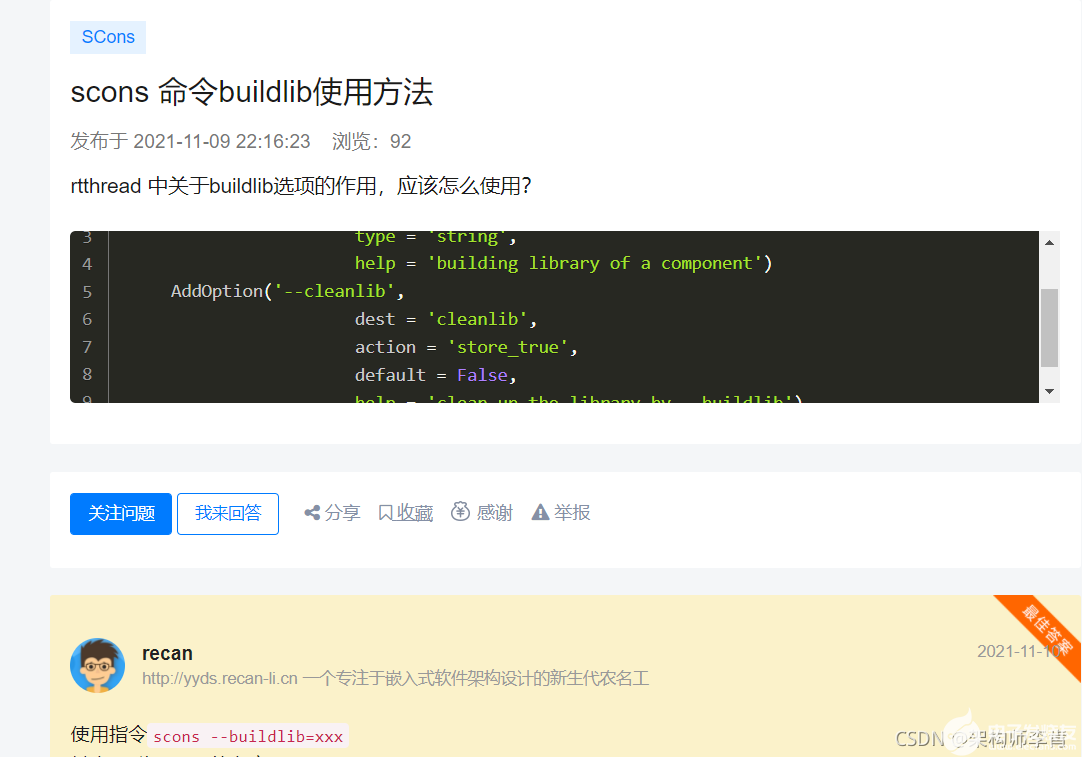
本問題來源于RT-Thread的技術論壇的一個常見問題,當時我回答了這個問題,很榮幸拿了一個最佳答案,為了能夠再次消化并進行知識點沉淀,我把這個問題再次拋到這里。 原問題,請戳這里:scons 命令buildlib使用方法
2 實踐分析
2.1 不懂就要問
既然不知道怎么用scons,那么我們先看到它的幫助信息,以下命令在scons的主目錄執行,即可以找到Sconscript的目錄下執行:
-
rt-thread/bsp/qemu-vexpress-a9$ scons -h -
scons: Reading SConscript files ... -
drivers/SConscript -
applications/SConscript -
[, , ] -
scons: done reading SConscript files. -
usage: scons [OPTION] [TARGET] ... -
SCons Options: -
-b, -d, -e, -m, -S, -t, -w, --environment-overrides, --no-keep-going, -
--no-print-directory, --print-directory, --stop, --touch -
Ignored for compatibility. -
-c, --clean, --remove Remove specified targets and dependencies. -
-C DIR, --directory=DIR Change to DIR before doing anything. -
--cache-debug=FILE Print CacheDir debug info to FILE. -
--cache-disable, --no-cache -
Do not retrieve built targets from CacheDir. -
--cache-force, --cache-populate -
Copy already-built targets into the CacheDir. -
--cache-readonly Do not update CacheDir with built targets. -
--cache-show Print build actions for files from CacheDir. -
--config=MODE Controls Configure subsystem: auto, force, -
cache. -
-D Search up directory tree for SConstruct, -
build all Default() targets. -
--debug=TYPE Print various types of debugging information: -
count, duplicate, explain, findlibs, includes, -
memoizer, memory, objects, pdb, prepare, -
presub, stacktrace, time, action-timestamps. -
--diskcheck=TYPE Enable specific on-disk checks. -
--duplicate=DUPLICATE Set the preferred duplication methods. Must be -
one of hard-soft-copy, soft-hard-copy, -
hard-copy, soft-copy, copy -
--enable-virtualenv Import certain virtualenv variables to SCons -
-f FILE, --file=FILE, --makefile=FILE, --sconstruct=FILE -
Read FILE as the top-level SConstruct file. -
-h, --help Print defined help message, or this one. -
-H, --help-options Print this message and exit. -
-i, --ignore-errors Ignore errors from build actions. -
-I DIR, --include-dir=DIR Search DIR for imported Python modules. -
--ignore-virtualenv Do not import virtualenv variables to SCons -
--implicit-cache Cache implicit dependencies -
--implicit-deps-changed Ignore cached implicit dependencies. -
--implicit-deps-unchanged Ignore changes in implicit dependencies. -
--interact, --interactive Run in interactive mode. -
-j N, --jobs=N Allow N jobs at once. -
-k, --keep-going Keep going when a target can't be made. -
--max-drift=N Set maximum system clock drift to N seconds. -
--md5-chunksize=N Set chunk-size for MD5 signature computation to -
N kilobytes. -
-n, --no-exec, --just-print, --dry-run, --recon -
Don't build; just print commands. -
--no-site-dir Don't search or use the usual site_scons dir. -
--profile=FILE Profile SCons and put results in FILE. -
-q, --question Don't build; exit status says if up to date. -
-Q Suppress "Reading/Building" progress messages. -
--random Build dependencies in random order. -
-s, --silent, --quiet Don't print commands. -
--site-dir=DIR Use DIR instead of the usual site_scons dir. -
--stack-size=N Set the stack size of the threads used to run -
jobs to N kilobytes. -
--taskmastertrace=FILE Trace Node evaluation to FILE. -
--tree=OPTIONS Print a dependency tree in various formats: all, -
derived, prune, status, linedraw. -
-u, --up, --search-up Search up directory tree for SConstruct, -
build targets at or below current directory. -
-U Search up directory tree for SConstruct, -
build Default() targets from local SConscript. -
-v, --version Print the SCons version number and exit. -
--warn=WARNING-SPEC, --warning=WARNING-SPEC -
Enable or disable warnings. -
-Y REPOSITORY, --repository=REPOSITORY, --srcdir=REPOSITORY -
Search REPOSITORY for source and target files. -
Local Options: -
--dist make distribution -
--dist-strip make distribution and strip useless files -
--dist-ide make distribution for RT-Thread Studio IDE -
--project-path=PROJECT-PATH -
set dist-ide project output path -
--project-name=PROJECT-NAME -
set project name -
--reset-project-config reset the project configurations to default -
--cscope Build Cscope cross reference database. Requires -
cscope installed. -
--clang-analyzer Perform static analyze with Clang-analyzer. -
Requires Clang installed. It is recommended to -
use with scan-build like this: `scan-build -
scons --clang-analyzer` If things goes well, -
scan-build will instruct you to invoke -
scan-view. -
--buildlib=BUILDLIB building library of a component -
--cleanlib clean up the library by --buildlib -
--target=TARGET set target project: mdk/mdk4/mdk5/iar/vs/vsc/ua/ -
cdk/ses/makefile/eclipse/codelite/cmake -
--stackanalysis thread stack static analysis -
--genconfig Generate .config from rtconfig.h -
--useconfig=USECONFIG make rtconfig.h from config file. -
--verbose print verbose information during build -
--menuconfig make menuconfig for RT-Thread BSP -
--pyconfig Python GUI menuconfig for RT-Thread BSP -
--pyconfig-silent Don`t show pyconfig window
精準匹配下:
-
rt-thread/bsp/qemu-vexpress-a9$ scons -h | grep buildlib -
--buildlib=BUILDLIB building library of a component -
--cleanlib clean up the library by --buildlib
2.2 實踐出整理
從上面的幫助信息,我們已經找到關鍵信息了,我們來實踐下:
-
rt-thread/bsp/qemu-vexpress-a9$ scons --buildlib=BUILDLIB -
scons: Reading SConscript files ... -
b'' -
drivers/SConscript -
applications/SConscript -
[, , ] -
scons: done reading SConscript files. -
scons: Building targets ... -
scons: building associated VariantDir targets: build -
scons: `.' is up to date. -
scons: done building targets.
發現并沒有生成,仔細一看,這個buildlib=后面跟的名稱不是亂填的,是需要填寫你當前目錄下,已經使用scons語法配置好的組件,這個東西在scons里面是叫Group。 通俗來說,就是使用buildlib,一個Gourp就可以生成一個庫。 我們再來實踐下,以bsp/qemu-vexpress-a9的Application這個Group為例,在其applications目錄有定義Sconsript:
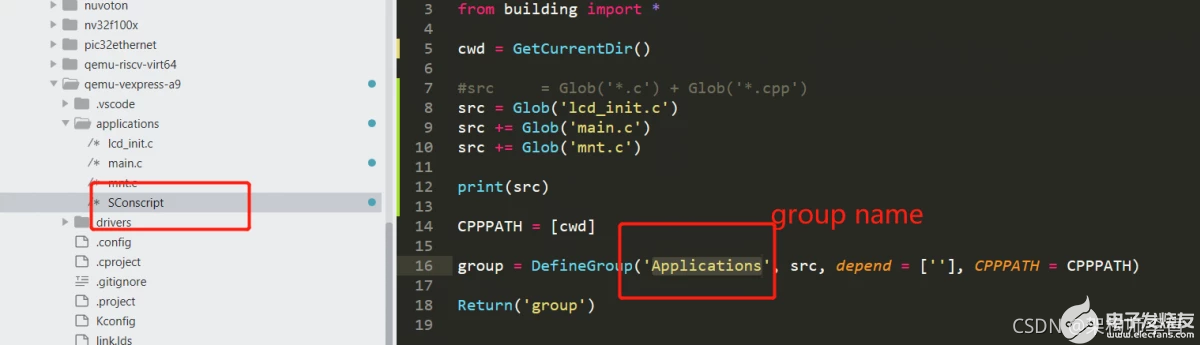
那么就可以輸入scons--buildlib=Applications
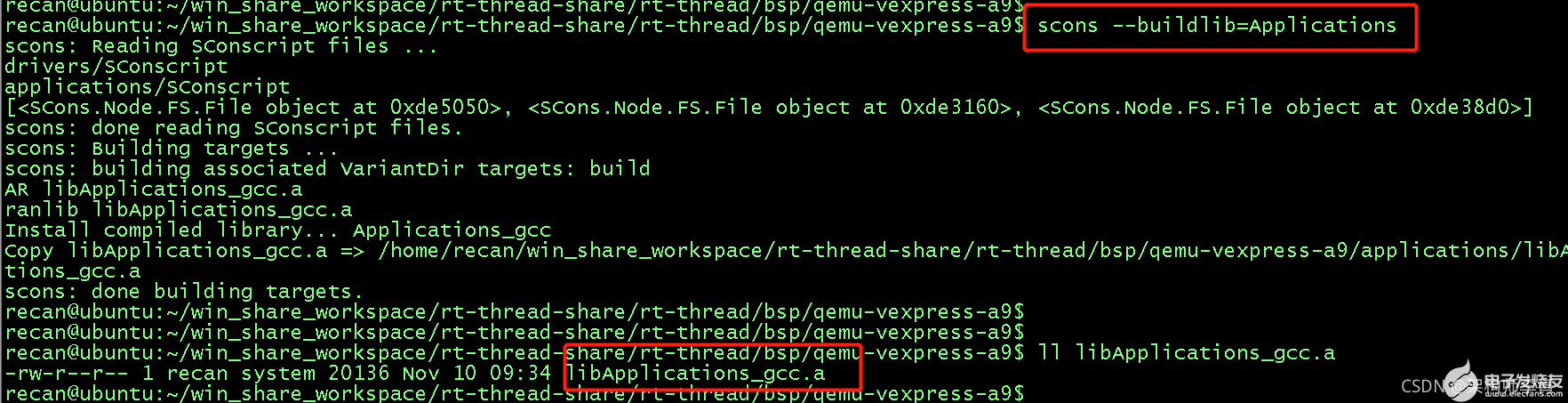
就可以將Applications那個group定義的C文件編譯打包成一個靜態庫,輸出也是位于bsp的目錄中。
3 經驗總結
- 任何命令行指令,千萬不要放過它的help信息
-
scons 使用
--buildlib=xxx輕松生存庫文件,庫名稱為libxxx.a
4 更多分享
架構師李肯
一個專注于嵌入式IoT領域的架構師。有著近10年的嵌入式一線開發經驗,深耕IoT領域多年,熟知IoT領域的業務發展,深度掌握IoT領域的相關技術棧,包括但不限于主流RTOS內核的實現及其移植、硬件驅動移植開發、網絡通訊協議開發、編譯構建原理及其實現、底層匯編及編譯原理、編譯優化及代碼重構、主流IoT云平臺的對接、嵌入式IoT系統的架構設計等等。擁有多項IoT領域的發明專利,熱衷于技術分享,有多年撰寫技術博客的經驗積累,連續多月獲得RT-Thread官方技術社區原創技術博文優秀獎,榮獲CSDN博客專家、CSDN物聯網領域優質創作者、2021年度CSDN&RT-Thread技術社區之星、RT-Thread官方嵌入式開源社區認證專家、RT-Thread 2021年度論壇之星TOP4、華為云云享專家(嵌入式物聯網架構設計師)等榮譽。堅信【知識改變命運,技術改變世界】!
歡迎關注我的github倉庫01workstation,日常分享一些開發筆記和項目實戰,歡迎指正問題。
同時也非常歡迎關注我的專欄:有問題的話,可以跟我討論,知無不答,謝謝大家。
-
靜態庫
+關注
關注
0文章
21瀏覽量
7781 -
RT-Thread
+關注
關注
32文章
1632瀏覽量
45106 -
scons
+關注
關注
0文章
2瀏覽量
1156
發布評論請先 登錄
ENV的scons能生成RT-Thread studio工程嗎?
RT-Thread系統中的Scons構建工具資料推薦
RT-Thread 內核學習筆記 - 理解defunct僵尸線程

RT-Thread 內核學習筆記 - 設備模型rt_device的理解
RT-Thread 內核學習筆記 - 內核對象鏈表結構深入理解
RT-Thread 內核學習筆記 - 內核對象初始化鏈表組織方式
RT-Thread 4.1.0的CMake構建教程
RT-Thread全球技術大會:關于SCons構建引擎的主要部分介紹
RT-Thread學習筆記 RT-Thread的架構概述




 工商網監
工商網監
評論