


 怎樣在C#中檢測手勢并控制IoT

步驟1:您需要的內容:
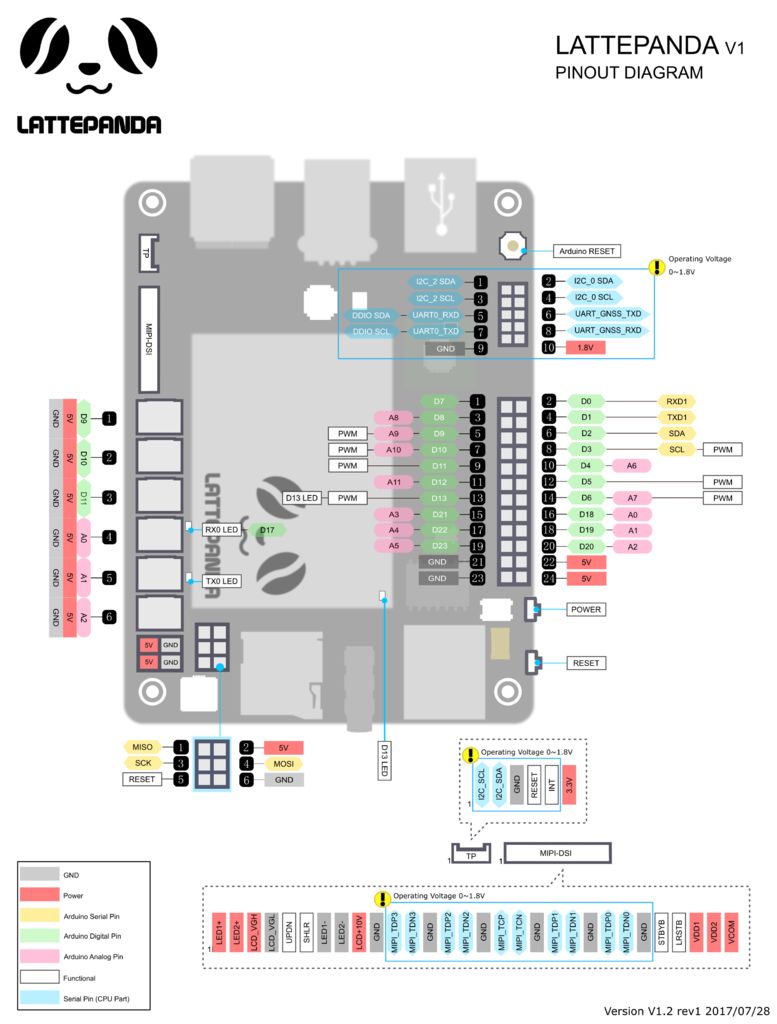
硬件:
LattePanda(您可以
屏幕和觸摸面板
軟件
Arduino IDE
Visual Studio
步驟2:演示1:檢測鼠標位置并單擊事件
讓我們執行項目步驟一步一步首先,請嘗試檢測是否按下了鼠標。因此,我們可以根據間隔來檢測雙擊和三次單擊。
這是一個簡單的Windows Form應用程序。文本框將顯示鼠標的X軸和Y軸。 您可以在PC上播放此演示。
操作方法播放演示1:
運行.exe并移動鼠標,軟件將自動檢測鼠標的位置。如果按下鼠標左鍵,文本框將顯示該事件。
您可以在下面查看代碼或在此處下載演示。如果要自己制作此演示,則需要在此處下載Visual Studio。 Open.sln文件,然后可以將其設置為自己的文件。
演示1代碼:
using System;
using System.Drawing;
using System.Windows.Forms;
using System.Runtime.InteropServices;
namespace Demo_mousehook_csdn
{
public partial class Form1 : Form
{
public Form1()
{
InitializeComponent();
}
MouseHook mh;
private void Form1_Load(object sender, EventArgs e)
{
mh = new MouseHook();
mh.SetHook();
mh.MouseMoveEvent += mh_MouseMoveEvent;
mh.MouseClickEvent += mh_MouseClickEvent;
mh.MouseDownEvent += mh_MouseDownEvent;
mh.MouseUpEvent += mh_MouseUpEvent;
}
private void mh_MouseDownEvent(object sender, MouseEventArgs e)
{
if (e.Button == MouseButtons.Left)
{
richTextBox1.AppendText(“Left Button Press ”);
}
if (e.Button == MouseButtons.Right)
{
richTextBox1.AppendText(“Right Button Press ”);
}
}
private void mh_MouseUpEvent(object sender, MouseEventArgs e)
{
if (e.Button == MouseButtons.Left)
{
richTextBox1.AppendText(“Left Button Release ”);
}
if (e.Button == MouseButtons.Right)
{
richTextBox1.AppendText(“Right Button Release ”);
}
}
private void mh_MouseClickEvent(object sender, MouseEventArgs e)
{
//MessageBox.Show(e.X + “-” + e.Y);
if (e.Button == MouseButtons.Left)
{
string sText = “(” + e.X.ToString() + “,” + e.Y.ToString() + “)”;
label1.Text = sText;
}
}
private void mh_MouseMoveEvent(object sender, MouseEventArgs e)
{
int x = e.Location.X;
int y = e.Location.Y;
textBox1.Text = x + “”;
textBox2.Text = y + “”;
}
private void Form1_FormClosed(object sender, FormClosedEventArgs e)
{
mh.UnHook();
}
private void Form1_FormClosed_1(object sender, FormClosedEventArgs e)
{
mh.UnHook();
}
private void richTextBox1_TextChanged(object sender, EventArgs e)
{
}
}
public class Win32Api
{
[StructLayout(LayoutKind.Sequential)]
public class POINT
{
public int x;
public int y;
}
[StructLayout(LayoutKind.Sequential)]
public class MouseHookStruct
{
public POINT pt;
public int hwnd;
public int wHitTestCode;
public int dwExtraInfo;
}
public delegate int HookProc(int nCode, IntPtr wParam, IntPtr lParam);
[DllImport(“user32.dll”, CharSet = CharSet.Auto, CallingConvention = CallingConvention.StdCall)]
public static extern int SetWindowsHookEx(int idHook, HookProc lpfn, IntPtr hInstance, int threadId);
[DllImport(“user32.dll”, CharSet = CharSet.Auto, CallingConvention = CallingConvention.StdCall)]
public static extern bool UnhookWindowsHookEx(int idHook);
[DllImport(“user32.dll”, CharSet = CharSet.Auto, CallingConvention = CallingConvention.StdCall)]
public static extern int CallNextHookEx(int idHook, int nCode, IntPtr wParam, IntPtr lParam);
}
public class MouseHook
{
private Point point;
private Point Point
{
get { return point; }
set
{
if (point != value)
{
point = value;
if (MouseMoveEvent != null)
{
var e = new MouseEventArgs(MouseButtons.None, 0, point.X, point.Y, 0);
MouseMoveEvent(this, e);
}
}
}
}
private int hHook;
private const int WM_MOUSEMOVE = 0x200;
private const int WM_LBUTTONDOWN = 0x201;
private const int WM_RBUTTONDOWN = 0x204;
private const int WM_MBUTTONDOWN = 0x207;
private const int WM_LBUTTONUP = 0x202;
private const int WM_RBUTTONUP = 0x205;
private const int WM_MBUTTONUP = 0x208;
private const int WM_LBUTTONDBLCLK = 0x203;
private const int WM_RBUTTONDBLCLK = 0x206;
private const int WM_MBUTTONDBLCLK = 0x209;
public const int WH_MOUSE_LL = 14;
public Win32Api.HookProc hProc;
public MouseHook()
{
this.Point = new Point();
}
public int SetHook()
{
hProc = new Win32Api.HookProc(MouseHookProc);
hHook = Win32Api.SetWindowsHookEx(WH_MOUSE_LL, hProc, IntPtr.Zero, 0);
return hHook;
}
public void UnHook()
{
Win32Api.UnhookWindowsHookEx(hHook);
}
private int MouseHookProc(int nCode, IntPtr wParam, IntPtr lParam)
{
Win32Api.MouseHookStruct MyMouseHookStruct = (Win32Api.MouseHookStruct)Marshal.PtrToStructure(lParam, typeof(Win32Api.MouseHookStruct));
if (nCode 《 0)
{
return Win32Api.CallNextHookEx(hHook, nCode, wParam, lParam);
}
else
{
if (MouseClickEvent != null)
{
MouseButtons button = MouseButtons.None;
int clickCount = 0;
switch ((Int32)wParam)
{
case WM_LBUTTONDOWN:
button = MouseButtons.Left;
clickCount = 1;
MouseDownEvent(this, new MouseEventArgs(button, clickCount, point.X, point.Y, 0));
break;
case WM_RBUTTONDOWN:
button = MouseButtons.Right;
clickCount = 1;
MouseDownEvent(this, new MouseEventArgs(button, clickCount, point.X, point.Y, 0));
break;
case WM_MBUTTONDOWN:
button = MouseButtons.Middle;
clickCount = 1;
MouseDownEvent(this, new MouseEventArgs(button, clickCount, point.X, point.Y, 0));
break;
case WM_LBUTTONUP:
button = MouseButtons.Left;
clickCount = 1;
MouseUpEvent(this, new MouseEventArgs(button, clickCount, point.X, point.Y, 0));
break;
case WM_RBUTTONUP:
button = MouseButtons.Right;
clickCount = 1;
MouseUpEvent(this, new MouseEventArgs(button, clickCount, point.X, point.Y, 0));
break;
case WM_MBUTTONUP:
button = MouseButtons.Middle;
clickCount = 1;
MouseUpEvent(this, new MouseEventArgs(button, clickCount, point.X, point.Y, 0));
break;
}
var e = new MouseEventArgs(button, clickCount, point.X, point.Y, 0);
MouseClickEvent(this, e);
}
this.Point = new Point(MyMouseHookStruct.pt.x, MyMouseHookStruct.pt.y);
return Win32Api.CallNextHookEx(hHook, nCode, wParam, lParam);
}
}
public delegate void MouseMoveHandler(object sender, MouseEventArgs e);
public event MouseMoveHandler MouseMoveEvent;
public delegate void MouseClickHandler(object sender, MouseEventArgs e);
public event MouseClickHandler MouseClickEvent;
public delegate void MouseDownHandler(object sender, MouseEventArgs e);
public event MouseDownHandler MouseDownEvent;
public delegate void MouseUpHandler(object sender, MouseEventArgs e);
public event MouseUpHandler MouseUpEvent;
}
}
如果有任何疑問,請讓我知道!
步驟3:演示2:檢測雙擊并控制LED
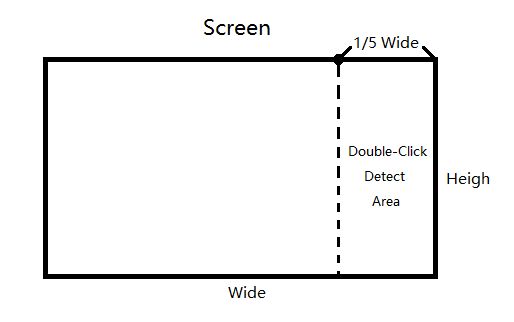
請參見上圖。為了防止錯誤觸發,我在屏幕區域的右1/5處設置了檢測鼠標雙擊的功能。
在此演示中,您將知道如何檢測雙擊(只需計算兩次單擊的間隔)并通過Arduino Leonardo控制LED。
此演示涉及C#和Arduino串行通信(PC與Arduino之間的通信)。如果您想了解這部分知識,請參見此處的教程。
如何播放演示2:
雙擊右側1/5側面屏幕上的,然后您將進入GPIO控制模式,LED將會點亮。單擊屏幕左側的4/5側,LED將關閉。
您可以在附件中查看代碼或在此處下載演示。如果最小化窗口,則該功能仍然有效。很酷,不是嗎?
演示2代碼:
using System;
using System.Collections.Generic;
using System.ComponentModel;
using System.Data;
using System.Drawing;
using System.Linq;
using System.Text;
using System.Windows.Forms;
using System.Runtime.InteropServices;
using System.Globalization;
using LattePanda.Firmata;
namespace Demo_mousehook_csdn
{
public partial class Form1 : Form
{
static Arduino arduino = new Arduino();
static DateTime localDate = DateTime.Now;
double click_time;
int click_count = 0;
bool tri_click_flag = false;
public Form1()
{
InitializeComponent();
arduino.pinMode(13, Arduino.OUTPUT);//
}
MouseHook mh;
private void Form1_Load(object sender, EventArgs e)
{
mh = new MouseHook();
mh.SetHook();
mh.MouseMoveEvent += mh_MouseMoveEvent;
mh.MouseClickEvent += mh_MouseClickEvent;
}
private void mh_MouseClickEvent(object sender, MouseEventArgs e)
{
//MessageBox.Show(e.X + “-” + e.Y);
if (e.Button == MouseButtons.Left)
{
string sText = “(” + e.X.ToString() + “,” + e.Y.ToString() + “)”;
label1.Text = sText;
click_time = (DateTime.Now - localDate).TotalSeconds;
localDate = DateTime.Now;
if (e.X 》 (Screen.PrimaryScreen.Bounds.Width / 5 * 4))
{
if (click_time 《= 0.5)
{
click_count += 1;
if (click_count 》 0)
{
click_count = 1;
tri_click_flag = true;
}
else
{
tri_click_flag = false;
}
}
else
{
}
if (click_count 《=1 && click_time 》 0.5)
click_count = 0;
}
else
{
click_count = 0;
tri_click_flag = false;
}
if (tri_click_flag == true)
{
textBox6.Text = “1”;
arduino.digitalWrite(13, Arduino.HIGH);
}
else
{
textBox6.Text = “0”;
arduino.digitalWrite(13, Arduino.LOW);
}
}
}
private void mh_MouseMoveEvent(object sender, MouseEventArgs e)
{
int x = e.Location.X;
int y = e.Location.Y;
textBox1.Text = x + “”;
textBox2.Text = y + “”;
textBox3.Text = Screen.PrimaryScreen.Bounds.Height.ToString();
textBox4.Text = Screen.PrimaryScreen.Bounds.Width.ToString();
}
private void Form1_FormClosed(object sender, FormClosedEventArgs e)
{
mh.UnHook();
}
private void Form1_FormClosed_1(object sender, FormClosedEventArgs e)
{
mh.UnHook();
}
private void textBox1_TextChanged(object sender, EventArgs e)
{
}
private void textBox2_TextChanged(object sender, EventArgs e)
{
}
private void label1_Click(object sender, EventArgs e)
{
}
private void textBox3_TextChanged(object sender, EventArgs e)
{
}
private void textBox4_TextChanged(object sender, EventArgs e)
{
}
private void label2_Click(object sender, EventArgs e)
{
}
private void label3_Click(object sender, EventArgs e)
{
}
private void textBox5_TextChanged(object sender, EventArgs e)
{
}
private void textBox6_TextChanged(object sender, EventArgs e)
{
}
}
public class Win32Api
{
[StructLayout(LayoutKind.Sequential)]
public class POINT
{
public int x;
public int y;
}
[StructLayout(LayoutKind.Sequential)]
public class MouseHookStruct
{
public POINT pt;
public int hwnd;
public int wHitTestCode;
public int dwExtraInfo;
}
public delegate int HookProc(int nCode, IntPtr wParam, IntPtr lParam);
//安裝鉤子
[DllImport(“user32.dll”, CharSet = CharSet.Auto, CallingConvention = CallingConvention.StdCall)]
public static extern int SetWindowsHookEx(int idHook, HookProc lpfn, IntPtr hInstance, int threadId);
//卸載鉤子
[DllImport(“user32.dll”, CharSet = CharSet.Auto, CallingConvention = CallingConvention.StdCall)]
public static extern bool UnhookWindowsHookEx(int idHook);
//調用下一個鉤子
[DllImport(“user32.dll”, CharSet = CharSet.Auto, CallingConvention = CallingConvention.StdCall)]
public static extern int CallNextHookEx(int idHook, int nCode, IntPtr wParam, IntPtr lParam);
}
public class MouseHook
{
private Point point;
private Point Point
{
get { return point; }
set
{
if (point != value)
{
point = value;
if (MouseMoveEvent != null)
{
var e = new MouseEventArgs(MouseButtons.None, 0, point.X, point.Y, 0);
MouseMoveEvent(this, e);
}
}
}
}
private int hHook;
private const int WM_LBUTTONDOWN = 0x201;
public const int WH_MOUSE_LL = 14;
public Win32Api.HookProc hProc;
public MouseHook()
{
this.Point = new Point();
}
public int SetHook()
{
hProc = new Win32Api.HookProc(MouseHookProc);
hHook = Win32Api.SetWindowsHookEx(WH_MOUSE_LL, hProc, IntPtr.Zero, 0);
return hHook;
}
public void UnHook()
{
Win32Api.UnhookWindowsHookEx(hHook);
}
private int MouseHookProc(int nCode, IntPtr wParam, IntPtr lParam)
{
Win32Api.MouseHookStruct MyMouseHookStruct = (Win32Api.MouseHookStruct)Marshal.PtrToStructure(lParam, typeof(Win32Api.MouseHookStruct));
if (nCode 《 0)
{
return Win32Api.CallNextHookEx(hHook, nCode, wParam, lParam);
}
else
{
if (MouseClickEvent != null)
{
MouseButtons button = MouseButtons.None;
int clickCount = 0;
switch ((Int32)wParam)
{
case WM_LBUTTONDOWN:
button = MouseButtons.Left;
clickCount = 1;
break;
}
var e = new MouseEventArgs(button, clickCount, point.X, point.Y, 0);
MouseClickEvent(this, e);
}
this.Point = new Point(MyMouseHookStruct.pt.x, MyMouseHookStruct.pt.y);
return Win32Api.CallNextHookEx(hHook, nCode, wParam, lParam);
}
}
public delegate void MouseMoveHandler(object sender, MouseEventArgs e);
public event MouseMoveHandler MouseMoveEvent;
public delegate void MouseClickHandler(object sender, MouseEventArgs e);
public event MouseClickHandler MouseClickEvent;
}
}
這是一種進行交互項目的新方法。它也可以用于家庭自動化控制系統。使用PC來控制空調,燈光,電視等。
步驟4:演示3:檢測三次單擊并控制屏幕背景光
在此演示中,您將獲得鼠標的位置并將實時值發送到PC。然后,您的PC可以根據該值更改背景光。 您還可以在PC上播放此演示。
此演示涉及使用C#來控制屏幕的背景光。如果您想了解這一部分知識,可以在這里查看教程。
如何播放演示3:
在右側1/3上單擊三次。屏幕的5側,然后您將進入GPIO控制模式,向上或向下移動手指,屏幕的背景光會變暗或變暗。
此功能與您的iPhone有點相似。您可以在附件中查看代碼或在此處下載演示。
方法1:
using System;
using System.Collections.Generic;
using System.ComponentModel;
using System.Data;
using System.Drawing;
using System.Linq;
using System.Text;
using System.Windows.Forms;
using System.Runtime.InteropServices;
using System.Globalization;
namespace Demo_mousehook_csdn
{
public partial class Form1 : Form
{
[DllImport(“gdi32.dll”)]
private unsafe static extern bool SetDeviceGammaRamp(Int32 hdc, void* ramp);
private static bool initialized = false;
private static Int32 hdc;
private static int a;
static DateTime localDate = DateTime.Now;
double click_time;
int click_count = 0;
bool tri_click_flag = false;
static string sText=“”;
static int IncreaseData = 0;
static int ClickPositionY = 0;
public Form1()
{
InitializeComponent();
}
MouseHook mh;
// protected override void SetVisibleCore(bool value)
// {
// base.SetVisibleCore(false);
// }
private void Form1_Load(object sender, EventArgs e)
{
mh = new MouseHook();
mh.SetHook();
mh.MouseMoveEvent += mh_MouseMoveEvent;
mh.MouseClickEvent += mh_MouseClickEvent;
mh.MouseDownEvent += mh_MouseDownEvent;
mh.MouseUpEvent += mh_MouseUpEvent;
}
private static void InitializeClass()
{
if (initialized)
return;
//Get the hardware device context of the screen, we can do
//this by getting the graphics object of null (IntPtr.Zero)
//then getting the HDC and converting that to an Int32.
hdc = Graphics.FromHwnd(IntPtr.Zero).GetHdc().ToInt32();
initialized = false;
}
public static unsafe bool SetBrightness(int brightness)
{
InitializeClass();
if (brightness 》 255)
brightness = 255;
if (brightness 《 0)
brightness = 0;
short* gArray = stackalloc short[3 * 256];
short* idx = gArray;
for (int j = 0; j 《 3; j++)
{
for (int i = 0; i 《 256; i++)
{
int arrayVal = i * (brightness + 128);
if (arrayVal 》 65535)
arrayVal = 65535;
*idx = (short)arrayVal;
idx++;
}
}
//For some reason, this always returns false?
bool retVal = SetDeviceGammaRamp(hdc, gArray);
//Memory allocated through stackalloc is automatically free‘d
//by the CLR.
return retVal;
}
private void mh_MouseClickEvent(object sender, MouseEventArgs e)
{
if (e.Button == MouseButtons.Left)
{
ClickPositionY = e.X;
sText = “(” + e.X.ToString() + “,” + e.Y.ToString() + “)”;
label1.Text = sText;
click_time = (DateTime.Now - localDate).TotalSeconds;
localDate = DateTime.Now;
if (e.X 》 (Screen.PrimaryScreen.Bounds.Width / 5 * 4))
{
if (click_time 《= 0.5)
{
click_count += 1;
label3.Text = “1”;
if (click_count 》 1)
{
click_count = 2;
label2.Text = “1”;
tri_click_flag = true;
}
else
{
label2.Text = “0”;
tri_click_flag = false;
}
textBox5.Text = click_count.ToString();
}
else
{
textBox5.Text = click_count.ToString();
}
if (click_count 《=1 && click_time 》 0.5)
click_count = 0;
}
else
{
label3.Text = “0”;
click_count = 0;
textBox5.Text = click_count.ToString();
label2.Text = “0”;
tri_click_flag = false;
}
}
}
private void mh_MouseMoveEvent(object sender, MouseEventArgs e)
{
int x = e.Location.X;
int y = e.Location.Y;
int LedData = 0;
LedData = (Screen.PrimaryScreen.Bounds.Height - y)*140/ Screen.PrimaryScreen.Bounds.Height;
if (LedData 《= 0)
LedData = 0;
if (e.X 》 (Screen.PrimaryScreen.Bounds.Width / 5 * 4))
{
if (tri_click_flag == true)
{
textBox6.Text = “1”;
SetBrightness(LedData);
label15.Text = LedData.ToString();
}
else
{
textBox6.Text = “0”;
}
}
textBox1.Text = x + “”;
textBox2.Text = y + “”;
textBox3.Text = Screen.PrimaryScreen.Bounds.Height.ToString();
textBox4.Text = Screen.PrimaryScreen.Bounds.Width.ToString();
}
private void Form1_FormClosed(object sender, FormClosedEventArgs e)
{
mh.UnHook();
}
private void Form1_FormClosed_1(object sender, FormClosedEventArgs e)
{
mh.UnHook();
}
private void textBox1_TextChanged(object sender, EventArgs e)
{
}
private void textBox2_TextChanged(object sender, EventArgs e)
{
}
private void label1_Click(object sender, EventArgs e)
{
}
private void textBox3_TextChanged(object sender, EventArgs e)
{
}
private void textBox4_TextChanged(object sender, EventArgs e)
{
}
private void label2_Click(object sender, EventArgs e)
{
}
private void label3_Click(object sender, EventArgs e)
{
}
private void textBox5_TextChanged(object sender, EventArgs e)
{
}
private void textBox6_TextChanged(object sender, EventArgs e)
{
}
private void mh_MouseDownEvent(object sender, MouseEventArgs e)
{
if (e.Button == MouseButtons.Left)
{
richTextBox1.AppendText(“按下了左鍵 ”);
}
}
private void mh_MouseUpEvent(object sender, MouseEventArgs e)
{
if (e.Button == MouseButtons.Left)
{
richTextBox1.AppendText(“松開了左鍵 ”);
}
}
private void notifyIcon1_MouseDoubleClick(object sender, MouseEventArgs e)
{
}
private void contextMenuStrip1_Opening(object sender, CancelEventArgs e)
{
}
private void exitToolStripMenuItem_Click(object sender, EventArgs e)
{
Application.ExitThread();
Environment.Exit(0);
}
private void label13_Click(object sender, EventArgs e)
{
}
private void label14_Click(object sender, EventArgs e)
{
}
private void label15_Click(object sender, EventArgs e)
{
}
private void richTextBox1_TextChanged(object sender, EventArgs e)
{
}
}
public class Win32Api
{
[StructLayout(LayoutKind.Sequential)]
public class POINT
{
public int x;
public int y;
}
[StructLayout(LayoutKind.Sequential)]
public class MouseHookStruct
{
public POINT pt;
public int hwnd;
public int wHitTestCode;
public int dwExtraInfo;
}
public delegate int HookProc(int nCode, IntPtr wParam, IntPtr lParam);
//安裝鉤子
[DllImport(“user32.dll”, CharSet = CharSet.Auto, CallingConvention = CallingConvention.StdCall)]
public static extern int SetWindowsHookEx(int idHook, HookProc lpfn, IntPtr hInstance, int threadId);
//卸載鉤子
[DllImport(“user32.dll”, CharSet = CharSet.Auto, CallingConvention = CallingConvention.StdCall)]
public static extern bool UnhookWindowsHookEx(int idHook);
//調用下一個鉤子
[DllImport(“user32.dll”, CharSet = CharSet.Auto, CallingConvention = CallingConvention.StdCall)]
public static extern int CallNextHookEx(int idHook, int nCode, IntPtr wParam, IntPtr lParam);
}
public class MouseHook
{
private Point point;
private Point Point
{
get { return point; }
set
{
if (point != value)
{
point = value;
if (MouseMoveEvent != null)
{
var e = new MouseEventArgs(MouseButtons.None, 0, point.X, point.Y, 0);
MouseMoveEvent(this, e);
}
}
}
}
private int hHook;
private const int WM_LBUTTONDOWN = 0x201;
private const int WM_LBUTTONUP = 0x202;
public const int WH_MOUSE_LL = 14;
public Win32Api.HookProc hProc;
public MouseHook()
{
this.Point = new Point();
}
public int SetHook()
{
hProc = new Win32Api.HookProc(MouseHookProc);
hHook = Win32Api.SetWindowsHookEx(WH_MOUSE_LL, hProc, IntPtr.Zero, 0);
return hHook;
}
public void UnHook()
{
Win32Api.UnhookWindowsHookEx(hHook);
}
private int MouseHookProc(int nCode, IntPtr wParam, IntPtr lParam)
{
Win32Api.MouseHookStruct MyMouseHookStruct = (Win32Api.MouseHookStruct)Marshal.PtrToStructure(lParam, typeof(Win32Api.MouseHookStruct));
if (nCode 《 0)
{
return Win32Api.CallNextHookEx(hHook, nCode, wParam, lParam);
}
else
{
if (MouseClickEvent != null)
{
MouseButtons button = MouseButtons.None;
int clickCount = 0;
switch ((Int32)wParam)
{
case WM_LBUTTONDOWN:
button = MouseButtons.Left;
clickCount = 1;
break;
case WM_LBUTTONUP:
button = MouseButtons.Left;
clickCount = 1;
break;
}
var e = new MouseEventArgs(button, clickCount, point.X, point.Y, 0);
MouseClickEvent(this, e);
}
this.Point = new Point(MyMouseHookStruct.pt.x, MyMouseHookStruct.pt.y);
return Win32Api.CallNextHookEx(hHook, nCode, wParam, lParam);
}
}
public delegate void MouseMoveHandler(object sender, MouseEventArgs e);
public event MouseMoveHandler MouseMoveEvent;
public delegate void MouseClickHandler(object sender, MouseEventArgs e);
public event MouseClickHandler MouseClickEvent;
public delegate void MouseDownHandler(object sender, MouseEventArgs e);
public event MouseDownHandler MouseDownEvent;
public delegate void MouseUpHandler(object sender, MouseEventArgs e);
public event MouseUpHandler MouseUpEvent;
}
}
方法2:
using System;
using System.Collections.Generic;
using System.ComponentModel;
using System.Data;
using System.Drawing;
using System.Linq;
using System.Text;
using System.Windows.Forms;
using System.Runtime.InteropServices;
using System.Globalization;
//using LattePanda.Firmata;
namespace Demo_mousehook_csdn
{
public partial class Form1 : Form
{
//static Arduino arduino = new Arduino();
static DateTime localDate = DateTime.Now;
double click_time;
int click_count = 0;
bool tri_click_flag = false;
bool mouse_down_flag = false;
static string sText=“”;
static int ClickPositionY = 0;
static int LedData = 0;//需要發送的LED亮度值
static int LedIncreaseData = 0; //Data增量
static int LedLastData = 0;//Led的最后一次亮度
static int LedStoreData = 0;//Led需要儲藏的數值,備用
[DllImport(“gdi32.dll”)]
private unsafe static extern bool SetDeviceGammaRamp(Int32 hdc, void* ramp);
private static bool initialized = false;
private static Int32 hdc;
private static void InitializeClass()
{
if (initialized)
return;
//Get the hardware device context of the screen, we can do
//this by getting the graphics object of null (IntPtr.Zero)
//then getting the HDC and converting that to an Int32.
hdc = Graphics.FromHwnd(IntPtr.Zero).GetHdc().ToInt32();
initialized = false;
}
public static unsafe bool SetBrightness(int brightness)
{
InitializeClass();
if (brightness 》 255)
brightness = 255;
if (brightness 《 0)
brightness = 0;
short* gArray = stackalloc short[3 * 256];
short* idx = gArray;
for (int j = 0; j 《 3; j++)
{
for (int i = 0; i 《 256; i++)
{
int arrayVal = i * (brightness + 128);
if (arrayVal 》 65535)
arrayVal = 65535;
*idx = (short)arrayVal;
idx++;
}
}
//For some reason, this always returns false?
bool retVal = SetDeviceGammaRamp(hdc, gArray);
//Memory allocated through stackalloc is automatically free’d
//by the CLR.
return retVal;
}
public Form1()
{
InitializeComponent();
// arduino.pinMode(13, Arduino.OUTPUT);//
}
MouseHook mh;
// protected override void SetVisibleCore(bool value)
// {
// base.SetVisibleCore(false);
// }
private void Form1_Load(object sender, EventArgs e)
{
mh = new MouseHook();
mh.SetHook();
mh.MouseMoveEvent += mh_MouseMoveEvent;
mh.MouseClickEvent += mh_MouseClickEvent;
mh.MouseUpEvent += mh_MouseUpEvent;
mh.MouseDownEvent += mh_MouseDownEvent;
}
private void mh_MouseUpEvent(object sender, MouseEventArgs e)
{
if (e.Button == MouseButtons.Left)
{
LedLastData = LedData;
mouse_down_flag = false;
richTextBox1.AppendText(“Released ”);
}
}
private void mh_MouseDownEvent(object sender, MouseEventArgs e)
{
if (e.Button == MouseButtons.Left)
{
mouse_down_flag = true;
click_time = (DateTime.Now - localDate).TotalSeconds;
localDate = DateTime.Now;
label13.Text = click_time.ToString();
richTextBox1.AppendText(“Pressed ”);
if (e.X 》 (Screen.PrimaryScreen.Bounds.Width / 5 * 4))
{
ClickPositionY= e.Location.Y;
if (click_time 《= 0.5)
{
click_count += 1;
label3.Text = “1”;
if (click_count 》 1)
{
click_count = 2;
label2.Text = “1”;
tri_click_flag = true;
}
else
{
label2.Text = “0”;
tri_click_flag = false;
}
textBox5.Text = click_count.ToString();
}
else
{
textBox5.Text = click_count.ToString();
}
if (click_count 《= 1 && click_time 》 0.5)
click_count = 0;
}
else
{
label3.Text = “0”;
click_count = 0;
textBox5.Text = click_count.ToString();
label2.Text = “0”;
tri_click_flag = false;
}
}
}
private void mh_MouseClickEvent(object sender, MouseEventArgs e)
{
if (e.Button == MouseButtons.Left)
{
sText = “(” + e.X.ToString() + “,” + e.Y.ToString() + “)”;
label1.Text = sText;
}
}
private void mh_MouseMoveEvent(object sender, MouseEventArgs e)
{
int x = e.Location.X;
int y = e.Location.Y;
if (e.X 》 (Screen.PrimaryScreen.Bounds.Width / 5 * 4))
{
if (tri_click_flag == true)
{
textBox6.Text = “1”;
if(mouse_down_flag==true)
{
LedIncreaseData = (ClickPositionY - y) * 140 / 1080;
LedData = LedStoreData + LedIncreaseData;
if(LedData《0)
{
LedData = 0;
}
if (LedData 》 140)
{
LedData = 140;
}
SetBrightness(LedData);
}
if(mouse_down_flag==false)
{
LedStoreData = LedLastData;
}
}
else
{
textBox6.Text = “0”;
}
}
label19.Text = LedStoreData.ToString();
label20.Text = LedData.ToString();
label15.Text = LedIncreaseData.ToString();
textBox1.Text = x + “”;
textBox2.Text = y + “”;
textBox3.Text = Screen.PrimaryScreen.Bounds.Height.ToString();
textBox4.Text = Screen.PrimaryScreen.Bounds.Width.ToString();
}
private void Form1_FormClosed(object sender, FormClosedEventArgs e)
{
mh.UnHook();
}
private void Form1_FormClosed_1(object sender, FormClosedEventArgs e)
{
mh.UnHook();
}
private void textBox1_TextChanged(object sender, EventArgs e)
{
}
private void textBox2_TextChanged(object sender, EventArgs e)
{
}
private void label1_Click(object sender, EventArgs e)
{
}
private void textBox3_TextChanged(object sender, EventArgs e)
{
}
private void textBox4_TextChanged(object sender, EventArgs e)
{
}
private void label2_Click(object sender, EventArgs e)
{
}
private void label3_Click(object sender, EventArgs e)
{
}
private void textBox5_TextChanged(object sender, EventArgs e)
{
}
private void textBox6_TextChanged(object sender, EventArgs e)
{
}
private void Form1_MouseDown(object sender, MouseEventArgs e)
{
}
private void Form1_MouseUp(object sender, MouseEventArgs e)
{
}
private void notifyIcon1_MouseDoubleClick(object sender, MouseEventArgs e)
{
}
private void contextMenuStrip1_Opening(object sender, CancelEventArgs e)
{
}
private void exitToolStripMenuItem_Click(object sender, EventArgs e)
{
Application.ExitThread();
Environment.Exit(0);
}
private void label13_Click(object sender, EventArgs e)
{
}
private void label14_Click(object sender, EventArgs e)
{
}
private void label15_Click(object sender, EventArgs e)
{
}
private void richTextBox1_TextChanged(object sender, EventArgs e)
{
}
private void label19_Click(object sender, EventArgs e)
{
}
private void label20_Click(object sender, EventArgs e)
{
}
}
public class Win32Api
{
[StructLayout(LayoutKind.Sequential)]
public class POINT
{
public int x;
public int y;
}
[StructLayout(LayoutKind.Sequential)]
public class MouseHookStruct
{
public POINT pt;
public int hwnd;
public int wHitTestCode;
public int dwExtraInfo;
}
public delegate int HookProc(int nCode, IntPtr wParam, IntPtr lParam);
//安裝鉤子
[DllImport(“user32.dll”, CharSet = CharSet.Auto, CallingConvention = CallingConvention.StdCall)]
public static extern int SetWindowsHookEx(int idHook, HookProc lpfn, IntPtr hInstance, int threadId);
//卸載鉤子
[DllImport(“user32.dll”, CharSet = CharSet.Auto, CallingConvention = CallingConvention.StdCall)]
public static extern bool UnhookWindowsHookEx(int idHook);
//調用下一個鉤子
[DllImport(“user32.dll”, CharSet = CharSet.Auto, CallingConvention = CallingConvention.StdCall)]
public static extern int CallNextHookEx(int idHook, int nCode, IntPtr wParam, IntPtr lParam);
}
public class MouseHook
{
private Point point;
private Point Point
{
get { return point; }
set
{
if (point != value)
{
point = value;
if (MouseMoveEvent != null)
{
var e = new MouseEventArgs(MouseButtons.None, 0, point.X, point.Y, 0);
MouseMoveEvent(this, e);
}
}
}
}
private int hHook;
private const int WM_LBUTTONDOWN = 0x201;
private const int WM_LBUTTONUP = 0x202;
public const int WH_MOUSE_LL = 14;
public Win32Api.HookProc hProc;
public MouseHook()
{
this.Point = new Point();
}
public int SetHook()
{
hProc = new Win32Api.HookProc(MouseHookProc);
hHook = Win32Api.SetWindowsHookEx(WH_MOUSE_LL, hProc, IntPtr.Zero, 0);
return hHook;
}
public void UnHook()
{
Win32Api.UnhookWindowsHookEx(hHook);
}
private int MouseHookProc(int nCode, IntPtr wParam, IntPtr lParam)
{
Win32Api.MouseHookStruct MyMouseHookStruct = (Win32Api.MouseHookStruct)Marshal.PtrToStructure(lParam, typeof(Win32Api.MouseHookStruct));
if (nCode 《 0)
{
return Win32Api.CallNextHookEx(hHook, nCode, wParam, lParam);
}
else
{
if (MouseClickEvent != null)
{
MouseButtons button = MouseButtons.None;
int clickCount = 0;
switch ((Int32)wParam)
{
case WM_LBUTTONDOWN:
button = MouseButtons.Left;
clickCount = 1;
MouseDownEvent(this, new MouseEventArgs(button, clickCount, point.X, point.Y, 0));
break;
case WM_LBUTTONUP:
button = MouseButtons.Left;
clickCount = 1;
MouseUpEvent(this, new MouseEventArgs(button, clickCount, point.X, point.Y, 0));
break;
}
var e = new MouseEventArgs(button, clickCount, point.X, point.Y, 0);
MouseClickEvent(this, e);
}
this.Point = new Point(MyMouseHookStruct.pt.x, MyMouseHookStruct.pt.y);
return Win32Api.CallNextHookEx(hHook, nCode, wParam, lParam);
}
}
public delegate void MouseMoveHandler(object sender, MouseEventArgs e);
public event MouseMoveHandler MouseMoveEvent;
public delegate void MouseClickHandler(object sender, MouseEventArgs e);
public event MouseClickHandler MouseClickEvent;
public delegate void MouseUpHandler(object sender, MouseEventArgs e);
public event MouseUpHandler MouseUpEvent;
public delegate void MouseDownHandler(object sender, MouseEventArgs e);
public event MouseDownHandler MouseDownEvent;
}
}
玩得開心!
到目前為止還好嗎?如有任何疑問,請告訴我!
步驟5:演示4:檢測三次單擊并控制LED燈
在此演示中,您將獲得鼠標的位置并將實時值發送到Arduino。然后您的Arduino可以根據該值控制LED。
播放DEMO 4的方法:
在屏幕右側的1/5上單擊三下,您將進入GPIO控制模式,移動您的GPIO手指向上或向下,LED(D13)會變亮或變暗。
此演示涉及PC與Arduino之間的通信(Arduino和C#通信)。如果您想了解這部分知識,請參閱此處的教程。
您可以在附件中查看代碼,也可以在此處下載演示。
Demo 4代碼:
using System;
using System.Collections.Generic;
using System.ComponentModel;
using System.Data;
using System.Drawing;
using System.Linq;
using System.Text;
using System.Windows.Forms;
using System.Runtime.InteropServices;
using System.Globalization;
using LattePanda.Firmata;
namespace Demo_mousehook_csdn
{
public partial class Form1 : Form
{
static Arduino arduino = new Arduino();
static DateTime localDate = DateTime.Now;
double click_time;
int click_count = 0;
bool tri_click_flag = false;
bool mouse_down_flag = false;
static string sText=“”;
static int ClickPositionY = 0;
static int LedData = 0;//需要發送的LED亮度值
static int LedIncreaseData = 0; //Data增量
static int LedLastData = 0;//Led的最后一次亮度
static int LedStoreData = 0;//Led需要儲藏的數值,備用
public Form1()
{
InitializeComponent();
arduino.pinMode(13, Arduino.PWM);//
}
MouseHook mh;
private void Form1_Load(object sender, EventArgs e)
{
mh = new MouseHook();
mh.SetHook();
mh.MouseMoveEvent += mh_MouseMoveEvent;
mh.MouseClickEvent += mh_MouseClickEvent;
mh.MouseUpEvent += mh_MouseUpEvent;
mh.MouseDownEvent += mh_MouseDownEvent;
}
private void mh_MouseUpEvent(object sender, MouseEventArgs e)
{
if (e.Button == MouseButtons.Left)
{
LedLastData = LedData;
mouse_down_flag = false;
richTextBox1.AppendText(“Released ”);
}
}
private void mh_MouseDownEvent(object sender, MouseEventArgs e)
{
if (e.Button == MouseButtons.Left)
{
mouse_down_flag = true;
click_time = (DateTime.Now - localDate).TotalSeconds;
localDate = DateTime.Now;
label13.Text = click_time.ToString();
richTextBox1.AppendText(“Pressed ”);
if (e.X 》 (Screen.PrimaryScreen.Bounds.Width / 5 * 4))
{
ClickPositionY= e.Location.Y;
if (click_time 《= 0.5)
{
click_count += 1;
label3.Text = “1”;
if (click_count 》 1)
{
click_count = 2;
label2.Text = “1”;
tri_click_flag = true;
}
else
{
label2.Text = “0”;
tri_click_flag = false;
}
textBox5.Text = click_count.ToString();
}
else
{
textBox5.Text = click_count.ToString();
}
if (click_count 《= 1 && click_time 》 0.5)
click_count = 0;
}
else
{
label3.Text = “0”;
click_count = 0;
textBox5.Text = click_count.ToString();
label2.Text = “0”;
tri_click_flag = false;
}
}
}
private void mh_MouseClickEvent(object sender, MouseEventArgs e)
{
if (e.Button == MouseButtons.Left)
{
sText = “(” + e.X.ToString() + “,” + e.Y.ToString() + “)”;
label1.Text = sText;
}
}
private void mh_MouseMoveEvent(object sender, MouseEventArgs e)
{
int x = e.Location.X;
int y = e.Location.Y;
if (e.X 》 (Screen.PrimaryScreen.Bounds.Width / 5 * 4))
{
if (tri_click_flag == true)
{
textBox6.Text = “1”;
if(mouse_down_flag==true)
{
LedIncreaseData = (ClickPositionY - y) * 140 / 1080;
LedData = LedStoreData + LedIncreaseData;
if(LedData《0)
{
LedData = 0;
}
if (LedData 》 140)
{
LedData = 140;
}
arduino.analogWrite(13,LedData);
}
if(mouse_down_flag==false)
{
LedStoreData = LedLastData;
}
}
else
{
textBox6.Text = “0”;
}
}
label19.Text = LedStoreData.ToString();
label20.Text = LedData.ToString();
label15.Text = LedIncreaseData.ToString();
textBox1.Text = x + “”;
textBox2.Text = y + “”;
textBox3.Text = Screen.PrimaryScreen.Bounds.Height.ToString();
textBox4.Text = Screen.PrimaryScreen.Bounds.Width.ToString();
}
private void Form1_FormClosed(object sender, FormClosedEventArgs e)
{
mh.UnHook();
}
private void Form1_FormClosed_1(object sender, FormClosedEventArgs e)
{
mh.UnHook();
}
private void textBox1_TextChanged(object sender, EventArgs e)
{
}
private void textBox2_TextChanged(object sender, EventArgs e)
{
}
private void label1_Click(object sender, EventArgs e)
{
}
private void textBox3_TextChanged(object sender, EventArgs e)
{
}
private void textBox4_TextChanged(object sender, EventArgs e)
{
}
private void label2_Click(object sender, EventArgs e)
{
}
private void label3_Click(object sender, EventArgs e)
{
}
private void textBox5_TextChanged(object sender, EventArgs e)
{
}
private void textBox6_TextChanged(object sender, EventArgs e)
{
}
private void Form1_MouseDown(object sender, MouseEventArgs e)
{
}
private void Form1_MouseUp(object sender, MouseEventArgs e)
{
}
private void notifyIcon1_MouseDoubleClick(object sender, MouseEventArgs e)
{
}
private void contextMenuStrip1_Opening(object sender, CancelEventArgs e)
{
}
private void exitToolStripMenuItem_Click(object sender, EventArgs e)
{
Application.ExitThread();
Environment.Exit(0);
}
private void label13_Click(object sender, EventArgs e)
{
}
private void label14_Click(object sender, EventArgs e)
{
}
private void label15_Click(object sender, EventArgs e)
{
}
private void richTextBox1_TextChanged(object sender, EventArgs e)
{
}
private void label19_Click(object sender, EventArgs e)
{
}
private void label20_Click(object sender, EventArgs e)
{
}
}
public class Win32Api
{
[StructLayout(LayoutKind.Sequential)]
public class POINT
{
public int x;
public int y;
}
[StructLayout(LayoutKind.Sequential)]
public class MouseHookStruct
{
public POINT pt;
public int hwnd;
public int wHitTestCode;
public int dwExtraInfo;
}
public delegate int HookProc(int nCode, IntPtr wParam, IntPtr lParam);
//安裝鉤子
[DllImport(“user32.dll”, CharSet = CharSet.Auto, CallingConvention = CallingConvention.StdCall)]
public static extern int SetWindowsHookEx(int idHook, HookProc lpfn, IntPtr hInstance, int threadId);
//卸載鉤子
[DllImport(“user32.dll”, CharSet = CharSet.Auto, CallingConvention = CallingConvention.StdCall)]
public static extern bool UnhookWindowsHookEx(int idHook);
//調用下一個鉤子
[DllImport(“user32.dll”, CharSet = CharSet.Auto, CallingConvention = CallingConvention.StdCall)]
public static extern int CallNextHookEx(int idHook, int nCode, IntPtr wParam, IntPtr lParam);
}
public class MouseHook
{
private Point point;
private Point Point
{
get { return point; }
set
{
if (point != value)
{
point = value;
if (MouseMoveEvent != null)
{
var e = new MouseEventArgs(MouseButtons.None, 0, point.X, point.Y, 0);
MouseMoveEvent(this, e);
}
}
}
}
private int hHook;
private const int WM_LBUTTONDOWN = 0x201;
private const int WM_LBUTTONUP = 0x202;
public const int WH_MOUSE_LL = 14;
public Win32Api.HookProc hProc;
public MouseHook()
{
this.Point = new Point();
}
public int SetHook()
{
hProc = new Win32Api.HookProc(MouseHookProc);
hHook = Win32Api.SetWindowsHookEx(WH_MOUSE_LL, hProc, IntPtr.Zero, 0);
return hHook;
}
public void UnHook()
{
Win32Api.UnhookWindowsHookEx(hHook);
}
private int MouseHookProc(int nCode, IntPtr wParam, IntPtr lParam)
{
Win32Api.MouseHookStruct MyMouseHookStruct = (Win32Api.MouseHookStruct)Marshal.PtrToStructure(lParam, typeof(Win32Api.MouseHookStruct));
if (nCode 《 0)
{
return Win32Api.CallNextHookEx(hHook, nCode, wParam, lParam);
}
else
{
if (MouseClickEvent != null)
{
MouseButtons button = MouseButtons.None;
int clickCount = 0;
switch ((Int32)wParam)
{
case WM_LBUTTONDOWN:
button = MouseButtons.Left;
clickCount = 1;
MouseDownEvent(this, new MouseEventArgs(button, clickCount, point.X, point.Y, 0));
break;
case WM_LBUTTONUP:
button = MouseButtons.Left;
clickCount = 1;
MouseUpEvent(this, new MouseEventArgs(button, clickCount, point.X, point.Y, 0));
break;
}
var e = new MouseEventArgs(button, clickCount, point.X, point.Y, 0);
MouseClickEvent(this, e);
}
this.Point = new Point(MyMouseHookStruct.pt.x, MyMouseHookStruct.pt.y);
return Win32Api.CallNextHookEx(hHook, nCode, wParam, lParam);
}
}
public delegate void MouseMoveHandler(object sender, MouseEventArgs e);
public event MouseMoveHandler MouseMoveEvent;
public delegate void MouseClickHandler(object sender, MouseEventArgs e);
public event MouseClickHandler MouseClickEvent;
public delegate void MouseUpHandler(object sender, MouseEventArgs e);
public event MouseUpHandler MouseUpEvent;
public delegate void MouseDownHandler(object sender, MouseEventArgs e);
public event MouseDownHandler MouseDownEvent;
}
}
如果您有任何疑問,請告訴我!
步驟6:摘要:
您得到的貨款!在Respberry Pi上運行Win10時,我不能忍受滯后。當您需要在SBC及其基于x64的處理器上進行大型項目時,LattePanda是一個不錯的選擇。 LattePanda的CPU可以完美地處理大型項目。它也可以完美地運行Ubuntu。對我來說,LattePanda是一個訓練我的編碼能力的好平臺。由于它運行Win10系統,因此我可以使用Visual Studio在C ++,C#,Python等中執行許多項目。更重要的是,它還配備了Arduino Leonardo。我可以在PC上輕松控制物理世界。
-
C#
+關注
關注
0文章
6瀏覽量
24008 -
IOT
+關注
關注
190文章
4395瀏覽量
208554
發布評論請先 登錄
零知IDE——基于零知標準板驅動PAJ7620U2手勢控制L9110風扇模塊和SG90舵機系統
AI智能體開發C#軟件的臨時方案
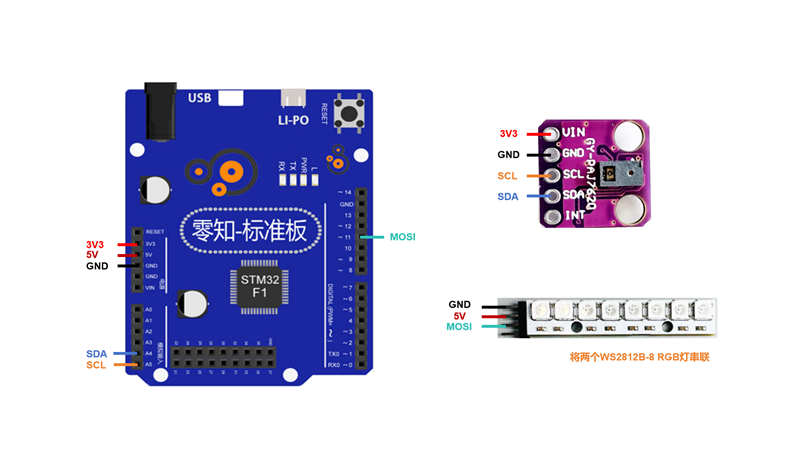
零知IDE——基于STM32F103RBT6的PAJ7620U2手勢控制WS2812 RGB燈帶系統
零知IDE——基于STM32F103RBT6的PAJ7620U2手勢控制WS2812 RGB燈帶系統
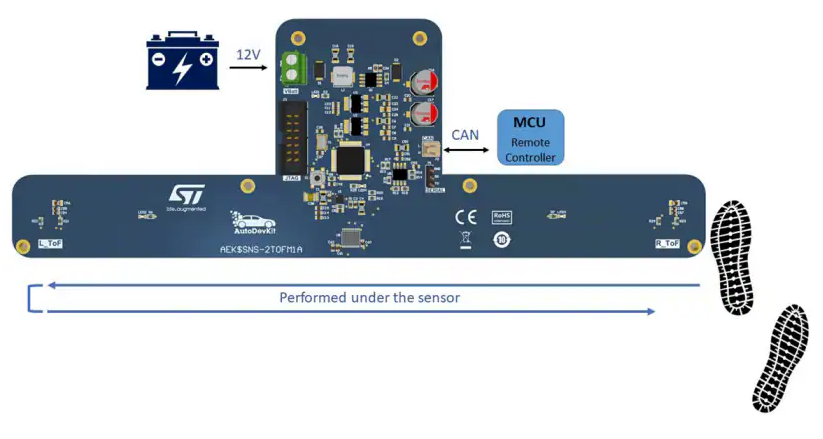
基于STMicroelectronics AEK-SNS-2TOFM1手勢檢測系統的技術解析與應用實踐
【技術討論】智能戒指手勢交互:如何優化PCBA成本與實現<20ms低延遲?
海瑞思高精度氣密檢測系統在3C產品制造中的應用
IOT平臺在工業環境監測系統中的作用



 工商網監
工商網監
評論