


 零知IDE——基于STM32與W5500的UDP通信實現溫濕度監控

? ?零知開源(零知IDE)是一個專為電子初學者/電子興趣愛好者設計的開源軟硬件平臺,在硬件上提供超高性價比STM32系列開發板、物聯網控制板。取消了Bootloader程序燒錄,讓開發重心從“配置環境”轉移到“創意實現”,極大降低了技術門檻。零知IDE編程軟件,內置上千個覆蓋多場景的示例代碼,支持項目源碼一鍵下載,項目文章在線瀏覽。零知開源(零知IDE)平臺通過軟硬件協同創新,讓你的創意快速轉化為實物,來動手試試吧!
?訪問零知實驗室,獲取更多實戰項目和教程資源吧!
www.lingzhilab.com
?
項目概述
本項目基于零知增強板(主控STM32F407VET6)結合W5500以太網模塊,實現了一套完整的UDP通信溫濕度監控系統。系統通過DHT11傳感器實時采集環境溫濕度數據,通過W5500以太網模塊建立UDP通信鏈路,將數據發送至PC上位機。同時,上位機可通過UDP協議發送控制指令,遠程控制開發板上的LED燈開關狀態
項目難點及解決方案
問題描述:多網卡路由沖突導致路由表混亂,UDP包丟失
解決方案:網段隔離與靜態配置,將網絡拓撲從混合網段改為獨立網段;代碼中禁用DHCP功能,網關和DNS強制指向PC的以太網IP;同時網段檢測邏輯
一、系統硬件部分
1.1 元件清單
| 硬件名稱 | 數量 | 備注 |
|---|---|---|
| 零知增強板(STM32F407VET6) | 1 | 主控核心板 |
| W5500 以太網模塊 | 1 | 帶 SPI 接口的以太網模塊 |
| DHT11 溫濕度傳感器 | 1 | 數字型溫濕度傳感器 |
| LED 發光二極管 | 1 | 用于遠程控制演示 |
| 10K 上拉電阻 | 1 | DHT11 數據腳需接 |
| 杜邦線 | 若干 | 連接各模塊 |
| 網線 | 1 | PC 與 W5500 直連 |
| PC(帶以太網口) | 1 | 運行 Python 上位機 |
1.2 接線方案表
請務必嚴格按照代碼中的定義進行連接,否則會導致初始化失敗。
| 零知增強板引腳 | 外接設備 | 設備引腳 | 功能說明 |
|---|---|---|---|
| 7 | DHT11 | DATA | 溫濕度數據傳輸 |
| 8 | LED | 正極 | LED 控制引腳(低電平熄滅) |
| GND | DHT11/LED/W5500 | GND | 公共接地 |
| 5V | W5500/DHT11 | 5V / + | 供電(W5500 需 5V) |
| 3.3V | 可選 | DHT11 (+) | DHT11 也可接 3.3V |
| A5 (SCLK) | W5500 | SCLK | SPI 時鐘線 |
| A6 (MISO) | W5500 | MISO | SPI 主機輸入 / 從機輸出 |
| A7 (MOSI) | W5500 | MOSI | SPI 主機輸出 / 從機輸入 |
| A4 (SCS) | W5500 | CS | W5500 片選引腳 |
1.3 接線示意圖
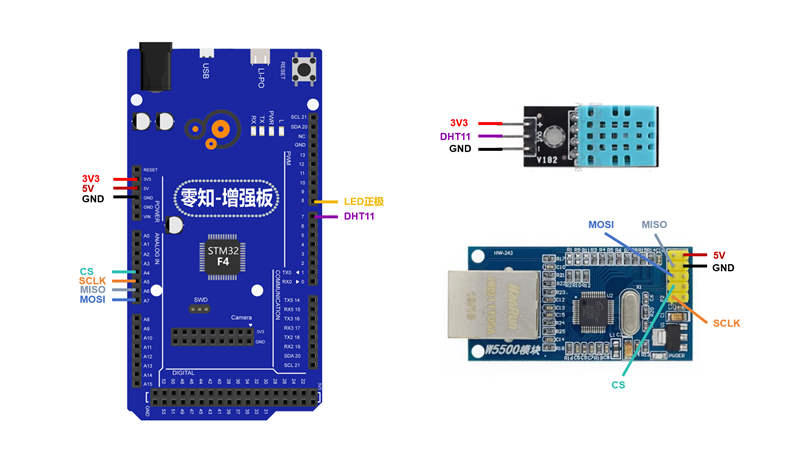
W5500 的 SPI 接線必須嚴格對應零知增強板 的 SPI 引腳(SCK/MISO/MOSI/CS)
1.4 實物連接圖
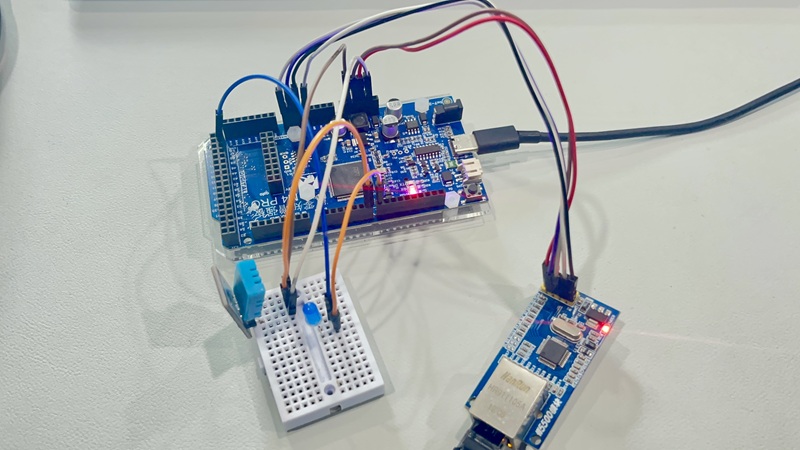
二、安裝與使用部分
2.1 開源平臺-輸入"W5500的UDP通信"并搜索-代碼下載自動打開
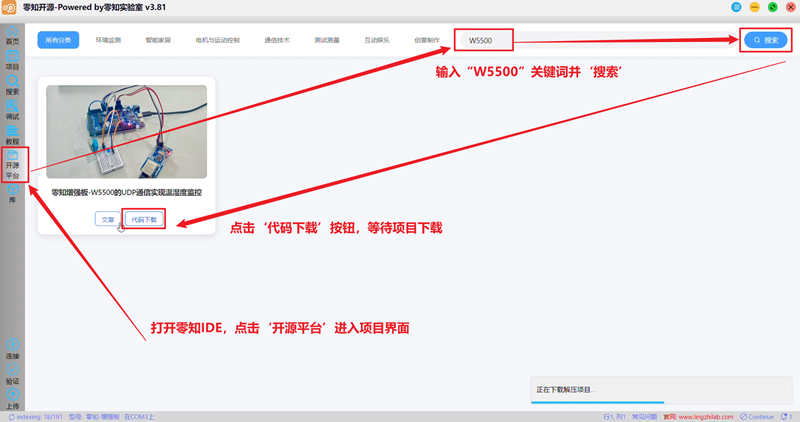
2.2 連接-驗證-上傳
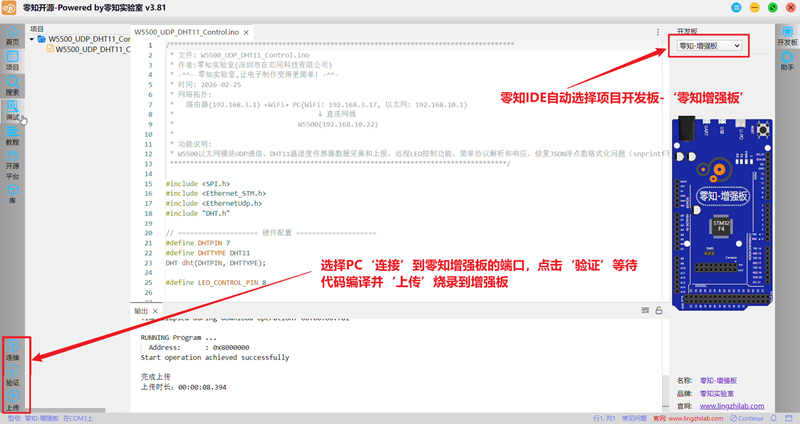
2.3 調試-串口監視器
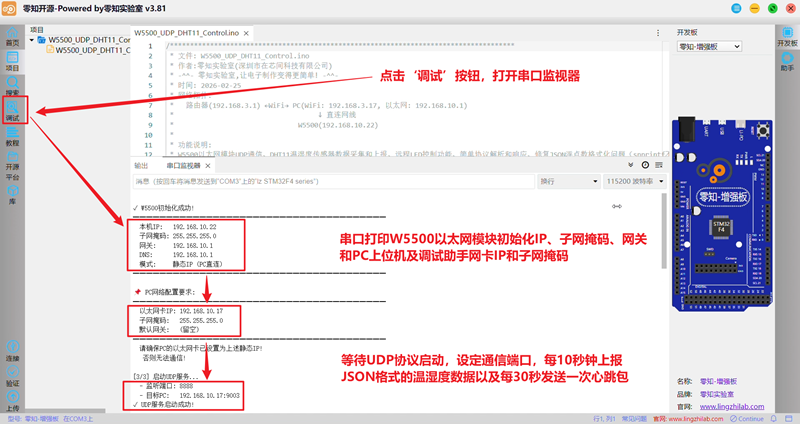
三、核心代碼講解
本項目的代碼設計體現了模塊化和健壯性的特點,以下將對核心的四個部分進行詳細剖析
3.1網絡初始化與配置
網絡初始化是本項目的核心,采用PC直連靜態IP模式,確保通信穩定
// ==================== 網絡配置 - PC直連模式 ====================
byte mac[] = {0xDE, 0xAD, 0xBE, 0xEF, 0xFE, 0xED};

// 靜態IP配置
IPAddress staticIP(192, 168, 10, 22);      // W5500的IP
IPAddress gateway(192, 168, 10, 1);        // 設為PC的以太網卡IP
IPAddress subnet(255, 255, 255, 0);
IPAddress dnsip(192, 168, 10, 1);          // DNS指向PC

// PC的以太網卡IP
IPAddress pcIP(192, 168, 10, 17);

// 網絡初始化函數
void initNetwork() {
  // 靜態IP配置
  Ethernet.begin(mac, staticIP, dnsip, gateway, subnet);

  // 驗證網絡配置
  IPAddress ip = Ethernet.localIP();
  if (ip == IPAddress(0, 0, 0, 0)) {
    Serial.println("??? 錯誤: 以太網初始化失敗! ???");
    // 錯誤處理...
  }

  // 啟動UDP服務
  Udp.begin(localPort);
}
PC以太網卡不提供DHCP服務,必須使用靜態IP;網關設置指向PC,點對點直連網絡
3.2DHT11數據采集與處理
DHT11傳感器數據采集需要精確的時序控制,并處理可能的讀取失敗情況
// DHT11初始化
DHT dht(DHTPIN, DHTTYPE);

// 讀取DHT數據函數
void readDHTData() {
  unsigned long currentTime = millis();

  // 每10秒讀取一次
  if (currentTime - lastDHTReadTime >= 10000) {
    lastDHTReadTime = currentTime;

    float h = dht.readHumidity();
    float t = dht.readTemperature();

    if (isnan(h) || isnan(t)) {
      Serial.println("? DHT11讀取失敗!");
      dhtValid = false;
    } else {
      humidity = h;
      temperature = t;
      dhtValid = true;

      // 發送數據
      sendDHTData();
    }
  }
}

// 發送DHT數據函數
void sendDHTData() {
  if (dhtValid) {
    messageCount++;

    char tempStr[10];
    char humiStr[10];
    floatToString(tempStr, temperature, 2);  // 2位小數精度
    floatToString(humiStr, humidity, 2);

    // 構建JSON格式數據
    snprintf(sendBuffer, sizeof(sendBuffer),
             "{"type":"dht","count":%lu,"temp":%s,"humi":%s,"time":%lu}",
             messageCount, tempStr, humiStr, millis() / 1000);

    sendUDP(sendBuffer);
  }
}
DHT11設置為10秒的讀取間隔,使用自定義floatToString()函數處理浮點數
3.3 UDP通信協議解析
實現簡單的命令解析機制,支持多種控制指令
// 協議解析函數
void parseCommand(const char* cmd, IPAddress remoteIP, int remotePort) {
  // LED_ON命令
  if (strcmp(cmd, "LED_ON") == 0) {
    digitalWrite(LED_CONTROL_PIN, HIGH);
    ledControlState = true;

    snprintf(sendBuffer, sizeof(sendBuffer),
             "{"type":"response","cmd":"LED_ON","status":"success","led_state":true}");

    Udp.beginPacket(remoteIP, remotePort);
    Udp.write((uint8_t*)sendBuffer, strlen(sendBuffer));
    Udp.endPacket();
  }
  // GET_DHT命令
  else if (strcmp(cmd, "GET_DHT") == 0) {
    float h = dht.readHumidity();
    float t = dht.readTemperature();

    if (isnan(h) || isnan(t)) {
      snprintf(sendBuffer, sizeof(sendBuffer),
               "{"type":"response","cmd":"GET_DHT","status":"error","error":"read_failed"}");
    } else {
      char tempStr[10];
      char humiStr[10];
      floatToString(tempStr, t, 2);
      floatToString(humiStr, h, 2);

      snprintf(sendBuffer, sizeof(sendBuffer),
               "{"type":"response","cmd":"GET_DHT","status":"success","temp":%s,"humi":%s}",
               tempStr, humiStr);
    }

    Udp.beginPacket(remoteIP, remotePort);
    Udp.write((uint8_t*)sendBuffer, strlen(sendBuffer));
    Udp.endPacket();
  }
  // 其他命令處理...
}
支持的命令列表
| 指令 | 功能說明 | 返回信息 |
|---|---|---|
| LED_ON | 點亮LED | 返回成功狀態和LED狀態 |
| LED_OFF | 熄滅LED | 返回成功狀態和LED狀態 |
| GET_DHT | 讀取實時溫濕度 | 返回數據或錯誤信息 |
| STATUS | 獲取設備完整狀態信息 | 返回設備狀態 |
每個命令都有明確的成功/失敗狀態返回,接收到命令后立即處理并返回結果
3.4系統狀態維護與心跳機制
系統需要維護多個狀態變量,并實現心跳機制確保連接正常
// 全局狀態變量
unsigned long lastDHTReadTime = 0;    // 上次DHT讀取時間
unsigned long lastSendTime = 0;       // 上次發送時間
unsigned long messageCount = 0;       // 消息計數器
unsigned long lastHeartbeat = 0;      // 上次心跳時間

bool dhtValid = false;                // DHT數據有效性
bool ledControlState = false;         // LED控制狀態
bool networkInitialized = false;      // 網絡初始化狀態

unsigned long packetsSent = 0;        // 發送數據包計數
unsigned long packetsReceived = 0;    // 接收數據包計數

// 心跳包發送函數
void sendHeartbeat() {
  unsigned long currentTime = millis();

  if (currentTime - lastHeartbeat >= 30000) {  // 每30秒
    lastHeartbeat = currentTime;

    snprintf(sendBuffer, sizeof(sendBuffer),
             "{"type":"heartbeat","uptime":%lu,"packets_sent":%lu,"packets_received":%lu}",
             millis() / 1000, packetsSent, packetsReceived);
    sendUDP(sendBuffer);
  }
}

// 狀態LED指示函數
void updateStatusLED() {
  unsigned long currentTime = millis();

  if (currentTime - lastBlinkTime >= 500) {  // 每500ms閃爍一次
    lastBlinkTime = currentTime;
    ledBlinkState = !ledBlinkState;
    digitalWrite(LED_BUILTIN, ledBlinkState ? LOW : HIGH);
  }
}
統計發送和接收的數據包數量,用于監控通信質量;定期發送心跳包,讓上位機知道設備在線狀態
3.5 系統完整代碼
/**************************************************************************************
 * 文件: W5500_UDP_DHT11_Control.ino
 * 作者:零知實驗室(深圳市在芯間科技有限公司)
 * -^^- 零知實驗室,讓電子制作變得更簡單! -^^-
 * 時間: 2026-02-09
 * 網絡拓撲:
 *   路由器(192.168.3.1) ←WiFi→ PC(WiFi: 192.168.3.17, 以太網: 192.168.10.1)
 *                                    ↓ 直連網線
 *                               W5500(192.168.10.22)
 *
 * 功能說明:
 * W5500以太網模塊UDP通信、DHT11溫濕度傳感器數據采集和上報、遠程LED控制功能、簡單協議解析和響應、修復JSON浮點數格式化問題(snprintf不支持%f)
 ************************************************************************************/

#include
#include
#include
#include "DHT.h"

// ==================== 硬件配置 ====================
#define DHTPIN 7
#define DHTTYPE DHT11
DHT dht(DHTPIN, DHTTYPE);

#define LED_CONTROL_PIN 8


// ==================== 網絡配置 - PC直連模式 ====================
#if defined(WIZ550io_WITH_MACADDRESS)
  // WIZ550io有內置MAC地址
#else
  byte mac[] = {0xDE, 0xAD, 0xBE, 0xEF, 0xFE, 0xED};
#endif

//  PC直連模式 - 必須使用靜態IP!
// PC的以太網卡不提供DHCP服務,所以DHCP無法工作
#define USE_DHCP false

// ==================== 重要: 網段配置說明 ====================
// 使用 192.168.10.x 網段,與PC的WiFi網段(192.168.3.x)分開
// 避免IP沖突和路由混亂

// 靜態IP配置
IPAddress staticIP(192, 168, 10, 22);      // W5500的IP
IPAddress gateway(192, 168, 10, 1);        // 設為PC的以太網卡IP
IPAddress subnet(255, 255, 255, 0);
IPAddress dnsip(192, 168, 10, 1);          // DNS指向PC

// PC的以太網卡IP (連接W5500的那個網卡)
//  不是WiFi的IP (192.168.3.17)!
IPAddress pcIP(192, 168, 10, 17);

// UDP端口
unsigned int localPort = 8888;
unsigned int pcPort = 9003;

// ==================== 如果您的PC以太網卡IP是其他值 ====================
// 請相應修改上面的配置,例如:
//
// 如果PC以太網卡是 192.168.137.1 (啟用了ICS):
//   IPAddress staticIP(192, 168, 137, 22);
//   IPAddress gateway(192, 168, 137, 1);
//   IPAddress dnsip(192, 168, 137, 1);
//   IPAddress pcIP(192, 168, 137, 1);
//
// 如果PC以太網卡是 192.168.3.215 (不推薦,會與WiFi沖突):
//   IPAddress staticIP(192, 168, 3, 22);
//   IPAddress gateway(192, 168, 3, 215);  // 指向PC,不是路由器!
//   IPAddress dnsip(192, 168, 3, 215);
//   IPAddress pcIP(192, 168, 3, 215);


// ==================== 全局變量 ====================
EthernetUDP Udp;
char receiveBuffer[256];
char sendBuffer[512];

// 定時器
unsigned long lastDHTReadTime = 0;
unsigned long lastSendTime = 0;
unsigned long messageCount = 0;
unsigned long lastHeartbeat = 0;

// DHT數據
float temperature = 0.0;
float humidity = 0.0;
bool dhtValid = false;

// LED狀態
bool ledControlState = false;
unsigned long lastBlinkTime = 0;
bool ledBlinkState = false;

// 網絡狀態
bool networkInitialized = false;
unsigned long lastSuccessTime = 0;
unsigned long packetsSent = 0;
unsigned long packetsReceived = 0;


// ==================== 函數聲明 ====================
void floatToString(char* buffer, float value, int decimalPlaces);


// ==================== 浮點數轉字符串 ====================
void floatToString(char* buffer, float value, int decimalPlaces) {
  int intPart = (int)value;
  int decPart = (int)((value - intPart) * pow(10, decimalPlaces));

  if (decPart < 0) decPart = -decPart;

  if (decimalPlaces == 1) {
    sprintf(buffer, "%d.%01d", intPart, decPart);
  } else if (decimalPlaces == 2) {
    sprintf(buffer, "%d.%02d", intPart, decPart);
  }
}


// ==================== 初始化 ====================
void setup() {
  Serial.begin(115200);
  delay(100);

  Serial.println("nn");
  Serial.println("========================================");
  Serial.println("  W5500 UDP + DHT11溫濕度監控系統");
  Serial.println("  零知實驗室");
  Serial.println("  版本: v3.1 (PC直連專用版)");
  Serial.println("========================================n");

  Serial.println("  網絡模式: PC直連(靜態IP)");
  Serial.println("  請確保PC的以太網卡已配置靜態IP!n");

  initHardware();
  initNetwork();
  initDHT();

  Serial.println("n========================================");
  Serial.println("系統啟動完成!");
  Serial.println("========================================n");

  printSystemInfo();
  sendStartupMessage();

  Serial.println("n開始工作...n");
  Serial.println("----------------------------------------n");
}


// ==================== 硬件初始化 ====================
void initHardware() {
  Serial.println("[1/3] 初始化硬件...");

  pinMode(LED_BUILTIN, OUTPUT);
  digitalWrite(LED_BUILTIN, HIGH);

  pinMode(LED_CONTROL_PIN, OUTPUT);
  digitalWrite(LED_CONTROL_PIN, LOW);
  ledControlState = false;

  // 啟動提示 - LED快閃3次
  for(int i = 0; i < 3; i++) {
    digitalWrite(LED_BUILTIN, LOW);
    delay(100);
    digitalWrite(LED_BUILTIN, HIGH);
    delay(100);
  }

  Serial.println("? 硬件初始化完成!");
}


// ==================== 網絡初始化 ====================
void initNetwork() {
  Serial.println("n[2/3] 初始化W5500以太網模塊...");
  Serial.println("  模式: 靜態IP (PC直連)");
  delay(500);

  // 靜態IP配置
  #if defined(WIZ550io_WITH_MACADDRESS)
    Ethernet.begin(staticIP, dnsip, gateway, subnet);
  #else
    Ethernet.begin(mac, staticIP, dnsip, gateway, subnet);
  #endif

  delay(1000);

  // 驗證網絡配置
  IPAddress ip = Ethernet.localIP();

  if (ip == IPAddress(0, 0, 0, 0)) {
    Serial.println("n??? 錯誤: 以太網初始化失敗! ???");
    Serial.println("n請檢查:");
    Serial.println("  1. W5500模塊SPI接線是否正確");
    Serial.println("  2. 網線是否連接到PC的以太網口");
    Serial.println("  3. PC的以太網卡是否已配置靜態IP");
    Serial.println("n設備將進入錯誤指示模式");

    while(1) {
      digitalWrite(LED_BUILTIN, !digitalRead(LED_BUILTIN));
      delay(100);
    }
  }

  Serial.println("n? W5500初始化成功!");
  Serial.println("━━━━━━━━━━━━━━━━━━━━━━━━━━━━━━━━━━━━━━");
  Serial.print("  本機IP:   ");
  Serial.println(ip);
  Serial.print("  子網掩碼: ");
  Serial.println(Ethernet.subnetMask());
  Serial.print("  網關:     ");
  Serial.println(Ethernet.gatewayIP());
  Serial.print("  DNS:      ");
  Serial.println(Ethernet.dnsServerIP());
  Serial.println("  模式:     靜態IP (PC直連)");
  Serial.println("━━━━━━━━━━━━━━━━━━━━━━━━━━━━━━━━━━━━━━");

  // 顯示PC配置提示
  Serial.println("n


審核編輯 黃宇
-
STM32
+關注
關注
2310文章
11176瀏覽量
373879 -
UDP
+關注
關注
0文章
334瀏覽量
35468 -
濕度監控
+關注
關注
0文章
4瀏覽量
5327
發布評論請先 登錄
模塊化擴展:多機房以太網 POE 溫濕度監控部署方案
冷庫溫濕度監控系統物聯網解決方案
科研實驗室以太網POE供電溫濕度監控系統方案
STM32驅動W5500作為客戶端進行通訊
MCU無法檢測到W5500是怎么回事?
使用w5500通信使用wiz包的時候,突然拔掉網線,如何釋放網絡資源?
零知開源——STM32F407VET6驅動SHT41溫濕度傳感器完整教程
零知開源——STM32F407VET6驅動SHT41溫濕度傳感器完整教程
一款適用于粉塵、易結露等惡劣環境溫濕度監控中的溫濕度傳感芯片
物聯網溫濕度監控系統
溫濕度變送器功能有哪些?一文詳細解析
智能倉儲:溫濕度監控方案應用




 工商網監
工商網監
評論