


 瑞芯微RK3576開發(fā)板Android14三屏異顯開發(fā)教程

本文介紹瑞芯微RK3576平臺(tái)Android14系統(tǒng)三屏異顯開發(fā)的方法,使用觸覺智能EVB7608開發(fā)板演示,開發(fā)板板載雙千兆網(wǎng)口、HDMI2.1、Daul LVDS、HDMI IN、Type C(USB3.2)等豐富的顯示、通信與拓展接口,幫助企業(yè)提高產(chǎn)品開發(fā)效率,降低成本和設(shè)計(jì)風(fēng)險(xiǎn)。
異顯實(shí)現(xiàn)原理
通過Presentation對(duì)象指定不同的DisplayID,來創(chuàng)建三個(gè)不同的窗口顯示到三個(gè)顯示屏上實(shí)現(xiàn)異顯。
創(chuàng)建Presentation對(duì)象方法有三種:
1、直接指定DisplayID,創(chuàng)建Presentation對(duì)象;
2、通過MediaRouter獲取Presentation對(duì)象;
3、通過DisplayManager獲取Display對(duì)象→創(chuàng)建Presentation對(duì)象→調(diào)用Presentation的show函數(shù);
代碼實(shí)現(xiàn)
第一步:使用MediaRouter來獲取當(dāng)前選中的路由,并從中獲取Display對(duì)象,然后創(chuàng)建并顯示MyPresentation,代碼如下:
private void showSecondByMediaRouter(Context context) { MediaRouter mediaRouter = (MediaRouter) context.getSystemService(Context.MEDIA_ROUTER_SERVICE); MediaRouter.RouteInfo route = mediaRouter.getSelectedRoute(MediaRouter.ROUTE_TYPE_LIVE_VIDEO); if (route != null) { Display presentationDisplay = route.getPresentationDisplay(); if (presentationDisplay != null) { presentation = new MyPresentation(context, presentationDisplay); presentation.show(); } } }
第二步:使用DisplayManager 來獲取可用的顯示器,并根據(jù)顯示器的數(shù)量顯示MyPresentation和MyPresentation2,代碼如下:
private void showSecondByDisplayManager(Context context) { DisplayManager mDisplayManager = (DisplayManager) getSystemService(Context.DISPLAY_SERVICE); Display[] displays = mDisplayManager.getDisplays(DisplayManager.DISPLAY_CATEGORY_PRESENTATION); if (displays != null) { if (displays.length >= 2) { presentation = new MyPresentation(context, displays[0]); presentation.show(); presentation2 = new MyPresentation2(context, displays[1]); presentation2.show(); } else { presentation = new MyPresentation(context, displays[displays.length - 1]); presentation.show(); } } }
第三步:使用 ActivityOptions來啟動(dòng)新的活動(dòng),并指定要在外部顯示器上顯示的內(nèi)容,代碼如下:
private void showSecondByActivity(Context context) { DisplayManager mDisplayManager = (DisplayManager) getSystemService(Context.DISPLAY_SERVICE); Display[] displays = mDisplayManager.getDisplays(DisplayManager.DISPLAY_CATEGORY_PRESENTATION); ActivityOptions options = ActivityOptions.makeBasic(); MediaRouter mediaRouter = (MediaRouter) context.getSystemService(Context.MEDIA_ROUTER_SERVICE); MediaRouter.RouteInfo route = mediaRouter.getSelectedRoute(MediaRouter.ROUTE_TYPE_LIVE_VIDEO); if (route != null) { Display presentationDisplay = route.getPresentationDisplay(); options.setLaunchDisplayId(presentationDisplay.getDisplayId()); Intent intent = new Intent(MainActivity.this, MainActivity2.class); intent.addFlags(Intent.FLAG_ACTIVITY_NEW_TASK); startActivity(intent, options.toBundle()); } if (displays.length >= 2) { ActivityOptions options2 = ActivityOptions.makeBasic(); options2.setLaunchDisplayId(2); Intent intent = new Intent(MainActivity.this, MainActivity3.class); intent.addFlags(Intent.FLAG_ACTIVITY_NEW_TASK); startActivity(intent, options2.toBundle()); } }
三異顯測(cè)試測(cè)試
打開系統(tǒng)的觸摸劃線測(cè)試,運(yùn)行修改為三顯的DualScreenDemo APK,點(diǎn)擊 Persentation DisplayManager來開啟三個(gè)窗口分別顯示在三個(gè)屏幕上。
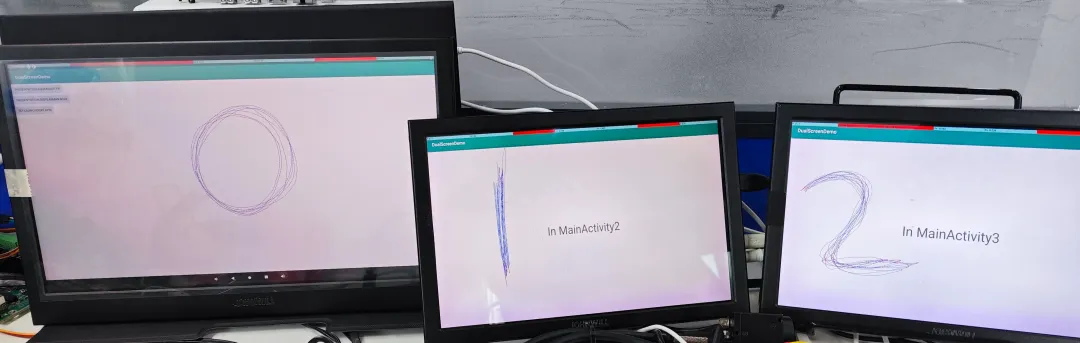
從Dumpsys input中可以看到 兩個(gè)ELAN Touchscreen分別對(duì)應(yīng)上了 displayId 0、1和 2。分別在三個(gè)觸摸屏上劃線,對(duì)應(yīng)的觸摸屏分別在指定的屏幕上劃線有效。
產(chǎn)品介紹
觸覺智能RK3576開發(fā)板,型號(hào)IDO-EVB7608-V1。助力全國產(chǎn)高階應(yīng)用!支持工業(yè)級(jí)攝像機(jī)高清圖像輸入與4K HDMI超清錄屏,賦能工控視覺、AIOT等場(chǎng)景;8核與6T高算力,流暢運(yùn)行視頻、AI應(yīng)用及多任務(wù)處理,兼顧低功耗與工業(yè)穩(wěn)定性,全能型高階方案就選TA!
-
開發(fā)板
+關(guān)注
關(guān)注
26文章
6326瀏覽量
119093 -
三屏顯示
+關(guān)注
關(guān)注
0文章
5瀏覽量
7869 -
rk3576
+關(guān)注
關(guān)注
1文章
275瀏覽量
1623
發(fā)布評(píng)論請(qǐng)先 登錄
如何移植EtherCAT Igh--基于米爾RK3576開發(fā)板
【米爾RK3576開發(fā)板評(píng)測(cè)】帶你初步了解米爾RK3576這塊開發(fā)板
【米爾RK3576開發(fā)板評(píng)測(cè)】+項(xiàng)目名稱【米爾RK3576開發(fā)板評(píng)測(cè)】一個(gè)視頻和你共同認(rèn)識(shí)一下米爾RK3576開發(fā)板
國產(chǎn)開發(fā)板的端側(cè)AI測(cè)評(píng)-基于米爾瑞芯微RK3576
Onenet云網(wǎng)關(guān)方案應(yīng)用--基于米爾瑞芯微RK3576開發(fā)板
【作品合集】米爾RK3576開發(fā)板測(cè)評(píng)
有獎(jiǎng)丨米爾 瑞芯微RK3576開發(fā)板免費(fèi)試用

追加名額丨米爾瑞芯微RK3576開發(fā)板有獎(jiǎng)試用
瑞芯微平臺(tái)Android系統(tǒng)串口測(cè)試方法,觸覺智能RK3562開發(fā)板演示

RK3576有多強(qiáng)?實(shí)測(cè)三屏八攝像頭輕松搞定
瑞芯微RK3576與RK3576S有什么區(qū)別,性能參數(shù)配置與型號(hào)差異解析



 工商網(wǎng)監(jiān)
評(píng)論