


 OpenVINO C#如何運行YOLO11實例分割模型

來源:OpenCV學堂
OpenVINO2025 C#支持
開源的支持項目來自顏國進老師貢獻,已經被OpenVINO官方收錄,項目網址:
https://gitee.com/linbei_cht/OpenVINO-CSharp-API
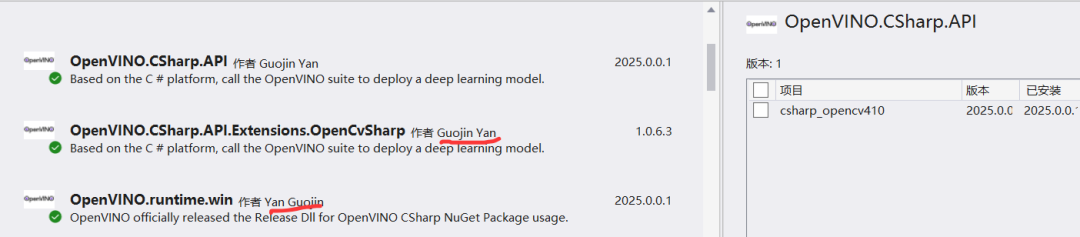
安裝非常容易,只要在VS2022里面點擊一下即可安裝。最新版本已經是OpenVINO2025支持。
YOLO11實例分割
YOLO11是YOLOv5跟YOLOv8作者推出最新升級版本模型,支持分類、檢測、分割、姿態評估、OBB。這里以YOLO11實例分割模型為例,演示OpenVINO C#如何運行,YOLO11-seg模型的輸入與輸出。
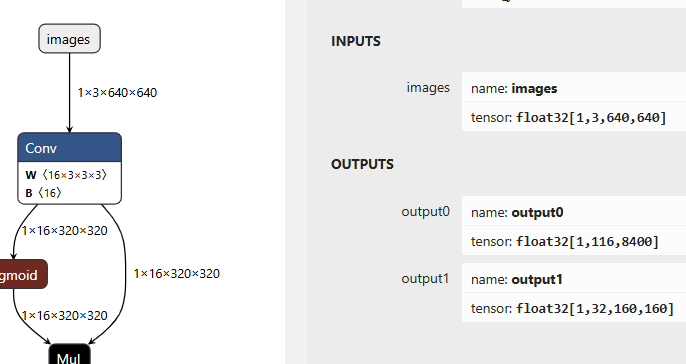
代碼是我在OpenVINO-CSharp-API作者開源的YOLOv8對象檢測的代碼基礎上修改而成。調用檢測代碼如下:
publicvoidDetect()
{
 // Set the video path and model path
 stringvideo_path="D:/images/video/play_scoers.mp4";
 stringmodel_path="D:/python/yolov5-7.0/yolo11n-seg.onnx";
 // Create a new Core object and read the model
 Corecore=newCore();
 Modelmodel=core.read_model(model_path);
 CompiledModelcompiled_model=core.compile_model(model,"GPU");
 // Create a list of InferRequest objects
  Listrequests =newList{ compiled_model.create_infer_request(), compiled_model.create_infer_request() };
 // Create a new VideoCapture object and read the video
 VideoCapturecapture=newVideoCapture(video_path);
 if(!capture.IsOpened())
  {
    Console.WriteLine("Error: Video not found!");
   return;
  }
 Matframe=newMat();
 Matnext_frame=newMat();
  capture.Read(frame);
 floatscale=0.0f;
 float[] input_data = preprocess(frame, out scale);
  requests[0].get_input_tensor().set_data(input_data);
  requests[0].start_async();
 Stopwatchsw=newStopwatch();
 float[] total_infs =newfloat[3];
  ListclassList = File.ReadAllLines("D:/python/yolov5-7.0/classes.txt").Select(line => line.Trim()).ToList();
 while(true)
  {
   if(!capture.Read(next_frame))
    {
     break;
    }
    sw.Restart();
    input_data = preprocess(frame, out scale);
    requests[1].get_input_tensor().set_data(input_data);
    requests[1].start_async();
    requests[0].wait();
   float[] det_data = requests[0].get_tensor("output0").get_data(8400*116);
   float[] seg_data = requests[0].get_tensor("output1").get_data(32*160*160);
   Matrgb_mask=newMat(frame.Size(), frame.Type());
   DetResultresult=postprocess(det_data, seg_data, scale, rgb_mask);
    sw.Stop();
    total_infs[0] = sw.ElapsedMilliseconds;
    Cv2.PutText(frame,"Inference: "+ (1000.0/ total_infs[0]).ToString("0.00") +"FPS "+ (total_infs[0]).ToString("0.00") +"ms",newOpenCvSharp.Point(20,40), HersheyFonts.HersheyPlain,2,newScalar(255,0,255),2);
    result.update_lable(classList);
    Visualize.draw_det_result(result, frame);
    Cv2.AddWeighted(frame,0.5, rgb_mask,0.5,0, frame);
    Cv2.ImShow("C# YOLO11-OpenVINO-Seg演示 - OpenCV學堂", frame);
   // Press 'ESC' to exit the program
   if(Cv2.WaitKey(1) ==27)
    {
     break;
    }
    swap(requests);
    frame = next_frame;
    rgb_mask.Release();
  }
}
后處理實現細節
這個實現最大的坑在后處理部分,要基于全局編碼信息乘以每個檢測BOX區域的編碼信息,才可以解碼得到每個BOX對象的掩膜。實現的代碼如下:
Matroi_mask=roi_masks[index];
Matm=roi_mask * mask_info;
for(intcol=0; col < m.Cols; col++)
{
? ? m.At(0, col) = sigmoid_function(m.At(0, col));
}
最后根據得到掩膜直接設置BOX區域的顏色即可,代碼如下:
rgb_mask[box].SetTo(new Scalar(0,0,255), box_m);
re.add(classIds[index], confidences[index], positionBoxes[index]);
然后把得到RGB彩色掩膜圖像跟BOX框繪制圖像相加記得到最終輸出結果圖像。
聲明:本文內容及配圖由入駐作者撰寫或者入駐合作網站授權轉載。文章觀點僅代表作者本人,不代表電子發燒友網立場。文章及其配圖僅供工程師學習之用,如有內容侵權或者其他違規問題,請聯系本站處理。
舉報投訴
-
開源
+關注
關注
3文章
4290瀏覽量
46359 -
模型
+關注
關注
1文章
3802瀏覽量
52224 -
代碼
+關注
關注
30文章
4974瀏覽量
74263 -
OpenCV
+關注
關注
33文章
652瀏覽量
45029
原文標題:C# YOLO11-OpenVINO實例分割
文章出處:【微信號:英特爾物聯網,微信公眾號:英特爾物聯網】歡迎添加關注!文章轉載請注明出處。
發布評論請先 登錄
相關推薦
熱點推薦
愛芯元智攜手合作伙伴M5Stack亮相YOLO Vision 2025
,現場展示了Ultralytics YOLO11高精度模型的高效端側部署,因其在邊緣AI計算領域的高性能、低功耗的硬實力,成為關注焦點。
如何精準驅動菜品識別模型--基于米爾瑞芯微RK3576邊緣計算盒
/rknn_toolkit2-2.3.2-cp310-cp310-manylinux_2_17_aarch64.manylinux2014_aarch64.whl
3. 模型轉換
rknn_model_zoo中包含了很多官方已經適配的模型,包括
發表于 10-31 21:19
【飛凌OK-MX9596-C開發板試用】①開箱圖賞、跑分測試、yolo大模型三箭齊發
的 Python 庫,尤其以 YOLO(You Only Look Once) 系列模型為核心,提供了簡單易用的接口,支持目標檢測、實例分割、姿態估計等任務。本文將詳細介紹 ultra
發表于 10-07 18:53
如何進行YOLO模型轉換?
我目前使用的轉模型代碼如下
from ultralytics import YOLOimport cv2import timeimport nncaseimport# 加載預訓練的YOLO模型
發表于 08-14 06:03
這個套件讓樹莓派5運行幾乎所有YOLO模型!Conda 與 Ultralytics!
如何在樹莓派上設置YOLO計算機視覺?Conda與Ultralytics在本指南中,我們將學習如何使用Conda在樹莓派上安裝UltralyticsYOLO視覺套件。該套件將允許你運行Ultralytics支持的幾乎所有YOLO

RK3576 Yolov11訓練部署教程
1.Yolo11簡介YOLO11系列是YOLO家族中最先進的(SOTA)、最輕量級、最高效的模型,其表現優于其前輩。它由Ultralytics創建,該組織發布了YOLOv8,這是迄今為

RK3576 yolo11-seg訓練部署教程
1.yolov11-seg簡介yolov11-seg是YOLO(YouOnlyLookOnce)系列的最新成員,專為實時實例分割任務設計。它
基于RK3576開發板的yolov11-track多目標跟蹤部署教程
1.yolov11_track簡介(多目標跟蹤算法)YOLO11是UltralyticsYOLO系列實時物體檢測器的最新版本,重新定義了在尖端準確度、速度和效率方面的可能性。在前幾代YOLO版本
k230執行yolov11分割任務顯示“MPY: soft reboot”,是怎么回事?
]]# 初始化YOLO11實例yolo=YOLO11(task_type=\"segment\",mode=\"image\",kmodel_path
發表于 07-18 07:41
【HZ-RK3568開發板免費體驗】04 YOLOv11 模型轉換為RKNN并在板端部署
aarch64,目標模型yolo11
./build-linux.sh -t rk3568 -a aarch64 -d yolo11
編譯結果如下所示
3.3 部署并運行Demo
將
發表于 07-02 14:01
使用Openvino? GenAI運行Sdxl Turbo模型時遇到錯誤怎么解決?
使用 OpenVINO? GenAI 運行 SDXL Turbo 模型。
遇到的錯誤: RuntimeError :- Check ov_tokenizer || ov_detokenizer
Neither tokenizer
發表于 06-24 06:38
無法將Openvino? 2025.0與onnx運行時Openvino? 執行提供程序 1.16.2 結合使用,怎么處理?
使用OpenVINO?與英特爾 i5-8500 CPU 和超核處理器 630 iGPU 一起部署模型。
使用了 Microsoft.ML.OnnxRuntime.OpenVino
發表于 06-24 06:31
基于RK3576開發板的yolov11-track多目標跟蹤部署教程
YOLO11是 Ultralytics YOLO系列實時物體檢測器的最新版本,重新定義了在尖端準確度、速度和效率方面的可能性。在前幾代 YOLO 版本的顯著進步基礎上,YOLO11 在
RK3576 yolov11-seg訓練部署教程
yolov11-seg 是YOLO(You Only Look Once)系列的最新成員,專為實時實例分割任務設計。它在保持YOLO家族高效



 工商網監
工商網監
評論