


 配置Skywalking告警

目錄
OpenTracing規(guī)范
為什么需要OpenTracing
什么是一個Trace
一個典型的Trace案例
Skywalking
功能介紹
整體架構(gòu)
Tracing、Logging和Metrics
.NET6 對接 Skywalking
添加依賴
編輯Skywalking配置文件skyapm.json
在launchSettings.json文件配置SK
在startup.cs文件中添加
安裝CLI(SkyAPM.DotNet.CLI)
自動生成skyapm.json文件
手動編寫skyapm.json
自動生成Skyapm.json
獲取traceId
自定義調(diào)用鏈路的信息
部署Skywalking環(huán)境
對接.NET6 程序
接入微服務(wù)網(wǎng)關(guān)+后臺微服務(wù)
添加依賴
拷貝配置文件并簡單修改
在launchsettings.json添加環(huán)境變量
啟動訂單微服務(wù)
添加依賴
拷貝配置文件并簡單修改
在launchsettings.json添加環(huán)境變量
修改網(wǎng)關(guān)配置文件,添加OrderServiceInstance微服務(wù)的路由
啟動網(wǎng)關(guān)
網(wǎng)關(guān)接入
訂單微服務(wù)接入
用戶微服務(wù)接入
配置Skywalking告警
配置告警規(guī)則
查閱配置規(guī)則文件及配置規(guī)則解讀
修改告警規(guī)則
告警API編寫
OpenTracing規(guī)范
OpenTracing是一種分布式系統(tǒng)鏈路跟蹤的設(shè)計原則、規(guī)范、標準。類似JDBC的規(guī)范,主要為了提供一套標準的JDBC API。OpenTracing也是一樣,是為了統(tǒng)一提供一套鏈路追蹤的標準API,所制定的一種規(guī)范。OpenTracing通過提供平臺無關(guān)、廠商無關(guān)的API,使得開發(fā)人員能夠方便的添加(或更換)追蹤系統(tǒng)的實現(xiàn)。
為什么需要OpenTracing
OpenTracing通過提供平臺無關(guān)、廠商無關(guān)的API,使得開發(fā)人員能夠方便的添加(或更換)追蹤系統(tǒng)的實現(xiàn)。 OpenTracing提供了用于運營支撐系統(tǒng)的和針對特定平臺的輔助程序庫。
什么是一個Trace
在廣義上,一個trace代表了一個事務(wù)或者流程在(分布式)系統(tǒng)中的執(zhí)行過程。在OpenTracing標準中,trace是多個span組成的一個有向無環(huán)圖(DAG),每一個span代表trace中被命名并計時的連續(xù)性的執(zhí)行片段。
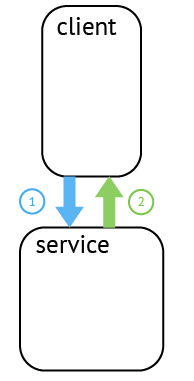
分布式追蹤中的每個組件都包含自己的一個或者多個span。例如,在一個常規(guī)的RPC調(diào)用過程中,OpenTracing推薦在RPC的客戶端和服務(wù)端,至少各有一個span,用于記錄RPC調(diào)用的客戶端和服務(wù)端信息。
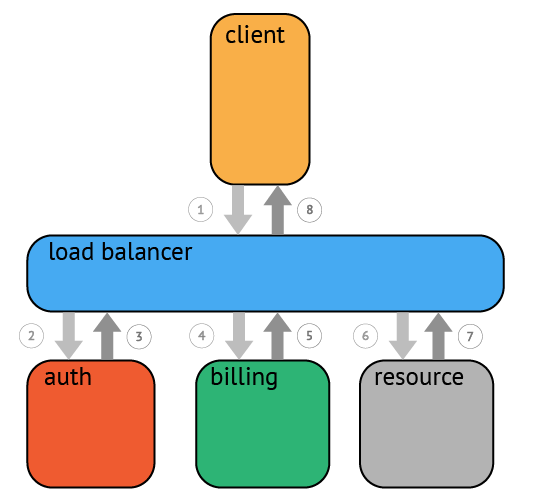
一個父級的span會顯示的并行或者串行啟動多個子span。在OpenTracing標準中,甚至允許一個子span有個多父span(例如:并行寫入的緩存,可能通過一次刷新操作寫入動作)。
一個典型的Trace案例
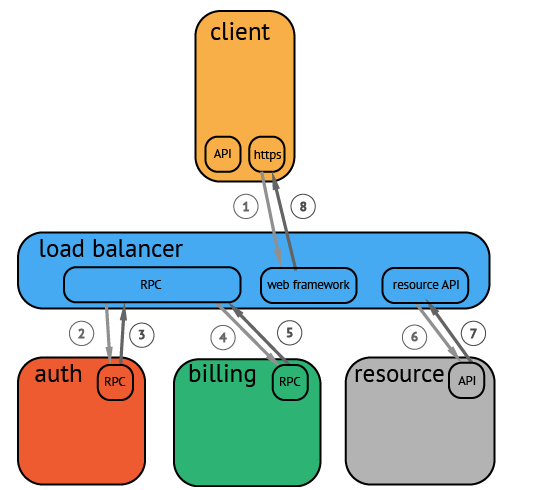
在一個分布式系統(tǒng)中,追蹤一個事務(wù)或者調(diào)用流一般如上圖所示。雖然這種圖對于看清各組件的組合關(guān)系是很有用的,但是,它不能很好顯示組件的調(diào)用時間,是串行調(diào)用還是并行調(diào)用,如果展現(xiàn)更復(fù)雜的調(diào)用關(guān)系,會更加復(fù)雜,甚至無法畫出這樣的圖。另外,這種圖也無法顯示調(diào)用間的時間間隔以及是否通過定時調(diào)用來啟動調(diào)用。一種更有效的展現(xiàn)一個典型的trace過程,如下圖所示:
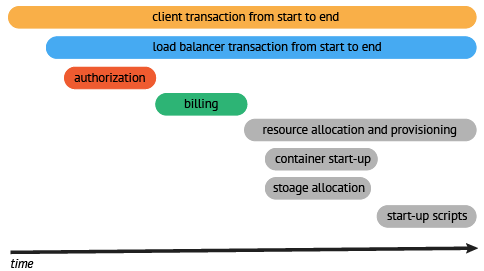
這種展現(xiàn)方式增加顯示了執(zhí)行時間的上下文,相關(guān)服務(wù)間的層次關(guān)系,進程或者任務(wù)的串行或并行調(diào)用關(guān)系。這樣的視圖有助于發(fā)現(xiàn)系統(tǒng)調(diào)用的關(guān)鍵路徑。通過關(guān)注關(guān)鍵路徑的執(zhí)行過程,項目團隊可能專注于優(yōu)化路徑中的關(guān)鍵位置,最大幅度的提升系統(tǒng)性能。例如:可以通過追蹤一個資源定位的調(diào)用情況,明確底層的調(diào)用情況,發(fā)現(xiàn)哪些操作有阻塞的情況。
Skywalking
Skywalking是一款A(yù)PM(Application Performance Management & Monitoring)系統(tǒng)。Skywalking是分布式系統(tǒng)應(yīng)用程序性能監(jiān)視工具,專為微服務(wù)、云原生架構(gòu)和基于容器(Docker、K8s、Mesos)架構(gòu)而設(shè)計。提供分布式追蹤、服務(wù)網(wǎng)格遙測分析、度量聚合和可視化一體化解決方案。
功能介紹
多種監(jiān)控手段。可以通過語言探針和 service mesh 獲得監(jiān)控是數(shù)據(jù)。
多個語言自動探針。包括 Java,.NET Core 和 Node.JS。
輕量高效。無需大數(shù)據(jù)平臺,和大量的服務(wù)器資源。
模塊化。UI、存儲、集群管理都有多種機制可選。
支持告警。
優(yōu)秀的可視化解決方案。
整體架構(gòu)
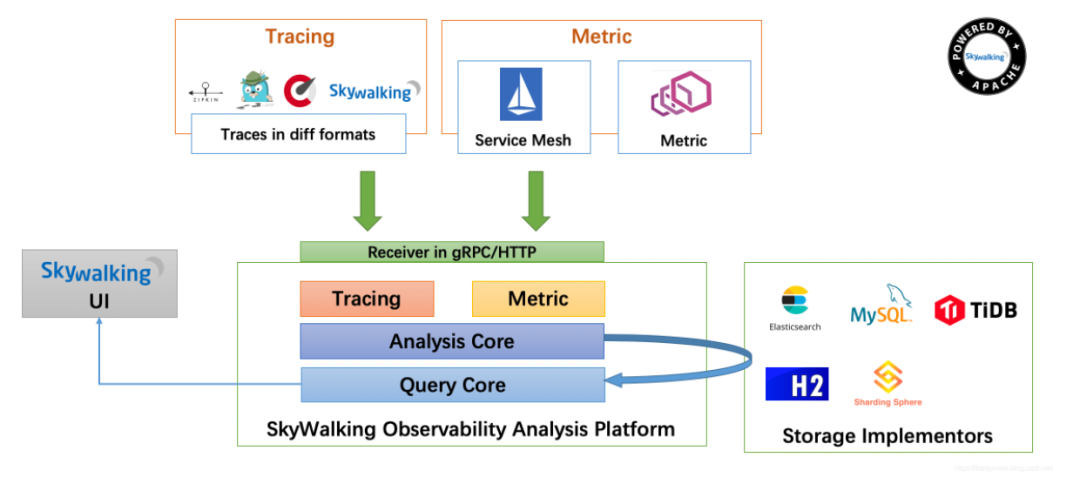
整個架構(gòu),分成上、下、左、右四部分:
探針基于不同的來源可能是不一樣的, 但作用都是收集數(shù)據(jù), 將數(shù)據(jù)格式化為 SkyWalking 適用的格式.
平臺后端是一個支持集群模式運行的后臺, 用于數(shù)據(jù)聚合, 數(shù)據(jù)分析以及驅(qū)動數(shù)據(jù)流從探針到用戶界面的流程. 平臺后端還提供了各種可插拔的能力, 如不同來源數(shù)據(jù)(如來自 Zipkin)格式化, 不同存儲系統(tǒng)以及集群管理. 你甚至還可以使用觀測分析語言來進行自定義聚合分析.
存儲是開放式的. 你可以選擇一個既有的存儲系統(tǒng), 如 ElasticSearch, H2 或 MySQL 集群(Sharding-Sphere 管理), 也可以選擇自己實現(xiàn)一個存儲系統(tǒng). 當然, 我們非常歡迎你貢獻新的存儲系統(tǒng)實現(xiàn).
用戶界面對于 SkyWalking 的最終用戶來說非常炫酷且強大. 同樣它也是可定制以匹配你已存在的后端的
Tracing、Logging和Metrics
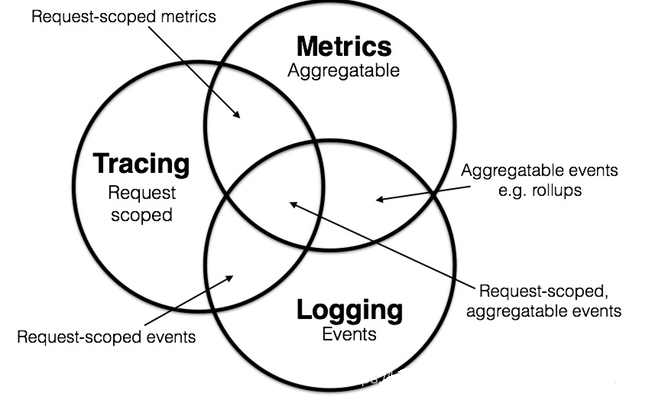
在微服務(wù)領(lǐng)域,很早以來就形成了Tracing、Logging和Metrics相輔相成,合力支撐多維度、多形態(tài)的監(jiān)控體系,三類監(jiān)控各有側(cè)重:
Tracing:它在單次請求的范圍內(nèi),處理信息。 任何的數(shù)據(jù)、元數(shù)據(jù)信息都被綁定到系統(tǒng)中的單個事務(wù)上。例如:一次調(diào)用遠程服務(wù)的RPC執(zhí)行過程;一次實際的SQL查詢語句;一次HTTP請求的業(yè)務(wù)性ID;
Logging:日志,不知道大家有沒有想過它的定義或者邊界。Logging即是記錄處理的離散事件,比如我們應(yīng)用的調(diào)試信息或者錯誤信息等發(fā)送到ES;審計跟蹤時間信息通過Kafka處理送到BigTable等數(shù)據(jù)倉儲等等,大多數(shù)情況下記錄的數(shù)據(jù)很分散,并且相互獨立,也許是錯誤信息,也許僅僅只是記錄當前的事件狀態(tài),或者是警告信息等等。
Metrics:當我們想知道我們服務(wù)的請求QPS是多少,或者當天的用戶登錄次數(shù)等等,這時我們可能需要將一部分事件進行聚合或計數(shù),也就是我們說的Metrics。可聚合性即是Metrics的特征,它們是一段時間內(nèi)某個度量(計數(shù)器或者直方圖)的原子或者是元數(shù)據(jù)。例如接收的HTTP數(shù)量可以被建模為計數(shù)器,每次的HTTP請求即是我們的度量元數(shù)據(jù),可以進行簡單的加法聚合,當持續(xù)了一段時間我們又可以建模為直方圖。
.NET6 對接 Skywalking
部署Skywalking環(huán)境
version: '3.3'
services:
  elasticsearch:
    image: docker.elastic.co/elasticsearch/elasticsearch:7.5.0
    container_name: elasticsearch
    restart: always
    ports:
      - 9200:9200
    environment:
      - discovery.type=single-node
      - bootstrap.memory_lock=true
      - "ES_JAVA_OPTS=-Xms256m -Xmx256m"
    ulimits:
      memlock:
        soft: -1
        hard: -1
  oap:
    image: apache/skywalking-oap-server:6.6.0-es7
    container_name: oap
    depends_on:
      - elasticsearch
    links:
      - elasticsearch
    restart: always
    ports:
      - 11800:11800
      - 12800:12800
    environment:
      SW_STORAGE: elasticsearch
      SW_STORAGE_ES_CLUSTER_NODES: elasticsearch:9200
  ui:
    image: apache/skywalking-ui:6.6.0
    container_name: ui
    depends_on:
      - oap
    links:
      - oap
    restart: always
    ports:
      - 8080:8080
    environment:
      SW_OAP_ADDRESS: http://oap:12800
安裝成功以后首頁地址:http://服務(wù)器IP:8080
對接.NET6 程序
添加依賴
編輯Skywalking配置文件skyapm.json
手動編寫skyapm.json
{
  "SkyWalking": {
    "ServiceName": "MySkyWalkingDemoTest",
    "Namespace": "",
    "HeaderVersions": [
      "sw8"
    ],
    "Sampling": {
      "SamplePer3Secs": -1,
      "Percentage": -1.0
    },
    "Logging": {
      "Level": "Information",
      "FilePath": "logs\skyapm-{Date}.log"
    },
    "Transport": {
      "Interval": 3000,
      "ProtocolVersion": "v8",
      "QueueSize": 30000,
      "BatchSize": 3000,
      "gRPC": {
        "Servers": "192.168.3.245:11800",
        "Timeout": 10000,
        "ConnectTimeout": 10000,
        "ReportTimeout": 600000,
        "Authentication": ""
      }
    }
  }
}
自動生成Skyapm.json
安裝CLI(SkyAPM.DotNet.CLI)
dotnet tool install -g SkyAPM.DotNet.CLI
自動生成skyapm.json文件
server name指的就是您剛才配置的SKYWALKING__SERVICENAME,server指的是您Skywalking的ip地址。執(zhí)行命令后,會自動生成一個skywalking.json 。
 dotnet skyapm config [service name] [server]:11800
 #eg: dotnet skyapm config MySkyWalking_OrderService 192.168.3.245:11800
SkyAPM Config 配置說明
ServiceName
服務(wù)名稱
Sampling
采樣配置節(jié)點
SamplePer3Secs 每3秒采樣數(shù)
Percentage 采樣百分比,例如10%采樣則配置為10
Logging
日志配置節(jié)點
Level 日志級別
FilePath 日志保存路徑
Transport
傳輸配置節(jié)點
Interval 每多少毫秒刷新
gRPC
gRPC配置節(jié)點
Servers gRPC地址,多個用逗號“,”
Timeout 創(chuàng)建gRPC鏈接的超時時間,毫秒
ConnectTimeout gRPC最長鏈接時間,毫秒
在launchSettings.json文件配置SK
"profiles": { // 項目
    "IIS Express": { // IIS部署項
      "commandName": "IISExpress",
      "launchBrowser": true,
      "launchUrl": "weatherforecast",
      "environmentVariables": {
        "ASPNETCORE_ENVIRONMENT": "Development",
        "ASPNETCORE_HOSTINGSTARTUPASSEMBLIES": "SkyAPM.Agent.AspNetCore",
        "SKYWALKING__SERVICENAME": "MySkyWalkingDemoTest"
      }
    },
    "SkyWalkingDemo": { // castrol部署項
      "commandName": "Project",
      "launchBrowser": true,
      "launchUrl": "weatherforecast",
      "applicationUrl": "http://localhost:5000",
      "environmentVariables": {
        "ASPNETCORE_ENVIRONMENT": "Development",
        "ASPNETCORE_HOSTINGSTARTUPASSEMBLIES": "SkyAPM.Agent.AspNetCore", // 必須配置
        "SKYWALKING__SERVICENAME": "MySkyWalkingDemoTest" // 必須配置,在skywalking做標識
      }
    }
  }
在startup.cs文件中添加
public void ConfigureServices(IServiceCollection services)
{
    services.AddSkyApmExtensions(); // 添加Skywalking相關(guān)配置
    services.AddControllers();
    services.AddHttpClient();
}
獲取traceId
private readonly IEntrySegmentContextAccessor segContext;
public SkywalkingController(IEntrySegmentContextAccessor segContext)
{
this.segContext = segContext;
}
///
/// 獲取鏈接追蹤ID
///
///
自定義調(diào)用鏈路的信息
[HttpGet] public async TaskSkywalkingTest() { //獲取全局的skywalking的TracId var TraceId = _segContext.Context.TraceId; Console.WriteLine($"TraceId={TraceId}"); _segContext.Context.Span.AddLog(LogEvent.Message($"SkywalkingTest---Worker running at: {DateTime.Now}")); System.Threading.Thread.Sleep(1000); _segContext.Context.Span.AddLog(LogEvent.Message($"SkywalkingTest---Worker running at--end: {DateTime.Now}")); return Ok($"Ok,SkywalkingTest-TraceId={TraceId} "); }
接入微服務(wù)網(wǎng)關(guān)+后臺微服務(wù)
網(wǎng)關(guān)接入
添加依賴
拷貝配置文件并簡單修改
{
  "SkyWalking": {
    "ServiceName": "MySkyWalking_Gateway", #修改名稱就OK
    "Namespace": "",
    "HeaderVersions": [
      "sw8"
    ],
    "Sampling": {
      "SamplePer3Secs": -1,
      "Percentage": -1.0
    },
    "Logging": {
      "Level": "Debug",
      "FilePath": "logs\skyapm-{Date}.log"
    },
    "Transport": {
      "Interval": 3000,
      "ProtocolVersion": "v8",
      "QueueSize": 30000,
      "BatchSize": 3000,
      "gRPC": {
        "Servers": "192.168.3.245:11800",
        "Timeout": 10000,
        "ConnectTimeout": 10000,
        "ReportTimeout": 600000,
        "Authentication": ""
      }
    }
  }
}
在launchsettings.json添加環(huán)境變量
"profiles": {
    "Zhaoxi.MicroService.GatewayCenter": {
      "commandName": "Project",
      "dotnetRunMessages": true,
      "launchBrowser": true,
      "launchUrl": "swagger",
      "applicationUrl": "https://localhost:7141;http://localhost:5141",
      "environmentVariables": {
        "ASPNETCORE_ENVIRONMENT": "Development",
        "ASPNETCORE_HOSTINGSTARTUPASSEMBLIES": "SkyAPM.Agent.AspNetCore", #添加HOST變量
        "SKYWALKING__SERVICENAME": "MySkyWalking_Gateway" #添加服務(wù)名稱
      }
    },
    "IIS Express": {
      "commandName": "IISExpress",
      "launchBrowser": true,
      "launchUrl": "swagger",
      "environmentVariables": {
        "ASPNETCORE_ENVIRONMENT": "Development",
        "ASPNETCORE_HOSTINGSTARTUPASSEMBLIES": "SkyAPM.Agent.AspNetCore",
        "SKYWALKING__SERVICENAME": "MySkyWalking_Gateway"
      }
    }
  }
修改網(wǎng)關(guān)配置文件,添加OrderServiceInstance微服務(wù)的路由
{
    "DownstreamPathTemplate": "/api/{url}", //服務(wù)地址--url變量
    "DownstreamScheme": "http",
    "UpstreamPathTemplate": "/microservice/{url}", //網(wǎng)關(guān)地址--url變量
    "UpstreamHttpMethod": [ "Get", "Post" ],
    "UseServiceDiscovery": true,
    "ServiceName": "OrderService", //consul服務(wù)名稱
    "LoadBalancerOptions": {
        "Type": "RoundRobin" //輪詢
}
啟動網(wǎng)關(guān)
dotnet run --urls=http://*:6299
訂單微服務(wù)接入
添加依賴
拷貝配置文件并簡單修改
{
  "SkyWalking": {
    "ServiceName": "MySkyWalking_OrderService",
    "Namespace": "",
    "HeaderVersions": [
      "sw8"
    ],
    "Sampling": {
      "SamplePer3Secs": -1,
      "Percentage": -1.0
    },
    "Logging": {
      "Level": "Debug",
      "FilePath": "logs\skyapm-{Date}.log"
    },
    "Transport": {
      "Interval": 3000,
      "ProtocolVersion": "v8",
      "QueueSize": 30000,
      "BatchSize": 3000,
      "gRPC": {
        "Servers": "192.168.3.245:11800",
        "Timeout": 10000,
        "ConnectTimeout": 10000,
        "ReportTimeout": 600000,
        "Authentication": ""
      }
    }
  }
}
在launchsettings.json添加環(huán)境變量
"profiles": {
    "Zhaoxi.MicroService.OrderServiceInstance": {
      "commandName": "Project",
      "dotnetRunMessages": true,
      "launchBrowser": true,
      "launchUrl": "swagger",
      "applicationUrl": "http://192.168.3.105:7900",
      "environmentVariables": {
        "ASPNETCORE_ENVIRONMENT": "Development",
        "ASPNETCORE_HOSTINGSTARTUPASSEMBLIES": "SkyAPM.Agent.AspNetCore",
        "SKYWALKING__SERVICENAME": "MySkyWalking_OrderService"
      }
    },
    "IIS Express": {
      "commandName": "IISExpress",
      "launchBrowser": true,
      "launchUrl": "swagger",
      "environmentVariables": {
        "ASPNETCORE_ENVIRONMENT": "Development"
      }
    }
  }
啟動訂單微服務(wù)
dotnet run
用戶微服務(wù)接入
步驟和訂單微服務(wù)一樣
配置Skywalking告警
配置告警規(guī)則
docker exec -it 12f053748e85 /bin/sh
ls -l
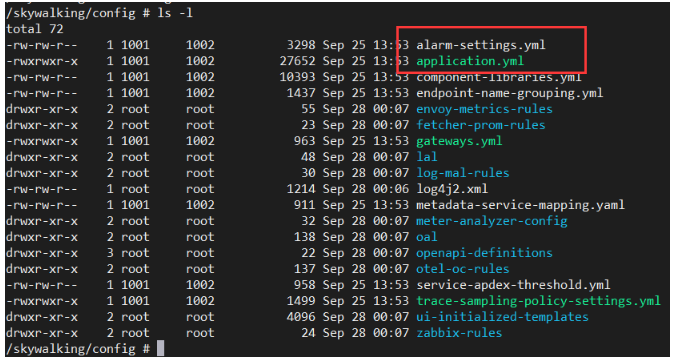
查閱配置規(guī)則文件及配置規(guī)則解讀
通過cat alarm-settings.yml可以查閱文件內(nèi)容,如下:
docker cp 12f053748e85:/skywalking/config/alarm-settings.yml .
# Sample alarm rules.
rules:
  # Rule unique name, must be ended with `_rule`.
  service_resp_time_rule:
    metrics-name: service_resp_time
    op: ">"
    threshold: 1000
    period: 10
    count: 3
    silence-period: 5
    message: Response time of service {name} is more than 1000ms in 3 minutes of last 10 minutes.
  service_sla_rule:
    # Metrics value need to be long, double or int
    metrics-name: service_sla
    op: "<"
    threshold: 8000
    # The length of time to evaluate the metrics
    period: 10
    # How many times after the metrics match the condition, will trigger alarm
    count: 2
    # How many times of checks, the alarm keeps silence after alarm triggered, default as same as period.
    silence-period: 3
    message: Successful rate of service {name} is lower than 80% in 2 minutes of last 10 minutes
  service_resp_time_percentile_rule:
    # Metrics value need to be long, double or int
    metrics-name: service_percentile
    op: ">"
    threshold: 1000,1000,1000,1000,1000
    period: 10
    count: 3
    silence-period: 5
    message: Percentile response time of service {name} alarm in 3 minutes of last 10 minutes, due to more than one condition of p50 > 1000, p75 > 1000, p90 > 1000, p95 > 1000, p99 > 1000
  service_instance_resp_time_rule:
    metrics-name: service_instance_resp_time
    op: ">"
    threshold: 1000
    period: 10
    count: 2
    silence-period: 5
    message: Response time of service instance {name} is more than 1000ms in 2 minutes of last 10 minutes
  database_access_resp_time_rule:
    metrics-name: database_access_resp_time
    threshold: 1000
    op: ">"
    period: 10
    count: 2
    message: Response time of database access {name} is more than 1000ms in 2 minutes of last 10 minutes
  endpoint_relation_resp_time_rule:
    metrics-name: endpoint_relation_resp_time
    threshold: 1000
    op: ">"
    period: 10
    count: 2
    message: Response time of endpoint relation {name} is more than 1000ms in 2 minutes of last 10 minutes
#  Active endpoint related metrics alarm will cost more memory than service and service instance metrics alarm.
#  Because the number of endpoint is much more than service and instance.
#
#  endpoint_avg_rule:
#    metrics-name: endpoint_avg
#    op: ">"
#    threshold: 1000
#    period: 10
#    count: 2
#    silence-period: 5
#    message: Response time of endpoint {name} is more than 1000ms in 2 minutes of last 10 minutes

webhooks:
#  - http://127.0.0.1/notify/
#  - http://127.0.0.1/go-wechat/
規(guī)則常用指標解讀:
rule name: 規(guī)則名稱,必須唯一,必須以_rule結(jié)尾;
metrics name: oal(Observability Analysis Language)腳本中的度量名;名稱在SkyWalking后端服務(wù)中已經(jīng)定義,進入容器skywalking-oap之后,進入如下目錄就可以找到。
include names: 本規(guī)則告警生效的實體名稱,如服務(wù)名,終端名;
exclude-names:將此規(guī)則作用于不匹配的實體名稱上,如服務(wù)名,終端名;
threshold: 閾值,可以是一個數(shù)組,即可以配置多個值;
op: 操作符, 可以設(shè)定 >, <, =;
period: 多久檢查一次當前的指標數(shù)據(jù)是否符合告警規(guī)則;以分鐘為單位
count: 超過閾值條件,達到count次數(shù),觸發(fā)告警;
silence period:在同一個周期,指定的silence period時間內(nèi),忽略相同的告警消息;
更多告警規(guī)則詳情,請參照這個地址:https://github.com/apache/skywalking/blob/master/docs/en/setup/backend/backend-alarm.md
修改告警規(guī)則
rules:
service_test_sal_rule:
# 指定指標名稱
    metrics-name: service_test_sal
    # 小于
    op: "<"
    # 指定閾值
    threshold: 8000
    # 每2分鐘檢測告警該規(guī)則
    period: 2
    # 觸發(fā)1次規(guī)則就告警
    count: 1
    # 設(shè)置三分鐘內(nèi)容相同告警,不重復(fù)告警
    silence-period: 3
    # 配置告警信息
    message: Successful rate of service {name} is lower than 80% in 2 minutes of last 10 minutes
概要:服務(wù)成功率在過去2分鐘內(nèi)低于80%
告警API編寫
本質(zhì)還是SkyWalking根據(jù)規(guī)則進行檢查,如果符合規(guī)則條件,就通過WebHook、gRPCHook、WeChat Hook、Dingtalk Hook等方式進行消息通知;接收到告警數(shù)據(jù)信息之后,可以自行處理消息。這里為了方便,就采用WebHook的方式進行演示,即觸發(fā)告警條件之后,SkyWalking會調(diào)用配置的WebHook 接口,并傳遞對應(yīng)的告警信息;
定義數(shù)據(jù)模型
public class AlarmMsg
{
    public int scopeId { get; set; }
    public string? scope { get; set; }
    public string? name { get; set; }
    public string? id0 { get; set; }
    public string? id1 { get; set; }
    public string? ruleName { get; set; }
    public string? alarmMessage { get; set; }
}
定義WebHook調(diào)用API
////// 告警API /// /// ///[HttpPost("AlarmMsg")] public void AlarmMsg(List msgs) { string msg = "觸發(fā)告警:"; msg += msgs.FirstOrDefault()?.alarmMessage; Console.WriteLine(msg); SendMail(msg); }
配置webHook
http://192.168.3.105:7900/api/Skywalking/AlarmMsg
# Sample alarm rules.
rules:
  # Rule unique name, must be ended with `_rule`.
  service_resp_time_rule:
    metrics-name: service_resp_time
    op: ">"
    threshold: 1000
    period: 10
    count: 3
    silence-period: 5
    message: Response time of service {name} is more than 1000ms in 3 minutes of last 10 minutes.
  service_sla_rule:
    # Metrics value need to be long, double or int
    metrics-name: service_sla
    op: "<"
    threshold: 8000
    # The length of time to evaluate the metrics
    period: 10
    # How many times after the metrics match the condition, will trigger alarm
    count: 2
    # How many times of checks, the alarm keeps silence after alarm triggered, default as same as period.
    silence-period: 3
    message: Successful rate of service {name} is lower than 80% in 2 minutes of last 10 minutes
  service_resp_time_percentile_rule:
    # Metrics value need to be long, double or int
    metrics-name: service_percentile
    op: ">"
    threshold: 1000,1000,1000,1000,1000
    period: 10
    count: 3
    silence-period: 5
    message: Percentile response time of service {name} alarm in 3 minutes of last 10 minutes, due to more than one condition of p50 > 1000, p75 > 1000, p90 > 1000, p95 > 1000, p99 > 1000
  service_instance_resp_time_rule:
    metrics-name: service_instance_resp_time
    op: ">"
    threshold: 1000
    period: 10
    count: 2
    silence-period: 5
    message: Response time of service instance {name} is more than 1000ms in 2 minutes of last 10 minutes
  database_access_resp_time_rule:
    metrics-name: database_access_resp_time
    threshold: 1000
    op: ">"
    period: 10
    count: 2
    message: Response time of database access {name} is more than 1000ms in 2 minutes of last 10 minutes
  endpoint_relation_resp_time_rule:
    metrics-name: endpoint_relation_resp_time
    threshold: 1000
    op: ">"
    period: 10
    count: 2
    message: Response time of endpoint relation {name} is more than 1000ms in 2 minutes of last 10 minutes
#  Active endpoint related metrics alarm will cost more memory than service and service instance metrics alarm.
#  Because the number of endpoint is much more than service and instance.
#
#  endpoint_avg_rule:
#    metrics-name: endpoint_avg
#    op: ">"
#    threshold: 1000
#    period: 10
#    count: 2
#    silence-period: 5
#    message: Response time of endpoint {name} is more than 1000ms in 2 minutes of last 10 minutes

webhooks:
  - http://192.168.3.105:7900/api/Skywalking/AlarmMsg
#  - http://127.0.0.1/go-wechat/
rules:
  # 告警規(guī)則名稱,必須唯一,以_rule結(jié)尾
  service_sla_rule:
     # 指定metrics-name
     metrics-name: service_sla
     # 小于
     op: "<"
     # 指定閾值
     threshold: 8000
     # 10分鐘檢測一次告警規(guī)則
     period: 10
     # 觸發(fā)2次告警規(guī)則就告警
     count: 2
     # 設(shè)置的3分鐘時間段有相同的告警,不重復(fù)告警.
     silence-period: 3
      # 配置告警消息
     message: Successful rate of service {name} is lower than 80% in 2 minutes of last 10 minutes
webhooks:
- http://192.168.3.105:7900/api/Skywalking/AlarmMsg
-
網(wǎng)關(guān)
+關(guān)注
關(guān)注
9文章
6782瀏覽量
56260 -
Trace
+關(guān)注
關(guān)注
0文章
20瀏覽量
11023
原文標題:配置Skywalking告警
文章出處:【微信號:magedu-Linux,微信公眾號:馬哥Linux運維】歡迎添加關(guān)注!文章轉(zhuǎn)載請注明出處。
發(fā)布評論請先 登錄
Prometheus告警規(guī)則編寫與Alertmanager通知配置實戰(zhàn)
電能質(zhì)量在線監(jiān)測裝置的多級告警閾值功能是如何實現(xiàn)的?
電能質(zhì)量在線監(jiān)測裝置可設(shè)置多級告警閾值嗎?
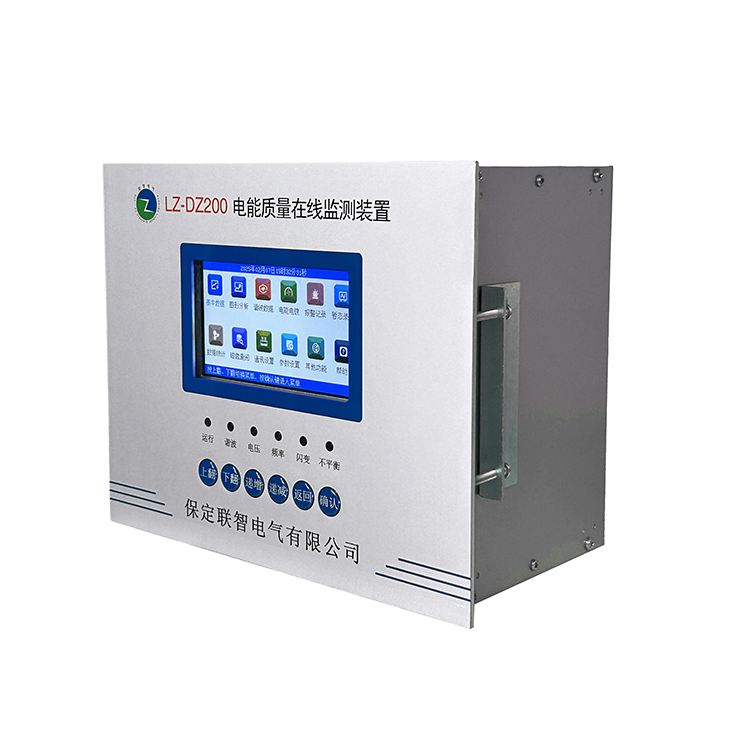
電能質(zhì)量在線監(jiān)測裝置故障會發(fā)微信告警嗎?
恒訊科技解析:服務(wù)器監(jiān)控與告警設(shè)置—企業(yè)必備指南
宏集分享 | 集中告警管理如何提升設(shè)施安全性?

工業(yè)設(shè)備告警管理平臺具備有什么功能
EM儲能網(wǎng)關(guān) ZWS智慧儲能云應(yīng)用(18) — 電站告警

M6000-S License授權(quán)失效告警問題

大彩講堂:VisualTFT軟件modbus協(xié)議下的告警應(yīng)用

車間通風(fēng)系統(tǒng)監(jiān)控告警物聯(lián)網(wǎng)解決方案
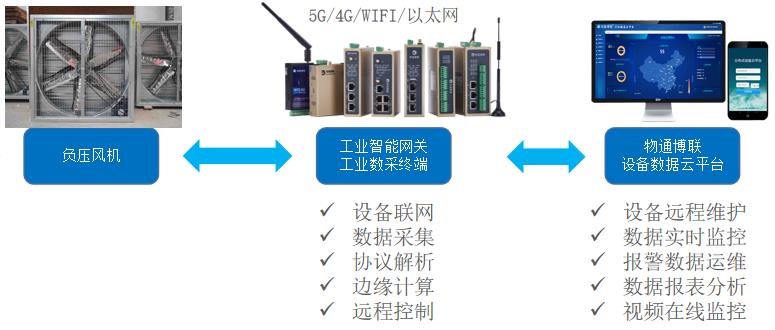
智能電纜通斷采集機,實時監(jiān)測精準告警
TECS OpenStack資源池虛機寫磁盤時延高告警的問題處理



 工商網(wǎng)監(jiān)
評論