


 ElfBoard開(kāi)源項(xiàng)目|車(chē)牌識(shí)別項(xiàng)目技術(shù)文檔

車(chē)牌識(shí)別項(xiàng)目基于百度智能云平臺(tái),旨在利用其強(qiáng)大的OCR服務(wù)實(shí)現(xiàn)車(chē)牌號(hào)碼的自動(dòng)識(shí)別。選擇百度智能云的原因是其高效的API接口和穩(wěn)定的服務(wù)質(zhì)量,能夠幫助開(kāi)發(fā)者快速實(shí)現(xiàn)車(chē)牌識(shí)別應(yīng)用。
這個(gè)開(kāi)源項(xiàng)目使用攝像頭捕捉圖像后,通過(guò)集成百度OCR服務(wù)的API,能夠輕松識(shí)別圖像中的車(chē)牌號(hào)碼,并將識(shí)別結(jié)果實(shí)時(shí)顯示在Qt界面上。
功能特性
1、圖片處理和OCR識(shí)別:使用百度OCR服務(wù),能夠通過(guò)API輕松識(shí)別圖片中的車(chē)牌號(hào)碼。
2、攝像頭實(shí)時(shí)采集圖像并保存:使用Qt設(shè)計(jì)了直觀的用戶(hù)界面,控制USB攝像頭的打開(kāi)、關(guān)閉以及實(shí)時(shí)顯示攝像頭捕獲的視頻流,并將采集到的視頻流保存為圖像。
環(huán)境說(shuō)明
1、開(kāi)發(fā)環(huán)境操作系統(tǒng):Ubuntu18.04 64位版
2、交叉編譯工具鏈:arm-poky-linux-gnueabi-gcc 5.3.0
3、開(kāi)發(fā)板使用Bootloader版本:u-boot-2016.03
4、開(kāi)發(fā)板內(nèi)核版本:linux-4.1.155、開(kāi)發(fā)板移植QT版本:qt5.6.2
圖片處理和OCR識(shí)別
百度智能云網(wǎng)址:cloud.baidu.com
本次車(chē)牌識(shí)別的方案是通過(guò)百度智能云平臺(tái)進(jìn)行實(shí)現(xiàn)的。首先進(jìn)入百度智能云網(wǎng)頁(yè)- >選擇文字識(shí)別 - > 車(chē)牌識(shí)別。
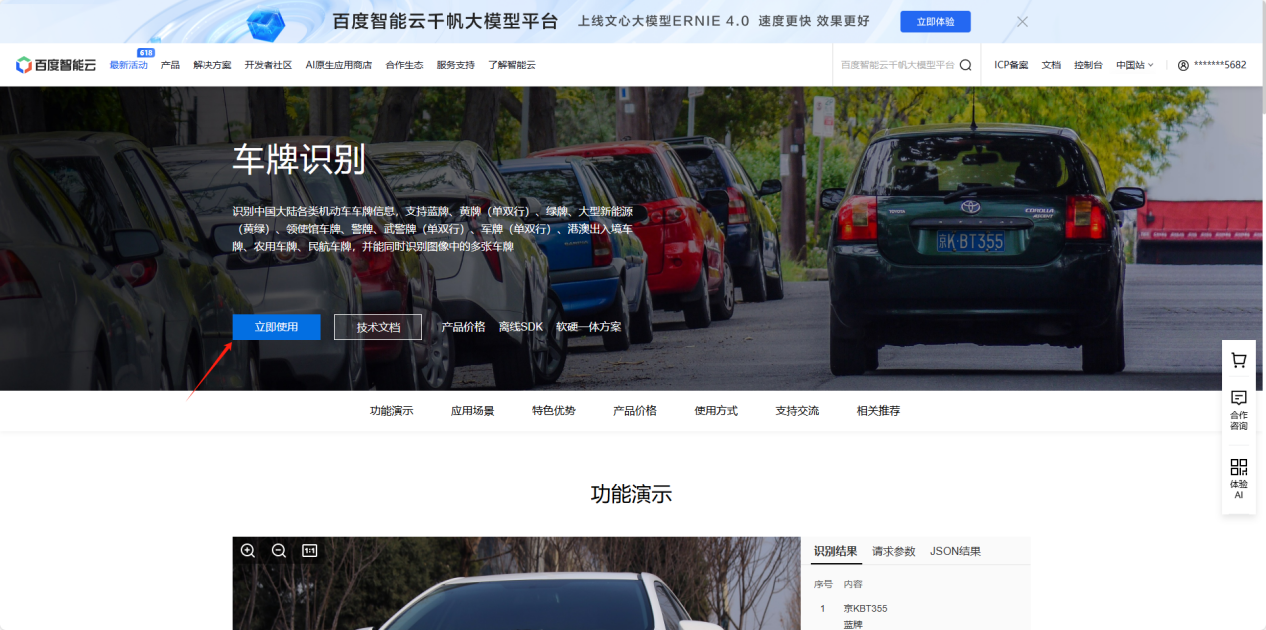
進(jìn)入車(chē)牌識(shí)別頁(yè)面之后可通過(guò)閱讀技術(shù)文檔來(lái)學(xué)習(xí)車(chē)牌識(shí)別的使用方法。
在線識(shí)別車(chē)牌圖片
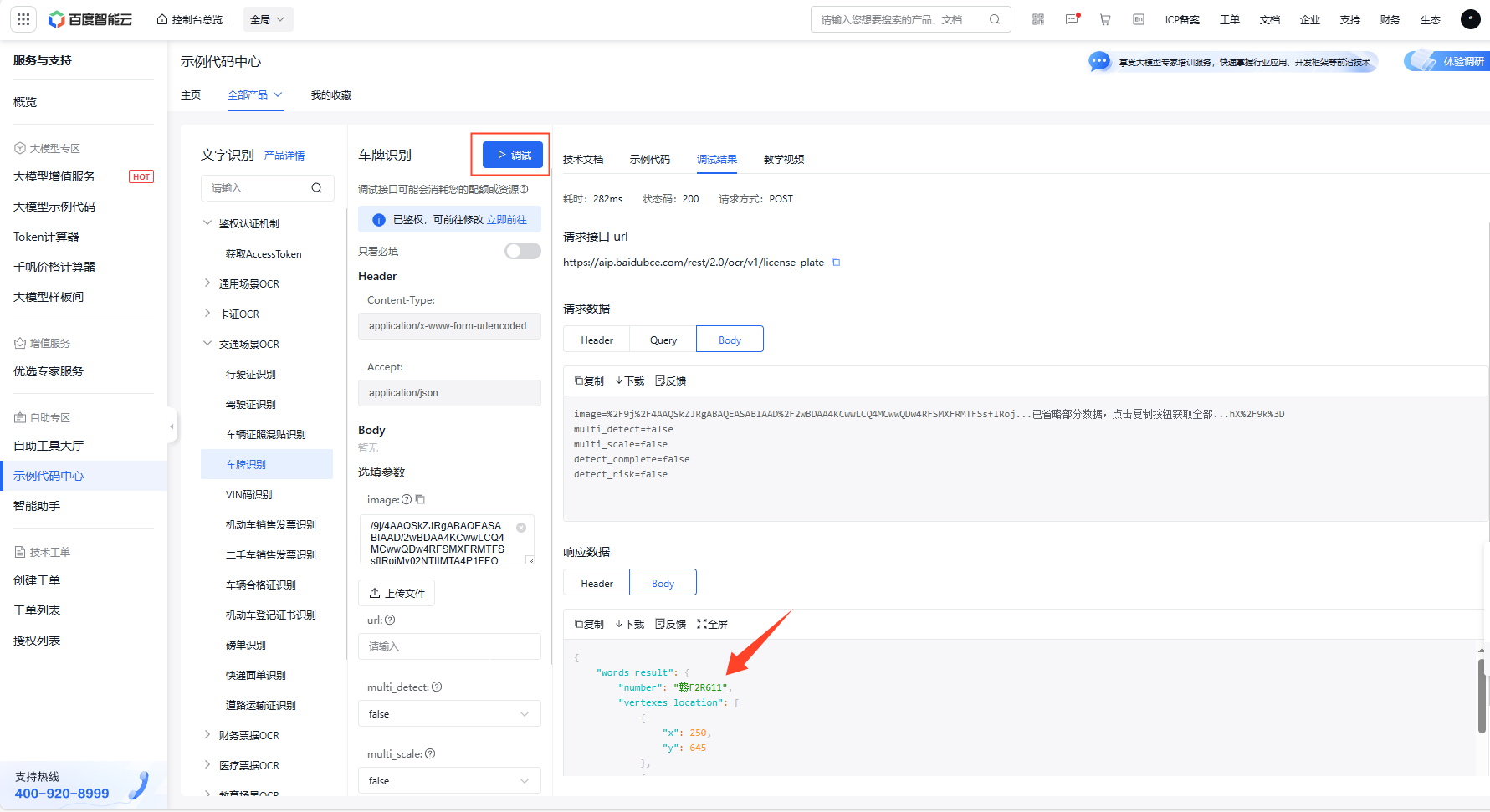
在本地實(shí)現(xiàn)之前可通過(guò)平臺(tái)提供的在線驗(yàn)證方法進(jìn)行驗(yàn)證,如下圖,需要在旁邊輸入一張車(chē)牌圖片的base64 編碼的字符串或者選擇上傳一張車(chē)牌圖片,即可進(jìn)行在線識(shí)別。視頻教程:cloud.baidu.com/video-center/video/741
識(shí)別本地車(chē)牌圖片
本地實(shí)現(xiàn)車(chē)牌識(shí)別的方法需要將識(shí)別代碼拷貝到本地,并需要實(shí)現(xiàn)一個(gè)將圖片轉(zhuǎn)換為base64編碼的函數(shù)。需要輸入自己的access_token(通過(guò)閱讀文檔可知怎么獲取)。
#include
#include
#include
#include
#include
#include
#include #include #include #include #include ? inline size_t onWriteData(void * buffer, size_t size, size_t nmemb, void * userp) { std::string * str = dynamic_cast((std::string *)userp);
str->append((char *)buffer, size * nmemb); return nmemb;
} ? std::string getFileBase64Content(const char * path, bool urlencoded=false) { const std::string base64_chars = "ABCDEFGHIJKLMNOPQRSTUVWXYZ" "abcdefghijklmnopqrstuvwxyz" "0123456789+/"; std::string ret;
int i = 0; int j = 0;
unsigned char char_array_3[3]; unsigned char char_array_4[4]; unsigned int bufferSize = 1024; unsigned char buffer[bufferSize]; std::ifstream file_read; file_read.open(path, std::ios::binary);
while (!file_read.eof()){ file_read.read((char *) buffer, bufferSize * sizeof(char));
int num = file_read.gcount(); int m = 0;
while (num--){ char_array_3[i++] = buffer[m++]; if(i == 3){ char_array_4[0] = (char_array_3[0] & 0xfc) >> 2;
char_array_4[1] = ((char_array_3[0] & 0x03) << 4) + ((char_array_3[1] & 0xf0) >> 4); char_array_4[2] = ((char_array_3[1] & 0x0f) << 2) + ((char_array_3[2] & 0xc0) >> 6); char_array_4[3] = char_array_3[2] & 0x3f;
for(i = 0; (i <4) ; i++) ret += base64_chars[char_array_4[i]]; i = 0;
} } } file_read.close(); if(i){ for(j = i; j < 3; j++) char_array_3[j] = '\0'; char_array_4[0] = (char_array_3[0] & 0xfc) >> 2; char_array_4[1] = ((char_array_3[0] & 0x03) << 4) + ((char_array_3[1] & 0xf0) >> 4); char_array_4[2] = ((char_array_3[1] & 0x0f) << 2) + ((char_array_3[2] & 0xc0) >> 6); char_array_4[3] = char_array_3[2] & 0x3f;
for(j = 0; (j < i + 1); j++) ret += base64_chars[char_array_4[j]]; while((i++ < 3)) ret += '='; } if (urlencoded) ret = curl_escape(ret.c_str(), ret.length());
return ret; } std::string performCurlRequest(const char *pic_path, const std::string &token) { std::string result;
char *web_curl = nullptr;
CURL *curl = curl_easy_init(); CURLcode res; if (!asprintf(&web_curl, "https://aip.baidubce.com/rest/2.0/ocr/v1/license_plate?access_token=%s", token.c_str())) { perror("asprintf error"); } curl_easy_setopt(curl, CURLOPT_CUSTOMREQUEST, "POST");
curl_easy_setopt(curl, CURLOPT_URL, web_curl); curl_easy_setopt(curl, CURLOPT_FOLLOWLOCATION, 1L); curl_easy_setopt(curl, CURLOPT_DEFAULT_PROTOCOL, "https"); ? curl_easy_setopt(curl, CURLOPT_SSL_VERIFYPEER, 0L); curl_easy_setopt(curl, CURLOPT_SSL_VERIFYHOST, 0L); ? struct curl_slist *headers = NULL; headers = curl_slist_append(headers, "Content-Type: application/x-www-form-urlencoded");
headers = curl_slist_append(headers, "Accept: application/json"); curl_easy_setopt(curl, CURLOPT_HTTPHEADER, headers); std::string base64_image = getFileBase64Content(pic_path, true); std::string post_data = "image=" + base64_image + "&multi_detect=false&multi_scale=false";
curl_easy_setopt(curl, CURLOPT_POSTFIELDS, post_data.c_str()); curl_easy_setopt(curl, CURLOPT_WRITEDATA, &result); curl_easy_setopt(curl, CURLOPT_WRITEFUNCTION, onWriteData); ? curl_easy_setopt(curl, CURLOPT_SSL_VERIFYPEER, false); curl_easy_setopt(curl, CURLOPT_SSL_VERIFYHOST, 0L);
if(curl_easy_perform(curl) != CURLE_OK) fprintf(stderr, "Curl request failed: %s\n", curl_easy_strerror(res)); curl_easy_cleanup(curl); free(web_curl); return result;
} int main(int argc, char *argv[]) { std::string access_token = "24.d69c300e601a1d2e3f735d916d45eb5a.2592000.1724636199.282335-99367601"; //填自己的access_tocken std::string result;
std::string car_number; ? result = performCurlRequest("/home/root/num/1.jpg", access_token); //存放圖片的路徑 ? std::string json = result; std::regex pattern(""number":"(.*?)""); std::smatch match; if (std::regex_search(json, match, pattern)) { car_number = match[1].str(); std::cout << "read car number is: " << car_number << std::endl; } }
依賴(lài)庫(kù)編譯
編譯車(chē)牌識(shí)別的應(yīng)用需要依賴(lài)Curl庫(kù)、OpenSSL庫(kù)、OpenCv庫(kù)、JsonCPP庫(kù)。詳細(xì)的依賴(lài)庫(kù)安裝步驟請(qǐng)參考以下鏈接:
bbs.elfboard.com/forum.php?mod=viewthread&tid=496&extra=page%3D1
bbs.elfboard.com/forum.php?mod=viewthread&tid=495&extra=page%3D1
bbs.elfboard.com/forum.php?mod=viewthread&tid=497&extra=page%3D1
bbs.elfboard.com/forum.php?mod=viewthread&tid=498&extra=page%3D1
應(yīng)用編譯
elf@ubuntu:~/work$ . /opt/fsl-imx-x11/4.1.15-2.0.0/environment-setup-cortexa7hf-neon-poky-linux-gnueabi elf@ubuntu:~/work$ $CXX demoCar.cpp -o demoCar -I /home/elf/work/curl-7.71.1/install/include/ -I /home/elf/work/jsoncpp-1.9.5/install/include/ -I /home/elf/work/opencv-3.4.1/install/include/ -std=c++11 -L /home/elf/work/curl-7.71.1/install/lib/ -L /home/elf/work/jsoncpp-1.9.5/install/lib/ -L /home/elf/work/opencv-3.4.1/install/lib/ -lopencv_core -lopencv_highgui -lopencv_imgproc -lopencv_videoio -lopencv_imgcodecs -lcurl
編譯完成將文件通過(guò)scp拷貝到ELF 1開(kāi)發(fā)板運(yùn)行即可,這樣就可以將本地的車(chē)牌圖片通過(guò)HTTPS發(fā)送到百度智能云進(jìn)行識(shí)別,并將識(shí)別結(jié)果返回。
攝像頭實(shí)時(shí)采集圖像并保存
程序設(shè)計(jì)
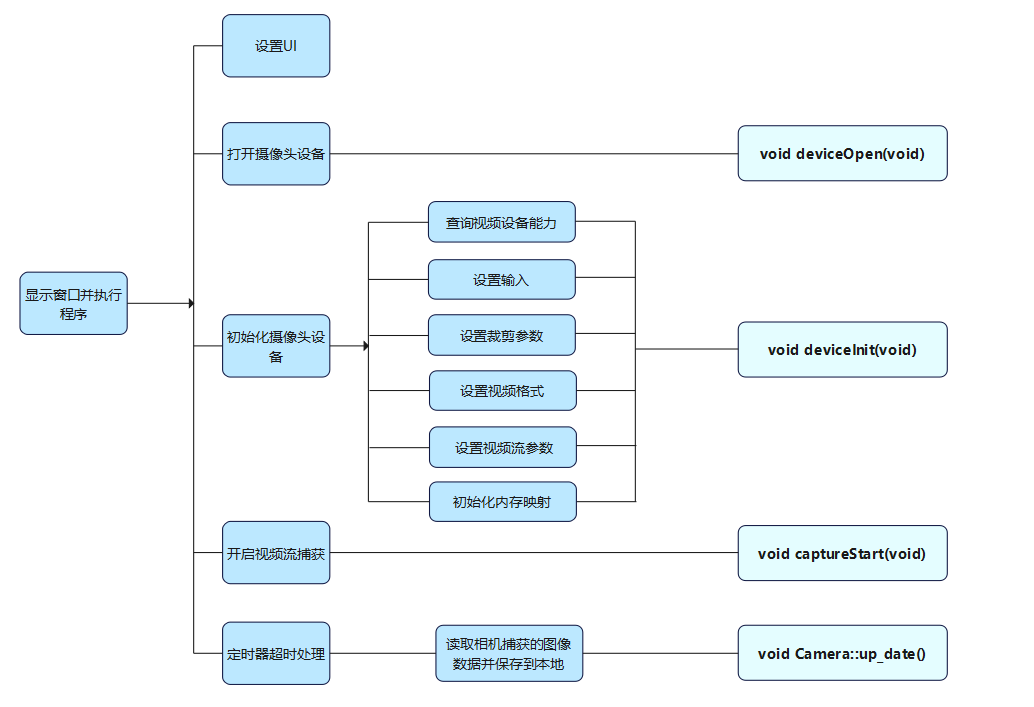
在前面一個(gè)章節(jié)實(shí)現(xiàn)了對(duì)本地車(chē)牌圖片的識(shí)別,下面來(lái)介紹如何通過(guò)攝像頭進(jìn)行車(chē)牌識(shí)別,采用USB攝像頭進(jìn)行識(shí)別,程序設(shè)計(jì)如下圖所示。
主函數(shù)的實(shí)現(xiàn)main.cpp
int main(int argc, char *argv[]) { QApplication a(argc, argv); Camera w; w.setWindowFlags(w.windowFlags()& ~Qt::WindowMaximizeButtonHint& ~Qt::WindowMinimizeButtonHint ); w.showMaximized(); w.show(); return a.exec(); }
設(shè)置UI
ui->setupUi(this); timer = new QTimer; QDesktopWidget* desktopWidget = QApplication::desktop(); QRect screenRect = desktopWidget->screenGeometry(); qDebug("screen.width = %d , screen.height = %d",screenRect.width(),screenRect.height());
this->imageWidget = new ImageWidget(this);
this->imageWidget->setBackgroundRole(QPalette::Dark); this->imageWidget->setSizePolicy(QSizePolicy::Ignored, QSizePolicy::Ignored); this->imageWidget->setObjectName(QString::fromUtf8("imageWidget"));
if(screenRect.width()==800) { ui->pbt_start->setGeometry(60,300,70,50); ui->pbt_stop->setGeometry(190,300,70,50); this->imageWidget->setGeometry(QRect(5, 30, 350, 250)); } else if(screenRect.width()>800) { ui->pbt_start->setGeometry(80,400,70,70); ui->pbt_stop->setGeometry(260,400,70,70);
this->imageWidget->setGeometry(QRect(6, 37, 500, 330)); }
打開(kāi)攝像頭設(shè)備
void deviceOpen(void) { fd = open(deviceName, O_RDWR | O_NONBLOCK, 0); if (-1 == fd) { QMessageBox::about(NULL, "About", "camera open error"); exit(EXIT_FAILURE); } }
初始化攝像頭設(shè)備
void deviceInit(void) { struct v4l2_capability cap; struct v4l2_cropcap cropcap; struct v4l2_crop crop; struct v4l2_format fmt; struct v4l2_streamparm sparm; unsigned int min;
if (-1 == xioctl(fd, VIDIOC_QUERYCAP, &cap)) { if (EINVAL == errno) { QMessageBox::about(NULL,"Information"," no V4L2 device");
exit(EXIT_FAILURE); } else { errno_exit("VIDIOC_QUERYCAP");
} } if (!(cap.capabilities & V4L2_CAP_VIDEO_CAPTURE)) { QMessageBox::about(NULL,"Information"," no video capture device"); exit(EXIT_FAILURE); } struct v4l2_input input; input.index = 0; if ( ioctl(fd, VIDIOC_ENUMINPUT, &input) != 0) { QMessageBox::about(NULL,"Information","set input error");
exit(0); }
if ((ioctl(fd, VIDIOC_S_INPUT, &input)) < 0) { QMessageBox::about(NULL,"Information","set s_input error");?
exit(0); } CLEAR(cropcap); cropcap.type = V4L2_BUF_TYPE_VIDEO_CAPTURE; if (0 == xioctl(fd, VIDIOC_CROPCAP, &cropcap)) { crop.type = V4L2_BUF_TYPE_VIDEO_CAPTURE; crop.c.top = 0; crop.c.left = 0; crop.c.height = 720; crop.c.width = 1280; if (-1 == xioctl(fd, VIDIOC_S_CROP, &crop)) { switch (errno) { case EINVAL: break; default: break; } } } CLEAR (fmt);
// v4l2_format fmt.type = V4L2_BUF_TYPE_VIDEO_CAPTURE; fmt.fmt.pix.width = width; fmt.fmt.pix.height = height; fmt.fmt.pix.pixelformat = V4L2_PIX_FMT_YUYV; fmt.fmt.pix.field = V4L2_FIELD_ANY; if (-1 == xioctl(fd, VIDIOC_S_FMT, &fmt)) errno_exit("VIDIOC_S_FMT");
/* Note VIDIOC_S_FMT may change width and height.*/ if (width != fmt.fmt.pix.width) { width = fmt.fmt.pix.width; //fprintf(stderr,"Image width set to %i by device %s.\n",width,deviceName); } if (height != fmt.fmt.pix.height) { height = fmt.fmt.pix.height; //fprintf(stderr,"Image height set to %i by device %s.\n",height,deviceName); } /*Buggy driver paranoia. */ min = fmt.fmt.pix.width * 2; if (fmt.fmt.pix.bytesperline < min) fmt.fmt.pix.bytesperline = min;?
min = fmt.fmt.pix.bytesperline * fmt.fmt.pix.height; if (fmt.fmt.pix.sizeimage < min) fmt.fmt.pix.sizeimage = min; CLEAR (sparm); sparm.type = V4L2_BUF_TYPE_VIDEO_CAPTURE; sparm.parm.capture.capturemode = 0; sparm.parm.capture.timeperframe.numerator = 1; sparm.parm.capture.timeperframe.denominator = 30; if(xioctl(fd,VIDIOC_S_PARM,&sparm) < 0){ errno_exit("cam s parm"); // exit(1); } mmapInit(); }
開(kāi)啟視頻流捕獲
void captureStart(void) { unsigned int i; enum v4l2_buf_type type; for (i = 0; i < n_buffers; ++i) { struct v4l2_buffer buf; CLEAR (buf); buf.type = V4L2_BUF_TYPE_VIDEO_CAPTURE; buf.memory = V4L2_MEMORY_MMAP; buf.index = i; if (-1 == xioctl(fd, VIDIOC_QBUF, &buf)) errno_exit("VIDIOC_QBUF"); } type = V4L2_BUF_TYPE_VIDEO_CAPTURE; if (-1 == xioctl(fd, VIDIOC_STREAMON, &type)) errno_exit("VIDIOC_STREAMON"); }
超時(shí)處理
void Camera::up_date() { unsigned char image_buf[921600+54]; frameRead(image_buf); this->imageWidget->setPixmap(image_buf); }
應(yīng)用編譯及測(cè)試
編譯
elf@ubuntu:~/work/camera-demo$ . /opt/fsl-imx-x11/4.1.15-2.0.0/environment-setup-cortexa7hf-neon-poky-linux-gnueabi elf@ubuntu:~/work/camera-demo$ qmake elf@ubuntu:~/work/camera-demo$ make
拷貝camera-demo到ELF 1開(kāi)發(fā)板的/home/root路徑下,運(yùn)行測(cè)試
root@ELF1:~# cp /run/media/sda1/camera-demo ./ root@ELF1:~# chmod 777 camera-demo root@ELF1:~# export DISPLAY=:0.0 root@ELF1:~# ./camera-demo
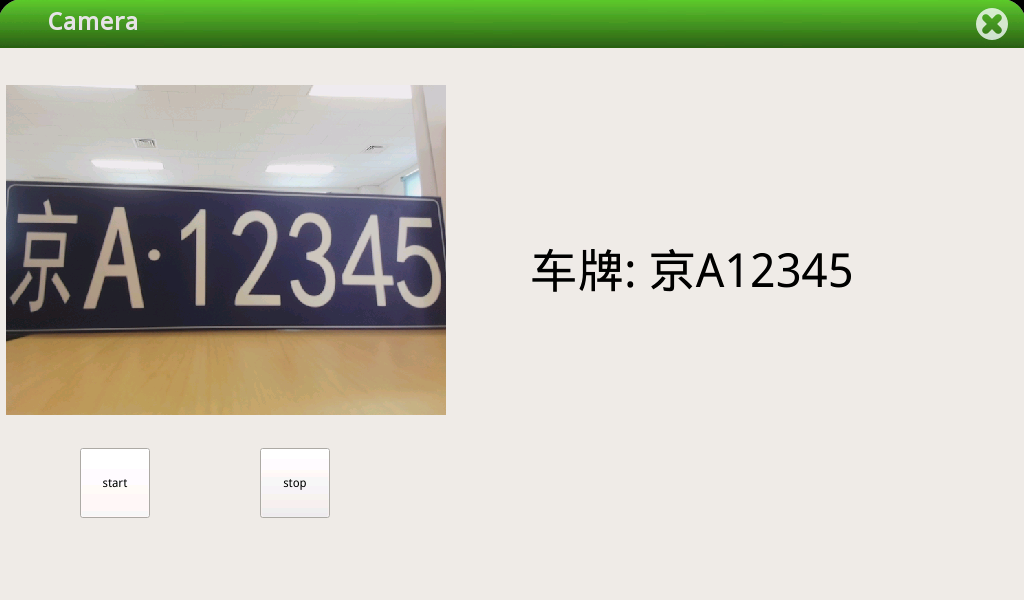
點(diǎn)擊start按鈕之后,使用ls num路徑下查看會(huì)有攝像頭拍攝的圖片。液晶屏上會(huì)實(shí)時(shí)預(yù)覽攝像頭拍到的圖像,如下圖所示:
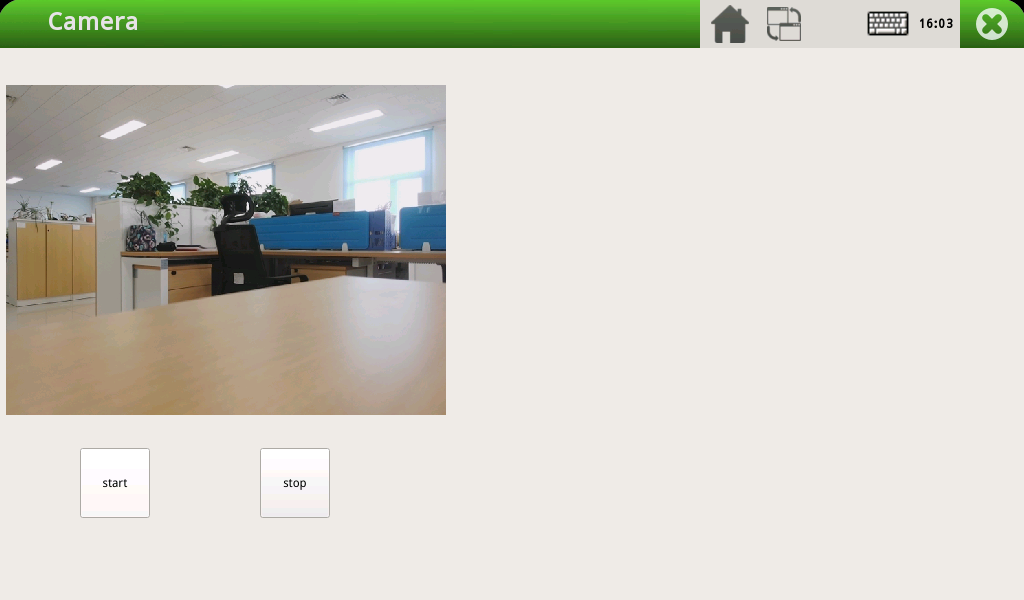
在這里就可以和前面車(chē)牌識(shí)別結(jié)合起來(lái)了,比如攝像頭里面的畫(huà)面是一張車(chē)牌信息,通過(guò)截取攝像頭中的實(shí)時(shí)畫(huà)面到本地,然后上傳到百度智能云的后臺(tái)進(jìn)行識(shí)別,至此就完成了通過(guò)攝像頭進(jìn)行車(chē)牌識(shí)別的過(guò)程。
項(xiàng)目測(cè)試
在此基礎(chǔ)上再次完善應(yīng)用,識(shí)別車(chē)牌的應(yīng)用將識(shí)別到的車(chē)牌信息保存到文本中,基于攝像頭的應(yīng)用讀取文檔中的車(chē)牌信息顯示在Qt界面中。
1、確保開(kāi)發(fā)板已連接USB攝像頭和屏幕
2、設(shè)置Wi-Fi連接
root@ELF1:~# elf1_cmd_wifi.sh -i 8723 -s 賬號(hào) -p 密碼
執(zhí)行應(yīng)用
root@ELF1:~# ./camera-demo & root@ELF1:~# ./demoCar
單擊“start”按鈕,識(shí)別結(jié)果如下圖所示
-
單片機(jī)
+關(guān)注
關(guān)注
6078文章
45550瀏覽量
672776 -
嵌入式
+關(guān)注
關(guān)注
5208文章
20586瀏覽量
336261 -
開(kāi)發(fā)板
+關(guān)注
關(guān)注
26文章
6372瀏覽量
120047 -
開(kāi)源代碼
+關(guān)注
關(guān)注
0文章
41瀏覽量
4018
發(fā)布評(píng)論請(qǐng)先 登錄
【MYD-Y6ULX申請(qǐng)】基于攝像頭的人臉識(shí)別項(xiàng)目
【瑞芯微RK1808計(jì)算棒試用申請(qǐng)】AIoT領(lǐng)域車(chē)牌識(shí)別Demo
【HarmonyOS HiSpark AI Camera】智能充電站項(xiàng)目-車(chē)牌識(shí)別、刷臉充電、空閑車(chē)位
【瑞芯微RK1808計(jì)算棒試用申請(qǐng)】AIoT領(lǐng)域車(chē)牌識(shí)別Demo
三步就能在OpenHarmony中實(shí)現(xiàn)車(chē)牌識(shí)別
三步就能在OpenHarmony中實(shí)現(xiàn)車(chē)牌識(shí)別
基于OpenCV開(kāi)源庫(kù)開(kāi)發(fā)的在OpenHarmony中實(shí)現(xiàn)車(chē)牌識(shí)別
Arduino Nano 33 BLE Sense的語(yǔ)音識(shí)別項(xiàng)目

眼神科技獨(dú)家中標(biāo)渤海銀行人臉識(shí)別項(xiàng)目!
項(xiàng)目分享|基于ELF 1開(kāi)發(fā)板的車(chē)牌識(shí)別系統(tǒng)

ElfBoard開(kāi)源項(xiàng)目|“智慧教室”開(kāi)源項(xiàng)目技術(shù)文檔

ElfBoard開(kāi)源項(xiàng)目|“智慧光伏”開(kāi)源項(xiàng)目技術(shù)文檔

【實(shí)戰(zhàn)】人工智能0基礎(chǔ)入門(mén):基于Python+OpenCV的車(chē)牌識(shí)別項(xiàng)目(課程+平臺(tái)實(shí)踐)

ElfBoard開(kāi)源項(xiàng)目|百度智能云平臺(tái)的人臉識(shí)別項(xiàng)目

ElfBoard開(kāi)源項(xiàng)目|智能消防車(chē)項(xiàng)目




 工商網(wǎng)監(jiān)
評(píng)論