


 鴻蒙HarmonyOS開發實例:【分布式關系型數據庫】

分布式關系型數據庫
介紹
本示例使用[@ohos.data.relationalStore]接口和[@ohos.distributedDeviceManager] 接口展示了在eTS中分布式關系型數據庫的使用,在增、刪、改、查的基本操作外,還包括分布式數據庫的數據同步同能。
效果預覽
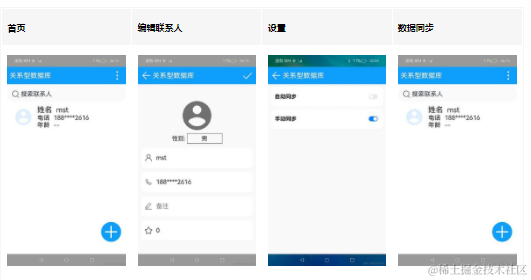
使用說明:
- 啟動應用后點擊“ + ”按鈕可以添加聯系人;
- 點擊聯系人可以進入編輯界面編輯聯系人信息;
- 長按聯系人進入多選狀態,底部有“ 全選 ”、“ 取消 ”、“ 刪除 ”、“ 退出 ”按鈕,點擊退出可以退出多選狀態;
- 點擊右上角更多按鈕,點擊“ 連接設備 ”,選擇要同步數據的設備,連接成功后可以開始將本端數據同步到對端;
- 點擊右上角更多按鈕,點擊“ 設置 ”可以進入設置界面設置數據同步方式,包括自動同步和手動同步。
具體實現
- 數據庫的增、刪、改、查操作都在RdbModel中,源碼參考[RdbModel.ets]:
/*

 * Copyright (c) 2023 Huawei Device Co., Ltd.

 * Licensed under the Apache License, Version 2.0 (the "License");

 * you may not use this file except in compliance with the License.

 * You may obtain a copy of the License at

 *

 *     http://www.apache.org/licenses/LICENSE-2.0

 *

 * Unless required by applicable law or agreed to in writing, software

 * distributed under the License is distributed on an "AS IS" BASIS,

 * WITHOUT WARRANTIES OR CONDITIONS OF ANY KIND, either express or implied.

 * See the License for the specific language governing permissions and

 * limitations under the License.

 */


import data_rdb from '@ohos.data.relationalStore'

import common from '@ohos.app.ability.common'

import Contact from '../model/Contact'

import Logger from '../model/Logger'

import { STORE_CONFIG } from '../model/RdbConst'

import { ValuesBucket } from '@ohos.data.ValuesBucket';


const TAG = 'RdbModel'


export default class RdbModel {

  private rdbStore: data_rdb.RdbStore | undefined = undefined

  private tableName: string = ''

  private sqlCreateTable: string = ''

  private columns: Array< string > = []

  private distributedTable: string = ''

  private dataChangeCallback : Function| null = null

  private isCreateDbDone: boolean = false

  private context: common.UIAbilityContext


  constructor(tableName: string, sqlCreateTable: string, columns: Array< string >, context: common.UIAbilityContext) {

    this.tableName = tableName

    this.sqlCreateTable = sqlCreateTable

    this.columns = columns

    this.context = context


    this.getRdbStore()

  }


  // 初始化數據庫

  async getRdbStore() {

    Logger.info(TAG, 'getRdbStore begin')

    if (this.isCreateDbDone) {

      Logger.info(TAG, 'getRdbStore isCreateDbDone')

      return

    }

    try {

      // 獲取數據庫存儲對象

      this.rdbStore = await data_rdb.getRdbStore(this.context, STORE_CONFIG);

    } catch (err) {

      console.info(`getRdbStore err ${JSON.stringify(err)}`);

    }

    Logger.info(TAG, 'getRdbStore end')

    try {

      // 執行sql語句,聯系人個各個屬性設定

      if(this.rdbStore != undefined) {

        await this.rdbStore.executeSql(this.sqlCreateTable)

        console.info(`create tabe start ` + this.sqlCreateTable);

        // 設置分布式表,表明為contact

        await this.rdbStore.setDistributedTables([this.tableName])

      }

    } catch (e) {

      Logger.error(TAG, 'getRdbStore:' + JSON.stringify(e))

    }

    // 分布式數據庫創建為完成

    this.isCreateDbDone = true

    Logger.info(TAG, 'create table done')

  }


  async insertData(contact: Contact) {

    let value1 = contact.name;

    let value2 = contact.gender;

    let value3 = contact.phone;

    let value4 = contact.remark;

    let value5 = contact.age;


    const valueBucket: ValuesBucket = {

      'name': value1,

      'gender': value2,

      'phone': value3,

      'remark': value4,

      'age': value5,

    }

    if(this.rdbStore != undefined) {

      let ret = await this.rdbStore.insert(this.tableName, valueBucket, data_rdb.ConflictResolution.ON_CONFLICT_REPLACE)

      Logger.info(TAG, `insert done:${ret}`)

    }

  }


  async updateData(contact: Contact) {

    let value1 = contact.name;

    let value2 = contact.gender;

    let value3 = contact.phone;

    let value4 = contact.remark;

    let value5 = contact.age;


    const valueBucket: ValuesBucket = {

      'name': value1,

      'gender': value2,

      'phone': value3,

      'remark': value4,

      'age': value5,

    }

    let predicates = new data_rdb.RdbPredicates(this.tableName)

    Logger.info(TAG, `updateData id=${contact.id}`)

    predicates.equalTo('id', contact.id)

    if (this.rdbStore != undefined) {

      let ret = await this.rdbStore.update(valueBucket, predicates)

      Logger.info(TAG, `updated row count: ${ret}`)

    }

  }


  async deleteContacts(contacts: Array< Contact >) {

    let predicates = new data_rdb.RdbPredicates(this.tableName)

    contacts.forEach((contact) = > {

      predicates.or()

        .equalTo('id', contact.id)

    })

    if (this.rdbStore != undefined) {

      let rows = await this.rdbStore.delete(predicates)

      Logger.info(TAG, `delete rows: ${rows}`)

    }

  }


  async query(predicates: data_rdb.RdbPredicates): Promise< Array< Contact >> {

    Logger.info(TAG, 'query start')

    Logger.info(TAG, 'predicates is ' + JSON.stringify(predicates))

    Logger.info(TAG, 'columns ' + JSON.stringify(this.columns))

    if (this.rdbStore != undefined) {

      // 默認查詢所有列

      let resultSet: data_rdb.ResultSet = await this.rdbStore.query(predicates, this.columns);

      Logger.info(TAG, 'result is ' + JSON.stringify(resultSet.rowCount))

      // 處理查詢到的結果數組

      return this.getListFromResultSet(resultSet)

    }

    return []

  }


  async syncData(predicates: data_rdb.RdbPredicates) {

    Logger.info(TAG, 'syncData')

    if (this.rdbStore != undefined) {

      let result = await this.rdbStore.sync(data_rdb.SyncMode.SYNC_MODE_PUSH, predicates)

      for (let i = 0; i < result.length; i++) {

        Logger.info(TAG, `device=${result[i][0]}, status = ${result[i][1]}`)

      }

    }

  }


  async onDataChange(device: string, callback: Function) {

    Logger.info(TAG, `onDataChange enter,device=` + device + ` ,tableName = ` + this.tableName)

    try {

      if (this.rdbStore != undefined) {

        this.distributedTable = await this.rdbStore.obtainDistributedTableName(device, this.tableName)

        Logger.info(TAG, `obtainDistributedTableName,distributedTable=` + this.distributedTable)

      }

    }

    catch (err) {

      Logger.error(TAG, `ObtainDistributedTableName failed, code is ${err.code},message is ${err.message}`)

    }

    this.dataChangeCallback = callback

    await this.pullData()

    if (this.rdbStore != undefined) {

      this.rdbStore.on('dataChange', data_rdb.SubscribeType.SUBSCRIBE_TYPE_REMOTE, async (devices) = > {

        Logger.info(TAG, `on dataChange, callback`)

        await this.pullData()

      })

    }

  }


  async pullData() {

    Logger.info(TAG, `start pullData`)

    if (this.rdbStore != undefined) {

      await this.rdbStore.executeSql('delete from ' + this.tableName)

      let predicates = new data_rdb.RdbPredicates(this.distributedTable)

      let resultSet = await this.rdbStore.query(predicates, this.columns)

      let result = this.getListFromResultSet(resultSet)

      Logger.info(TAG, `on dataChange,result.length=${result.length}`)

      for (let i = 0; i < result.length; i++) {

        Logger.info(TAG, `on dataChange,insert${result[i].name}`)

        let predicate = new data_rdb.RdbPredicates(this.tableName)

        predicate.equalTo('name', result[i].name)

        let exit = await this.rdbStore.query(predicate, this.columns)

        exit.goToFirstRow()

        if (exit.rowCount === 0) {

          await this.insertData(result[i])

        } else {

          result[i].id = exit.getDouble(resultSet.getColumnIndex('id'))

          await this.updateData(result[i])

        }

      }

      if (this.dataChangeCallback != null) {

        this.dataChangeCallback(result)

      }

    }

  }


  offDataChange() {

    if(this.rdbStore != undefined) {

      this.rdbStore.off('dataChange', data_rdb.SubscribeType.SUBSCRIBE_TYPE_REMOTE, (devices) = > {

        for (let i = 0; i < devices.length; i++) {

          Logger.info(TAG, `device=${devices[i]} off data changed`)

        }

      })

    }

  }


  // 處理數據格式

  getListFromResultSet(resultSet: data_rdb.ResultSet): Array< Contact > {

    // 聲明結果變量

    let contacts: Array< Contact > = []

    // 進入結果集的第一行

    resultSet.goToFirstRow()

    // 如果沒有結束就繼續遍歷

    while (!resultSet.isEnded) {

      // 讀取各個屬性,初始化臨時變量contact

      let contact: Contact = new Contact(resultSet.getDouble(resultSet.getColumnIndex('id'))

        , resultSet.getString(resultSet.getColumnIndex('name'))

        , resultSet.getDouble(resultSet.getColumnIndex('gender'))

        , resultSet.getString(resultSet.getColumnIndex('phone'))

        , resultSet.getLong(resultSet.getColumnIndex('age'))

        , resultSet.getString(resultSet.getColumnIndex('remark')))

      if (!contacts.includes(contact)) {

        // 如果數據集合中沒有這條數據就添加進去

        contacts.push(contact)

      }

      // 進入下一行

      resultSet.goToNextRow()

    }

    // 數據整合完畢就釋放資源

    resultSet.close()

    Logger.info(TAG, 'contacts number is ' + contacts.length)

    // 返回整合的聯系人數據

    return contacts

  }

}
- 數據庫操作:使用[@ohos.data.relationalStore] 接口的getRdbStore獲得一個相關的操作型關系數據庫RdbStore,通過這個RdbStore調用相關接口進行增刪改查,RdbStore.insert數據插入,RdbStore.delete數據刪除,RdbStore.update更新數據,RdbStore.query根據條件查詢數據;
- 數據同步:RdbStore.on注冊數據庫觀察者,使用RdbStore.obtainDistributedTableName根據本地表名獲取指定遠程設備的分布式表名,數據發生變動時通過RdbStore.sync同步數據,不需要用時刪除指定觀察者使用RdbStore.off。
- 連接設備管理在RemoteDeviceModel中,源碼參考[RemoteDeviceModel.ets]:
/*

 * Copyright (c) 2023 Huawei Device Co., Ltd.

 * Licensed under the Apache License, Version 2.0 (the "License");

 * you may not use this file except in compliance with the License.

 * You may obtain a copy of the License at

 *

 *     http://www.apache.org/licenses/LICENSE-2.0

 *

 * Unless required by applicable law or agreed to in writing, software

 * distributed under the License is distributed on an "AS IS" BASIS,

 * WITHOUT WARRANTIES OR CONDITIONS OF ANY KIND, either express or implied.

 * See the License for the specific language governing permissions and

 * limitations under the License.

 */


import deviceManager from '@ohos.distributedDeviceManager';

import Logger from '../model/Logger'

import { BUNDLE } from '../model/RdbConst'

import { BusinessError } from '@ohos.base';


let SUBSCRIBE_ID = 100

const TAG: string = 'RemoteDeviceModel'

class Data {

  device: deviceManager.DeviceBasicInfo = {

    deviceId: "",

    deviceName: "",

    deviceType: "",

    networkId: "",

  }

}

class RemoteDeviceModel {

  public deviceList: Array< deviceManager.DeviceBasicInfo > = [];

  public discoverList: Array< deviceManager.DeviceBasicInfo > = [];

  private callback: () = > void = () = > {};

  private authCallback: (device: deviceManager.DeviceBasicInfo) = > void = (device: deviceManager.DeviceBasicInfo) = > '';

  private deviceManager: deviceManager.DeviceManager | undefined = undefined


  registerDeviceListCallback(callback: () = > void) {

    if (typeof (this.deviceManager) !== 'undefined') {

      this.registerDeviceListCallbackImplement(callback)

      return

    }

    Logger.info(TAG, 'deviceManager.createDeviceManager begin')

    try {

      let dmInstance = deviceManager.createDeviceManager(BUNDLE);

      Logger.info(TAG, `dmInstance= ${JSON.stringify (dmInstance)}`);

      this.deviceManager = dmInstance;

      this.registerDeviceListCallbackImplement(callback);

      Logger.info(TAG, `createDeviceManager callback returned, value= ${JSON.stringify(this.deviceManager)}`);

    } catch (error) {

      Logger.error(TAG, `createDeviceManager throw error, code: ${(error as BusinessError).code} message: ${(error as BusinessError).message}`);

    }

    Logger.info(TAG, 'deviceManager.createDeviceManager end');

  }


  deviceStateChangeActionOnline(device: deviceManager.DeviceBasicInfo) {

    this.deviceList[this.deviceList.length] = device

    Logger.info(TAG, `online, device list=${JSON.stringify(this.deviceList)}`)

    if (this.authCallback !== undefined) {

      this.authCallback(device)

      this.authCallback = () = > {}

    }

  }


  deviceStateChangeActionReady(device: deviceManager.DeviceBasicInfo) {

    if (this.deviceList.length <= 0) {

      this.callback()

      return

    }

    let list: Array< deviceManager.DeviceBasicInfo > = new Array()

    for (let i = 0; i < this.deviceList.length; i++) {

      if (this.deviceList[i].deviceId !== device.deviceId) {

        list[i] = device

      }

    }

    this.deviceList = list

    Logger.info(TAG, `ready, device list=${JSON.stringify(this.deviceList)}`)

    this.callback()

  }


  deviceStateChangeActionOffline(device: deviceManager.DeviceBasicInfo) {

    if (this.deviceList.length <= 0) {

      this.callback()

      return

    }

    for (let j = 0; j < this.deviceList.length; j++) {

      if (this.deviceList[j].deviceId === device.deviceId) {

        this.deviceList[j] = device

        break

      }

    }

    Logger.info(TAG, `offline, device list=${JSON.stringify(this.deviceList)}`)

  }


  getLocalDevice(): string {

    Logger.info(TAG, `getLocalDevice`);

    if(this.deviceManager != undefined) {

      let deviceId: string = this.deviceManager.getLocalDeviceId();

      Logger.info(TAG, `local deviceInfo=${JSON.stringify(deviceId)}`);

      return deviceId;

    }

    return ''

  }


  registerDeviceListCallbackImplement(callback: () = > void) {

    Logger.info(TAG, 'registerDeviceListCallback' + JSON.stringify(this.deviceManager))

    this.callback = callback

    if (this.deviceManager === undefined) {

      Logger.error(TAG, 'deviceManager has not initialized')

      this.callback()

      return

    }

    Logger.info(TAG, 'getTrustedDeviceListSync begin' + JSON.stringify(this.deviceManager));

    let list = this.deviceManager.getAvailableDeviceListSync();

    Logger.info(TAG, `getTrustedDeviceListSync end, deviceList=${JSON.stringify(list)}`)

    if (typeof (list) !== 'undefined' && typeof (list.length) !== 'undefined') {

      this.deviceList = list

    }

    this.callback()

    Logger.info(TAG, 'callback finished')

    this.deviceManager.on('deviceStateChange', (data) = > {

      Logger.info(TAG, 'deviceStateChange on:' + JSON.stringify(data));

      if (data === null) {

        return

      }

      switch (data.action) {

        case deviceManager.DeviceStateChange.UNKNOWN:

          this.deviceStateChangeActionOnline(data.device)

          break

        case deviceManager.DeviceStateChange.AVAILABLE:

          this.deviceStateChangeActionReady(data.device)

          break

        case deviceManager.DeviceStateChange.UNAVAILABLE:

          this.deviceStateChangeActionOffline(data.device)

          break

        default:

          break

      }

    })

    this.deviceManager.on('discoverSuccess', (data: Data) = > {

      if (data === null) {

        return

      }

      Logger.info(TAG, `discoverSuccess data=${JSON.stringify(data)}`);

      this.deviceFound(data);

    })

    this.deviceManager.on('discoverFailure', (data) = > {

      Logger.info(TAG, `discoverFailure data=${JSON.stringify(data)}`);

    })

    this.deviceManager.on('serviceDie', () = > {

      Logger.info(TAG, 'serviceDie')

    })

    this.startDeviceDiscovery()

  }


  deviceFound(data: Data) {

    if(data != undefined) {

      if (data.device != undefined) {

        for (let i = 0; i < this.discoverList.length; i++) {

          if (this.discoverList[i].deviceId === data.device.deviceId) {

            Logger.info(TAG, 'device founded ignored')

            return

          }

        }

        this.discoverList[this.discoverList.length] = data.device

        Logger.info(TAG, `deviceFound self.discoverList=${JSON.stringify(this.discoverList)}`);

        this.callback()

      }

    }

  }


  startDeviceDiscovery() {

    let discoverParam: Record< string, number > = {

      'discoverTargetType': 1

    };

    let filterOptions: Record< string, number > = {

      'availableStatus': 0

    };

    Logger.info(TAG, `startDeviceDiscovery${SUBSCRIBE_ID}`);

    try {

      if(this.deviceManager != undefined) {

        this.deviceManager.startDiscovering(discoverParam, filterOptions);

      }

    } catch (error) {

      Logger.error(TAG, `startDeviceDiscovery throw error, code: ${(error as BusinessError).code} message: ${(error as BusinessError).message}`);

    }

  }


  unregisterDeviceListCallback() {

    if(this.deviceManager != undefined) {

      Logger.info(TAG, `stopDeviceDiscovery${SUBSCRIBE_ID}`);

      this.deviceManager.stopDiscovering();

      this.deviceManager.off('deviceStateChange');

      this.deviceManager.off('discoverSuccess');

      this.deviceManager.off('discoverFailure');

      this.deviceManager.off('serviceDie');

    }

    this.deviceList = [];

    this.discoverList = [];

  }


  authenticateDevice(device: deviceManager.DeviceBasicInfo, callBack: (device: deviceManager.DeviceBasicInfo) = > void) {

    Logger.info(TAG, `bindTarget${JSON.stringify(device)}`);

    for (let i = 0; i < this.discoverList.length; i++) {

      if (this.discoverList[i].deviceId !== device.deviceId) {

        continue

      }

      if (this.deviceManager === undefined) {

        return

      }

      try {

        if (this.deviceManager !== null) {

          this.deviceManager.bindTarget(device.deviceId, {

            bindType: 1,

            targetPkgName: BUNDLE,

            appName: 'Distributed distributedrdb',

          }, (err, data) = > {

            if (err) {

              Logger.error(TAG, `authenticateDevice throw error, code: ${(err as BusinessError).code} message: ${(err as BusinessError).message}`);

              this.authCallback = () = > {

              }

              return

            }

            Logger.debug(TAG, `authenticateDevice succeed: ${JSON.stringify(data)}`);

            this.authCallback = callBack;

          })

        }

      } catch (error) {

        Logger.error(TAG, `authenticateDevice throw error, code: ${(error as BusinessError).code} message: ${(error as BusinessError).message}`);

      }

    }

  }

}


export default new RemoteDeviceModel()
- 設備同步:設備同步數據需要[ohos.permission.DISTRIBUTED_DATASYNC] 權限,在頁面渲染前申請權限,源碼參考[Index.ets],
/*

 * Copyright (c) 2022-2023 Huawei Device Co., Ltd.

 * Licensed under the Apache License, Version 2.0 (the "License");

 * you may not use this file except in compliance with the License.

 * You may obtain a copy of the License at

 *

 *     http://www.apache.org/licenses/LICENSE-2.0

 *

 * Unless required by applicable law or agreed to in writing, software

 * distributed under the License is distributed on an "AS IS" BASIS,

 * WITHOUT WARRANTIES OR CONDITIONS OF ANY KIND, either express or implied.

 * See the License for the specific language governing permissions and

 * limitations under the License.

 */


import data_rdb from '@ohos.data.relationalStore'

import common from '@ohos.app.ability.common'

import Want from '@ohos.app.ability.Want'

import router from '@ohos.router'

import Contact from '../model/Contact'

import ContactDataSource from '../common/BasicDataSource'

import LiteStore from '../model/LiteStore'

import Logger from '../model/Logger'

import RdbModel from '../model/RdbModel'

import { BottomBtn } from '../common/BottomBtn'

import { ContactItem } from '../common/ContactItem'

import { PopupMenu } from '../common/PopupMenu'

import { SyncState } from '../model/LiteStore'

import { SearchBar } from '../common/SearchBar'

import { TitleBar } from '../common/TitleBar'

import { TABLE_NAME, BUNDLE, ABILITY, SQL_CREATE_TABLE, COLUMNS } from '../model/RdbConst'


const TAG: string = 'Index'


export interface stateType {

  popupMenu: boolean,

  isDistributed: boolean,

  isStage: boolean,

  selectedIndex: number,

  syncState: string,

  distributedDevice: string,

  opacityValue: number

}

@Entry

@Component

struct Index {

  private liteStore = new LiteStore("sync_state", getContext(this) as common.UIAbilityContext)

  private rdbModel = new RdbModel(TABLE_NAME, SQL_CREATE_TABLE, COLUMNS, getContext(this) as common.UIAbilityContext)

  private intervalId: number = 0

  @State contacts: ContactDataSource = new ContactDataSource([])

  @State isMultiCheck: boolean = false

  @State isSelectedAll: boolean = false

  @State state: stateType = {

    popupMenu: false,

    isDistributed: false,

    isStage: false,

    selectedIndex: 0,

    syncState: SyncState.ManualSync,

    distributedDevice: '',

    opacityValue: 1

  }


  async aboutToAppear() {

    Logger.info(TAG, 'aboutToAppear')

    await this.rdbModel.getRdbStore();

    await this.getData();

  }


  // 拉起應用后讀取數據,暫定為分布式功能

  getWant() {

    let want = AppStorage.Get< Want >('want') as Want

    if(want.parameters != undefined) {

      if (this.state.isDistributed && want.parameters.isStage === 'EXIT') {

        Logger.info(TAG, 'isStage = EXIT')

        this.state.isStage = false

        this.state.isDistributed = false

        this.state.selectedIndex = 0

        this.state.distributedDevice = ''

        this.rdbModel.offDataChange()

      }

      if (!this.state.isDistributed && want.parameters.isStage === 'Stage') {

        Logger.info(TAG, 'isStage = Stage')

        this.state.isStage = true

        this.state.isDistributed = true

        this.state.distributedDevice = want.parameters.dmsSrcNetworkId as string;

        let context = getContext(this) as common.UIAbilityContext

        context.startAbility({

          bundleName: BUNDLE,

          abilityName: ABILITY,

          deviceId: this.state.distributedDevice,

          parameters: {

            isStage: 'CONNECT'

          }

        })

        Logger.info(TAG, 'onDataChange')

        this.rdbModel.onDataChange(this.state.distributedDevice, (result: Array< Contact >)= > {

        this.contacts.dataArray = result

          this.contacts.notifyDataReload()

        })

      }

    }

  }


  async onPageShow() {

    try {

      // 初始化分部署數據庫

      await this.rdbModel.getRdbStore()

      this.intervalId = setInterval(() = > {

        // 手動偵聽應用被拉起的動作

        this.getWant()

      }, 1000)

      // 讀取數據庫數據

      await this.getData()

    } catch (err) {

      Logger.error('onPageShow:' + JSON.stringify(err))

    }

  }


  async getData() {

    Logger.info(TAG, 'getData')

    // 初始化數據庫的表,表名為contact

    let predicates = new data_rdb.RdbPredicates(TABLE_NAME)

    // 讀取表中的數據

    this.contacts.replaceDataArray(await this.rdbModel.query(predicates));

    // 通知懶加載數據變更

    this.contacts.notifyDataReload()

    Logger.info(TAG, 'getData contacts count' + this.contacts.dataArray.length)

    // 讀取Preferences中的數據

    let syncState = await this.liteStore.getValue()

    this.state.syncState = `${syncState}`

    if (!this.state.isStage && this.state.isDistributed && syncState === SyncState.AutomaticSync) {

      await this.syncData()

    }

  }


  showDeleteDialog() {

    let deleteContacts: Contact[] = []

    this.contacts.dataArray.forEach((contact) = > {

      if (contact.isSelected) {

        deleteContacts.push(contact)

      }

    })

    if (deleteContacts.length == 0) {

      return

    }

    AlertDialog.show({

      message: $r('app.string.delete_contact'),

      primaryButton: {

        value: $r('app.string.sure'),

        fontColor: Color.Red,

        action: async () = > {

          await this.rdbModel.deleteContacts(deleteContacts)

          await this.getData()

          this.quitMultiCheck()

        }

      },

      secondaryButton: {

        value: $r('app.string.cancel'),

        fontColor: Color.Blue,

        action: () = > {

        }

      }

    })

  }


  handleClickContact(item: Contact, index: number) {

    Logger.info(TAG, `handleClickContact, item = ${JSON.stringify(item)}`)

    if (this.isMultiCheck) {

      let tempContacts = this.contacts.dataArray

      this.contacts.dataArray = []

      tempContacts[index].isSelected = !item.isSelected

      this.contacts.dataArray = tempContacts

      this.contacts.notifyDataReload()

    } else {

      router.pushUrl({

        url: 'pages/ContactEdit',

        params: { contact: item, isInsert: false }

      })

    }

  }


  refreshSelectState(isSelect: boolean) {

    this.contacts.dataArray.forEach((contact) = > {

      contact.isSelected = isSelect

    })

    this.contacts.notifyDataReload()

  }


  quitMultiCheck() {

    this.isSelectedAll = false

    this.refreshSelectState(this.isSelectedAll)

    this.isMultiCheck = false

  }


  handleBottomBtnClick = (index: number) = > {

    switch (index) {

      case 0:

        this.isSelectedAll = !this.isSelectedAll

        this.refreshSelectState(this.isSelectedAll)

        break

      case 1:

        this.showDeleteDialog()

        break

      case 2:

        this.quitMultiCheck()

        break

      default:

        break

    }

  }

  handleRightBtn = () = > {

    this.state.popupMenu = true;

    this.state.opacityValue = 1;

  }

  syncData = () = > {

    Logger.info(TAG, 'sync data')

    let predicates = new data_rdb.RdbPredicates(TABLE_NAME)

    predicates.inAllDevices()

    this.rdbModel.syncData(predicates)

  }


  build() {

    Stack({ alignContent: Alignment.BottomEnd }) {

      Column() {

        Stack() {

          if (this.state.isStage) {

            TitleBar()

          } else {

            TitleBar({ rightBtn: $r('app.media.more'), handleRightBtn: this.handleRightBtn })

          }

          if (this.state.isDistributed && !this.state.isStage && this.state.syncState === SyncState.ManualSync) {

            Row() {

              Blank()


              Image($r('app.media.ic_syncto'))

                .size({ width: 50, height: 60 })

                .onClick(this.syncData)

            }.width('80%')

          }

        }.width('100%')


        SearchBar()

        List() {

          LazyForEach(this.contacts, (item: Contact, index) = > {

            ListItem() {

              ContactItem({ contact: item, isMultiCheck: $isMultiCheck })

            }

            .onClick(() = > {

              this.handleClickContact(item, index)

            })

          }, (item: Contact) = > JSON.stringify(item))

        }

        .width('100%')

        .layoutWeight(1)

        .padding({ left: 10, right: 10 })

        .divider({ strokeWidth: 1, color: Color.Gray, startMargin: 16, endMargin: 16 })

      }

      .width('100%')

      .height('100%')


      if (this.state.popupMenu) {

        PopupMenu({ state: $state, handleStartAbility: this.syncData })

      }


      BottomBtn({

        isMultiCheck: this.isMultiCheck,

        isSelectedAll: this.isSelectedAll,

        handleBottomBtnClick: this.handleBottomBtnClick

      })


      if (!this.isMultiCheck && !this.state.isStage) {

        Button() {

          Image($r('app.media.add'))

            .height('100%')

            .width('100%')

            .objectFit(ImageFit.Contain)

            .align(Alignment.End)

        }

        .id('btnAdd')

        .width(80)

        .height(80)

        .margin({ right: 20, bottom: 50 })

        .type(ButtonType.Circle)

        .backgroundColor('#0D9FFB')

        .onClick(() = > {

          Logger.info(TAG, 'onClick')

          router.pushUrl({

            url: 'pages/ContactEdit',

            params: { contact: new Contact(0, '', 0, '', -1, ''), isInsert: true }

          })

        })

      }

    }

    .width('100%')

    .height('100%')

  }


  onBackPress() {

    Logger.info(TAG, 'onBackPress')

    let context = getContext(this) as common.UIAbilityContext

    context.startAbility({

      bundleName: BUNDLE,

      abilityName: ABILITY,

      deviceId: this.state.distributedDevice,

      parameters: {

        isStage: 'EXIT'

      }

    })

    this.rdbModel.offDataChange()

  }


  onPageHide() {

    Logger.info(TAG, 'onBackPress')

    clearInterval(this.intervalId)

  }

}
使用[@ohos.distributedDeviceManager]接口,首先通過createDeviceManager創建設備管理器實例,然后通過getTrustedDeviceListSync同步獲取所有可信設備列表;
- 設備連接:首先通過on方法注冊設備狀態,例如發現設備,設備連接失敗,然后通過startDeviceDiscovery方法發現周邊設備,然后選擇連接設備,再用[startAbility]啟動連接設備的應用。
審核編輯 黃宇
聲明:本文內容及配圖由入駐作者撰寫或者入駐合作網站授權轉載。文章觀點僅代表作者本人,不代表電子發燒友網立場。文章及其配圖僅供工程師學習之用,如有內容侵權或者其他違規問題,請聯系本站處理。
舉報投訴
-
數據庫
+關注
關注
7文章
4020瀏覽量
68342 -
分布式
+關注
關注
1文章
1093瀏覽量
76579 -
鴻蒙
+關注
關注
60文章
2963瀏覽量
45889 -
HarmonyOS
+關注
關注
80文章
2153瀏覽量
36047 -
OpenHarmony
+關注
關注
33文章
3952瀏覽量
21102
發布評論請先 登錄
相關推薦
熱點推薦
Oracle數據庫ASM實例無法掛載的數據恢復案例
一個Oracle數據庫故障表現為ASM磁盤組掉線,ASM實例無法掛載(mount)。數據庫管理員自行進行簡單修復,未能成功,隨后聯系北亞數據恢復中心恢復
分布式數據恢復—Ceph+TiDB數據恢復報告
無法正常訪問。目標需要恢復的RBD卷中存儲了一臺虛擬機的完整磁盤鏡像,該虛擬機內部運行TiDB分布式數據庫系統,包含重要的業務數據。
SC-3568HA:解鎖鴻蒙全權限API與分布式能力的工業控制平臺
傳統嵌入式開發面臨硬件碎片化、高權限功能缺失、分布式協同復雜及自動化測試不足等痛點。SC-3568HA開發板基于鴻蒙系統,通過統一內核抽象層和硬件驅動框架解決兼容問題,開放全量系統AP
一鍵部署無損網絡:EasyRoCE助力分布式存儲效能革命
分布式存儲的性能瓶頸往往在于網絡。如何構建一個高帶寬、超低時延、零丟包的無損網絡,是釋放分布式存儲全部潛力、賦能企業關鍵業務(如實時數據庫、AI訓練、高性能計算)的關鍵挑戰。
【 HarmonyOS 5 入門系列 】鴻蒙HarmonyOS示例項目講解
【 HarmonyOS 5 入門系列 】鴻蒙HarmonyOS示例項目講解 ##鴻蒙開發能力 ##Har
鴻蒙5開發寶藏案例分享---應用接續提升內容發布體驗
小紅書圖文,突然想換平板繼續排版,這時候只要輕點平板Dock欄圖標,草稿瞬間帶著圖片文字無縫轉移!這種科幻片般的體驗,用HarmonyOS的分布式能力分分鐘就能實現!
(悄悄說:實測中甚至可以實現手機
發表于 06-03 18:25
鴻蒙5開發寶藏案例分享---一多開發實例(游戲)
十年前藏的現金一樣驚喜!)這些藏在文檔深處的\"武功秘籍\",能幫我們輕松實現分布式游戲、跨端協同這些聽起來很酷的功能。快上車,帶你解鎖鴻蒙開發的正確姿勢!
一、分布式游戲手柄
發表于 06-03 18:22
SQLSERVER數據庫是什么
SQL Server 是由微軟公司開發的一款 關系型數據庫管理系統(RDBMS) ,用于存儲、管理和檢索結構化數據。它是企業級應用中廣泛使用
MySQL數據庫是什么
MySQL數據庫是一種 開源的關系型數據庫管理系統(RDBMS) ,由瑞典MySQL AB公司開發,后被Oracle公司收購。它通過結構化查
HarmonyOS5云服務技術分享--云數據庫使用指南
? 華為云數據庫(CloudDB)在HarmonyOS中的使用指南 ?
??嗨,開發者朋友們!??
今天咱們來聊聊華為云數據庫(CloudDB)在H
發表于 05-22 18:29
分布式存儲數據恢復—虛擬機上hbase和hive數據庫數據恢復案例
分布式存儲數據恢復環境:
16臺某品牌R730xd服務器節點,每臺服務器節點上有數臺虛擬機。
虛擬機上部署Hbase和Hive數據庫。
分布式存儲故障:
“RdbStore”上線開源鴻蒙社區 助力鴻蒙應用數據訪問效率大幅提升
近日,由伙伴參與共建的鴻蒙關系映射數據庫“RdbStore”正式上線OpenHarmony社區,為鴻蒙生態開發者提供了簡單高效的
深入HarmonyOS NEXT開發中的ArkData操作SQLite數據庫
大家好,我是 V 哥。今天給大家整理的內容是關于鴻蒙 NEXT 開發中使用 ArkData 操作 SQLite 數據庫的詳細介紹,從入門到精通,包含案例代碼和注釋,幫助小白快速入門到提升。先贊后看,家財萬貫。



 工商網監
工商網監
評論