


 gdb本地調試版本移植至ARM-Linux系統

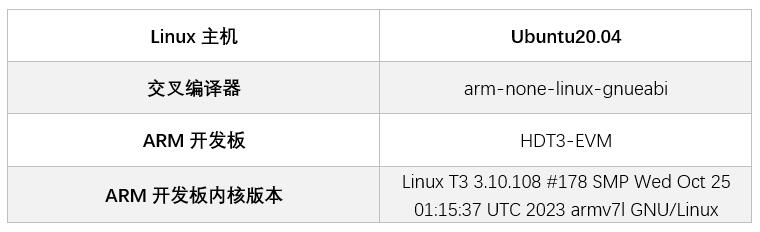
移植ncurses庫
本文使用的ncurses版本為ncurses-5.9.tar.gz
1. 將ncurses壓縮包拷貝至Linux主機或使用wget命令下載并解壓
tar-zxvfncurses-5.9.tar.gz
2. 解壓后進入到ncurses-5.9目錄下
cdncurses-5.9
3. 在ncurses-5.9目錄下創建編譯完成后生成文件位置
mkdiroutput
cdoutput
mkdirarm-linux
4. 生成Makefile文件
./configure--target=arm-none-linux-gnueabi--prefix=$PWD/output/arm-linux--enable-termcap--with-shared--without-ada
- --target表示編譯器的前綴,需要根據編譯的不同需求進行修改
- --prefix表示編譯完成后生成文件的位置
- --nable-termcap表示關鍵代碼使用termcap(terminalcapabilities)數據庫[自動檢測]
- --with-shared表示動態編譯
5. 編譯
make
當遇到如下報錯時
Makefile:794:recipefortarget'../obj_s/lib_gen.o'failed
make[1]:***[../obj_s/lib_gen.o]Error1
make[1]:Leavingdirectory'.../ncurses-5.9/ncurses'
Makefile:109:recipefortarget'all'failed
make:***[all]Error2
需要進入ncurses-5.9/include文件夾,修改curses.tail文件下的如下內容,將注釋/*generated*/去掉
externNCURSES_EXPORT(bool)mouse_trafo(int*,int*,bool);/*generated*/
6. 安裝
Makeinstall
7. 安裝完成后會在/output/arm-linux目錄下生成庫文件,我們只需將lib目錄下的libncurses.so.5庫拷貝至開發板
移植gdb
本文使用的gdb版本為gdb-7.12.tar.gz
1. 將gdb壓縮包拷貝至Linux主機或使用wget命令下載并解壓
tar-zxvfgdb-7.12.tar.gz
2. 解壓后進入到ncurses-5.9目錄下
cdgdb-7.12
3. 生成Makefile文件
./configure-host=arm-none-linux-gnueabiCC=/home/vanxoak/CodeSourcery/Sourcery_G++_Lite/bin/arm-none-linux-gnueabi-gcc--enable-shared--prefix=$PWD/output/arm-linux--disable-werror--without-x--disable-gdbtk--disable-tui--without-included-regex--without-included-gettextLDFLAGS="-L$PWD/../output/arm-linux/lib"CPPFLASS="-I$PWD/../output/arm-linux/include"
- --host=arm-none-linux-gnueabi用arm-none-linux-gnueabi編譯
- CC為交叉編譯器絕對路徑
- --enable-shared動態編譯
- prefix=“$PWD/output/arm-linux”安裝目錄
- --disable-werror屏蔽werror報警
- --without-x取消xwindows支持
- --disable-gdbtk取消gdbtk
- --disable-tui取消tui界面
- --without-included-gettext去掉用于多語言處理的gettext庫
- "LDFLAGS=XXX"指交叉編譯完成的ncurse的lib目錄路徑
- "CPPFLAGS=XXX"指是交叉編譯完成的ncurse的include目錄路徑
4. 編譯
make
5. 安裝
makeinstall
安裝完成后會在.../gdb-7.12/output/arm-linux/bin/目錄下生成gdb可執行程序。
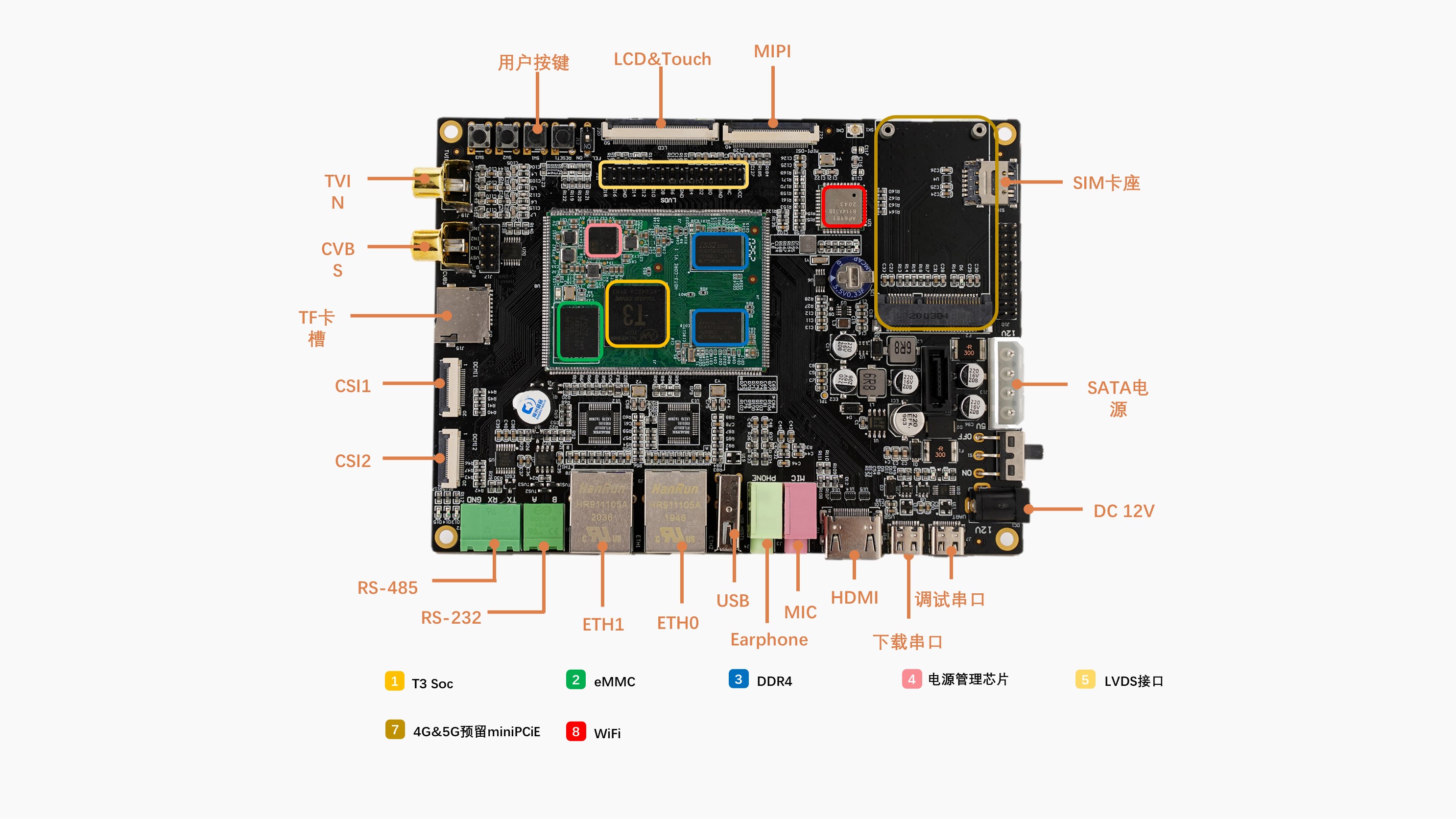
移植至HDT3-EVM開發板
1. 將libncurses.so.5庫文件拷貝至/usr/lib目錄下,若/usr目錄下無lib目錄可手動創建mkdirlib
2. 將gdb程序拷貝至/bin目錄下
?
測試調試
1. 編寫可執行測試程序,示例hello.c代碼如下,該代碼執行后會打印HelloWorld。
#include
intmain(intargc,char*argv[])
{
printf("HelloWorld\n");
return0;
}
2. 使用交叉編譯器進行編譯,需要注意的是,要使用gdb調試程序,需要在使用交叉編譯器編譯源代碼時加上"-g"參數保留調試信息,否則不能使用GDB進行調試且報如下最后一行所示錯誤:
/home#gdbhello
GNUgdb(GDB)7.12
Copyright(C)2016FreeSoftwareFoundation,Inc.
LicenseGPLv3+:GNUGPLversion3orlater
Thisisfreesoftware:youarefreetochangeandredistributeit.
ThereisNOWARRANTY,totheextentpermittedbylaw.Type"showcopying"
and"showwarranty"fordetails.
ThisGDBwasconfiguredas"arm-none-linux-gnueabi".
Type"showconfiguration"forconfigurationdetails.
Forbugreportinginstructions,pleasesee:
.
FindtheGDBmanualandotherdocumentationresourcesonlineat:
.
Forhelp,type"help".
Type"aproposword"tosearchforcommandsrelatedto"word"...
Readingsymbolsfromhello...(nodebuggingsymbolsfound)...done.
3. 使用交叉編譯器編譯測試程序
arm-none-linux-gnueabi-gcc-g-ohellohello.c
4. 將生成的hello文件拷貝至HDT3-EVM開發板上并使用sync命令保存
5. 輸入gbd命令啟動gdb程序
/home#gdb
GNUgdb(GDB)7.12
Copyright(C)2016FreeSoftwareFoundation,Inc.
LicenseGPLv3+:GNUGPLversion3orlater
Thisisfreesoftware:youarefreetochangeandredistributeit.
ThereisNOWARRANTY,totheextentpermittedbylaw.Type"showcopying"
and"showwarranty"fordetails.
ThisGDBwasconfiguredas"arm-none-linux-gnueabi".
Type"showconfiguration"forconfigurationdetails.
Forbugreportinginstructions,pleasesee:
.
FindtheGDBmanualandotherdocumentationresourcesonlineat:
.
Forhelp,type"help".
Type"aproposword"tosearchforcommandsrelatedto"word".
(gdb)
上述代碼(gdb)為GBD內部命令引導符,表示等待用戶輸入gbd命令
6. 使用"filehello"命令載入被調試的測試程序
(gdb)filehello
Readingsymbolsfromhello...done.
顯示Readingsymbolsfromhello...done.表示被測程序加載成功
7. 使用"r"命令執行調試測試程序
(gdb)r
Startingprogram:/home/hello
HelloWorld
[Inferior1(process849)exitednormally]
如上述代碼顯示"HelloWorld"即表示hello程序執行完成
(gdb)help
Listofclassesofcommands:
aliases--Aliasesofothercommands
breakpoints--Makingprogramstopatcertainpoints
data--Examiningdata
files--Specifyingandexaminingfiles
internals--Maintenancecommands
obscure--Obscurefeatures
running--Runningtheprogram
stack--Examiningthestack
status--Statusinquiries
support--Supportfacilities
tracepoints--Tracingofprogramexecutionwithoutstoppingtheprogram
user-defined--User-definedcommands
Type"help"followedbyaclassnameforalistofcommandsinthatclass.
Type"helpall"forthelistofallcommands.
Type"help"followedbycommandnameforfulldocumentation.
Type"aproposword"tosearchforcommandsrelatedto"word".
Commandnameabbreviationsareallowedifunambiguous.
-
Linux
+關注
關注
88文章
11802瀏覽量
219440 -
編譯器
+關注
關注
1文章
1672瀏覽量
51865 -
全志
+關注
關注
25文章
316瀏覽量
54947
發布評論請先 登錄
ARM-Linux與MCU開發的不同之處
基于ARM-Linux的MiniGUI的仿真與移植
嵌入式Linux的GDB調試環境建立
嵌入式Linux系統的GDB遠程調試的實現
ARM-Linux開發與MCU開發有何不同?上篇

ARM-Linux開發與MCU開發比較
ARM-Linux開發與MCU開發的各自優勢?



 工商網監
工商網監
評論