


 淺談圖像調(diào)試之raw圖像問題分析

1、問題背景
在圖像調(diào)試過程,當(dāng)發(fā)現(xiàn)一個(gè)問題時(shí),很多時(shí)候都要通過 dump raw 圖像來分析,如果raw圖像上有,那就排除了是 ISP的處理導(dǎo)致。
下一步就是排查 sensor 或者鏡頭,這樣可以有效的幫我們定位問題所在。
但遇到過有些 raw, 用工具打不開或者出圖不對(duì)的情況,那可能是因?yàn)?raw 的存儲(chǔ)格式不同導(dǎo)致,本文主要對(duì) raw 的格式做下介紹說明。
2、問題分析
a. 什么是 raw
raw 數(shù)據(jù)是 sensor 輸出的原始數(shù)據(jù),常用的一般有raw8, raw10, raw12等,分別表示一個(gè)像素點(diǎn)有 8bit、10bit、12bit 數(shù)據(jù)。
是 sensor 將光信號(hào)轉(zhuǎn)化為電信號(hào)時(shí)的電平高低的原始記錄,單純地沒有進(jìn)行任何處理的圖像數(shù)據(jù),即表現(xiàn)的是 sensor 和鏡頭本征特性的數(shù)據(jù)。
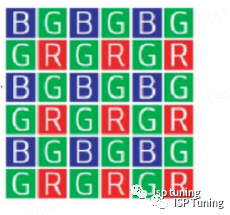
raw 數(shù)據(jù)在輸出的時(shí)候是有一定順序的,主要有四種: GRBG、RGGB、BGGR、GBRG,如下圖為BGGR格式。
b. raw 分哪幾種格式,有什么區(qū)別 ?
raw 一般分為 plain raw 和 mipi raw,主要是存儲(chǔ)方式上的區(qū)別,如下圖所示是 Plain raw10 的示意圖。
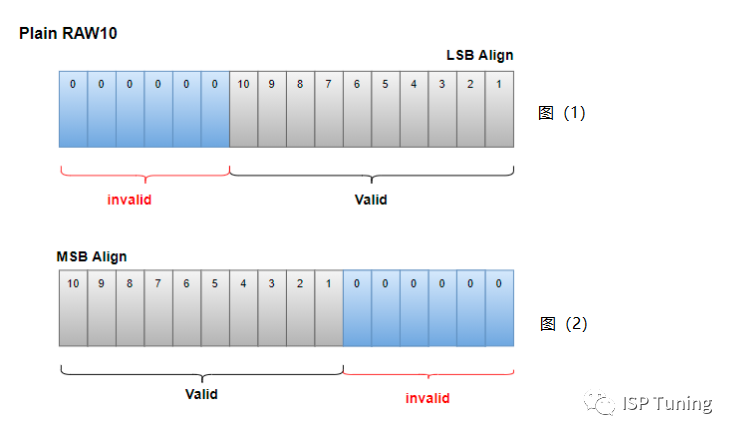
10bit的raw,單個(gè)像素也就是10bit,需要兩個(gè)字節(jié)(16bit)來存儲(chǔ),那就會(huì)空出 6位用不到。
因?yàn)橛锌沼啵@里就涉及到一個(gè)高位/低位對(duì)齊的問題,也就是存儲(chǔ)數(shù)據(jù)時(shí),右移6位低位對(duì)齊(如上圖1所示),左移6位高位對(duì)齊(如上圖2所示)。
這個(gè)主要看平臺(tái)廠商對(duì)數(shù)據(jù)處理有什么要求,我司用的是高位對(duì)齊的數(shù)據(jù),所以讀取時(shí),要有相應(yīng)的移位操作才行。
如下圖所示是 mipi raw10 的示意圖,以大端存儲(chǔ)方式為例,它是把4個(gè)像素放到5個(gè)字節(jié)(40bit)中,組成一個(gè)包去存儲(chǔ)。
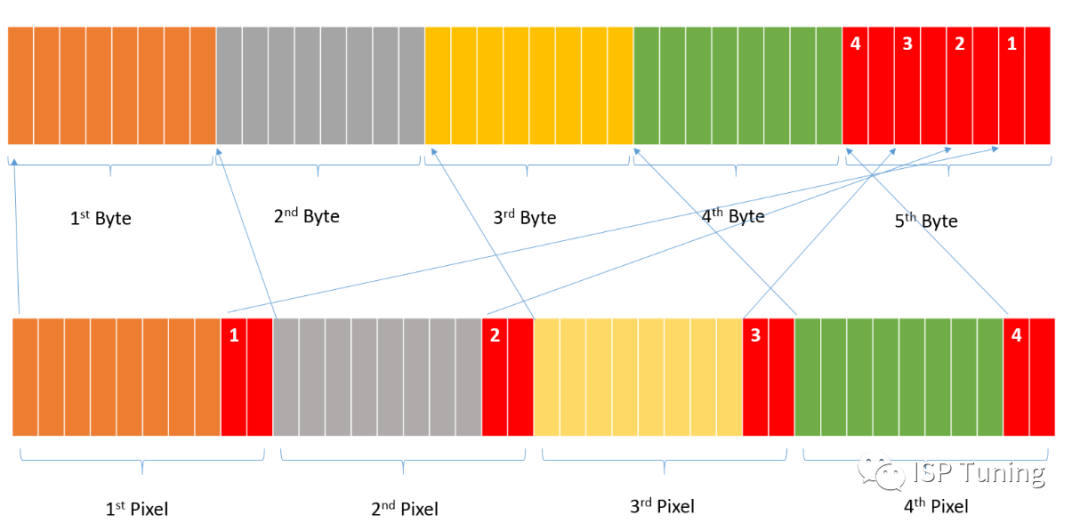
前4字節(jié)依次存放 raw10 圖像的前 4個(gè)像素的后 8位,4個(gè)像素的前 2位依次存放在包的第 5個(gè)字節(jié)中。
所以從存儲(chǔ)方式來看,mipi raw 的存儲(chǔ)方式是要比 plain raw 更節(jié)省內(nèi)存。
c. 怎么正確查看 raw ?
一般raw圖工具打開都會(huì)要求配置一下 raw 圖尺寸、位寬、bayer格式、MSB/LSB。
但一般工具支持 plain raw 打開的居多,還有些并不支持MSB和LSB的選擇,所以需要我們對(duì) raw 做一下處理。
如下是mipi raw 轉(zhuǎn) plain raw 、plain raw10 MSB 轉(zhuǎn)LSB 的相關(guān) python 代碼。
分析代碼的處理過程,也會(huì)加深我們關(guān)于raw圖像的理解,如下代碼中使用的raw圖像,可以在公眾號(hào)后臺(tái)回復(fù) "raw圖" 獲取。
# plain raw10 的讀取和 MSB轉(zhuǎn)LSB的處理


import numpy as np


def read_plained_file(file_path_name,height,width,shift_bits):
    frame = np.fromfile(file_path_name, dtype="uint16")
    frame=frame[0:height*width]
    frame.shape = [height, width]


    # MSB ----> LSB,  LSB存低位數(shù)據(jù),此時(shí)是高位對(duì)齊的,則右移代表向低位移了6位,數(shù)值是減小的狀態(tài)。
    frame=np.right_shift(frame, shift_bits)
    return frame


if __name__ == "__main__":
    file_name = "ov13b10_shading_4208X3120_MSB.raw"
    image = read_plained_file(file_name, 3120, 4208, 6)
    image = image / 1023


    # 將讀取的 image 數(shù)據(jù)另存為 raw 數(shù)據(jù)
    output_file_name = "output_image.raw"


    # 將圖像數(shù)據(jù)映射到 16 位無符號(hào)整數(shù)范圍
    image_mapped = (image * 1023).astype('uint16')
    image_mapped.tofile(output_file_name)
    print(f"Image data has been saved to {output_file_name}")
# mipi raw10 轉(zhuǎn) plain raw10


import numpy as np
import math


def read_mipi10_file(file_path_name,height,width):
    # 單行長度的補(bǔ)齊
    new_width = int(math.floor((width + 3) / 4) * 4) #對(duì)四字節(jié)補(bǔ)齊
    packet_num_L = int(new_width / 4)
    width_byte_num = packet_num_L * 5 #單行byte長度
    width_byte_num = int(math.floor((width_byte_num + 7) / 8) * 8)#單行做8個(gè)字節(jié)補(bǔ)齊
    image_bytes=width_byte_num*height
    frame = np.fromfile(file_path_name, count=image_bytes,dtype ="uint8")
    print("b shape",frame.shape)
    print('%#x'%frame[0])


    frame.shape = [height, width_byte_num] #按字節(jié)整理的圖像矩陣
    one_byte = frame[:,05]
    two_byte = frame[:,15]
    three_byte = frame[:,25]
    four_byte = frame[:,35]
    five_byte = frame[:,45]


    #數(shù)據(jù)轉(zhuǎn)換防止溢出
    one_byte = one_byte.astype('uint16')
    two_byte = two_byte.astype('uint16')
    three_byte = three_byte.astype('uint16')
    four_byte = four_byte.astype('uint16')
    five_byte = five_byte.astype('uint16')


    #用矩陣的方法進(jìn)行像素的拼接
    one_byte = np.left_shift(one_byte, 2) + np.bitwise_and((five_byte), 3)
    two_byte = np.left_shift(two_byte, 2) + np.right_shift(np.bitwise_and((five_byte), 12), 2)
    three_byte = np.left_shift(three_byte, 2) + np.right_shift(np.bitwise_and((five_byte), 48), 4)
    four_byte = np.left_shift(four_byte, 2) + np.right_shift(np.bitwise_and((five_byte), 192), 6)


    #重組幀
    frame_pixels=np.zeros(shape=(height,new_width))
    frame_pixels[:, 0: new_width:4]=one_byte[:, 0: packet_num_L]
    frame_pixels[:, 1: new_width:4]=two_byte[:, 0: packet_num_L]
    frame_pixels[:, 2: new_width:4]=three_byte[:, 0: packet_num_L]
    frame_pixels[:, 3: new_width:4]=four_byte[:, 0: packet_num_L]


    #裁剪無用的數(shù)據(jù),這里表示的是0-2559列,包含完整的數(shù)據(jù)了。
    frame_out=frame_pixels[:,0:width]
    return frame_out


if __name__ == "__main__":
    file_name="imx335_2560x1440_GRBG_mipi.raw"
    image=read_mipi10_file(file_name,1440, 2560)
    image=image/1023


    # 將讀取的 image 數(shù)據(jù)另存為 raw 數(shù)據(jù)
    output2_file_name = "output2_image.raw"
    # 將圖像數(shù)據(jù)映射到 16 位無符號(hào)整數(shù)范圍
    image_mapped = (image * 1023).astype('uint16')
    image_mapped.tofile(output2_file_name)
    print(f"Image data has been saved to {output2_file_name}")
審核編輯:黃飛
-
ISP
+關(guān)注
關(guān)注
6文章
498瀏覽量
54914 -
光信號(hào)
+關(guān)注
關(guān)注
0文章
462瀏覽量
28409 -
電信號(hào)
+關(guān)注
關(guān)注
1文章
845瀏覽量
21837 -
RAW
+關(guān)注
關(guān)注
0文章
21瀏覽量
4208
原文標(biāo)題:關(guān)于 raw 圖像的理解
文章出處:【微信號(hào):vision263com,微信公眾號(hào):新機(jī)器視覺】歡迎添加關(guān)注!文章轉(zhuǎn)載請(qǐng)注明出處。
發(fā)布評(píng)論請(qǐng)先 登錄
FPGA之視頻圖像抓取案例分析
調(diào)試THS8200時(shí)圖像能正常輸出,但是圖像很模糊不清怎么樣解決?
淺談大數(shù)據(jù)視頻圖像處理系統(tǒng)技術(shù)
怎樣獲取bayer raw圖像的AWB的參數(shù)?使用什么工具。跪求解...
例說FPGA連載101:雙攝像頭圖像采集之板級(jí)調(diào)試
如何獲取raw10格式的圖像數(shù)據(jù)
圖像頻率域分析之傅里葉變換
伺服調(diào)試—結(jié)合圖像分析
智能車競賽淺談——圖像篇
基于圖像分析的黃豆質(zhì)量評(píng)估系統(tǒng)
PyTorch教程14.1之圖像增強(qiáng)

對(duì)于極暗場景RAW圖像去噪,你是否還在被標(biāo)定折磨?

機(jī)器視覺之圖像增強(qiáng)和圖像處理

機(jī)器視覺之圖像增強(qiáng)和圖像處理




 工商網(wǎng)監(jiān)
評(píng)論