


 基于vite3的monorepo前端工程搭建步驟

一、技術(shù)棧選擇
1. 代碼庫管理方式 - Monorepo:將多個項(xiàng)目存放在同一個代碼庫中
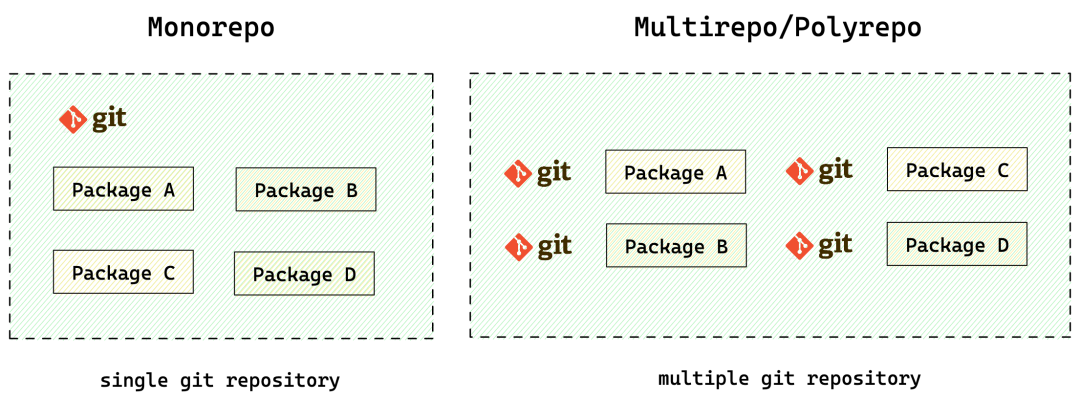
選擇理由
1:多個應(yīng)用(可以按業(yè)務(wù)線產(chǎn)品粒度劃分)在同一個 repo 管理,便于統(tǒng)一管理代碼規(guī)范、共享工作流 選擇理由
2:解決跨項(xiàng)目 / 應(yīng)用之間物理層面的代碼復(fù)用,不用通過發(fā)布 / 安裝 npm 包解決共享問題
2. 依賴管理 - PNPM:消除依賴提升、規(guī)范拓?fù)浣Y(jié)構(gòu)
選擇理由 1:通過軟 / 硬鏈接方式,最大程度節(jié)省磁盤空間 選擇理由 2:解決幽靈依賴問題,管理更清晰
3. 構(gòu)建工具 - Vite:基于 ESM 和 Rollup 的構(gòu)建工具
選擇理由:省去本地開發(fā)時的編譯過程,提升本地開發(fā)效率
4. 前端框架 - Vue3:Composition API
選擇理由:除了組件復(fù)用之外,還可以復(fù)用一些共同的邏輯狀態(tài),比如請求接口 loading 與結(jié)果的邏輯
5. 模擬接口返回數(shù)據(jù) - Mockjs
選擇理由:前后端統(tǒng)一了數(shù)據(jù)結(jié)構(gòu)后,即可分離開發(fā),降低前端開發(fā)依賴,縮短開發(fā)周期
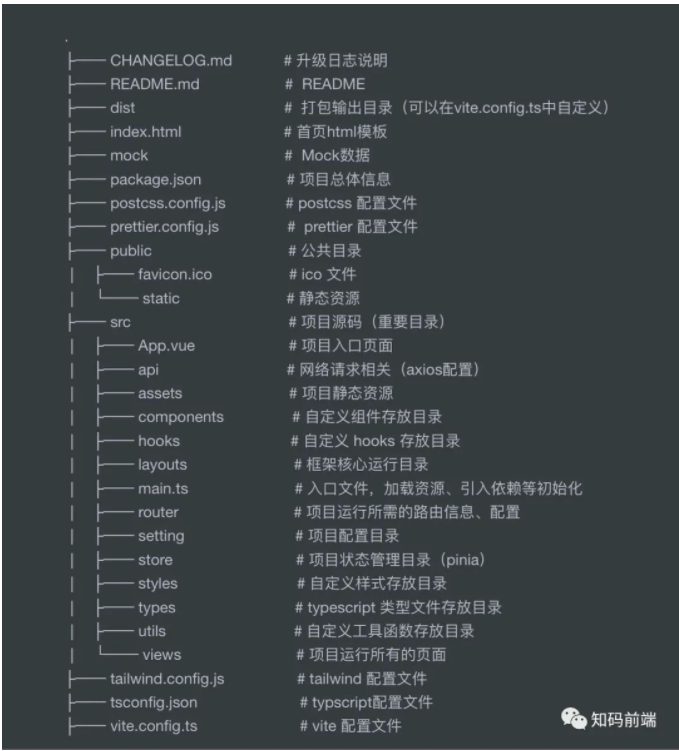
二、目錄結(jié)構(gòu)設(shè)計:重點(diǎn)關(guān)注 src 部分
1. 常規(guī) / 簡單模式:根據(jù)文件功能類型集中管理
```
mesh-fe
├── .husky                  #git提交代碼觸發(fā)
│   ├── commit-msg
│   └── pre-commit
├── mesh-server             #依賴的node服務(wù)
│   ├── mock
│   │   └── data-service   #mock接口返回結(jié)果
│   └── package.json
├── README.md
├── package.json
├── pnpm-workspace.yaml     #PNPM工作空間
├── .eslintignore           #排除eslint檢查
├── .eslintrc.js            #eslint配置
├── .gitignore
├── .stylelintignore        #排除stylelint檢查
├── stylelint.config.js     #style樣式規(guī)范
├── commitlint.config.js    #git提交信息規(guī)范
├── prettier.config.js      #格式化配置
├── index.html              #入口頁面
└── mesh-client #不同的web應(yīng)用package
    ├── vite-vue3
        ├── src
            ├── api                 #api調(diào)用接口層
            ├── assets              #靜態(tài)資源相關(guān)
            ├── components          #公共組件
            ├── config              #公共配置,如字典/枚舉等
            ├── hooks               #邏輯復(fù)用
            ├── layout              #router中使用的父布局組件
            ├── router              #路由配置
            ├── stores              #pinia全局狀態(tài)管理
            ├── types               #ts類型聲明
            ├── utils
            │   ├── index.ts
            │   └── request.js     #Axios接口請求封裝
            ├── views               #主要頁面
            ├── main.ts             #js入口
            └── App.vue
```
2. 基于 domain 領(lǐng)域模式:根據(jù)業(yè)務(wù)模塊集中管理
```
mesh-fe
├── .husky                  #git提交代碼觸發(fā)
│   ├── commit-msg
│   └── pre-commit
├── mesh-server             #依賴的node服務(wù)
│   ├── mock
│   │   └── data-service   #mock接口返回結(jié)果
│   └── package.json
├── README.md
├── package.json
├── pnpm-workspace.yaml     #PNPM工作空間
├── .eslintignore           #排除eslint檢查
├── .eslintrc.js            #eslint配置
├── .gitignore
├── .stylelintignore        #排除stylelint檢查
├── stylelint.config.js     #style樣式規(guī)范
├── commitlint.config.js    #git提交信息規(guī)范
├── prettier.config.js      #格式化配置
├── index.html              #入口頁面
└── mesh-client             #不同的web應(yīng)用package
    ├── vite-vue3
        ├── src                    #按業(yè)務(wù)領(lǐng)域劃分
            ├── assets              #靜態(tài)資源相關(guān)
            ├── components          #公共組件
            ├── domain              #領(lǐng)域
            │   ├── config.ts
            │   ├── service.ts
            │   ├── store.ts
            │   ├── type.ts
            ├── hooks               #邏輯復(fù)用
            ├── layout              #router中使用的父布局組件
            ├── router              #路由配置
            ├── utils
            │   ├── index.ts
            │   └── request.js     #Axios接口請求封裝
            ├── views               #主要頁面
            ├── main.ts             #js入口
            └── App.vue
```
可以根據(jù)具體業(yè)務(wù)場景,選擇以上 2 種方式其中之一。
三、搭建部分細(xì)節(jié)
1.Monorepo+PNPM 集中管理多個應(yīng)用(workspace)
根目錄創(chuàng)建 pnpm-workspace.yaml,mesh-client 文件夾下每個應(yīng)用都是一個 package,之間可以相互添加本地依賴:pnpm install
packages:
  # all packages in direct subdirs of packages/
  - 'mesh-client/*'
  # exclude packages that are inside test directories
  - '!**/test/**'
pnpm install #安裝所有package中的依賴 pnpm install -w axios #將axios庫安裝到根目錄 pnpm --filter | -F
2.Vue3 請求接口相關(guān)封裝
request.ts 封裝:主要是對接口請求和返回做攔截處理,重寫 get/post 方法支持泛型
import axios, { AxiosError } from 'axios'
import type { AxiosRequestConfig, AxiosResponse } from 'axios'

// 創(chuàng)建 axios 實(shí)例
const service = axios.create({
  baseURL: import.meta.env.VITE_APP_BASE_URL,
  timeout: 1000 * 60 * 5, // 請求超時時間
  headers: { 'Content-Type': 'application/json;charset=UTF-8' },
})

const toLogin = (sso: string) => {
  const cur = window.location.href
  const url = `${sso}${encodeURIComponent(cur)}`
  window.location.href = url
}

// 服務(wù)器狀態(tài)碼錯誤處理
const handleError = (error: AxiosError) => {
  if (error.response) {
    switch (error.response.status) {
      case 401:
        // todo
        toLogin(import.meta.env.VITE_APP_SSO)
        break
      // case 404:
      //   router.push('/404')
      //   break
      // case 500:
      //   router.push('/500')
      //   break
      default:
        break
    }
  }
  return Promise.reject(error)
}

// request interceptor
service.interceptors.request.use((config) => {
  const token = ''
  if (token) {
    config.headers!['Access-Token'] = token // 讓每個請求攜帶自定義 token 請根據(jù)實(shí)際情況自行修改
  }
  return config
}, handleError)

// response interceptor
service.interceptors.response.use((response: AxiosResponse) => {
  const { code } = response.data
  if (code === '10000') {
    toLogin(import.meta.env.VITE_APP_SSO)
  } else if (code !== '00000') {
    // 拋出錯誤信息,頁面處理
    return Promise.reject(response.data)
  }
  // 返回正確數(shù)據(jù)
  return Promise.resolve(response)
  // return response
}, handleError)

// 后端返回數(shù)據(jù)結(jié)構(gòu)泛型,根據(jù)實(shí)際項(xiàng)目調(diào)整
interface ResponseData {
  code: string
  message: string
  result: T
}

export const httpGet = async (url: string, config?: AxiosRequestConfig) => {
  return service.get>(url, config).then((res) => res.data)
}

export const httpPost = async (
  url: string,
  data?: D,
  config?: AxiosRequestConfig,
) => {
  return service.post>(url, data, config).then((res) => res.data)
}

export { service as axios }

export type { ResponseData }
useRequest.ts 封裝:基于 vue3 Composition API,將請求參數(shù)、狀態(tài)以及結(jié)果等邏輯封裝復(fù)用
import { ref } from 'vue'
import type { Ref } from 'vue'
import { ElMessage } from 'element-plus'
import type { ResponseData } from '@/utils/request'
export const useRequest = (
  api: (...args: P[]) => Promise>,
  defaultParams?: P,
) => {
  const params = ref() as Ref
  if (defaultParams) {
    params.value = {
      ...defaultParams,
    }
  }
  const loading = ref(false)
  const result = ref()
  const fetchResource = async (...args: P[]) => {
    loading.value = true
    return api(...args)
      .then((res) => {
        if (!res?.result) return
        result.value = res.result
      })
      .catch((err) => {
        result.value = undefined
        ElMessage({
          message: typeof err === 'string' ? err : err?.message || 'error',
          type: 'error',
          offset: 80,
        })
      })
      .finally(() => {
        loading.value = false
      })
  }
  return {
    params,
    loading,
    result,
    fetchResource,
  }
}
API 接口層
import { httpGet } from '@/utils/request'

const API = {
  getLoginUserInfo: '/userInfo/getLoginUserInfo',
}
type UserInfo = {
  userName: string
  realName: string
}
export const getLoginUserInfoAPI = () => httpGet(API.getLoginUserInfo)
頁面使用:接口返回結(jié)果 userInfo,可以自動推斷出 UserInfo 類型,
// 方式一:推薦
const {
  loading,
  result: userInfo,
  fetchResource: getLoginUserInfo,
} = useRequest(getLoginUserInfoAPI)

// 方式二:不推薦,每次使用接口時都需要重復(fù)定義type
type UserInfo = {
  userName: string
  realName: string
}
const {
  loading,
  result: userInfo,
  fetchResource: getLoginUserInfo,
} = useRequest(getLoginUserInfoAPI)

onMounted(async () => {
  await getLoginUserInfo()
  if (!userInfo.value) return
  const user = useUserStore()
  user.$patch({
    userName: userInfo.value.userName,
    realName: userInfo.value.realName,
  })
})
3.Mockjs 模擬后端接口返回數(shù)據(jù)
import Mock from 'mockjs'
const BASE_URL = '/api'
Mock.mock(`${BASE_URL}/user/list`, {
  code: '00000',
  message: '成功',
  'result|10-20': [
    {
      uuid: '@guid',
      name: '@name',
      tag: '@title',
      age: '@integer(18, 35)',
      modifiedTime: '@datetime',
      status: '@cword("01")',
    },
  ],
})
四、統(tǒng)一規(guī)范
1.ESLint
注意:不同框架下,所需要的 preset 或 plugin 不同,建議將公共部分提取并配置在根目錄中,package 中的 eslint 配置設(shè)置 extends。
/* eslint-env node */
require('@rushstack/eslint-patch/modern-module-resolution')

module.exports = {
  root: true,
  extends: [
    'plugin:vue/vue3-essential',
    'eslint:recommended',
    '@vue/eslint-config-typescript',
    '@vue/eslint-config-prettier',
  ],
  overrides: [
    {
      files: ['cypress/e2e/**.{cy,spec}.{js,ts,jsx,tsx}'],
      extends: ['plugin:cypress/recommended'],
    },
  ],
  parserOptions: {
    ecmaVersion: 'latest',
  },
  rules: {
    'vue/no-deprecated-slot-attribute': 'off',
  },
}
2.StyleLint
module.exports = {
  extends: ['stylelint-config-standard', 'stylelint-config-prettier'],
  plugins: ['stylelint-order'],
  customSyntax: 'postcss-html',
  rules: {
    indentation: 2, //4空格
    'selector-class-pattern':
      '^(?:(?:o|c|u|t|s|is|has|_|js|qa)-)?[a-zA-Z0-9]+(?:-[a-zA-Z0-9]+)*(?:__[a-zA-Z0-9]+(?:-[a-zA-Z0-9]+)*)?(?:--[a-zA-Z0-9]+(?:-[a-zA-Z0-9]+)*)?(?:[.+])?$',
    // at-rule-no-unknown: 屏蔽一些scss等語法檢查
    'at-rule-no-unknown': [true, { ignoreAtRules: ['mixin', 'extend', 'content', 'export'] }],
    // css-next :global
    'selector-pseudo-class-no-unknown': [
      true,
      {
        ignorePseudoClasses: ['global', 'deep'],
      },
    ],
    'order/order': ['custom-properties', 'declarations'],
    'order/properties-alphabetical-order': true,
  },
}
3.Prettier
module.exports = {
  printWidth: 100,
  singleQuote: true,
  trailingComma: 'all',
  bracketSpacing: true,
  jsxBracketSameLine: false,
  tabWidth: 2,
  semi: false,
}
4.CommitLint
module.exports = {
  extends: ['@commitlint/config-conventional'],
  rules: {
    'type-enum': [
      2,
      'always',
      ['build', 'feat', 'fix', 'docs', 'style', 'refactor', 'test', 'chore', 'revert'],
    ],
    'subject-full-stop': [0, 'never'],
    'subject-case': [0, 'never'],
  },
}
五、附錄:技術(shù)棧圖譜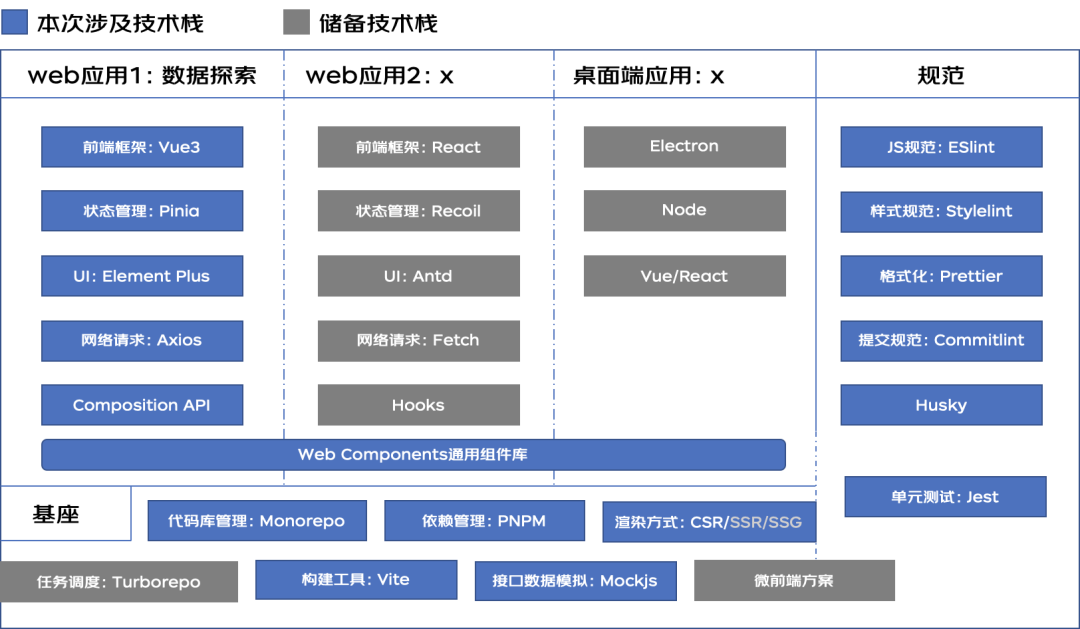
審核編輯:劉清
-
ESM
+關(guān)注
關(guān)注
0文章
9瀏覽量
9291 -
SRC
+關(guān)注
關(guān)注
0文章
63瀏覽量
18728
原文標(biāo)題:基于vite3的monorepo前端工程搭建
文章出處:【微信號:OSC開源社區(qū),微信公眾號:OSC開源社區(qū)】歡迎添加關(guān)注!文章轉(zhuǎn)載請注明出處。
發(fā)布評論請先 登錄
前端工程師月薪15000元福利好[1-3年經(jīng)驗(yàn)]
關(guān)于虛擬儀器測試環(huán)境VITE的分析
如何搭建寄存器的工程環(huán)境詳細(xì)方法步驟說明
物聯(lián)網(wǎng)LoRa系列-3:LoRa終端搭建的總體思路、步驟與架構(gòu)

搭建基于Vue3+Vite2+Arco+Typescript+Pinia后臺管理系統(tǒng)模板
Vite 4.3正式發(fā)布,前端構(gòu)建工具
ViteConf 2023:Vite即將Rust化挑戰(zhàn)



 工商網(wǎng)監(jiān)
評論