


 基于阿里云MQTT物聯網平臺視頻監控(下)

1.項目介紹
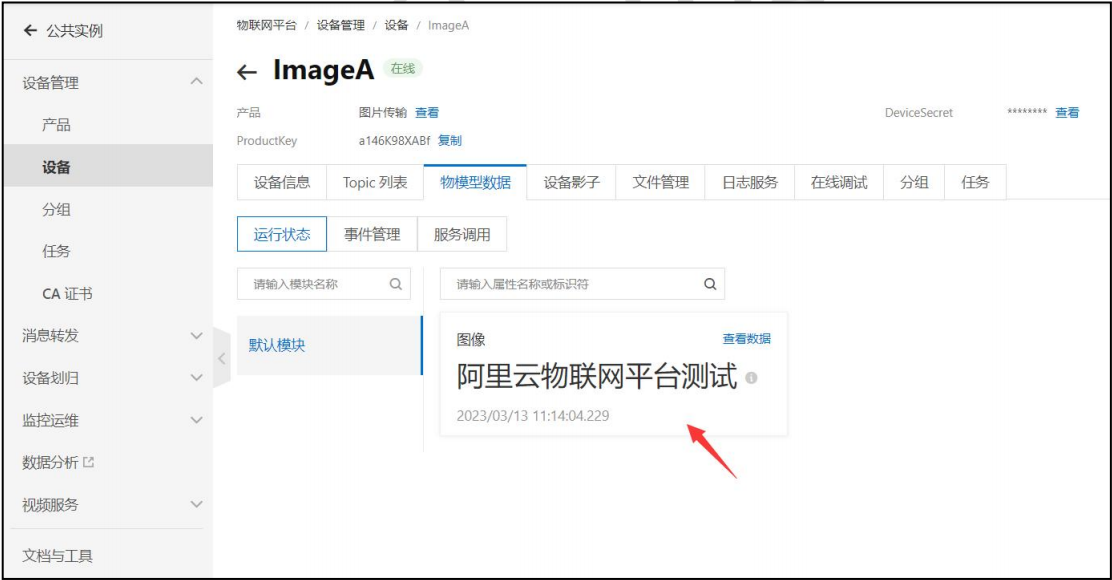
本項目基于物聯量平臺遠程的視頻監控項目,通過MQTT協議實現兩個設備間的數據上報與訂閱。通過這個項目來演示,兩個MQTT設備如何互相訂閱,進行消息流轉。在阿里云服務器上創建2個設備,分為為設備A和設備B;設備A負責采集本地攝像頭畫面上傳,設備B負責接收設備A上傳的數據然后解析顯示出來。在阿里云服務器上需要配置云產品流轉,讓設備A的數據上傳后自動發送給設備B。這樣就完成了視頻畫面數據的流轉。不過因為阿里云的最大數據限制,每次最大發送10240字節的數據。
#define SERVER_IP "asfdda.iot-as-mqtt.cn-shanghai.aliyuncs.com"http://服務器IP
#define SERVER_PORT 1883 //端口號
#define ClientID "aasfsaXABf.Imasfas|securemode=2,signmethod=hmacsha256,timestamp=1678323607797|"
#define Username "ImsfeA&a1sadf8XABf"
#define Password "15566ab496e81da728a3792ebe532fd4a3f4026a2b831df5af24da06"http://密文
#define SET_TOPIC  "/sys/a14dXABf/ImagfA/thing/service/property/set"  //訂閱
#define POST_TOPIC "/sys/a14sdf8XABf/ImdfeA/thing/event/property/post"  //發布
int main()
{
    pthread_t id;
    signal(SIGPIPE,SIG_IGN);/*忽略SIGPIPE信號*/
    signal(SIGALRM,signal_func);/*鬧鐘信號*/
    sockfd=socket(AF_INET,SOCK_STREAM,0);
    if(sockfd==-1)
    {
        printf("網絡套接字打開失敗n");
        return 0;
    }
    /*設置發送緩沖區大小*/
	int nSendBuf=40*1024;//設置為 20K
	if(setsockopt(sockfd,SOL_SOCKET,SO_SNDBUF,(const char*)&nSendBuf,sizeof(int)))
    {
        printf("setsockopt(SO_SNDBUF) 設置錯誤!n");
        return 0;
    }
	/*域名解析*/
	struct hostent *hostent;
	while(1)
	{
		hostent=gethostbyname(SERVER_IP);
		if(hostent==NULL)
		{
			printf("域名解析失敗n");
			sleep(1);
		}
		else break;
	}
	printf("主機名:%sn",hostent->h_name);
	printf("協議類型:%sn",(hostent->h_addrtype == AF_INET)?"AF_INET":"AF_INET6");
	printf("IP地址長度:%dn",hostent->h_length);
	char *ip;
	for(int i=0;hostent->h_addr_list[i];i++)
	{
		ip=inet_ntoa(*(struct in_addr *)hostent->h_addr_list[i]);
		printf("ip=%sn",ip);
	}
    /*連接服務器*/
     struct sockaddr_in addr;
     addr.sin_family=AF_INET;//IPV4
     addr.sin_port=htons(SERVER_PORT);/*端口號*/
     addr.sin_addr.s_addr=inet_addr(ip);//服務器IP
     if(connect(sockfd, (struct sockaddr *)&addr,sizeof(struct sockaddr_in))==0)
     {
         printf("服務器連接成功n");
         while(1)
         {
            MQTT_Init();
            /*登錄服務器*/
            if(MQTT_Connect(ClientID,Username,Password)==0)
            {
                break;
            }
            sleep(1);
            printf("服務器連接中....n");
         }
        printf("連接成功rn");
        //訂閱物聯網平臺數據
        stat=MQTT_SubscribeTopic(SET_TOPIC,1,1);
        if(stat)
        {
            close(sockfd);
            printf("訂閱失敗rn");
            exit(0);
        }
        printf("訂閱成功rn");
        /*創建線程*/
        pthread_create(&id, NULL,pth_work_func,NULL);
        pthread_detach(id);//設置分離屬性
        alarm(3);//鬧鐘函數,時間到達會產生SIGALRM信號
        int a=0;
        while(1)
        {
sprintf(mqtt_message,"{"method":"thing.event.property.post","params":{"image":"阿里云物聯網平臺測試"}}");
            MQTT_PublishData(POST_TOPIC,mqtt_message,0);//發布數據
        }
     }
}
3.云產品流轉
云產品流轉文檔: https: //help. aliyun. com/document_detail/68677. html
3.1 什么是云產品流轉
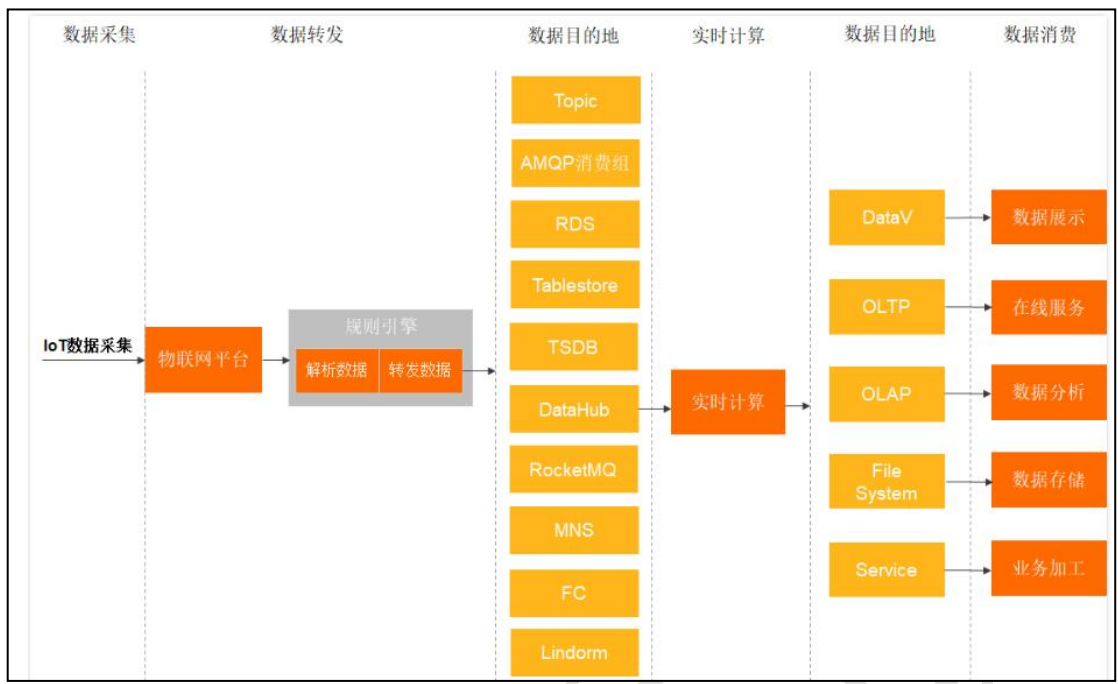
設備基于 Topic 與物聯網平臺進行通信時, 您可以在數據流轉中, 編寫 SQL 對 Topic 中的數據進行處理, 并配置轉發規則將處理后的數據轉發到其他設備 Topic 或阿里云其他服務。
3.2 云產品流轉配置
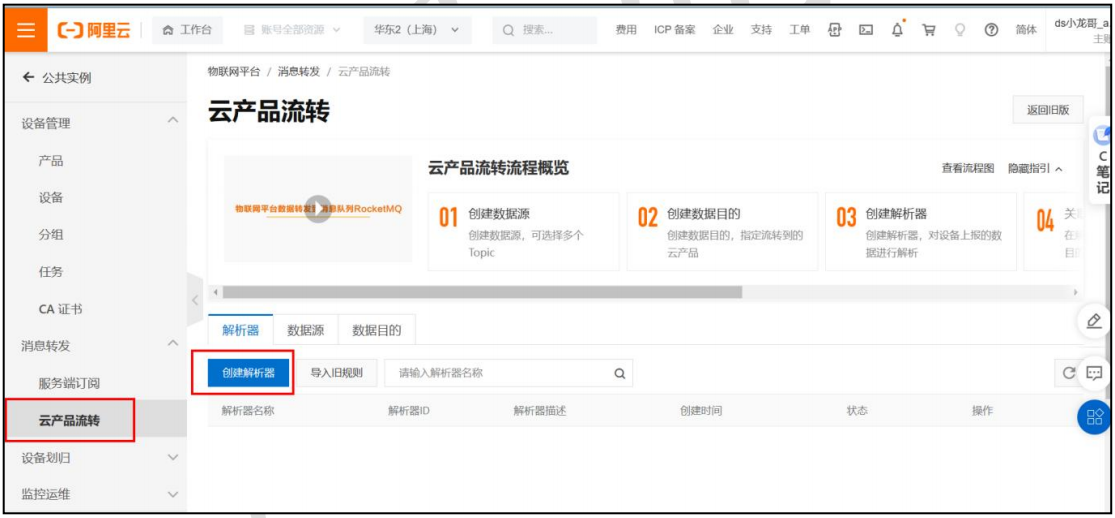
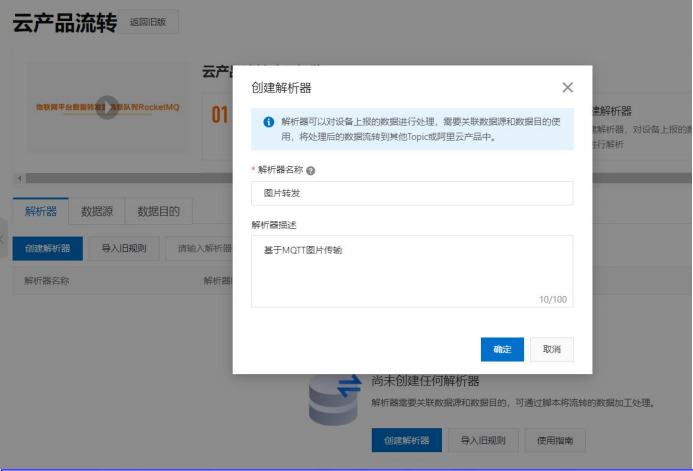
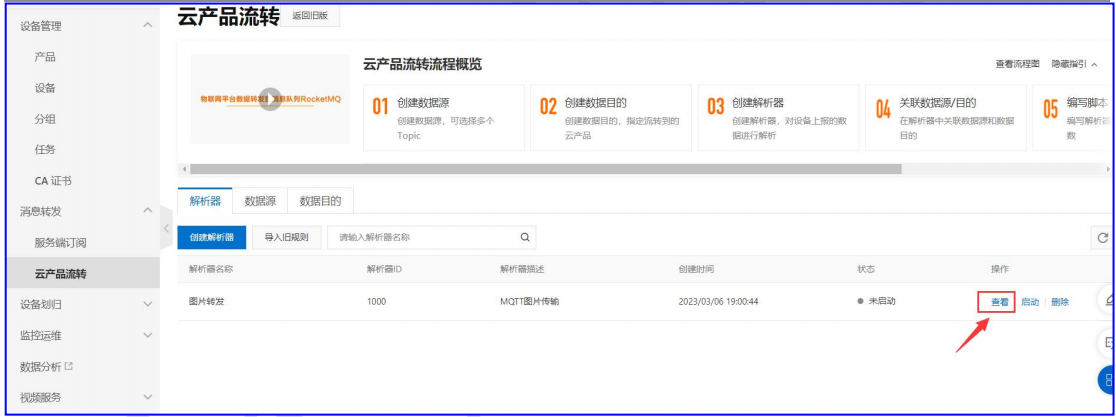
1 .創建解析器
2.關聯數據源
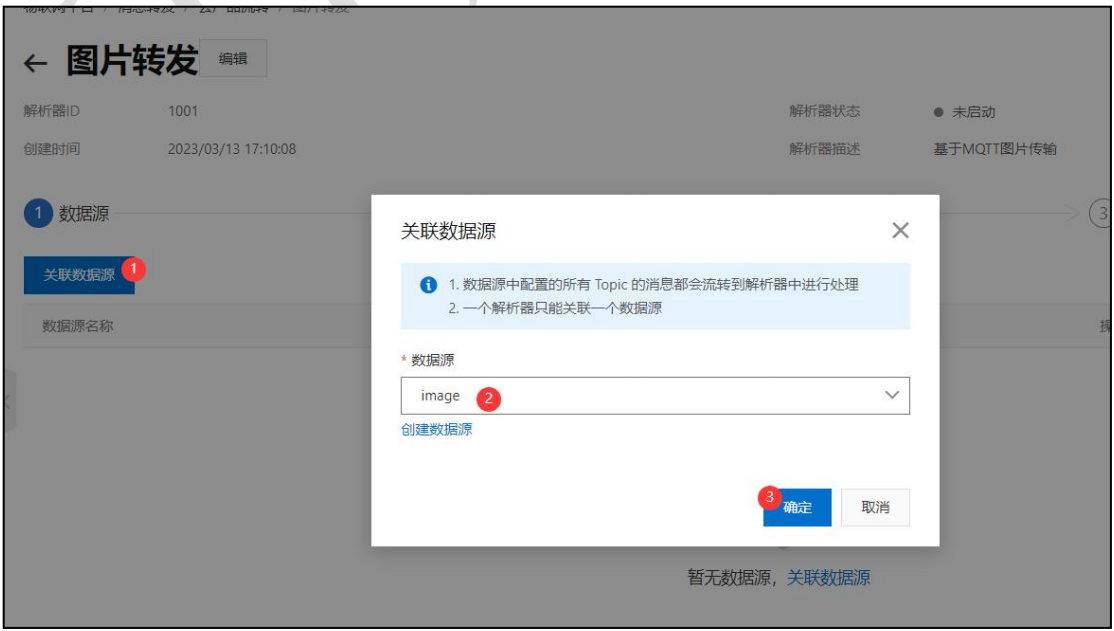
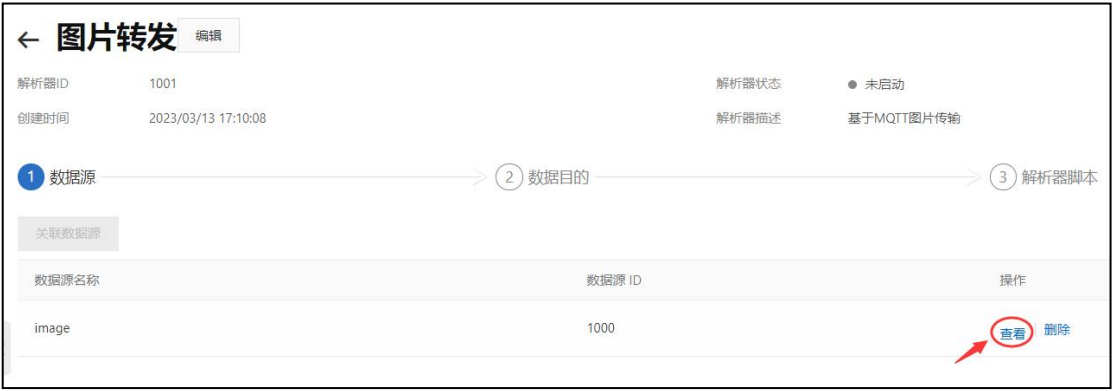
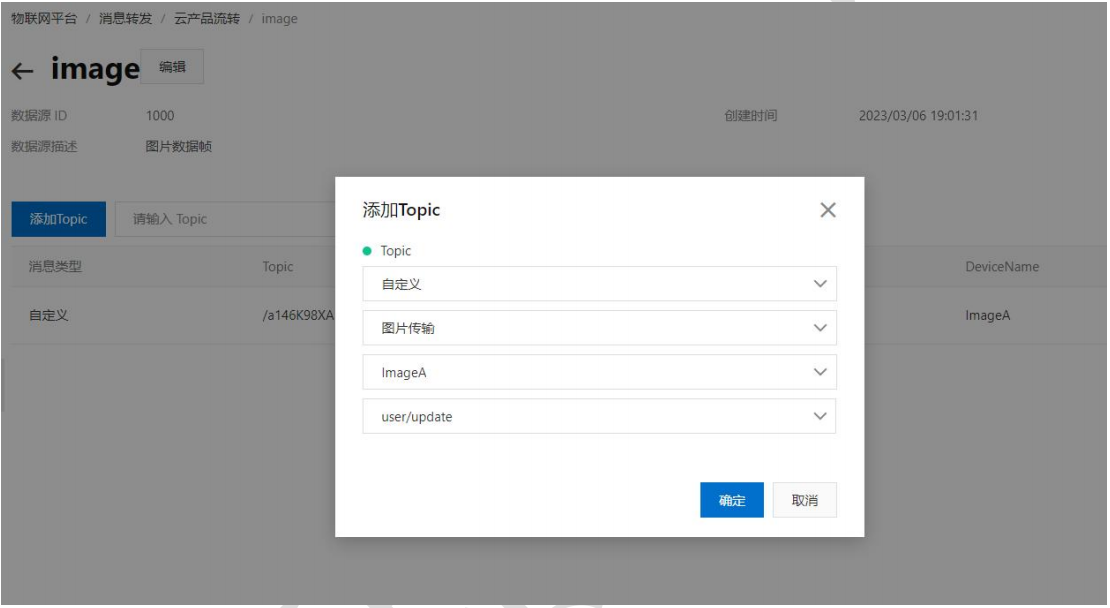
3.關聯數據目的
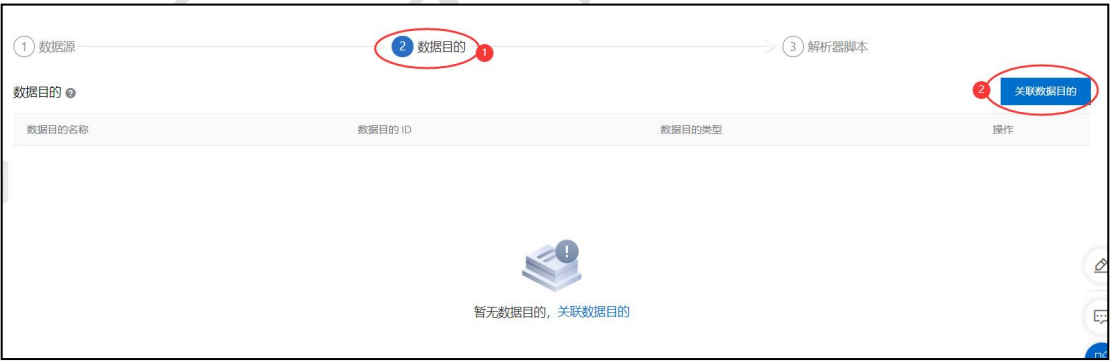
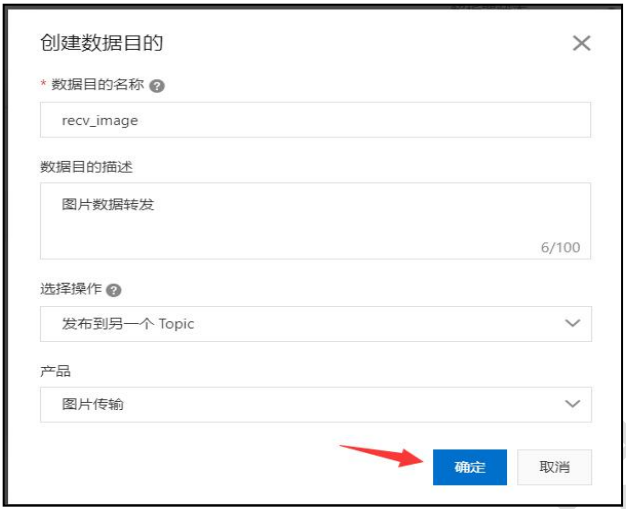
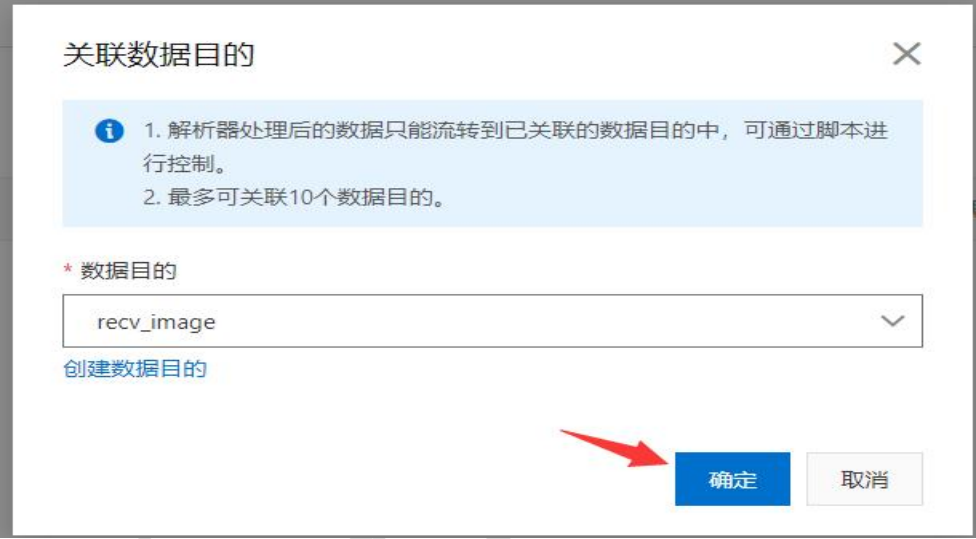
4.編寫解析器腳本
解析器說明文檔: https: //help. aliyun. com/document_detail/270931. html
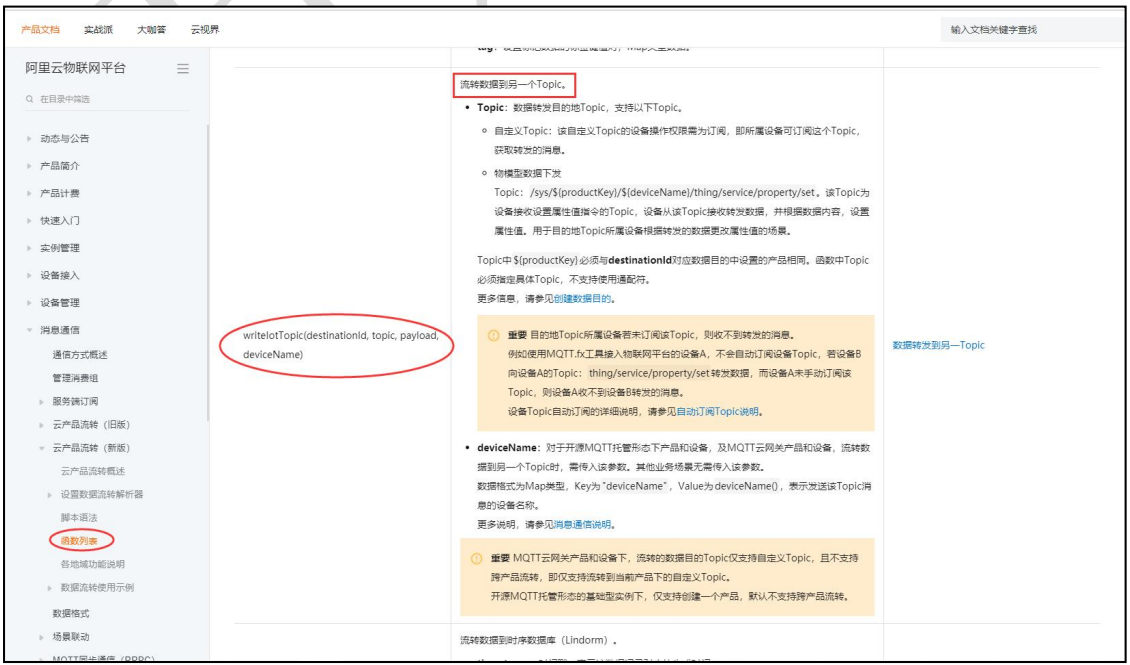
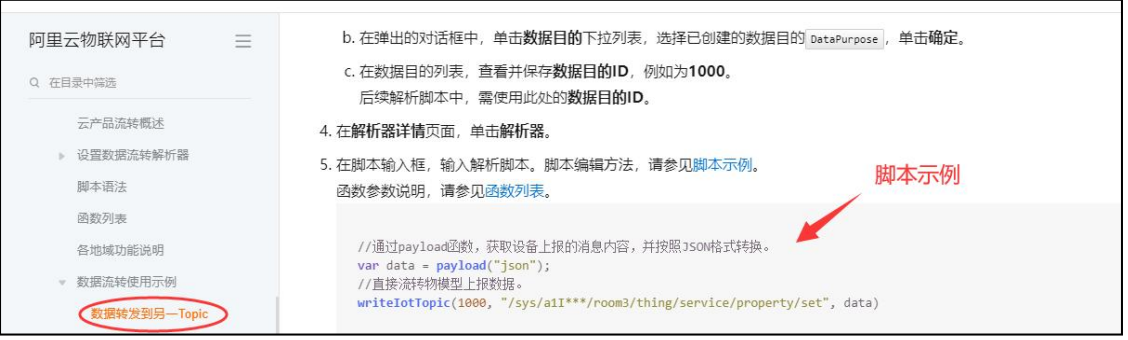
格式示例:
//通過 payload 函數, 獲取設備上報的消息內容, 并按照 JSON 格式轉換。
var data = payload("json"); //直接流轉物模型上報數據。
writeIotTopic(1000, topic, data);
topic 如下:
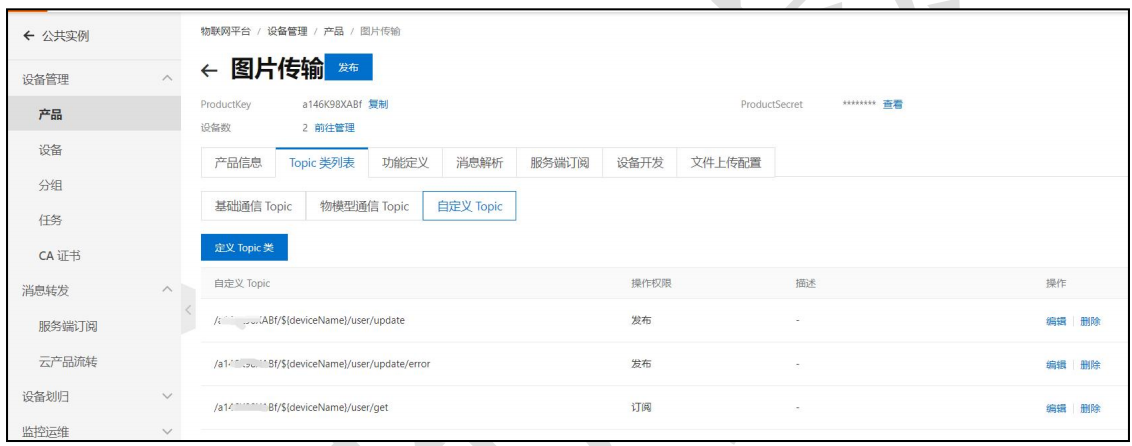
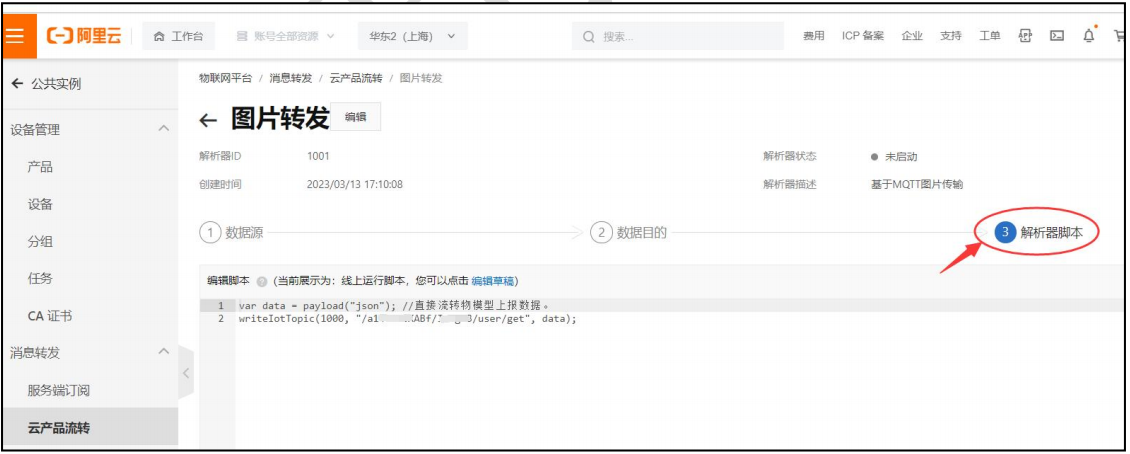
編輯好后發布即可, 至此, 阿里物聯網平臺配置完成。
4.代碼實現
4.1 設備 A 發送方
1 .USB 攝像頭應用編程
采用 Linux 下 V4L2 框架初始化 USB 攝像頭, 采集圖像數據。
/*
攝像頭初始化
返回值:成功返回攝像頭描述符,失敗返回負數
*/
int Video_Init(struct CAMERA *camera)
{
  int video_fd;
  int i=0;
  /*1.打開設備節點*/
  video_fd=open(VIDEO_DEV,O_RDWR);
  if(video_fd==-1)return -1;
  /*2.設置攝像頭格式*/
  struct v4l2_format format;
  memset(&format,0,sizeof(format));
  format.type=V4L2_BUF_TYPE_VIDEO_CAPTURE;//視頻捕獲格式
  format.fmt.pix.width=320;
  format.fmt.pix.height=240;
  format.fmt.pix.pixelformat=V4L2_PIX_FMT_YUYV;//圖像數據格式yuyv
  if(ioctl(video_fd,VIDIOC_S_FMT,&format))return -2;
  printf("圖像尺寸:%d * %dn",format.fmt.pix.width,format.fmt.pix.height);
  camera->image_w=format.fmt.pix.width;
  camera->image_h=format.fmt.pix.height;
  /*3.向內核請求緩沖區*/
  struct v4l2_requestbuffers reqbuf;
  memset(&reqbuf,0,sizeof(reqbuf));
  reqbuf.count=4;/*緩沖區個數*/
  reqbuf.type=V4L2_BUF_TYPE_VIDEO_CAPTURE;//視頻捕獲格式
  reqbuf.memory=V4L2_MEMORY_MMAP;/*內存映射*/
  if(ioctl(video_fd,VIDIOC_REQBUFS,&reqbuf))return -3;
  printf("緩沖區個數:%dn",reqbuf.count);
  /*4.將緩沖區映射到進程空間*/
  struct v4l2_buffer quebuff;
  for(i=0;imamp_buff[i]=mmap(NULL,quebuff.length,PROT_READ|PROT_WRITE,MAP_SHARED,video_fd,quebuff.m.offset);
    printf("buff[%d]=%pn",i,camera->mamp_buff[i]);
    camera->mmap_size=quebuff.length;
  }
  /*5.將緩沖區添加到采集隊列*/
  for(i=0;i
2.圖片編碼處理
實時采集圖像數據, 將圖片數據編碼為 jpg 圖像格式, 再進 base64 格式編碼。Base64 編碼是一種將二進制數據轉換為 ASCII 字符的方法, 它使用 64 個字符來表示任意序列的二進制數據。 Base64 編碼后的數據長度會比原始二進制數據略長, 但可以方便地被轉換為文本格式并在網絡上進行傳輸。
3.base64 格式編碼
#include
static const char * base64char = "ABCDEFGHIJKLMNOPQRSTUVWXYZabcdefghijklmnopqrstuvwxyz0123456789+/";
/*
函數功能:將圖片編碼為base64格式
形參:bindata 源圖片數據
   base64 編碼后的數據
   binlength --源文件大小
返回值:返回編碼后的base64數據
*/
char * base64_encode( const unsigned char * bindata, char * base64, int binlength )
{
  int i, j;
  unsigned char current;
  for ( i = 0, j = 0 ; i < binlength ; i += 3 )
? ? {
? ? ? ? current = (bindata[i] >> 2) ;
    current &= (unsigned char)0x3F;
    base64[j++] = base64char[(int)current];

    current = ( (unsigned char)(bindata[i] << 4 ) ) & ( (unsigned char)0x30 ) ;
? ? ? ? if ( i + 1 >= binlength )
    {
      base64[j++] = base64char[(int)current];
      base64[j++] = '=';
      base64[j++] = '=';
      break;
    }
    current |= ( (unsigned char)(bindata[i+1] >> 4) ) & ( (unsigned char) 0x0F );
    base64[j++] = base64char[(int)current];

    current = ( (unsigned char)(bindata[i+1] << 2) ) & ( (unsigned char)0x3C ) ;
? ? ? ? if ( i + 2 >= binlength )
    {
      base64[j++] = base64char[(int)current];
      base64[j++] = '=';
      break;
    }
    current |= ( (unsigned char)(bindata[i+2] >> 6) ) & ( (unsigned char) 0x03 );
    base64[j++] = base64char[(int)current];

    current = ( (unsigned char)bindata[i+2] ) & ( (unsigned char)0x3F ) ;
    base64[j++] = base64char[(int)current];
  }
  base64[j] = '';
  return base64;
}
4. base64 格式解碼
/*
函數功能:base64格式數據解碼
形參:base64 base64格式數據
   bindata 保存解碼成功的圖像數據
返回值:成功返回解碼的圖像大小
*/
static const char * base64char = "ABCDEFGHIJKLMNOPQRSTUVWXYZabcdefghijklmnopqrstuvwxyz0123456789+/";
int base64_decode( const char * base64, unsigned char * bindata )
{
  int i, j;
  unsigned char k;
  unsigned char temp[4];
  for ( i = 0, j = 0; base64[i] != '' ; i += 4 )
  {
    memset( temp, 0xFF, sizeof(temp) );
    for ( k = 0 ; k < 64 ; k ++ )
? ? ? ? {
? ? ? ? ? ? if ( base64char[k] == base64[i] )
? ? ? ? ? ? ? ? temp[0]= k;
? ? ? ? }
? ? ? ? for ( k = 0 ; k < 64 ; k ++ )
? ? ? ? {
? ? ? ? ? ? if ( base64char[k] == base64[i+1] )
? ? ? ? ? ? ? ? temp[1]= k;
? ? ? ? }
? ? ? ? for ( k = 0 ; k < 64 ; k ++ )
? ? ? ? {
? ? ? ? ? ? if ( base64char[k] == base64[i+2] )
? ? ? ? ? ? ? ? temp[2]= k;
? ? ? ? }
? ? ? ? for ( k = 0 ; k < 64 ; k ++ )
? ? ? ? {
? ? ? ? ? ? if ( base64char[k] == base64[i+3] )
? ? ? ? ? ? ? ? temp[3]= k;
? ? ? ? }

? ? ? ? bindata[j++] = ((unsigned char)(((unsigned char)(temp[0] << 2))&0xFC)) |
? ? ? ? ? ? ? ? ((unsigned char)((unsigned char)(temp[1]>>4)&0x03));
    if ( base64[i+2] == '=' )
      break;

    bindata[j++] = ((unsigned char)(((unsigned char)(temp[1] << 4))&0xF0)) |
? ? ? ? ? ? ? ? ((unsigned char)((unsigned char)(temp[2]>>2)&0x0F));
    if ( base64[i+3] == '=' )
      break;

    bindata[j++] = ((unsigned char)(((unsigned char)(temp[2] << 6))&0xF0)) |
? ? ? ? ? ? ? ? ((unsigned char)(temp[3]&0x3F));
? ? }
? ? return j;
}
5.數據上報
Linux 下 socket 網絡編程, 連接阿里云服務器, 接入阿里云物聯網平臺, 通過 MQTT 協議實時上報數據。
4.2 設備 B 訂閱方
1 .數據獲取
Linux 下 socket 網絡編程, 連接阿里云服務器, 接入阿里云物聯網平臺, 訂閱設備 A 端發送的消息。
2.數據解析
物聯網平臺下發消息格式為 JSON 格式, 進行消息數據解析, 提取圖像數據, 將圖像數據進行 base64 格式解碼得到 JPG 圖片數據。
3.JPG 圖片解析
解析 JPG 圖片獲取到 RGB 顏色數據。
//顯示JPEG 編譯時加-ljpeg
int LCD_ShowJPEG(unsigned char *jpg_buffer,int size,struct ImageDecodingInfo *image_rgb)
{
  struct jpeg_decompress_struct cinfo; //存放圖像的數據
  struct jpeg_error_mgr jerr; //存放錯誤信息
  unsigned char *buffer;
  unsigned int i,j;
  unsigned int color;
  static int written;

  /*init jpeg壓縮對象錯誤處理程序*/
  cinfo.err = jpeg_std_error(&jerr); //初始化標準錯誤,用來存放錯誤信息
  jpeg_create_decompress(&cinfo);  //創建解壓縮結構信息

  jpeg_mem_src(&cinfo, (unsigned char *)jpg_buffer, size);
  //jpeg_stdio_src(&cinfo, infile);
  /*讀jpeg頭*/
  jpeg_read_header(&cinfo, TRUE);
  /*開始解壓*/
  jpeg_start_decompress(&cinfo);
  #if 0
  printf("JPEG圖片高度: %dn",cinfo.output_height);
  printf("JPEG圖片寬度: %dn",cinfo.output_width);
  printf("JPEG圖片顏色位數(字節單位): %dn",cinfo.output_components);
  #endif
  image_rgb->Height=cinfo.output_height;
  image_rgb->Width=cinfo.output_width;

  unsigned char *rgb_data=image_rgb->rgb;
  /*為一條掃描線上的像素點分配存儲空間,一行一行的解碼*/
  int row_stride = cinfo.output_width * cinfo.output_components;
  buffer = (unsigned char *)malloc(row_stride);
 //將圖片內容顯示到framebuffer上,cinfo.output_scanline表示當前行的位置,讀取數據是會自動增加
  i=0;
  while(cinfo.output_scanline < cinfo.output_height)
? ? {
? ? ? ? //讀取一行的數據 ? ?
? ? ? ? jpeg_read_scanlines(&cinfo,&buffer,1);
? ? ? ? memcpy(rgb_data + i * cinfo.output_width * 3, buffer, row_stride);
? ? ? ? i++;
? ? } ? ?
? ? /*完成解壓,摧毀解壓對象*/
? ? jpeg_finish_decompress(&cinfo); //結束解壓
? ? jpeg_destroy_decompress(&cinfo); //釋放結構體占用的空間
? ? /*釋放內存緩沖區*/
? ? free(buffer);
? ? return 0; ? ? ?
}
4.GTK 窗口渲染
創建 GTK 窗口, 將原始圖片進行縮放, 實時渲染圖像數據。
/*****************************BMP圖片放大縮小************************
**image_rgb --圖像結構體信息
**int lcd_width,int lcd_hight --屏幕大小
**返回值:0 -- 成功; 其它值 -- 失敗
*********************************************************************/
int ZoomInandOut(struct ImageDecodingInfo *image_rgb,int lcd_width,int lcd_hight)
{
  //printf("源圖片寬:%dn",image_rgb->Width);
  //printf("源圖片高:%dn",image_rgb->Height);
  u32 w=image_rgb->Width;
  u32 h=image_rgb->Height;
  u8 *src_rgb=image_rgb->rgb;//源圖片RGB值
  unsigned long oneline_byte=w*3;//一行字節數
  float zoom_count=0;
  /*按比例縮放*/
  zoom_count=(lcd_width/(w*1.0)) > (lcd_hight/(h*1.0)) ? (lcd_hight/(h*1.0)):(lcd_width/(w*1.0));

  int new_w,new_h;
  new_w=zoom_count*w;//新圖片寬
  new_h=zoom_count*h;//新圖片高

  //printf("新圖片寬:%dn",new_w);
  //printf("新圖片高:%dn", new_h);
  //printf("縮放比例:%.0f%%n",(new_w*1.0/w)*100);
  unsigned long new_oneline_byte=new_w*3;
  unsigned char *newbmp_buff=(unsigned char *)malloc(new_h*new_oneline_byte);//動態分配新圖片RGB顏色數據緩沖區
  if(newbmp_buff==NULL)
  {
    printf("[%s line %d]動態分配空間失敗n",__FUNCTION__,__LINE__);
    return -1;
  }
  memset(newbmp_buff, 0, new_h*new_oneline_byte);
  /************************圖像處理算法(雙線性插值)*******************************/
  int i,j;
  for(i=0;irgb,newbmp_buff,new_h*new_oneline_byte);//新圖像RGB數據
  image_rgb->Width=new_w;//新圖像寬
  image_rgb->Height=new_h;//新圖像高
  free(newbmp_buff);
  return 0;
}
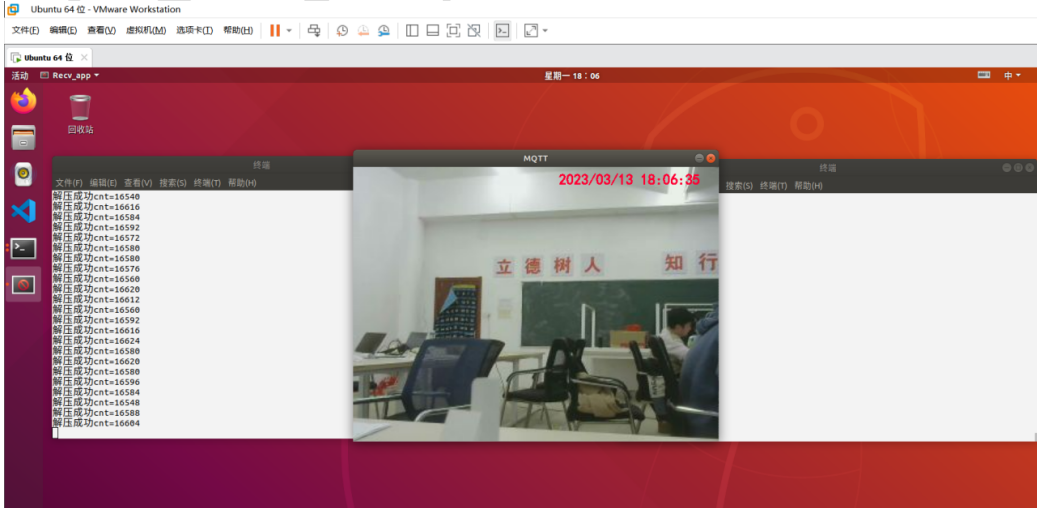
4.3 項目效果

審核編輯黃宇
-
物聯網
+關注
關注
2945文章
47820瀏覽量
415052 -
阿里云
+關注
關注
3文章
1038瀏覽量
45694 -
MQTT
+關注
關注
5文章
733瀏覽量
25091
發布評論請先 登錄
基于阿里云HiTSDB搭建工業物聯網平臺實踐
物聯網之阿里云教程(1)——MQTT連接阿里云教程
基于鴻蒙Hi3861V100 MQTT協議 對接阿里云物聯網平臺
踏入物聯網第一篇——STM32F103開發板接入阿里云IOT平臺 精選資料分享

基于阿里云MQTT物聯網平臺視頻監控(上)

【教程】必看!手把手教你學會MQTT工作模式下阿里云物聯網平臺的配置




 工商網監
工商網監
評論