


 Linux下基于百度智能云平臺人臉檢測分析

1.百度智能云接口及簡介
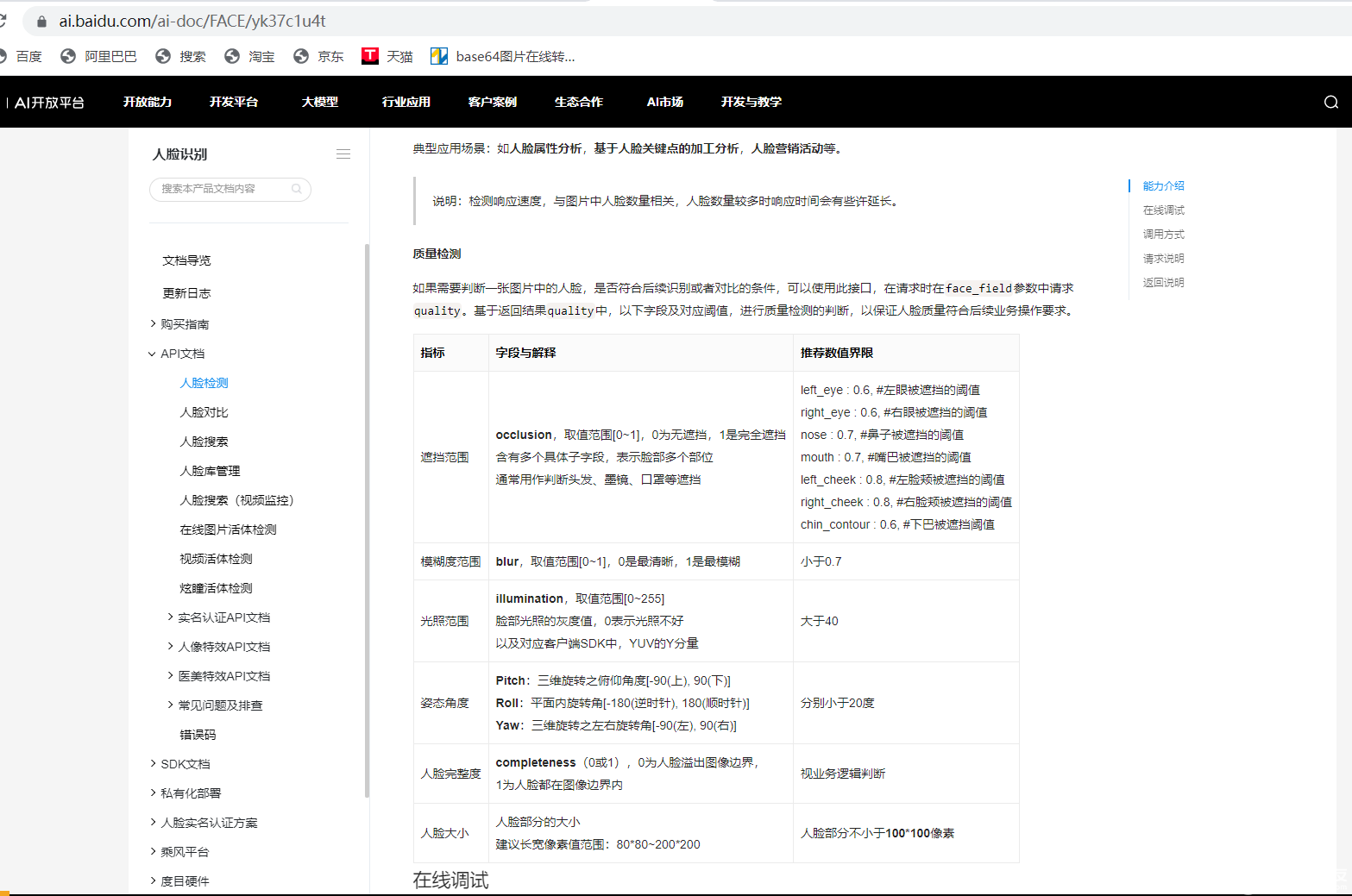
云平臺接口

??接口技術文檔:
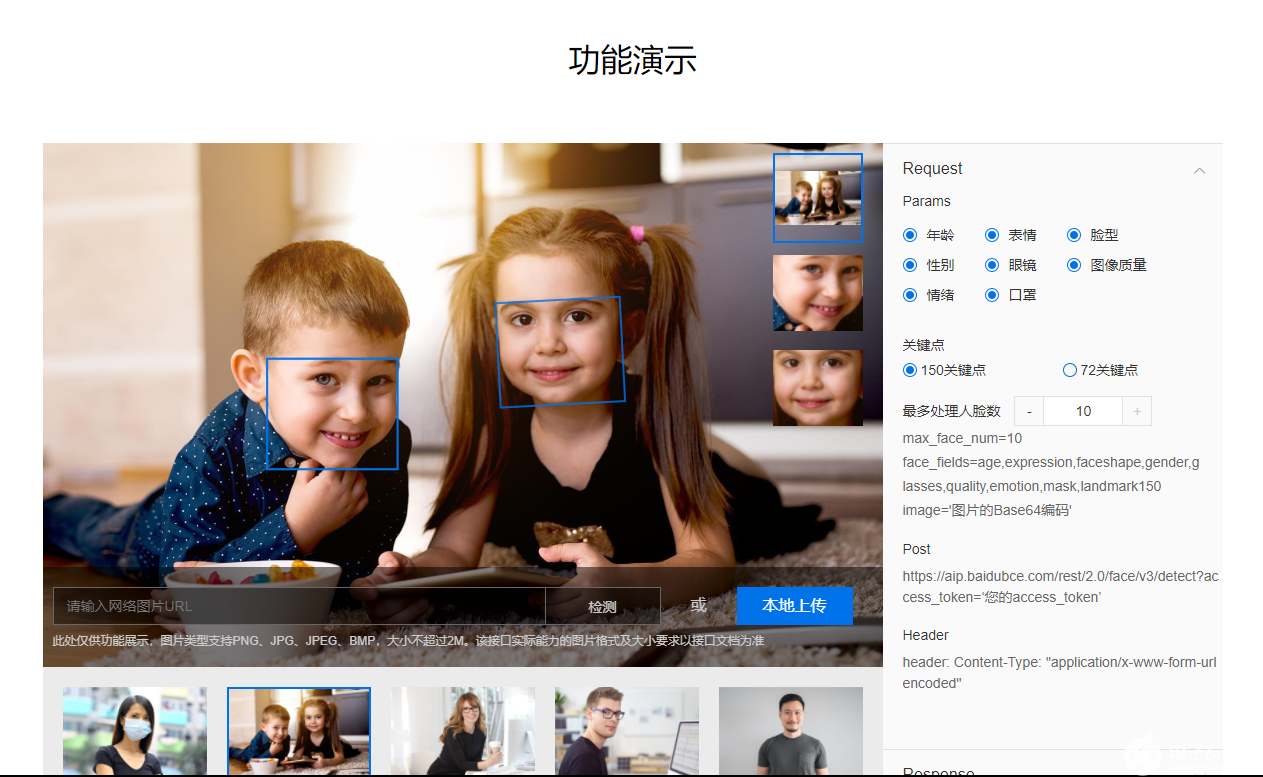
網頁功能演示:
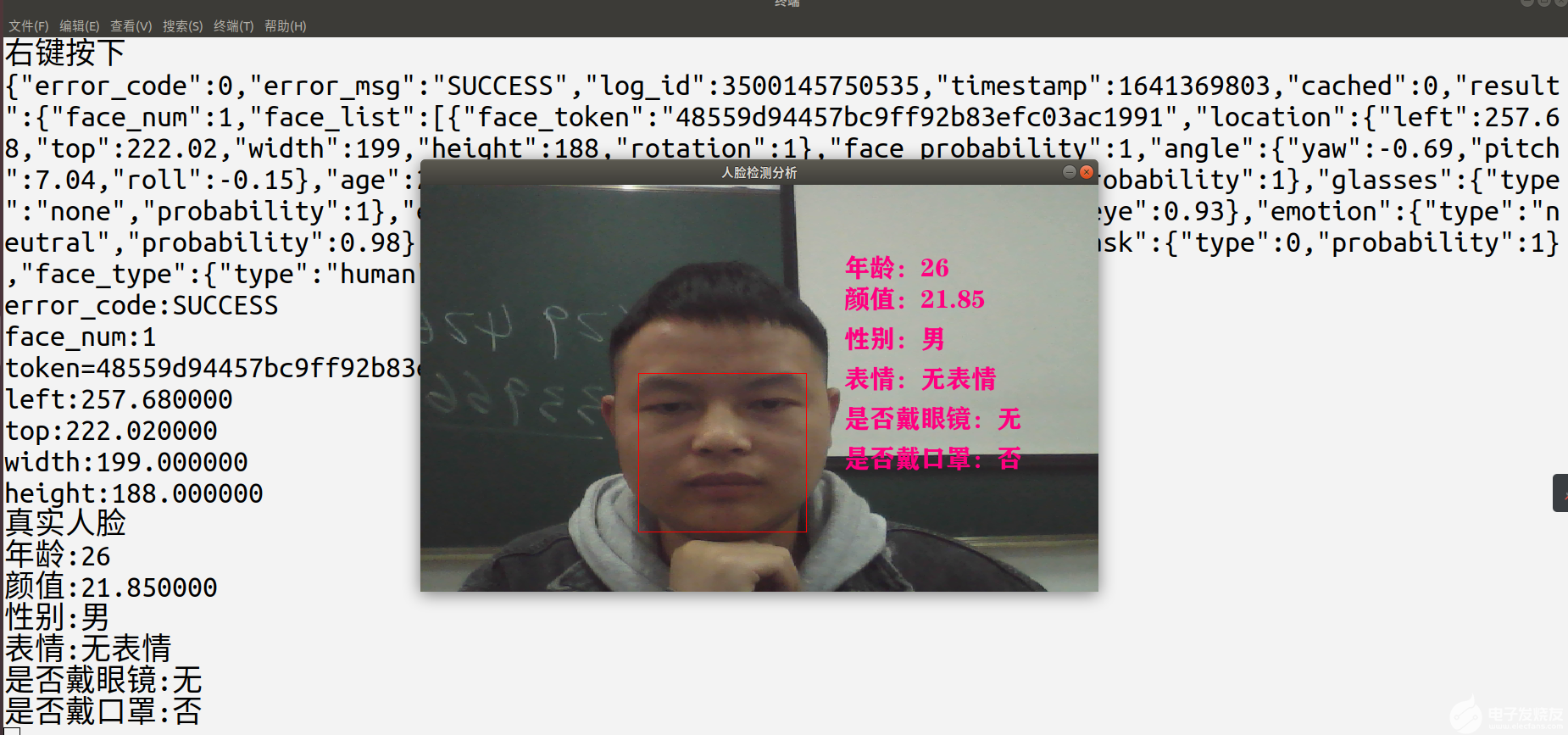
2.人臉檢測屬性分析項目示例
?硬件平臺: ubuntu18.04、USB免驅攝像頭
?圖像渲染: SDL庫
?開發語言: C語言
3.攝像頭應用框架V4L2示例
#include
#include
#include
#include
#include
#include "video.h"

/*攝像頭應用編程框架*/
int Video_Init(u8 *dev,int video_fd,struct video *video_info)
{
    /*1.打開攝像設備文件*/
	video_fd=open(dev,O_RDWR);
	if(video_fd<0)return -1;
    /*2.圖像數據格式*/
	struct v4l2_format video_format;
	memset(&video_format,0,sizeof(struct v4l2_format));
	video_format.type=V4L2_BUF_TYPE_VIDEO_CAPTURE;//捕獲格式
	video_format.fmt.pix.width=800;
	video_format.fmt.pix.height=480;
	video_format.fmt.pix.pixelformat=V4L2_PIX_FMT_YUYV;
	if(ioctl(video_fd,VIDIOC_S_FMT,&video_format))return -2;
	video_info->width=video_format.fmt.pix.width;
	video_info->height=video_format.fmt.pix.height;
    printf("圖像尺寸:%d * %dn",video_info->width,video_info->height);
    /*3.申請空間*/
	struct v4l2_requestbuffers video_requestbuffers;
	memset(&video_requestbuffers,0,sizeof(struct v4l2_requestbuffers));
	video_requestbuffers.count=4;//緩沖區個數
	video_requestbuffers.type=V4L2_BUF_TYPE_VIDEO_CAPTURE;//V4L2捕獲框架格式
	video_requestbuffers.memory=V4L2_MEMORY_MMAP;//內存映射
	if(ioctl(video_fd,VIDIOC_REQBUFS,&video_requestbuffers))return -3;
	printf("緩沖區個數:%dn",video_requestbuffers.count);
	/*4.將緩沖映射到進程空間*/
	int i=0;
	struct v4l2_buffer video_buffer;
	for(i=0;immap_size=video_buffer.length;/*映射大小*/
        video_info->mmapbuf[i]=mmap(NULL,video_buffer.length,PROT_READ|PROT_WRITE,MAP_SHARED,video_fd,video_buffer.m.offset);
	}
	/*5.將緩沖區添加到采集隊列*/
	for(i=0;i
4.調用百度人家屬性分析接示例
// libcurl庫下載鏈接:https://curl.haxx.se/download.html
// jsoncpp庫下載鏈接:https://github.com/open-source-parsers/jsoncpp/
const static char * request_url = "https://aip.baidubce.com/rest/2.0/face/v3/detect";
char faceDetect_result[1024];
char faceDetect_result[1024];
/**
 * 人臉檢測與屬性分析
 * @return 調用成功返回0,發生錯誤返回其他錯誤碼
 */
int faceDetect(char *json_result, const char *access_token,const char *image_base64)
{
    //std::string url = request_url + "?access_token=" + access_token;

    char url[1024];
    snprintf(url,sizeof(url),"%s?access_token=%s",request_url,access_token);
    CURL *curl = NULL;
    CURLcode result_code;
    int is_success=0;
	char iamge[1024*1024];
	snprintf(iamge,sizeof(iamge),"{"image":"%s","image_type":"BASE64","face_field":"age,beauty,gender,glasses,eye_status,emotion,race,mask,facetype"}",image_base64);

    curl = curl_easy_init();
    if (curl) {
        curl_easy_setopt(curl, CURLOPT_URL, url);
        curl_easy_setopt(curl, CURLOPT_POST, 1);
        struct curl_slist *headers = NULL;
        headers = curl_slist_append(headers, "Content-Type:application/json;charset=UTF-8");
        curl_easy_setopt(curl, CURLOPT_HTTPHEADER, headers);
        curl_easy_setopt(curl, CURLOPT_POSTFIELDS,iamge);
        result_code = curl_easy_perform(curl);
        FILE *outfile;
        outfile = fopen("test.cmd", "wb");
        curl_easy_setopt(curl, CURLOPT_WRITEDATA, outfile);
        result_code=curl_easy_perform(curl);
        fclose(outfile);

        if (result_code != CURLE_OK) {
            fprintf(stderr, "curl_easy_perform() failed: %s",curl_easy_strerror(result_code));
            is_success = 1;
            return is_success;
        }
        strcpy(json_result,faceDetect_result);
        curl_easy_cleanup(curl);
        is_success = 0;

    } else {
        fprintf(stderr, "curl_easy_init() failed.");
        is_success = 1;
    }

    return is_success;
}
5.base64圖片編碼示例
static const char * base64char = "ABCDEFGHIJKLMNOPQRSTUVWXYZabcdefghijklmnopqrstuvwxyz0123456789+/";
char * base64_encode( const unsigned char * bindata, char * base64, int binlength )
{
    int i, j;
    unsigned char current;

    for ( i = 0, j = 0 ; i < binlength ; i += 3 )
    {
        current = (bindata[i] >> 2) ;
        current &= (unsigned char)0x3F;
        base64[j++] = base64char[(int)current];

        current = ( (unsigned char)(bindata[i] << 4 ) ) & ( (unsigned char)0x30 ) ;
        if ( i + 1 >= binlength )
        {
            base64[j++] = base64char[(int)current];
            base64[j++] = '=';
            base64[j++] = '=';
            break;
        }
        current |= ( (unsigned char)(bindata[i+1] >> 4) ) & ( (unsigned char) 0x0F );
        base64[j++] = base64char[(int)current];

        current = ( (unsigned char)(bindata[i+1] << 2) ) & ( (unsigned char)0x3C ) ;
        if ( i + 2 >= binlength )
        {
            base64[j++] = base64char[(int)current];
            base64[j++] = '=';
            break;
        }
        current |= ( (unsigned char)(bindata[i+2] >> 6) ) & ( (unsigned char) 0x03 );
        base64[j++] = base64char[(int)current];

        current = ( (unsigned char)bindata[i+2] ) & ( (unsigned char)0x3F ) ;
        base64[j++] = base64char[(int)current];
    }
    base64[j] = '?';
    return base64;
}

int base64_decode( const char * base64, unsigned char * bindata )
{
    int i, j;
    unsigned char k;
    unsigned char temp[4];
    for ( i = 0, j = 0; base64[i] != '?' ; i += 4 )
    {
        memset( temp, 0xFF, sizeof(temp) );
        for ( k = 0 ; k < 64 ; k ++ )
        {
            if ( base64char[k] == base64[i] )
                temp[0]= k;
        }
        for ( k = 0 ; k < 64 ; k ++ )
        {
            if ( base64char[k] == base64[i+1] )
                temp[1]= k;
        }
        for ( k = 0 ; k < 64 ; k ++ )
        {
            if ( base64char[k] == base64[i+2] )
                temp[2]= k;
        }
        for ( k = 0 ; k < 64 ; k ++ )
        {
            if ( base64char[k] == base64[i+3] )
                temp[3]= k;
        }

        bindata[j++] = ((unsigned char)(((unsigned char)(temp[0] << 2))&0xFC)) |
                ((unsigned char)((unsigned char)(temp[1]>>4)&0x03));
        if ( base64[i+2] == '=' )
            break;

        bindata[j++] = ((unsigned char)(((unsigned char)(temp[1] << 4))&0xF0)) |
                ((unsigned char)((unsigned char)(temp[2]>>2)&0x0F));
        if ( base64[i+3] == '=' )
            break;

        bindata[j++] = ((unsigned char)(((unsigned char)(temp[2] << 6))&0xF0)) |
                ((unsigned char)(temp[3]&0x3F));
    }
    return j;
}
6.JOSN數據格式解析示例
/*josn數據解析*/
int Josn_Get(const char *buff,struct Faceinfo *face_info)
{
	/*創建cJSON對象*/
	cJSON *root=cJSON_CreateObject();
	char *p=strstr(buff,"{"error_code"");
	root=cJSON_Parse(p);/*載入JSON數據*/
	if(root==NULL)return -1;
	/*2.解析字段*/
	cJSON *item;
	int i=0;
	item=cJSON_GetObjectItem(root,"error_code");
	if(item)
	{
		printf("error_code:%dn",item->valueint);
		if(item->valueint)return -2;
	}
	item=cJSON_GetObjectItem(root,"error_msg");
	if(item)
	{
		printf("error_code:%sn",item->valuestring);
	}
	item=cJSON_GetObjectItem(root,"result");
	if(item)
	{
		cJSON *obj;
		obj=cJSON_GetObjectItem(item, "face_num");
		printf("face_num:%dn",obj->valueint);
		item=cJSON_GetObjectItem(item,"face_list");
		if(item)
		{
			int arraysize=cJSON_GetArraySize(item);/*獲取數組成員個數*/
			for(i=0;ivaluestring);
				obj=cJSON_GetObjectItem(array_item,"location");
				if(obj)
				{
					cJSON *data;
					data=cJSON_GetObjectItem(obj, "left");
					printf("left:%fn",data->valuedouble);
					face_info->x=data->valuedouble;
					data=cJSON_GetObjectItem(obj, "top");
					printf("top:%fn",data->valuedouble);
					face_info->y=data->valuedouble;
					data=cJSON_GetObjectItem(obj, "width");
					printf("width:%fn",data->valuedouble);
					face_info->w=data->valuedouble;
					data=cJSON_GetObjectItem(obj, "height");
					printf("height:%fn",data->valuedouble);
					face_info->h=data->valuedouble;
					data=cJSON_GetObjectItem(obj, "face_probability");
				}
				obj=cJSON_GetObjectItem(array_item,"face_probability");
				//printf("probability=%dn",obj->valueint);
				obj=cJSON_GetObjectItem(array_item,"age");
				//printf("年齡=%dn",obj->valueint);
				face_info->age=obj->valueint;
				obj=cJSON_GetObjectItem(array_item,"beauty");
				if(obj!=NULL)
				{
					//printf("顏值=%fn",obj->valuedouble);
					face_info->beauty=obj->valuedouble;
				}
				obj=cJSON_GetObjectItem(array_item,"gender");//性別
				if(obj)
				{
					cJSON *data;
					data=cJSON_GetObjectItem(obj,"type");
					if(strcmp(data->valuestring,"male")==0)
					{
						//printf("性別:男n");
						strcpy(face_info->gender,"男");
					}
					else if(strcmp(data->valuestring,"female")==0)
					{
						//printf("性別:女n");
						strcpy(face_info->gender,"女");
					}
				}
				obj=cJSON_GetObjectItem(array_item,"glasses");//是否帶眼鏡
				if(obj)
				{
					cJSON *data;
					data=cJSON_GetObjectItem(obj,"type");
					if(strcmp(data->valuestring,"none")==0)
					{
						//printf("眼鏡:無n");
						strcpy(face_info->glasses,"無");
					}
					else if(strcmp(data->valuestring,"common")==0)
					{
						//printf("眼鏡:普通眼鏡n");
						strcpy(face_info->glasses,"普通眼鏡");
					}
					else if(strcmp(data->valuestring,"sun")==0)
					{
						//printf("眼鏡:墨鏡n");
						strcpy(face_info->glasses,"墨鏡");
					}
				}
				obj=cJSON_GetObjectItem(array_item,"emotion");//表情
				if(obj)
				{
					cJSON *data;
					data=cJSON_GetObjectItem(obj,"type");
					if(strcmp(data->valuestring,"angry")==0)
					{
						//printf("表情:憤怒n");
						strcpy(face_info->emotion,"憤怒");
					}
					else if(strcmp(data->valuestring,"disgust")==0)
					{
						//printf("表情:厭惡n");
						strcpy(face_info->emotion,"厭惡");
					}
					else if(strcmp(data->valuestring,"fear")==0)
					{
						//printf("表情:恐懼n");
						strcpy(face_info->emotion,"恐懼");
					}
					else if(strcmp(data->valuestring,"happy")==0)
					{
						//printf("表情:高興n");
						strcpy(face_info->emotion,"高興");
					}
					else if(strcmp(data->valuestring,"sad")==0)
					{
						//printf("表情:傷心n");
						strcpy(face_info->emotion,"傷心");
					}
					else if(strcmp(data->valuestring,"surprise")==0)
					{
						//printf("表情:驚訝n");
						strcpy(face_info->emotion,"驚訝");
					}
					else if(strcmp(data->valuestring,"neutral")==0)
					{
						//printf("表情:無表情n");
						strcpy(face_info->emotion,"無表情");
					}
					else if(strcmp(data->valuestring,"pouty")==0)
					{
						//printf("表情:噘嘴n");
						strcpy(face_info->emotion,"噘嘴");
					}
					else if(strcmp(data->valuestring,"grimace")==0)
					{
						//printf("表情:鬼臉n");
						strcpy(face_info->emotion,"鬼臉");
					}
				}
				obj=cJSON_GetObjectItem(array_item,"mask");//是否帶口罩
				if(obj)
				{
					cJSON *data;
					data=cJSON_GetObjectItem(obj,"type");
					//printf("是否帶口罩:%dn",data->valueint);
					if(data->valueint)strcpy(face_info->mask,"是");
					else strcpy(face_info->mask,"否");
				}
				obj=cJSON_GetObjectItem(array_item,"face_type");
				if(obj)
				{
					cJSON *data;
					data=cJSON_GetObjectItem(obj,"type");
					if(strcmp(data->valuestring,"human")==0)
					{
						printf("真實人臉n");
					}
					else if(strcmp(data->valuestring," cartoon")==0)
					{
						printf("卡通人臉n");
					}
				}
			}
		}
	}
	cJSON_Delete(root);//釋放空間
	return 0;
}
7.調用SDL庫圖像渲染
int main()
{
	struct Faceinfo face_info={0};
	int w,h;
    /*初始化攝像頭*/
    video_fd=Video_Init(CAMERA_DEV,video_fd,&video_info);
    if(video_fd<=0)
    {
        printf("攝像頭初始化失敗,res=%dn",video_fd);
        return 0;
    }
	/*TTF 初始化*/
	TTF_Init();
	/*打開字庫*/
	TTF_Font *ttffont=TTF_OpenFont("方正粗黑宋簡體.ttf",30);
	if(ttffont==NULL)
	{
		printf("字庫打開失敗n");
		return 0;
	}
	SDL_Color color={255,0,128,255};/*字體顏色 RGBA*/
    /*創建窗口 */
	SDL_Window *window=SDL_CreateWindow("人臉檢測分析", SDL_WINDOWPOS_CENTERED,SDL_WINDOWPOS_CENTERED,800,480,SDL_WINDOW_ALLOW_HIGHDPI|SDL_WINDOW_SHOWN);
	SDL_GetWindowSize(window,&w,&h);
    /*創建渲染器*/
	SDL_Renderer *render=SDL_CreateRenderer(window,-1,SDL_RENDERER_ACCELERATED);
	/*清空渲染器*/
	SDL_RenderClear(render);
    printf("圖像尺寸:%d * %dn",video_info.width,video_info.height);
    /*創建紋理*/
	SDL_Texture*sdltext=SDL_CreateTexture(render,SDL_PIXELFORMAT_RGB24,SDL_TEXTUREACCESS_STREAMING,video_info.width,video_info.height);
    /*創建攝像頭采集線程*/
    u8 *rgb_data=malloc(video_info.height*video_info.width*3);
    rgb_buff=malloc(video_info.height*video_info.width*3);//保存RGB顏色數據
	u8 *jpg_data=malloc(video_info.height*video_info.width*3);//保存RGB顏色數據
	u8 *imagebase64_data=malloc((video_info.height*video_info.width*3)*8/6);//保存RGB顏色數據
	int jpg_size;
   //printf("size=%dn",video_info.mmap_size);
    video_flag=1;/*攝像頭采集標志*/
    pthread_t pthid;
    pthread_create(&pthid,NULL,Video_CollectImage, NULL);
    bool quit=true;
	SDL_Event event;
	SDL_Rect rect;
	int  display_stat=1;
	char buff[100];
	while(quit)
	{
		while(SDL_PollEvent(&event))/*事件監測*/
		{
			if(event.type==SDL_QUIT)/*退出事件*/
			{
				quit=false;
				video_flag=0;
				pthread_cancel(pthid);/*殺死指定線程*/
				continue;
			}
			else if(event.type==SDL_MOUSEBUTTONDOWN)/*點擊事件*/
			{
				if(event.button.button==SDL_BUTTON_LEFT)/*左鍵*/
				{
					pthread_mutex_lock(&fastmutex);//互斥鎖上鎖
					pthread_cond_wait(&cond,&fastmutex);
					memcpy(rgb_data,rgb_buff,video_info.height*video_info.width*3);
					pthread_mutex_unlock(&fastmutex);//互斥鎖解鎖
					jpg_size=rgb_to_jpeg(video_info.width,video_info.height,video_info.height*video_info.width*3,rgb_data,jpg_data, 80);//RGB轉JPG
					base64_encode(jpg_data, imagebase64_data, jpg_size);
					char json_result[1024];
					int res=0;
					res=faceDetect(json_result,access_token,imagebase64_data);
					FILE *fp=fopen("test.cmd","rb");
					if(fp==NULL)continue;
					struct stat statbuf;
					int size=0;
					stat("test.cmd", &statbuf);
					char *data=malloc(statbuf.st_size+1);
					size=fread(data,1,statbuf.st_size,fp);
					data[size]='?';
					fclose(fp);
					//SDL_ttfDisplayFont(10,10,window,ttffont,45,color,"字庫測試",render);

					display_stat=0;
					if(Josn_Get(data,&face_info))
					{
						display_stat=1;
						continue;
					}
					printf("年齡:%dn",face_info.age);
					printf("顏值:%fn",face_info.beauty);
					printf("性別:%sn",face_info.gender);
					printf("表情:%sn",face_info.emotion);
					printf("是否戴眼鏡:%sn",face_info.glasses);
					printf("是否戴口罩:%sn",face_info.mask);
					SDL_SetRenderDrawColor(render,255,0,0, 255);// 透明值
					SDL_Rect rect;
					rect.x=face_info.x;
					rect.y=face_info.y;
					rect.w=face_info.w;
					rect.h=face_info.h;
					SDL_UpdateTexture(sdltext,NULL,rgb_data, video_info.width*3);
					SDL_RenderCopyEx(render, sdltext,NULL,NULL,0,NULL,SDL_FLIP_HORIZONTAL);
					SDL_RenderDrawRect(render,&rect);
					int y=80;
					snprintf(buff,sizeof(buff),"年齡:%d",face_info.age);
					size=SDL_ttfDisplayFont(w-300,y,window,ttffont,30,color,buff,render);
					y+=size;
					snprintf(buff,sizeof(buff),"顏值:%.2f",face_info.beauty);
					size=SDL_ttfDisplayFont(w-300,y,window,ttffont,30,color,buff,render);
					y+=size+10;
					snprintf(buff,sizeof(buff),"性別:%s",face_info.gender);
					size=SDL_ttfDisplayFont(w-300,y,window,ttffont,30,color,buff,render);
					y+=size+10;
					snprintf(buff,sizeof(buff),"表情:%s",face_info.emotion);
					size=SDL_ttfDisplayFont(w-300,y,window,ttffont,30,color,buff,render);
					y+=size+10;
					snprintf(buff,sizeof(buff),"是否戴眼鏡:%s",face_info.glasses);
					size=SDL_ttfDisplayFont(w-300,y,window,ttffont,30,color,buff,render);
					y+=size+10;
					snprintf(buff,sizeof(buff),"是否戴口罩:%s",face_info.mask);
					size=SDL_ttfDisplayFont(w-300,y,window,ttffont,30,color,buff,render);

					SDL_RenderPresent(render); // 渲染
					free(data);
				}
				else if(event.button.button==SDL_BUTTON_RIGHT)/*右鍵*/
				{
					printf("右鍵按下n");
					display_stat=1;

				}
			}
		}
		if(!video_flag)
		{
			quit=false;
			continue;
		}
		pthread_mutex_lock(&fastmutex);//互斥鎖上鎖
		pthread_cond_wait(&cond,&fastmutex);
		memcpy(rgb_data,rgb_buff,video_info.height*video_info.width*3);
		pthread_mutex_unlock(&fastmutex);//互斥鎖解鎖
		SDL_UpdateTexture(sdltext,NULL,rgb_data, video_info.width*3);
		//SDL_RenderCopy(render, sdltext, NULL,NULL); // 拷貝紋理到渲染器
		SDL_RenderCopyEx(render, sdltext,NULL,NULL,0,NULL,SDL_FLIP_HORIZONTAL);
		if(display_stat)SDL_RenderPresent(render); // 渲染

	}
    SDL_DestroyTexture(sdltext);/*銷毀紋理*/
    SDL_DestroyRenderer(render);/*銷毀渲染器*/
    SDL_DestroyWindow(window);/*銷毀窗口 */
    SDL_Quit();/*關閉SDL*/
    pthread_mutex_destroy(&fastmutex);/*銷毀互斥鎖*/
    pthread_cond_destroy(&cond);/*銷毀條件變量*/
	free(rgb_buff);
	free(rgb_data);
}
審核編輯:劉清
聲明:本文內容及配圖由入駐作者撰寫或者入駐合作網站授權轉載。文章觀點僅代表作者本人,不代表電子發燒友網立場。文章及其配圖僅供工程師學習之用,如有內容侵權或者其他違規問題,請聯系本站處理。
舉報投訴
-
Linux
+關注
關注
88文章
11760瀏覽量
219030 -
嵌入式技術
+關注
關注
10文章
366瀏覽量
43441
發布評論請先 登錄
相關推薦
熱點推薦
機械,求ADMAS軟件的百度云盤資料,有的兄弟快快分享下,謝謝
機械,求ADMAS軟件的百度云盤資料,有的兄弟快快分享下,謝謝機械,求ADMAS軟件的百度云盤資料,有的兄弟快快分享
發表于 02-28 19:42
Firefly 百度人臉識別開發套件
`Firefly推出了百度人臉識別套件,基于Firefly高性能主板,融合百度AI精準的離線人臉識別技術,集算法與軟硬件為一體的開發平臺。僅需一個套件,可一站式輕松解決人工
發表于 07-25 10:19
labview調用百度人臉識別SDK
本帖最后由 故人心 于 2021-11-19 13:52 編輯
labview實現人臉識別有多種途徑,我這里調用的百度的人臉識別SDK(C#版本),實現離線人臉識別。過程中踩了很
發表于 11-27 19:40
人臉識別模塊mini版【ESP32+百度云在線識別】UART串口輸出方便連接使用
,下面百度云平臺配置會介紹到如何獲取。3.AT+RST 這條指令用于復位模塊。ESP32+百度云在線人臉
發表于 12-19 16:03
GTC 2023:百度智能云DPU落地實踐
百度太行●計算:深度擁抱DPU的彈性計算基礎架構
百度智能云DPU落地實踐:極致彈性、高可用的裸金屬實例
百度

百度智能云正式發布了《百度智能云水業大模型白皮書》
3月28日,由E20環境平臺主辦的2024(第二十二屆)水業戰略論壇在北京召開。會上,百度智能云正式發布了《百度




 工商網監
工商網監
評論