


 移植speexdsp到OpenHarmony標準系統①

由于想要分享的內容較多,為避免觀眾姥爺們失去看下去的耐心,分享將以連載的方式進行。
本期為移植speexdsp到OpenHarmony標準系統的第①期,主要內容如下:

Speexdsp
提到Speexdsp不得不先提到開源語音編解碼器Speex

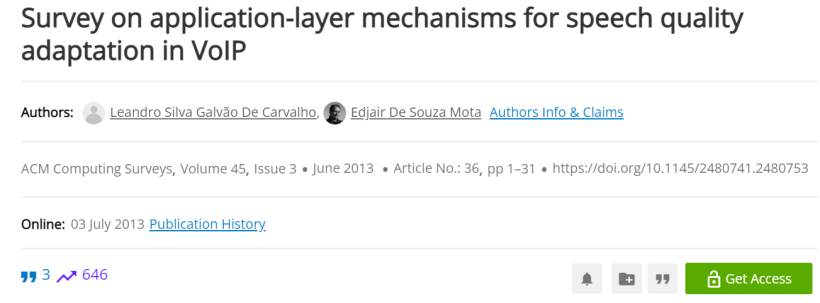
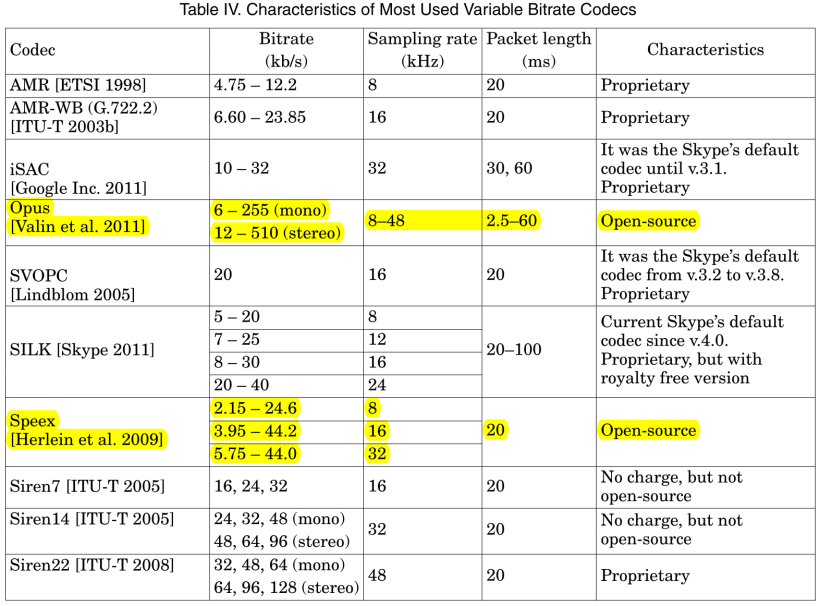
如下是ACM Surveys中收錄的標題為《Survey on Application-Layer Mechanisms for Speech Quality Adaptation in VoIP》綜述中的一張圖表。
-
它總結了一些常用的可變比特率編解碼器,并且做了性能方面的比較。
-
其中唯一Open-source開源的兩個編解碼器之一就是speex。
-
2007年12月11日Speex1.2beta3中首次將Speex中所有非編解碼器組件(預處理器、回聲消除、抖動緩沖區)都已移至新的libspeexdsp中。
-
2014年12月6日推出的Speex 1.2rc2和SpeexDSP1.2rc2正式將speex編解碼器庫和speexDSP庫拆分為單獨的源代碼。
Speexdsp功能
預處理器
預處理器被設計為在運行編碼器之前在音頻上使用。預處理器提供三個主要功能:
-
噪聲抑制
-
自動增益控制(AGC)
-
語音活動檢測(VAD)
自適應抖動緩沖區
-
當通過UDP或RTP傳輸語音(或任何相關內容)時,包可能會丟失,以不同的延遲到達,甚至亂序。
-
抖動緩沖區的目的是重新排序數據包,并緩沖足夠長的時間,以便它們可以被發送以進行解碼。
聲學回聲消除器
回聲消除是為了提高遠端質量
-
在任何免提通信系統中,遠端語音通過本地揚聲器播放。音頻在房間內傳播,并被麥克風捕獲。如果從麥克風捕獲的音頻被直接發送到遠程端,那么用戶就會聽到遠端語音的回聲。聲學回聲消除器設計用于在聲學回聲發送到遠端之前消除它。
重采樣器
這個重采樣器可以用于在任意兩個速率之間進行轉換(比率必須是有理數),并且可以控制質量/復雜性的權衡。
-
重采樣器在某些情況下將音頻從一個采樣率轉換到另一個采樣率。
-
它可以用于混合具有不同采樣率的流、用于支持聲卡不支持的采樣率、用于轉碼等。
Speexdsp移植到OpenHarmony標準系統
OpenHarmony三方庫主要是基于標準 Linux 系統的 c/c++ 開源庫,所以三方庫的移植工作,首先是在標準 Linux 系統搭建環境、編譯與驗證,然后將三方庫的編譯加入到 OpenHarmony 工程的構建中。
三方庫移植的主要開發步驟如下:
-
在標準Linux系統下載三方庫源碼,搭建開發環境,編譯整個源碼工程;
-
分析在標準Linux系統的編譯過程文件,提取編譯需要的源文件、編譯依賴等信息;
-
根據上一步分析結果,編寫gn文件,將三方庫加入到OpenHarmony的編譯體系;
-
驗證編譯結果,在OpenHarmony的out目錄是否生成目標庫;
-
測試demo/測試單元用例執行。
一、下載源碼
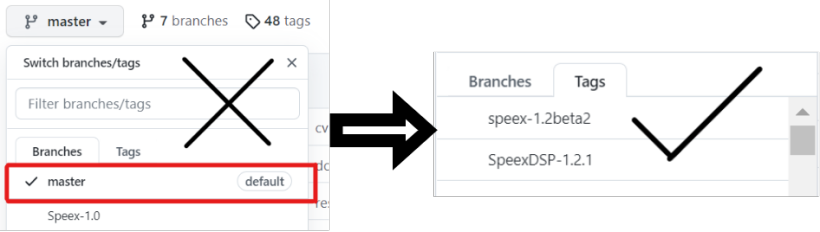
下載三方庫源碼時,優先使用最新版,不要下載master分支,下載最新的版本分支。移植speexdsp下載的是1.2.1版本。
Speexdsp源碼下載地址:https://github.com/xiph/speexdsp
二、搭建開發環境,生成Makefile編譯構建speexdsp
不同的原生三方庫提供的編譯方式不相同,根據原生三方庫的readme文件或者manual用戶手冊可以知道該如何編譯。
Speexdsp在linux下的編譯安裝,在linux終端輸入如下語句:
安裝make工具:
sudo apt-get install make
(左右移動查看全部內容)
安裝autoAutotools工具:
sudo apt-get install autoconf automake libtool
(左右移動查看全部內容)
GNU Autotools框架包括三個主要的包:Autoconf,Automake,和Libtool。
GNU軟件的構建過程,一般來說, 包含三個步驟:
tar xfv xxx.tar.gz
./configure
make
make install
(左右移動查看全部內容)
該過程一般依賴兩個文件, configure和Makefile文件。
Autoconf/Automake就是一套用于自動構建configure腳本和Makefile文件的工具。
一般使用Makefile.am構建的三方庫,原生庫中存在autogen.sh,configure.ac文件。由makefile.am自動生成makefile。
./autogen.sh
(左右移動查看全部內容)
./autogen.sh之后我們可以運行./configure --help查看configure配置
./configure --help
(左右移動查看全部內容)
jiajiahao@ubuntu:~/Desktop/SpeexDSP-1.2.1$ ./configure --help
`configure' configures speexdsp 1.2.1 to adapt to many kinds of systems.


Usage: ./configure [OPTION]... [VAR=VALUE]...


To assign environment variables (e.g., CC, CFLAGS...), specify them as
VAR=VALUE. See below for descriptions of some of the useful variables.


Defaults for the options are specified in brackets.


Configuration:
 -h, --help       display this help and exit
   --help=short    display options specific to this package
   --help=recursive  display the short help of all the included packages
 -V, --version      display version information and exit
 -q, --quiet, --silent  do not print `checking ...' messages
   --cache-file=FILE  cache test results in FILE [disabled]
 -C, --config-cache   alias for `--cache-file=config.cache'
 -n, --no-create     do not create output files
   --srcdir=DIR    find the sources in DIR [configure dir or `..']


Installation directories:
 --prefix=PREFIX     install architecture-independent files in PREFIX
             [/usr/local]
 --exec-prefix=EPREFIX  install architecture-dependent files in EPREFIX
             [PREFIX]


By default, `make install' will install all the files in
`/usr/local/bin', `/usr/local/lib' etc. You can specify
an installation prefix other than `/usr/local' using `--prefix',
for instance `--prefix=$HOME'.


For better control, use the options below.


Fine tuning of the installation directories:
 --bindir=DIR      user executables [EPREFIX/bin]
 --sbindir=DIR      system admin executables [EPREFIX/sbin]
 --libexecdir=DIR    program executables [EPREFIX/libexec]
 --sysconfdir=DIR    read-only single-machine data [PREFIX/etc]
 --sharedstatedir=DIR  modifiable architecture-independent data [PREFIX/com]
 --localstatedir=DIR   modifiable single-machine data [PREFIX/var]
 --runstatedir=DIR    modifiable per-process data [LOCALSTATEDIR/run]
 --libdir=DIR      object code libraries [EPREFIX/lib]
 --includedir=DIR    C header files [PREFIX/include]
 --oldincludedir=DIR   C header files for non-gcc [/usr/include]
 --datarootdir=DIR    read-only arch.-independent data root [PREFIX/share]
 --datadir=DIR      read-only architecture-independent data [DATAROOTDIR]
 --infodir=DIR      info documentation [DATAROOTDIR/info]
 --localedir=DIR     locale-dependent data [DATAROOTDIR/locale]
 --mandir=DIR      man documentation [DATAROOTDIR/man]
 --docdir=DIR      documentation root [DATAROOTDIR/doc/speexdsp]
 --htmldir=DIR      html documentation [DOCDIR]
 --dvidir=DIR      dvi documentation [DOCDIR]
 --pdfdir=DIR      pdf documentation [DOCDIR]
 --psdir=DIR       ps documentation [DOCDIR]


Program names:
 --program-prefix=PREFIX      prepend PREFIX to installed program names
 --program-suffix=SUFFIX      append SUFFIX to installed program names
 --program-transform-name=PROGRAM  run sed PROGRAM on installed program names


System types:
 --build=BUILD   configure for building on BUILD [guessed]
 --host=HOST    cross-compile to build programs to run on HOST [BUILD]


Optional Features:
 --disable-option-checking ignore unrecognized --enable/--with options
 --disable-FEATURE    do not include FEATURE (same as --enable-FEATURE=no)
 --enable-FEATURE[=ARG] include FEATURE [ARG=yes]
 --enable-silent-rules  less verbose build output (undo: "make V=1")
 --disable-silent-rules verbose build output (undo: "make V=0")
 --disable-maintainer-mode
             disable make rules and dependencies not useful (and
             sometimes confusing) to the casual installer
 --enable-shared[=PKGS] build shared libraries [default=yes]
 --enable-static[=PKGS] build static libraries [default=yes]
 --enable-fast-install[=PKGS]
             optimize for fast installation [default=yes]
 --enable-dependency-tracking
             do not reject slow dependency extractors
 --disable-dependency-tracking
             speeds up one-time build
 --disable-libtool-lock avoid locking (might break parallel builds)
 --enable-sse      Enable SSE support
 --enable-neon      Enable NEON support
 --enable-fixed-point  Compile as fixed-point
 --disable-float-api   Disable the floating-point API
 --disable-examples   Do not build example programs, only the library
 --enable-arm4-asm    Make use of ARM4 assembly optimizations
 --enable-arm5e-asm   Make use of ARM5E assembly optimizations
 --enable-blackfin-asm  Make use of Blackfin assembly optimizations
 --enable-fixed-point-debug Debug fixed-point implementation
 --enable-resample-full-sinc-table Resample full SINC table (no interpolation)
 --enable-ti-c55x    Enable support for TI C55X DSP


Optional Packages:
 --with-PACKAGE[=ARG]  use PACKAGE [ARG=yes]
 --without-PACKAGE    do not use PACKAGE (same as --with-PACKAGE=no)
 --with-pic[=PKGS]    try to use only PIC/non-PIC objects [default=use
             both]
 --with-aix-soname=aix|svr4|both
             shared library versioning (aka "SONAME") variant to
             provide on AIX, [default=aix].
 --with-gnu-ld      assume the C compiler uses GNU ld [default=no]
 --with-sysroot[=DIR]  Search for dependent libraries within DIR (or the
             compiler's sysroot if not specified).
 --with-fft=choice    use an alternate FFT implementation. The available
             choices are kiss (default fixed point), smallft
             (default floating point), gpl-fftw3 and
             proprietary-intel-mkl


Some influential environment variables:
 CC     C compiler command
 CFLAGS   C compiler flags
 LDFLAGS   linker flags, e.g. -Lif you have libraries in a
       nonstandard directory
 LIBS    libraries to pass to the linker, e.g. -l
 CPPFLAGS  (Objective) C/C++ preprocessor flags, e.g. -Iif
       you have headers in a nonstandard directory
 LT_SYS_LIBRARY_PATH
       User-defined run-time library search path.
 CPP     C preprocessor
 PKG_CONFIG path to pkg-config utility
 PKG_CONFIG_PATH
       directories to add to pkg-config's search path
 PKG_CONFIG_LIBDIR
       path overriding pkg-config's built-in search path
 FFT_CFLAGS C compiler flags for FFT, overriding pkg-config
 FFT_LIBS  linker flags for FFT, overriding pkg-config


Use these variables to override the choices made by `configure' or to help
it to find libraries and programs with nonstandard names/locations.


Report bugs to .@xiph.org>
(左右移動查看全部內容)
在下載到linux中的speexdsp中新建build目錄
mkdir build
(左右移動查看全部內容)
運行configure命令來生成Makefile。
./configure --prefix=/XXX/speexdsp/build -disable-sse
(左右移動查看全部內容)
SSE是一個X86平臺的指令集,所以要移植speexdsp到OpenHarmony過程,configure時要disable掉sse這個配置。否則在加入OpenHarmony編譯體系后生成libspeexdsp_share.z.so和在ohos上執行的可執行文件編譯過程中會報錯。
在linux上生成speexdsp的so動態鏈接庫和.a靜態鏈接庫
-
make和make install后會生成speexdsp的.so動態鏈接庫和.a靜態鏈接庫
make
make install
(左右移動查看全部內容)
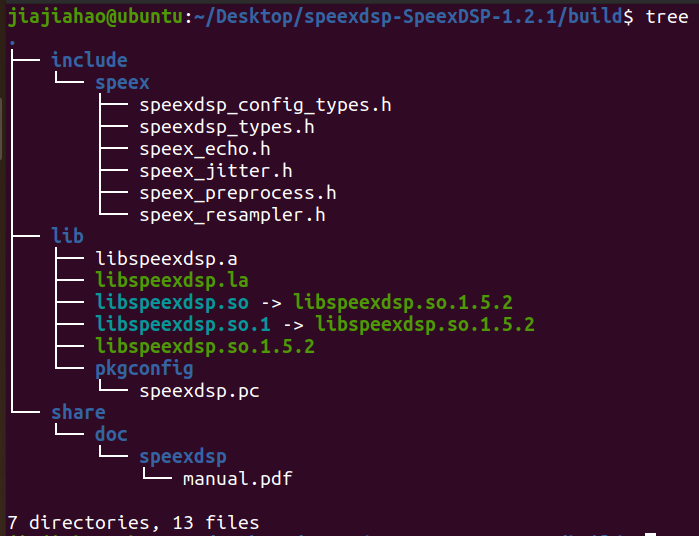
編譯安裝后build目錄結構如下:
整個編譯安裝過程終端輸出log如下:
jiajiahao@ubuntu:~/Desktop/speexdsp-SpeexDSP-1.2.1$ ./autogen.sh
Updating build configuration files, please wait....
libtoolize: putting auxiliary files in '.'.
libtoolize: copying file './ltmain.sh'
libtoolize: putting macros in AC_CONFIG_MACRO_DIRS, 'm4'.
libtoolize: copying file 'm4/libtool.m4'
libtoolize: copying file 'm4/ltoptions.m4'
libtoolize: copying file 'm4/ltsugar.m4'
libtoolize: copying file 'm4/ltversion.m4'
libtoolize: copying file 'm4/lt~obsolete.m4'
configure.ac:26: installing './compile'
configure.ac:24: installing './config.guess'
configure.ac:24: installing './config.sub'
configure.ac:21: installing './install-sh'
configure.ac:21: installing './missing'
libspeexdsp/Makefile.am: installing './depcomp'
jiajiahao@ubuntu:~/Desktop/speexdsp-SpeexDSP-1.2.1$ mkdir build
jiajiahao@ubuntu:~/Desktop/speexdsp-SpeexDSP-1.2.1$ ./configure --prefix=/home/jiajiahao/Desktop/speexdsp-SpeexDSP-1.2.1/build -disable-sse
checking whether make supports nested variables... yes
checking for a BSD-compatible install... /usr/bin/install -c
checking whether build environment is sane... yes
checking for a thread-safe mkdir -p... /usr/bin/mkdir -p
checking for gawk... no
checking for mawk... mawk
checking whether make sets $(MAKE)... yes
checking whether to enable maintainer-specific portions of Makefiles... yes
checking build system type... x86_64-pc-linux-gnu
checking host system type... x86_64-pc-linux-gnu
checking how to print strings... printf
checking whether make supports the include directive... yes (GNU style)
checking for gcc... gcc
checking whether the C compiler works... yes
checking for C compiler default output file name... a.out
checking for suffix of executables...
checking whether we are cross compiling... no
checking for suffix of object files... o
checking whether we are using the GNU C compiler... yes
checking whether gcc accepts -g... yes
checking for gcc option to accept ISO C89... none needed
checking whether gcc understands -c and -o together... yes
checking dependency style of gcc... gcc3
checking for a sed that does not truncate output... /usr/bin/sed
checking for grep that handles long lines and -e... /usr/bin/grep
checking for egrep... /usr/bin/grep -E
checking for fgrep... /usr/bin/grep -F
checking for ld used by gcc... /usr/bin/ld
checking if the linker (/usr/bin/ld) is GNU ld... yes
checking for BSD- or MS-compatible name lister (nm)... /usr/bin/nm -B
checking the name lister (/usr/bin/nm -B) interface... BSD nm
checking whether ln -s works... yes
checking the maximum length of command line arguments... 1572864
checking how to convert x86_64-pc-linux-gnu file names to x86_64-pc-linux-gnu format... func_convert_file_noop
checking how to convert x86_64-pc-linux-gnu file names to toolchain format... func_convert_file_noop
checking for /usr/bin/ld option to reload object files... -r
checking for objdump... objdump
checking how to recognize dependent libraries... pass_all
checking for dlltool... dlltool
checking how to associate runtime and link libraries... printf %s

checking for ar... ar
checking for archiver [url=home.php?mod=space&uid=1455510]@file[/url] support... @
checking for strip... strip
checking for ranlib... ranlib
checking command to parse /usr/bin/nm -B output from gcc object... ok
checking for sysroot... no
checking for a working dd... /usr/bin/dd
checking how to truncate binary pipes... /usr/bin/dd bs=4096 count=1
checking for mt... mt
checking if mt is a manifest tool... no
checking how to run the C preprocessor... gcc -E
checking for ANSI C header files... yes
checking for sys/types.h... yes
checking for sys/stat.h... yes
checking for stdlib.h... yes
checking for string.h... yes
checking for memory.h... yes
checking for strings.h... yes
checking for inttypes.h... yes
checking for stdint.h... yes
checking for unistd.h... yes
checking for dlfcn.h... yes
checking for objdir... .libs
checking if gcc supports -fno-rtti -fno-exceptions... no
checking for gcc option to produce PIC... -fPIC -DPIC
checking if gcc PIC flag -fPIC -DPIC works... yes
checking if gcc static flag -static works... yes
checking if gcc supports -c -o file.o... yes
checking if gcc supports -c -o file.o... (cached) yes
checking whether the gcc linker (/usr/bin/ld -m elf_x86_64) supports shared libraries... yes
checking whether -lc should be explicitly linked in... no
checking dynamic linker characteristics... GNU/Linux ld.so
checking how to hardcode library paths into programs... immediate
checking whether stripping libraries is possible... yes
checking if libtool supports shared libraries... yes
checking whether to build shared libraries... yes
checking whether to build static libraries... yes
checking whether byte ordering is bigendian... no
checking for an ANSI C-conforming const... yes
checking for inline... inline
checking for C/C++ restrict keyword... __restrict
checking for C99 variable-size arrays... yes
checking for SSE in current arch/CFLAGS... yes
checking for SSE2 in current arch/CFLAGS... yes
checking for NEON in current arch/CFLAGS... no
checking for ELF visibility... yes
checking sys/soundcard.h usability... yes
checking sys/soundcard.h presence... yes
checking for sys/soundcard.h... yes
checking sys/audioio.h usability... no
checking sys/audioio.h presence... no
checking for sys/audioio.h... no
checking for cos in -lm... yes
checking for pkg-config... /usr/bin/pkg-config
checking pkg-config is at least version 0.9.0... yes
checking size of int16_t... 2
checking size of uint16_t... 2
checking size of u_int16_t... 2
checking size of int32_t... 4
checking size of uint32_t... 4
checking size of u_int32_t... 4
checking size of short... 2
checking size of int... 4
checking size of long... 8
checking that generated files are newer than configure... done
configure: creating ./config.status
config.status: creating Makefile
config.status: creating libspeexdsp/Makefile
config.status: creating doc/Makefile
config.status: creating SpeexDSP.spec
config.status: creating include/Makefile
config.status: creating include/speex/Makefile
config.status: creating speexdsp.pc
config.status: creating win32/Makefile
config.status: creating win32/libspeexdsp/Makefile
config.status: creating symbian/Makefile
config.status: creating win32/VS2003/Makefile
config.status: creating win32/VS2003/libspeexdsp/Makefile
config.status: creating win32/VS2003/tests/Makefile
config.status: creating win32/VS2005/Makefile
config.status: creating win32/VS2005/libspeexdsp/Makefile
config.status: creating win32/VS2005/tests/Makefile
config.status: creating win32/VS2008/Makefile
config.status: creating win32/VS2008/libspeexdsp/Makefile
config.status: creating win32/VS2008/tests/Makefile
config.status: creating include/speex/speexdsp_config_types.h
config.status: creating ti/Makefile
config.status: creating ti/speex_C54_test/Makefile
config.status: creating ti/speex_C55_test/Makefile
config.status: creating ti/speex_C64_test/Makefile
config.status: creating config.h
config.status: executing depfiles commands
config.status: executing libtool commands
Type "make; make install" to compile and install Speex
jiajiahao@ubuntu:~/Desktop/speexdsp-SpeexDSP-1.2.1$ make
make all-recursive
make[1]: 進入目錄“/home/jiajiahao/Desktop/speexdsp-SpeexDSP-1.2.1”
Making all in libspeexdsp
make[2]: 進入目錄“/home/jiajiahao/Desktop/speexdsp-SpeexDSP-1.2.1/libspeexdsp”
 CC    preprocess.lo
 CC    jitter.lo
 CC    mdf.lo
 CC    fftwrap.lo
 CC    filterbank.lo
 CC    resample.lo
 CC    buffer.lo
 CC    scal.lo
 CC    smallft.lo
 CCLD   libspeexdsp.la
make[2]: 離開目錄“/home/jiajiahao/Desktop/speexdsp-SpeexDSP-1.2.1/libspeexdsp”
Making all in include
make[2]: 進入目錄“/home/jiajiahao/Desktop/speexdsp-SpeexDSP-1.2.1/include”
Making all in speex
make[3]: 進入目錄“/home/jiajiahao/Desktop/speexdsp-SpeexDSP-1.2.1/include/speex”
make[3]: 對“all”無需做任何事。
make[3]: 離開目錄“/home/jiajiahao/Desktop/speexdsp-SpeexDSP-1.2.1/include/speex”
make[3]: 進入目錄“/home/jiajiahao/Desktop/speexdsp-SpeexDSP-1.2.1/include”
make[3]: 對“all-am”無需做任何事。
make[3]: 離開目錄“/home/jiajiahao/Desktop/speexdsp-SpeexDSP-1.2.1/include”
make[2]: 離開目錄“/home/jiajiahao/Desktop/speexdsp-SpeexDSP-1.2.1/include”
Making all in doc
make[2]: 進入目錄“/home/jiajiahao/Desktop/speexdsp-SpeexDSP-1.2.1/doc”
make[2]: 對“all”無需做任何事。
make[2]: 離開目錄“/home/jiajiahao/Desktop/speexdsp-SpeexDSP-1.2.1/doc”
Making all in win32
make[2]: 進入目錄“/home/jiajiahao/Desktop/speexdsp-SpeexDSP-1.2.1/win32”
Making all in libspeexdsp
make[3]: 進入目錄“/home/jiajiahao/Desktop/speexdsp-SpeexDSP-1.2.1/win32/libspeexdsp”
make[3]: 對“all”無需做任何事。
make[3]: 離開目錄“/home/jiajiahao/Desktop/speexdsp-SpeexDSP-1.2.1/win32/libspeexdsp”
Making all in VS2003
make[3]: 進入目錄“/home/jiajiahao/Desktop/speexdsp-SpeexDSP-1.2.1/win32/VS2003”
Making all in libspeexdsp
make[4]: 進入目錄“/home/jiajiahao/Desktop/speexdsp-SpeexDSP-1.2.1/win32/VS2003/libspeexdsp”
make[4]: 對“all”無需做任何事。
make[4]: 離開目錄“/home/jiajiahao/Desktop/speexdsp-SpeexDSP-1.2.1/win32/VS2003/libspeexdsp”
Making all in tests
make[4]: 進入目錄“/home/jiajiahao/Desktop/speexdsp-SpeexDSP-1.2.1/win32/VS2003/tests”
make[4]: 對“all”無需做任何事。
make[4]: 離開目錄“/home/jiajiahao/Desktop/speexdsp-SpeexDSP-1.2.1/win32/VS2003/tests”
make[4]: 進入目錄“/home/jiajiahao/Desktop/speexdsp-SpeexDSP-1.2.1/win32/VS2003”
make[4]: 對“all-am”無需做任何事。
make[4]: 離開目錄“/home/jiajiahao/Desktop/speexdsp-SpeexDSP-1.2.1/win32/VS2003”
make[3]: 離開目錄“/home/jiajiahao/Desktop/speexdsp-SpeexDSP-1.2.1/win32/VS2003”
Making all in VS2005
make[3]: 進入目錄“/home/jiajiahao/Desktop/speexdsp-SpeexDSP-1.2.1/win32/VS2005”
Making all in libspeexdsp
make[4]: 進入目錄“/home/jiajiahao/Desktop/speexdsp-SpeexDSP-1.2.1/win32/VS2005/libspeexdsp”
make[4]: 對“all”無需做任何事。
make[4]: 離開目錄“/home/jiajiahao/Desktop/speexdsp-SpeexDSP-1.2.1/win32/VS2005/libspeexdsp”
Making all in tests
make[4]: 進入目錄“/home/jiajiahao/Desktop/speexdsp-SpeexDSP-1.2.1/win32/VS2005/tests”
make[4]: 對“all”無需做任何事。
make[4]: 離開目錄“/home/jiajiahao/Desktop/speexdsp-SpeexDSP-1.2.1/win32/VS2005/tests”
make[4]: 進入目錄“/home/jiajiahao/Desktop/speexdsp-SpeexDSP-1.2.1/win32/VS2005”
make[4]: 對“all-am”無需做任何事。
make[4]: 離開目錄“/home/jiajiahao/Desktop/speexdsp-SpeexDSP-1.2.1/win32/VS2005”
make[3]: 離開目錄“/home/jiajiahao/Desktop/speexdsp-SpeexDSP-1.2.1/win32/VS2005”
Making all in VS2008
make[3]: 進入目錄“/home/jiajiahao/Desktop/speexdsp-SpeexDSP-1.2.1/win32/VS2008”
Making all in libspeexdsp
make[4]: 進入目錄“/home/jiajiahao/Desktop/speexdsp-SpeexDSP-1.2.1/win32/VS2008/libspeexdsp”
make[4]: 對“all”無需做任何事。
make[4]: 離開目錄“/home/jiajiahao/Desktop/speexdsp-SpeexDSP-1.2.1/win32/VS2008/libspeexdsp”
Making all in tests
make[4]: 進入目錄“/home/jiajiahao/Desktop/speexdsp-SpeexDSP-1.2.1/win32/VS2008/tests”
make[4]: 對“all”無需做任何事。
make[4]: 離開目錄“/home/jiajiahao/Desktop/speexdsp-SpeexDSP-1.2.1/win32/VS2008/tests”
make[4]: 進入目錄“/home/jiajiahao/Desktop/speexdsp-SpeexDSP-1.2.1/win32/VS2008”
make[4]: 對“all-am”無需做任何事。
make[4]: 離開目錄“/home/jiajiahao/Desktop/speexdsp-SpeexDSP-1.2.1/win32/VS2008”
make[3]: 離開目錄“/home/jiajiahao/Desktop/speexdsp-SpeexDSP-1.2.1/win32/VS2008”
make[3]: 進入目錄“/home/jiajiahao/Desktop/speexdsp-SpeexDSP-1.2.1/win32”
make[3]: 對“all-am”無需做任何事。
make[3]: 離開目錄“/home/jiajiahao/Desktop/speexdsp-SpeexDSP-1.2.1/win32”
make[2]: 離開目錄“/home/jiajiahao/Desktop/speexdsp-SpeexDSP-1.2.1/win32”
Making all in symbian
make[2]: 進入目錄“/home/jiajiahao/Desktop/speexdsp-SpeexDSP-1.2.1/symbian”
make[2]: 對“all”無需做任何事。
make[2]: 離開目錄“/home/jiajiahao/Desktop/speexdsp-SpeexDSP-1.2.1/symbian”
Making all in ti
make[2]: 進入目錄“/home/jiajiahao/Desktop/speexdsp-SpeexDSP-1.2.1/ti”
Making all in speex_C54_test
make[3]: 進入目錄“/home/jiajiahao/Desktop/speexdsp-SpeexDSP-1.2.1/ti/speex_C54_test”
make[3]: 對“all”無需做任何事。
make[3]: 離開目錄“/home/jiajiahao/Desktop/speexdsp-SpeexDSP-1.2.1/ti/speex_C54_test”
Making all in speex_C55_test
make[3]: 進入目錄“/home/jiajiahao/Desktop/speexdsp-SpeexDSP-1.2.1/ti/speex_C55_test”
make[3]: 對“all”無需做任何事。
make[3]: 離開目錄“/home/jiajiahao/Desktop/speexdsp-SpeexDSP-1.2.1/ti/speex_C55_test”
Making all in speex_C64_test
make[3]: 進入目錄“/home/jiajiahao/Desktop/speexdsp-SpeexDSP-1.2.1/ti/speex_C64_test”
make[3]: 對“all”無需做任何事。
make[3]: 離開目錄“/home/jiajiahao/Desktop/speexdsp-SpeexDSP-1.2.1/ti/speex_C64_test”
make[3]: 進入目錄“/home/jiajiahao/Desktop/speexdsp-SpeexDSP-1.2.1/ti”
make[3]: 對“all-am”無需做任何事。
make[3]: 離開目錄“/home/jiajiahao/Desktop/speexdsp-SpeexDSP-1.2.1/ti”
make[2]: 離開目錄“/home/jiajiahao/Desktop/speexdsp-SpeexDSP-1.2.1/ti”
make[2]: 進入目錄“/home/jiajiahao/Desktop/speexdsp-SpeexDSP-1.2.1”
make[2]: 離開目錄“/home/jiajiahao/Desktop/speexdsp-SpeexDSP-1.2.1”
make[1]: 離開目錄“/home/jiajiahao/Desktop/speexdsp-SpeexDSP-1.2.1”
jiajiahao@ubuntu:~/Desktop/speexdsp-SpeexDSP-1.2.1$ make install
Making install in libspeexdsp
make[1]: 進入目錄“/home/jiajiahao/Desktop/speexdsp-SpeexDSP-1.2.1/libspeexdsp”
make[2]: 進入目錄“/home/jiajiahao/Desktop/speexdsp-SpeexDSP-1.2.1/libspeexdsp”
 /usr/bin/mkdir -p '/home/jiajiahao/Desktop/speexdsp-SpeexDSP-1.2.1/build/lib'
 /bin/sh ../libtool  --mode=install /usr/bin/install -c  libspeexdsp.la '/home/jiajiahao/Desktop/speexdsp-SpeexDSP-1.2.1/build/lib'
libtool: install: /usr/bin/install -c .libs/libspeexdsp.so.1.5.2 /home/jiajiahao/Desktop/speexdsp-SpeexDSP-1.2.1/build/lib/libspeexdsp.so.1.5.2
libtool: install: (cd /home/jiajiahao/Desktop/speexdsp-SpeexDSP-1.2.1/build/lib && { ln -s -f libspeexdsp.so.1.5.2 libspeexdsp.so.1 || { rm -f libspeexdsp.so.1 && ln -s libspeexdsp.so.1.5.2 libspeexdsp.so.1; }; })
libtool: install: (cd /home/jiajiahao/Desktop/speexdsp-SpeexDSP-1.2.1/build/lib && { ln -s -f libspeexdsp.so.1.5.2 libspeexdsp.so || { rm -f libspeexdsp.so && ln -s libspeexdsp.so.1.5.2 libspeexdsp.so; }; })
libtool: install: /usr/bin/install -c .libs/libspeexdsp.lai /home/jiajiahao/Desktop/speexdsp-SpeexDSP-1.2.1/build/lib/libspeexdsp.la
libtool: install: /usr/bin/install -c .libs/libspeexdsp.a /home/jiajiahao/Desktop/speexdsp-SpeexDSP-1.2.1/build/lib/libspeexdsp.a
libtool: install: chmod 644 /home/jiajiahao/Desktop/speexdsp-SpeexDSP-1.2.1/build/lib/libspeexdsp.a
libtool: install: ranlib /home/jiajiahao/Desktop/speexdsp-SpeexDSP-1.2.1/build/lib/libspeexdsp.a
libtool: finish: PATH="/usr/local/sbin:/usr/local/bin:/usr/sbin:/usr/bin:/sbin:/bin:/usr/games:/usr/local/games:/snap/bin:/sbin" ldconfig -n /home/jiajiahao/Desktop/speexdsp-SpeexDSP-1.2.1/build/lib
----------------------------------------------------------------------
Libraries have been installed in:
  /home/jiajiahao/Desktop/speexdsp-SpeexDSP-1.2.1/build/lib


If you ever happen to want to link against installed libraries
in a given directory, LIBDIR, you must either use libtool, and
specify the full pathname of the library, or use the '-LLIBDIR'
flag during linking and do at least one of the following:
  - add LIBDIR to the 'LD_LIBRARY_PATH' environment variable
   during execution
  - add LIBDIR to the 'LD_RUN_PATH' environment variable
   during linking
  - use the '-Wl,-rpath -Wl,LIBDIR' linker flag
  - have your system administrator add LIBDIR to '/etc/ld.so.conf'


See any operating system documentation about shared libraries for
more information, such as the ld(1) and ld.so(8) manual pages.
----------------------------------------------------------------------
make[2]: 對“install-data-am”無需做任何事。
make[2]: 離開目錄“/home/jiajiahao/Desktop/speexdsp-SpeexDSP-1.2.1/libspeexdsp”
make[1]: 離開目錄“/home/jiajiahao/Desktop/speexdsp-SpeexDSP-1.2.1/libspeexdsp”
Making install in include
make[1]: 進入目錄“/home/jiajiahao/Desktop/speexdsp-SpeexDSP-1.2.1/include”
Making install in speex
make[2]: 進入目錄“/home/jiajiahao/Desktop/speexdsp-SpeexDSP-1.2.1/include/speex”
make[3]: 進入目錄“/home/jiajiahao/Desktop/speexdsp-SpeexDSP-1.2.1/include/speex”
make[3]: 對“install-exec-am”無需做任何事。
 /usr/bin/mkdir -p '/home/jiajiahao/Desktop/speexdsp-SpeexDSP-1.2.1/build/include/speex'
 /usr/bin/install -c -m 644 speexdsp_config_types.h '/home/jiajiahao/Desktop/speexdsp-SpeexDSP-1.2.1/build/include/speex'
 /usr/bin/mkdir -p '/home/jiajiahao/Desktop/speexdsp-SpeexDSP-1.2.1/build/include/speex'
 /usr/bin/install -c -m 644 speex_echo.h speex_jitter.h speex_preprocess.h speex_resampler.h speexdsp_types.h '/home/jiajiahao/Desktop/speexdsp-SpeexDSP-1.2.1/build/include/speex'
make[3]: 離開目錄“/home/jiajiahao/Desktop/speexdsp-SpeexDSP-1.2.1/include/speex”
make[2]: 離開目錄“/home/jiajiahao/Desktop/speexdsp-SpeexDSP-1.2.1/include/speex”
make[2]: 進入目錄“/home/jiajiahao/Desktop/speexdsp-SpeexDSP-1.2.1/include”
make[3]: 進入目錄“/home/jiajiahao/Desktop/speexdsp-SpeexDSP-1.2.1/include”
make[3]: 對“install-exec-am”無需做任何事。
make[3]: 對“install-data-am”無需做任何事。
make[3]: 離開目錄“/home/jiajiahao/Desktop/speexdsp-SpeexDSP-1.2.1/include”
make[2]: 離開目錄“/home/jiajiahao/Desktop/speexdsp-SpeexDSP-1.2.1/include”
make[1]: 離開目錄“/home/jiajiahao/Desktop/speexdsp-SpeexDSP-1.2.1/include”
Making install in doc
make[1]: 進入目錄“/home/jiajiahao/Desktop/speexdsp-SpeexDSP-1.2.1/doc”
make[2]: 進入目錄“/home/jiajiahao/Desktop/speexdsp-SpeexDSP-1.2.1/doc”
make[2]: 對“install-exec-am”無需做任何事。
 /usr/bin/mkdir -p '/home/jiajiahao/Desktop/speexdsp-SpeexDSP-1.2.1/build/share/doc/speexdsp'
 /usr/bin/install -c -m 644 manual.pdf '/home/jiajiahao/Desktop/speexdsp-SpeexDSP-1.2.1/build/share/doc/speexdsp'
make[2]: 離開目錄“/home/jiajiahao/Desktop/speexdsp-SpeexDSP-1.2.1/doc”
make[1]: 離開目錄“/home/jiajiahao/Desktop/speexdsp-SpeexDSP-1.2.1/doc”
Making install in win32
make[1]: 進入目錄“/home/jiajiahao/Desktop/speexdsp-SpeexDSP-1.2.1/win32”
Making install in libspeexdsp
make[2]: 進入目錄“/home/jiajiahao/Desktop/speexdsp-SpeexDSP-1.2.1/win32/libspeexdsp”
make[3]: 進入目錄“/home/jiajiahao/Desktop/speexdsp-SpeexDSP-1.2.1/win32/libspeexdsp”
make[3]: 對“install-exec-am”無需做任何事。
make[3]: 對“install-data-am”無需做任何事。
make[3]: 離開目錄“/home/jiajiahao/Desktop/speexdsp-SpeexDSP-1.2.1/win32/libspeexdsp”
make[2]: 離開目錄“/home/jiajiahao/Desktop/speexdsp-SpeexDSP-1.2.1/win32/libspeexdsp”
Making install in VS2003
make[2]: 進入目錄“/home/jiajiahao/Desktop/speexdsp-SpeexDSP-1.2.1/win32/VS2003”
Making install in libspeexdsp
make[3]: 進入目錄“/home/jiajiahao/Desktop/speexdsp-SpeexDSP-1.2.1/win32/VS2003/libspeexdsp”
make[4]: 進入目錄“/home/jiajiahao/Desktop/speexdsp-SpeexDSP-1.2.1/win32/VS2003/libspeexdsp”
make[4]: 對“install-exec-am”無需做任何事。
make[4]: 對“install-data-am”無需做任何事。
make[4]: 離開目錄“/home/jiajiahao/Desktop/speexdsp-SpeexDSP-1.2.1/win32/VS2003/libspeexdsp”
make[3]: 離開目錄“/home/jiajiahao/Desktop/speexdsp-SpeexDSP-1.2.1/win32/VS2003/libspeexdsp”
Making install in tests
make[3]: 進入目錄“/home/jiajiahao/Desktop/speexdsp-SpeexDSP-1.2.1/win32/VS2003/tests”
make[4]: 進入目錄“/home/jiajiahao/Desktop/speexdsp-SpeexDSP-1.2.1/win32/VS2003/tests”
make[4]: 對“install-exec-am”無需做任何事。
make[4]: 對“install-data-am”無需做任何事。
make[4]: 離開目錄“/home/jiajiahao/Desktop/speexdsp-SpeexDSP-1.2.1/win32/VS2003/tests”
make[3]: 離開目錄“/home/jiajiahao/Desktop/speexdsp-SpeexDSP-1.2.1/win32/VS2003/tests”
make[3]: 進入目錄“/home/jiajiahao/Desktop/speexdsp-SpeexDSP-1.2.1/win32/VS2003”
make[4]: 進入目錄“/home/jiajiahao/Desktop/speexdsp-SpeexDSP-1.2.1/win32/VS2003”
make[4]: 對“install-exec-am”無需做任何事。
make[4]: 對“install-data-am”無需做任何事。
make[4]: 離開目錄“/home/jiajiahao/Desktop/speexdsp-SpeexDSP-1.2.1/win32/VS2003”
make[3]: 離開目錄“/home/jiajiahao/Desktop/speexdsp-SpeexDSP-1.2.1/win32/VS2003”
make[2]: 離開目錄“/home/jiajiahao/Desktop/speexdsp-SpeexDSP-1.2.1/win32/VS2003”
Making install in VS2005
make[2]: 進入目錄“/home/jiajiahao/Desktop/speexdsp-SpeexDSP-1.2.1/win32/VS2005”
Making install in libspeexdsp
make[3]: 進入目錄“/home/jiajiahao/Desktop/speexdsp-SpeexDSP-1.2.1/win32/VS2005/libspeexdsp”
make[4]: 進入目錄“/home/jiajiahao/Desktop/speexdsp-SpeexDSP-1.2.1/win32/VS2005/libspeexdsp”
make[4]: 對“install-exec-am”無需做任何事。
make[4]: 對“install-data-am”無需做任何事。
make[4]: 離開目錄“/home/jiajiahao/Desktop/speexdsp-SpeexDSP-1.2.1/win32/VS2005/libspeexdsp”
make[3]: 離開目錄“/home/jiajiahao/Desktop/speexdsp-SpeexDSP-1.2.1/win32/VS2005/libspeexdsp”
Making install in tests
make[3]: 進入目錄“/home/jiajiahao/Desktop/speexdsp-SpeexDSP-1.2.1/win32/VS2005/tests”
make[4]: 進入目錄“/home/jiajiahao/Desktop/speexdsp-SpeexDSP-1.2.1/win32/VS2005/tests”
make[4]: 對“install-exec-am”無需做任何事。
make[4]: 對“install-data-am”無需做任何事。
make[4]: 離開目錄“/home/jiajiahao/Desktop/speexdsp-SpeexDSP-1.2.1/win32/VS2005/tests”
make[3]: 離開目錄“/home/jiajiahao/Desktop/speexdsp-SpeexDSP-1.2.1/win32/VS2005/tests”
make[3]: 進入目錄“/home/jiajiahao/Desktop/speexdsp-SpeexDSP-1.2.1/win32/VS2005”
make[4]: 進入目錄“/home/jiajiahao/Desktop/speexdsp-SpeexDSP-1.2.1/win32/VS2005”
make[4]: 對“install-exec-am”無需做任何事。
make[4]: 對“install-data-am”無需做任何事。
make[4]: 離開目錄“/home/jiajiahao/Desktop/speexdsp-SpeexDSP-1.2.1/win32/VS2005”
make[3]: 離開目錄“/home/jiajiahao/Desktop/speexdsp-SpeexDSP-1.2.1/win32/VS2005”
make[2]: 離開目錄“/home/jiajiahao/Desktop/speexdsp-SpeexDSP-1.2.1/win32/VS2005”
Making install in VS2008
make[2]: 進入目錄“/home/jiajiahao/Desktop/speexdsp-SpeexDSP-1.2.1/win32/VS2008”
Making install in libspeexdsp
make[3]: 進入目錄“/home/jiajiahao/Desktop/speexdsp-SpeexDSP-1.2.1/win32/VS2008/libspeexdsp”
make[4]: 進入目錄“/home/jiajiahao/Desktop/speexdsp-SpeexDSP-1.2.1/win32/VS2008/libspeexdsp”
make[4]: 對“install-exec-am”無需做任何事。
make[4]: 對“install-data-am”無需做任何事。
make[4]: 離開目錄“/home/jiajiahao/Desktop/speexdsp-SpeexDSP-1.2.1/win32/VS2008/libspeexdsp”
make[3]: 離開目錄“/home/jiajiahao/Desktop/speexdsp-SpeexDSP-1.2.1/win32/VS2008/libspeexdsp”
Making install in tests
make[3]: 進入目錄“/home/jiajiahao/Desktop/speexdsp-SpeexDSP-1.2.1/win32/VS2008/tests”
make[4]: 進入目錄“/home/jiajiahao/Desktop/speexdsp-SpeexDSP-1.2.1/win32/VS2008/tests”
make[4]: 對“install-exec-am”無需做任何事。
make[4]: 對“install-data-am”無需做任何事。
make[4]: 離開目錄“/home/jiajiahao/Desktop/speexdsp-SpeexDSP-1.2.1/win32/VS2008/tests”
make[3]: 離開目錄“/home/jiajiahao/Desktop/speexdsp-SpeexDSP-1.2.1/win32/VS2008/tests”
make[3]: 進入目錄“/home/jiajiahao/Desktop/speexdsp-SpeexDSP-1.2.1/win32/VS2008”
make[4]: 進入目錄“/home/jiajiahao/Desktop/speexdsp-SpeexDSP-1.2.1/win32/VS2008”
make[4]: 對“install-exec-am”無需做任何事。
make[4]: 對“install-data-am”無需做任何事。
make[4]: 離開目錄“/home/jiajiahao/Desktop/speexdsp-SpeexDSP-1.2.1/win32/VS2008”
make[3]: 離開目錄“/home/jiajiahao/Desktop/speexdsp-SpeexDSP-1.2.1/win32/VS2008”
make[2]: 離開目錄“/home/jiajiahao/Desktop/speexdsp-SpeexDSP-1.2.1/win32/VS2008”
make[2]: 進入目錄“/home/jiajiahao/Desktop/speexdsp-SpeexDSP-1.2.1/win32”
make[3]: 進入目錄“/home/jiajiahao/Desktop/speexdsp-SpeexDSP-1.2.1/win32”
make[3]: 對“install-exec-am”無需做任何事。
make[3]: 對“install-data-am”無需做任何事。
make[3]: 離開目錄“/home/jiajiahao/Desktop/speexdsp-SpeexDSP-1.2.1/win32”
make[2]: 離開目錄“/home/jiajiahao/Desktop/speexdsp-SpeexDSP-1.2.1/win32”
make[1]: 離開目錄“/home/jiajiahao/Desktop/speexdsp-SpeexDSP-1.2.1/win32”
Making install in symbian
make[1]: 進入目錄“/home/jiajiahao/Desktop/speexdsp-SpeexDSP-1.2.1/symbian”
make[2]: 進入目錄“/home/jiajiahao/Desktop/speexdsp-SpeexDSP-1.2.1/symbian”
make[2]: 對“install-exec-am”無需做任何事。
make[2]: 對“install-data-am”無需做任何事。
make[2]: 離開目錄“/home/jiajiahao/Desktop/speexdsp-SpeexDSP-1.2.1/symbian”
make[1]: 離開目錄“/home/jiajiahao/Desktop/speexdsp-SpeexDSP-1.2.1/symbian”
Making install in ti
make[1]: 進入目錄“/home/jiajiahao/Desktop/speexdsp-SpeexDSP-1.2.1/ti”
Making install in speex_C54_test
make[2]: 進入目錄“/home/jiajiahao/Desktop/speexdsp-SpeexDSP-1.2.1/ti/speex_C54_test”
make[3]: 進入目錄“/home/jiajiahao/Desktop/speexdsp-SpeexDSP-1.2.1/ti/speex_C54_test”
make[3]: 對“install-exec-am”無需做任何事。
make[3]: 對“install-data-am”無需做任何事。
make[3]: 離開目錄“/home/jiajiahao/Desktop/speexdsp-SpeexDSP-1.2.1/ti/speex_C54_test”
make[2]: 離開目錄“/home/jiajiahao/Desktop/speexdsp-SpeexDSP-1.2.1/ti/speex_C54_test”
Making install in speex_C55_test
make[2]: 進入目錄“/home/jiajiahao/Desktop/speexdsp-SpeexDSP-1.2.1/ti/speex_C55_test”
make[3]: 進入目錄“/home/jiajiahao/Desktop/speexdsp-SpeexDSP-1.2.1/ti/speex_C55_test”
make[3]: 對“install-exec-am”無需做任何事。
make[3]: 對“install-data-am”無需做任何事。
make[3]: 離開目錄“/home/jiajiahao/Desktop/speexdsp-SpeexDSP-1.2.1/ti/speex_C55_test”
make[2]: 離開目錄“/home/jiajiahao/Desktop/speexdsp-SpeexDSP-1.2.1/ti/speex_C55_test”
Making install in speex_C64_test
make[2]: 進入目錄“/home/jiajiahao/Desktop/speexdsp-SpeexDSP-1.2.1/ti/speex_C64_test”
make[3]: 進入目錄“/home/jiajiahao/Desktop/speexdsp-SpeexDSP-1.2.1/ti/speex_C64_test”
make[3]: 對“install-exec-am”無需做任何事。
make[3]: 對“install-data-am”無需做任何事。
make[3]: 離開目錄“/home/jiajiahao/Desktop/speexdsp-SpeexDSP-1.2.1/ti/speex_C64_test”
make[2]: 離開目錄“/home/jiajiahao/Desktop/speexdsp-SpeexDSP-1.2.1/ti/speex_C64_test”
make[2]: 進入目錄“/home/jiajiahao/Desktop/speexdsp-SpeexDSP-1.2.1/ti”
make[3]: 進入目錄“/home/jiajiahao/Desktop/speexdsp-SpeexDSP-1.2.1/ti”
make[3]: 對“install-exec-am”無需做任何事。
make[3]: 對“install-data-am”無需做任何事。
make[3]: 離開目錄“/home/jiajiahao/Desktop/speexdsp-SpeexDSP-1.2.1/ti”
make[2]: 離開目錄“/home/jiajiahao/Desktop/speexdsp-SpeexDSP-1.2.1/ti”
make[1]: 離開目錄“/home/jiajiahao/Desktop/speexdsp-SpeexDSP-1.2.1/ti”
make[1]: 進入目錄“/home/jiajiahao/Desktop/speexdsp-SpeexDSP-1.2.1”
make[2]: 進入目錄“/home/jiajiahao/Desktop/speexdsp-SpeexDSP-1.2.1”
make[2]: 對“install-exec-am”無需做任何事。
 /usr/bin/mkdir -p '/home/jiajiahao/Desktop/speexdsp-SpeexDSP-1.2.1/build/lib/pkgconfig'
 /usr/bin/install -c -m 644 speexdsp.pc '/home/jiajiahao/Desktop/speexdsp-SpeexDSP-1.2.1/build/lib/pkgconfig'
make[2]: 離開目錄“/home/jiajiahao/Desktop/speexdsp-SpeexDSP-1.2.1”
make[1]: 離開目錄“/home/jiajiahao/Desktop/speexdsp-SpeexDSP-1.2.1”
(左右移動查看全部內容)
生成在linux上測試speexdsp功能用的可執行文件
編譯生成出在linux上測試speexdsp功能用的可執行文件,目的是為了分析speexdsp在ohos編譯體系生成動態鏈接庫后進功能測試的邏輯。
閱讀speexdsp用戶手冊,測試speexdsp功能的源文件分別為:
-
testdenoise.c
-
testecho.c
-
testjitter.c
-
testresample.c
-
testresample2.c
它們均位于speexdsp下的libspeexdsp。
需要把它們編譯為可運行的執行文件,通過閱讀用戶手冊可以知道在編譯時需要添加-lspeexdsp和-lm
以編譯testresample可執行文件為例,編譯執行語句如下:
在speexdsp目錄libspeexdsp目錄下打開終端輸入如下語句
gcc testjitter.c -L /home/jiajiahao/Desktop/speexdsp-SpeexDSP-1.2.1/build/lib -lspeexdsp -o testjitter -I /home/jiajiahao/Desktop/speexdsp-SpeexDSP-1.2.1/include -lm
(左右移動查看全部內容)
-
其中/home/jiajiahao/Desktop/speexdsp-SpeexDSP-1.2.1為筆者放置speexdsp原生庫linux下的絕對路徑。
-
鏈接動態鏈接庫編譯可執行文件,gcc后面是測試用的源文件。-L 后指定so庫所在的文件夾,-l+so庫的名字(出去lib和后綴)。-o 后面是可執行文件的名字,-I 后面是測試用的源文件要用到的頭文件所在的地址。
編譯出全部測試功能用的可執行文件如下:

更多熱點文章閱讀
- 玩嗨OpenHarmony:基于OpenHarmony的智能助老服務機器人
- 玩嗨OpenHarmony:基于OpenHarmony的智慧農業環境監控系統
- OpenHarmony 3.2 Beta多媒體系列:音視頻播放gstreamer
- 基于OpenHarmony的智慧牧場方案:生物運動軌跡跟蹤篇
-
基于OpenHarmony的智能門禁系統,讓出行更便捷
提示:本文由電子發燒友社區發布,轉載請注明以上來源。如需社區合作及入群交流,請添加微信EEFans0806,或者發郵箱liuyong@huaqiu.com。
原文標題:移植speexdsp到OpenHarmony標準系統①
文章出處:【微信公眾號:電子發燒友開源社區】歡迎添加關注!文章轉載請注明出處。
-
電子發燒友
+關注
關注
34文章
591瀏覽量
34133 -
開源社區
+關注
關注
1文章
95瀏覽量
798
原文標題:移植speexdsp到OpenHarmony標準系統①
文章出處:【微信號:HarmonyOS_Community,微信公眾號:電子發燒友開源社區】歡迎添加關注!文章轉載請注明出處。
發布評論請先 登錄
【原創】OpenHarmony系統投屏工具軟件 - OpenHarmony_OHScrcpy使用推薦








 工商網監
工商網監
評論