


 整理一些實用的Linux Shell腳本案例

今天給大家整理一些實用的 Linux Shell 腳本案例
希望可以幫到大家,讓大家更熟悉 shell 編程
1.顯示系統一些基本信息
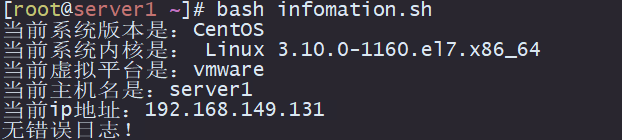
顯示信息如下:
系統版本
系統內核
虛擬平臺
主機名
ip地址
開機信息有沒有報錯,有的話輸出到屏幕
可以將該腳本加入到開機自啟動里面,這樣開機就會輸出基本信息
#!/bin/bash
info(){
system=$(hostnamectl|grepSystem|awk'{print$3}')
kernel_release=$(hostnamectl|grepKernel|awk-F:'{print$2}')
Virtualization=$(hostnamectl|grepVirtualization|awk'{print$2}')
server_name=$(hostname)
ipaddr=$(hostname-I)
echo"當前系統版本是:${system}"
echo"當前系統內核是:${kernel_release}"
echo"當前虛擬平臺是:${Virtualization}"
echo"當前主機名是:${server_name}"
echo"當前ip地址:${ipaddr}"
}

checkerrror(){
error_info=$(dmesg|greperror)
if[-e${error_info}]
then
echo"無錯誤日志!"
else
ehcho${error_info}
fi
}
info
checkerrror
2.關閉系統防火墻和SELinux
檢查防火墻狀態,是否安裝防火墻,如果安裝則關閉 關閉SELinux 清空iptables規則
#!/bin/bash
close_firewalld(){
code=$(systemctlstatusfirewalld)

if[${code}-eq0]
then
systemctlstopfirewalld
fi
}

close_selinux(){
sed-i'/^SELINUX/s/=.*/=disabled/'/etc/selinux/config
setenforce0
}

close_iptables(){
iptables-F
serviceiptablessave
serviceiptablesrestart
}

close_firewalld
close_selinux
close_iptables
3.定時任務計劃:歸檔備份
打包壓縮/var/log/nginx目錄下所有內容,存放在/tmp/nginx目錄里
壓縮文件命名規范:yymmdd_logs.tar.gz,只保存七天內的文件,超過七天的文件會進行清理
#!bin/bash
date="$(date+%Y%m%d)"
dir='/tmp/nginx'
backupfile='yymmdd_logs.tar.gz'

#查看/tmp/nginx是否存在,不存在則創建
checkbak(){
if[!-e${dir}]
then
mkdir${dir}
fi
}

#壓縮文件
backup(){
tar-zcvf${dir}/${backupfile}/var/log/nginx/>/dev/null2>&1
echo"${backupfile}Compressed and packaged successfully !"
}

#清除七天過期文件
cleanup(){
find${dir}-typef-mtime+7|xagrsrm-rf
if[$?-eq0]
then
echo"Cleaned up successfully!"
else
echo"datacleaningfailederror,pleasepayattentionintime"
fi
}

checkbak
backup
cleanup
4.自動批量創建用戶
批量創建user1、user2、user3.....
#!/bin/bash
#檢查用戶是否存在,不存在則創建
checkuser(){
foriin$(seq120)
do
iduser${i}>/dev/null2>&1
if[$?-eq0]
then
echo"user${i}已存在!"
else
useradduser${i}&&echo"user${i}"|passwd--stdinuser${i}>/dev/null2>&1
fi
done
}
checkuser
5.通過位置參數創建用戶
$1 是執行腳本的第一個參數
$2 是執行腳本的第二個參數
#!/bin/bash
checkuser(){
id${1}>/dev/null2>&1
if[$?-eq0]
then
echo"${1}已存在!"
else
useradd"$1"
echo"$2"|passwd‐‐stdin"$1"
fi
}
6.批量刪除用戶
批量刪除user1...user20
#!/bin/bash
#檢查用戶是否存在,存在則刪除
checkuser(){
foriin$(seq120)
do
iduser${i}>/dev/null2>&1
if[$?-eq0]
then
userdel-ruser${i}
else
echo"user${i}不存在!"
fi
done
}
checkuser
7.更新系統時間,并寫入硬件時間里
查看是否安裝ntpdate工具
創建上海時區文件的軟鏈接
更新時間并寫入到硬件時間里
#!/bin/bash
package="ntpdate"
info=$(rpm-q${package})
check_pkgs(){
if[!-e${info}]
then
echo"ntpdate already exists!"
else
echo"start installation!"
yumcleanall>/dev/null2>&1
fi
yumupdate-y&&yuminstall-y${package}>/dev/null2>&1
fi
}

modify_time(){
echo"開始修改時間"
rm-rf/etc/localtime&&ln-s/usr/share/zoneinfo/Asia/Shanghai/etc/localtime
/usr/sbin/ntpdatecn.pool.ntp.org>/dev/null2>&1&&hwclock-w
}

check_pkgs
modify_time
8.檢查服務運行狀態
檢查某一服務是否正常運行,執行腳本的時候第一個參數為服務名
#!/bin/bash
result=$(pidof$1|wc-l)
echo${result}
if[${result}-eq0]
then
echo"service does not exist !"
else
echo"Service is running normally !"
fi

9.對目標主機進行心跳檢測
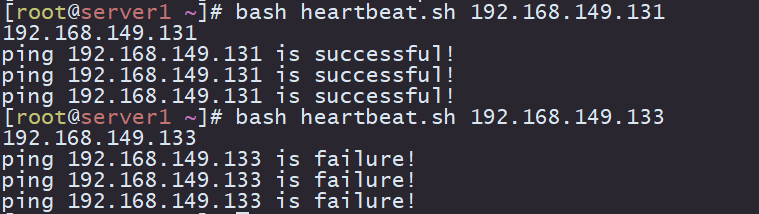
ping目標主機看是否ping得通,三次ping通表示主機正常運行
將目標主機的ip地址作為第一個參數傳進去
#!/bin/bash
ipaddr=$1
echo${ipaddr}
ping_status(){
ifping-c1${ipaddr}>/dev/null2>&1
then
echo"ping${ipaddr}issuccessful!"
continue
fi
}

foriin$(seq13)
do
ping_status
echo"ping${ipaddr}isfailure!"
done
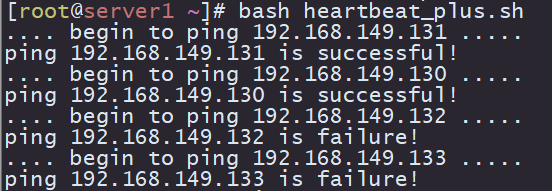
進階版:對ip地址池里的主機分別進行心跳檢測
ipaddr=(192.168.149.131192.168.149.130192.168.149.132192.168.149.133)
foriin${ipaddr[*]}
do
echo"....begintoping${i}....."
ifping-c3${i}>/dev/null2>&1
then
echo"ping${i}issuccessful!"
else
echo"ping${i}isfailure!"
fi
done
10.系統磁盤內存容量告警
根分區剩余空間小于20%(即使用空間大于80%) 輸出告警信息 內存使用空間大于80% 輸出告警信息 配合crond每5分鐘檢查一次
#!/bin/bash
disk_letfspace=$(df-Th|grep-w/|awk'{print$6}'|cut-d%-f1)
mem_used=$(free-m|grepMem|awk'{print$3}')
mem_total=$(free-m|grepMem|awk'{print$2}')
mem_letfspace=$[${mem_used}*100/${mem_total}]
if[${disk_letfspace}-gt80]
then
echo"Diskfreespaceislessthan20%!"
else
echo"${disk_letfspace}%ofdiskspaceleft"
fi
if[${mem_letfspace}-gt80]
then
echo"memoryspaceislessthan20%!"
else
echo"${mem_letfspace}%ofmemoryspaceleft"
fi
crontab-l
*/5****/root/check_space.sh

審核編輯:劉清
-
Linux
+關注
關注
88文章
11760瀏覽量
219016 -
磁盤
+關注
關注
1文章
398瀏覽量
26472 -
Shell
+關注
關注
1文章
375瀏覽量
25375
原文標題:【干貨】10個實用 Linux Shell 腳本案例
文章出處:【微信號:釋然IT雜談,微信公眾號:釋然IT雜談】歡迎添加關注!文章轉載請注明出處。
發布評論請先 登錄
如何使用Shell腳本在 Linux 服務器尋找攻擊證據
如何利用Shell腳本掩藏Linux服務器使用痕跡
如何創建和執行一個簡單的Linux shell腳本
34個Linux Shell腳本匯總
通過Shell腳本掩蓋Linux系統上的操作痕跡
使用Shell腳本掩蓋Linux上的操作痕跡
Linux Shell腳本經典案例分享
Linux從零到精通:最簡單的Shell腳本入門教程



 工商網監
工商網監
評論