


 【RT-Thread學習筆記】如何優雅地退出QEMU模擬器?

1 問題場景
相信很多人也跟我一樣,剛接觸RT-Thread不久,正在學習RT-Thread的路上,然而學習一款嵌入式實時操作系統,沒有一個硬件開發板,在我之前的認知里面,這應該很難把RTOS的內核代碼調試起來吧?
直到了解了RT-Thread,我才知道原來有QEMU模擬器這么個東西。
所以我很快就參考相關教程,把QEMU給裝起來了,結合RT-Thread編譯bsp的方法,很快我選擇的qemu-vexpress-a9固件很快就編譯出來了。
看了bsp目錄下有好幾個啟動腳本:
-
bsp/qemu-vexpress-a9$ ls -al *.sh -
-rwxr-xr-x 1 recan system 168 Sep 6 10:43 qemu-dbg.sh -
-rwxr-xr-x 1 recan system 187 Oct 22 17:41 qemu-nographic.sh -
-rwxr-xr-x 1 recan system 166 Sep 6 10:43 qemu.sh
我逐個嘗試,發現在我的環境下,只有./qemu-nographic.sh能夠跑起來。
-
bsp/qemu-vexpress-a9$ ./qemu-nographic.sh -
qemu-system-arm: -no-quit is only valid for GTK and SDL, ignoring option -
WARNING: Image format was not specified for 'sd.bin' and probing guessed raw. -
Automatically detecting the format is dangerous for raw images, write operations on block 0 will be restricted. -
Specify the 'raw' format explicitly to remove the restrictions. -
ALSA lib confmisc.c:767:(parse_card) cannot find card '0' -
ALSA lib conf.c:4732:(_snd_config_evaluate) function snd_func_card_driver returned error: No such file or directory -
ALSA lib confmisc.c:392:(snd_func_concat) error evaluating strings -
ALSA lib conf.c:4732:(_snd_config_evaluate) function snd_func_concat returned error: No such file or directory -
ALSA lib confmisc.c:1246:(snd_func_refer) error evaluating name -
ALSA lib conf.c:4732:(_snd_config_evaluate) function snd_func_refer returned error: No such file or directory -
ALSA lib conf.c:5220:(snd_config_expand) Evaluate error: No such file or directory -
ALSA lib pcm.c:2642:(snd_pcm_open_noupdate) Unknown PCM default -
alsa: Could not initialize DAC -
alsa: Failed to open `default': -
alsa: Reason: No such file or directory -
ALSA lib confmisc.c:767:(parse_card) cannot find card '0' -
ALSA lib conf.c:4732:(_snd_config_evaluate) function snd_func_card_driver returned error: No such file or directory -
ALSA lib confmisc.c:392:(snd_func_concat) error evaluating strings -
ALSA lib conf.c:4732:(_snd_config_evaluate) function snd_func_concat returned error: No such file or directory -
ALSA lib confmisc.c:1246:(snd_func_refer) error evaluating name -
ALSA lib conf.c:4732:(_snd_config_evaluate) function snd_func_refer returned error: No such file or directory -
ALSA lib conf.c:5220:(snd_config_expand) Evaluate error: No such file or directory -
ALSA lib pcm.c:2642:(snd_pcm_open_noupdate) Unknown PCM default -
alsa: Could not initialize DAC -
alsa: Failed to open `default': -
alsa: Reason: No such file or directory -
audio: Failed to create voice `lm4549.out' -
\ | / -
- RT - Thread Operating System -
/ | \ 4.0.4 build Nov 5 2021 -
2006 - 2021 Copyright by rt-thread team -
lwIP-2.1.2 initialized! -
[I/sal.skt] Socket Abstraction Layer initialize success. -
[I/SDIO] SD card capacity 65536 KB. -
[I/SDIO] switching card to high speed failed! -
hello rt-thread 99, 99 -
1, 2 -
1, 2 -
1, 2 -
msh />
不過問題來了,我想重新編譯源碼,再次運行新的代碼,怎么辦呢?如何才能退出這個QEMU命令行控制臺?
2 嘗試解決
2.1 牛刀小試
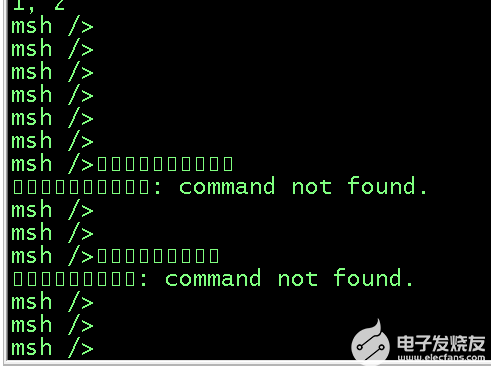
大家都知道,Linux退出一個控制臺啟動的程序,使用CTRL+C就可以把它退出來,我試了一下,發現它壓根就不認CTRL+C,只是一直輸出一些亂碼符號。
2.2 我放大招
既然CTRL+C不能,那我用killall-9xxx總可以吧?難不成你還能逃脫Linux內核對你的管控?
于是另開一個控制臺,直接killall-9qemu-system-arm,結果一試,的確可以退出QEMU(連進程都退出來了)。
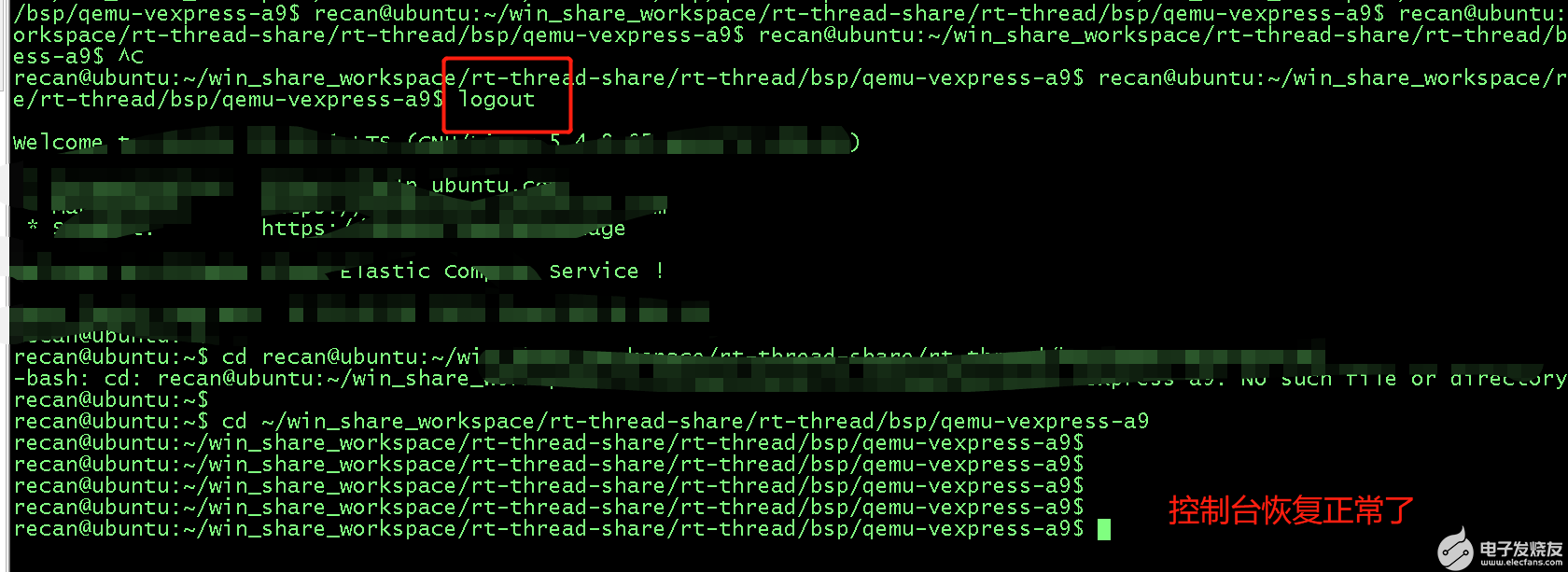
但是問題來了,退出QEMU之后,這個控制臺感覺亂來了,我一瞧回車,它都不好好換行了,你看看!

這就很讓人難受了,控制臺沒法用了,而且這個時候敲命令進去還不能回顯,也不知道你敲對了沒有,只好退出命令行,重新登入,控制臺得以恢復。
2.3 黔驢技窮
上面的這種情況,顯示是我不能接受的,這個我倒是想了一下,QEMU不可能不支持退出吧,會不會什么啟動參數我搞錯了,于是qemu-system-arm-h,找了幾個看似跟這個問題相關的參數:
-
qemu-system-arm -h -
... -
-no-quit disable SDL window close capability -
... -
-no-reboot exit instead of rebooting -
... -
-no-shutdown stop before shutdown
于是在qemu-nographic.sh添加來嘗試:
-
if [ ! -f "sd.bin" ]; then -
dd if=/dev/zero of=sd.bin bs=1024 count=65536 -
fi -
qemu-system-arm -M vexpress-a9 -smp cpus=2 -kernel rtthread.bin -nographic -sd sd.bin -no-shutdown -no-quit -no-reboot
運行之后,同樣在另一個控制臺使用killall-9qemu-system-arm退出,發現有的時候退出QEMU的控制臺可以好好的,有的時候換行問題依然存在,沒有找到規律,實在沒辦法,就不了了之了。
3 終極方案
3.1 發現新大陸
直到今天,我偶然翻到RT-Thread的官方文檔,對RT-Thread Smart版本的介紹的時候,有一個章節是介紹使用QEMU模擬環境進行代碼調試運行的,里面居然提到了如何退出QEMU!
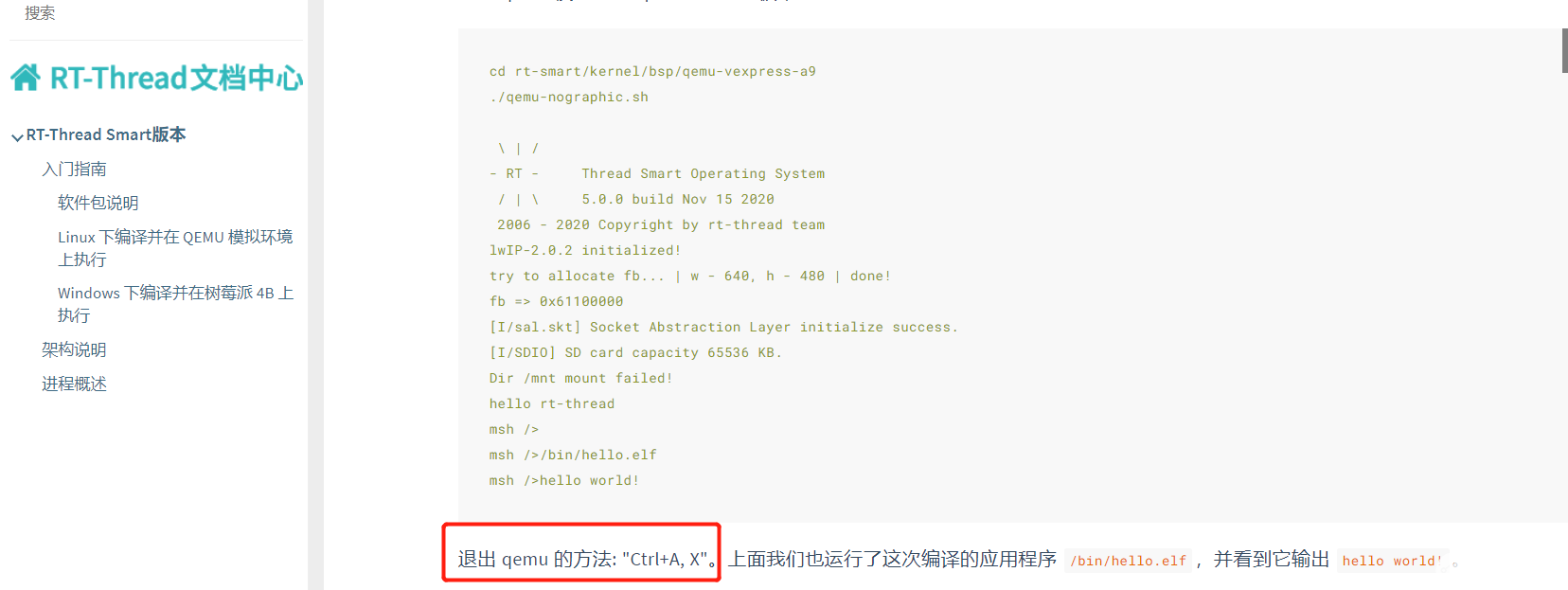
Word天吶,那種感覺簡直像是發現新大陸一樣。 馬上登入QEMU開發環境做測試,果然,操作竟是如此的絲滑,爽就一個字!
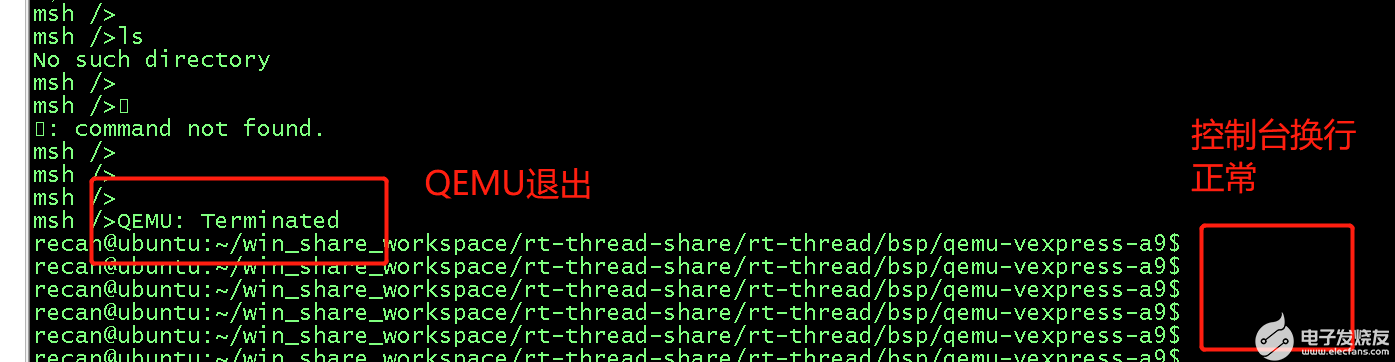
真的像是歷史難題被解決的那種感覺。
3.2 扒一扒到底誰讓QEMU退出了
第一感覺是不是RT-Thread的Finsh組件處理了這個CTRL+A,X? 于是找了Finsh的關鍵代碼:
-
void finsh_thread_entry(void *parameter) -
{ -
int ch; -
/* normal is echo mode */ -
#ifndef FINSH_ECHO_DISABLE_DEFAULT -
shell->echo_mode = 1; -
#else -
shell->echo_mode = 0; -
#endif -
#if !defined(RT_USING_POSIX) && defined(RT_USING_DEVICE) -
/* set console device as shell device */ -
if (shell->device == RT_NULL) -
{ -
rt_device_t console = rt_console_get_device(); -
if (console) -
{ -
finsh_set_device(console->parent.name); -
} -
} -
#endif -
#ifdef FINSH_USING_AUTH -
/* set the default password when the password isn't setting */ -
if (rt_strlen(finsh_get_password()) == 0) -
{ -
if (finsh_set_password(FINSH_DEFAULT_PASSWORD) != RT_EOK) -
{ -
rt_kprintf("Finsh password set failed.\n"); -
} -
} -
/* waiting authenticate success */ -
finsh_wait_auth(); -
#endif -
rt_kprintf(FINSH_PROMPT); -
while (1) -
{ -
ch = (int)finsh_getchar(); -
if (ch < 0) -
{ -
continue; -
} -
/* -
* handle control key -
* up key : 0x1b 0x5b 0x41 -
* down key: 0x1b 0x5b 0x42 -
* right key:0x1b 0x5b 0x43 -
* left key: 0x1b 0x5b 0x44 -
*/ -
if (ch == 0x1b) -
{ -
shell->stat = WAIT_SPEC_KEY; -
continue; -
} -
else if (shell->stat == WAIT_SPEC_KEY) -
{ -
if (ch == 0x5b) -
{ -
shell->stat = WAIT_FUNC_KEY; -
continue; -
} -
shell->stat = WAIT_NORMAL; -
} -
else if (shell->stat == WAIT_FUNC_KEY) -
{ -
shell->stat = WAIT_NORMAL; -
if (ch == 0x41) /* up key */ -
{ -
#ifdef FINSH_USING_HISTORY -
/* prev history */ -
if (shell->current_history > 0) -
shell->current_history --; -
else -
{ -
shell->current_history = 0; -
continue; -
} -
/* copy the history command */ -
memcpy(shell->line, &shell->cmd_history[shell->current_history][0], -
FINSH_CMD_SIZE); -
shell->line_curpos = shell->line_position = strlen(shell->line); -
shell_handle_history(shell); -
#endif -
continue; -
} -
else if (ch == 0x42) /* down key */ -
{ -
#ifdef FINSH_USING_HISTORY -
/* next history */ -
if (shell->current_history < shell->history_count - 1) -
shell->current_history ++; -
else -
{ -
/* set to the end of history */ -
if (shell->history_count != 0) -
shell->current_history = shell->history_count - 1; -
else -
continue; -
} -
memcpy(shell->line, &shell->cmd_history[shell->current_history][0], -
FINSH_CMD_SIZE); -
shell->line_curpos = shell->line_position = strlen(shell->line); -
shell_handle_history(shell); -
#endif -
continue; -
} -
else if (ch == 0x44) /* left key */ -
{ -
if (shell->line_curpos) -
{ -
rt_kprintf("\b"); -
shell->line_curpos --; -
} -
continue; -
} -
else if (ch == 0x43) /* right key */ -
{ -
if (shell->line_curpos < shell->line_position) -
{ -
rt_kprintf("%c", shell->line[shell->line_curpos]); -
shell->line_curpos ++; -
} -
continue; -
} -
} -
/* received null or error */ -
if (ch == '\0' || ch == 0xFF) continue; -
/* handle tab key */ -
else if (ch == '\t') -
{ -
int i; -
/* move the cursor to the beginning of line */ -
for (i = 0; i < shell->line_curpos; i++) -
rt_kprintf("\b"); -
/* auto complete */ -
shell_auto_complete(&shell->line[0]); -
/* re-calculate position */ -
shell->line_curpos = shell->line_position = strlen(shell->line); -
continue; -
} -
/* handle backspace key */ -
else if (ch == 0x7f || ch == 0x08) -
{ -
/* note that shell->line_curpos >= 0 */ -
if (shell->line_curpos == 0) -
continue; -
shell->line_position--; -
shell->line_curpos--; -
if (shell->line_position > shell->line_curpos) -
{ -
int i; -
rt_memmove(&shell->line[shell->line_curpos], -
&shell->line[shell->line_curpos + 1], -
shell->line_position - shell->line_curpos); -
shell->line[shell->line_position] = 0; -
rt_kprintf("\b%s \b", &shell->line[shell->line_curpos]); -
/* move the cursor to the origin position */ -
for (i = shell->line_curpos; i <= shell->line_position; i++) -
rt_kprintf("\b"); -
} -
else -
{ -
rt_kprintf("\b \b"); -
shell->line[shell->line_position] = 0; -
} -
continue; -
} -
/* handle end of line, break */ -
if (ch == '\r' || ch == '\n') -
{ -
#ifdef FINSH_USING_HISTORY -
shell_push_history(shell); -
#endif -
if (shell->echo_mode) -
rt_kprintf("\n"); -
msh_exec(shell->line, shell->line_position); -
rt_kprintf(FINSH_PROMPT); -
memset(shell->line, 0, sizeof(shell->line)); -
shell->line_curpos = shell->line_position = 0; -
continue; -
} -
/* it's a large line, discard it */ -
if (shell->line_position >= FINSH_CMD_SIZE) -
shell->line_position = 0; -
/* normal character */ -
if (shell->line_curpos < shell->line_position) -
{ -
int i; -
rt_memmove(&shell->line[shell->line_curpos + 1], -
&shell->line[shell->line_curpos], -
shell->line_position - shell->line_curpos); -
shell->line[shell->line_curpos] = ch; -
if (shell->echo_mode) -
rt_kprintf("%s", &shell->line[shell->line_curpos]); -
/* move the cursor to new position */ -
for (i = shell->line_curpos; i < shell->line_position; i++) -
rt_kprintf("\b"); -
} -
else -
{ -
shell->line[shell->line_position] = ch; -
if (shell->echo_mode) -
rt_kprintf("%c", ch); -
} -
ch = 0; -
shell->line_position ++; -
shell->line_curpos++; -
if (shell->line_position >= FINSH_CMD_SIZE) -
{ -
/* clear command line */ -
shell->line_position = 0; -
shell->line_curpos = 0; -
} -
} /* end of device read */ -
}
通讀代碼之后,發現它并沒有處理這個CTRL+A,X輸入,那么到底是誰接管了這個指令呢? 看到QEMU退出的時候,有提示``,這個關鍵字給了我線索,于是我開始懷疑是QEMU自己接管的這個命令,于是下面的一頓操作終于把它揪出來了。
-
bsp/qemu-vexpress-a9$ whereis qemu-system-arm -
qemu-system-arm: /usr/bin/qemu-system-arm /usr/share/man/man1/qemu-system-arm.1.gz -
bsp/qemu-vexpress-a9$ -
bsp/qemu-vexpress-a9$ cp /usr/bin/qemu-system-arm . -
bsp/qemu-vexpress-a9$ -
bsp/qemu-vexpress-a9$ grep -rsn "Terminated" -
Binary file qemu-system-arm matches -
bsp/qemu-vexpress-a9$ -
bsp/qemu-vexpress-a9$ hexdump -C qemu-system-arm | grep -n "Terminated" -
699798:00b2b4a0 4d 55 3a 20 54 65 72 6d 69 6e 61 74 65 64 0a 0d |MU: Terminated..| -
bsp/qemu-vexpress-a9$ -
bsp/qemu-vexpress-a9$ hexdump -C qemu-system-arm > hexdump.log -
bsp/qemu-vexpress-a9$ -
bsp/qemu-vexpress-a9$ head -699797 hexdump.log | tail -1 -
00b2b490 73 20 68 65 6c 70 0a 0d 00 43 2d 25 63 00 51 45 |s help...C-%c.QE| -
bsp/qemu-vexpress-a9$ -
bsp/qemu-vexpress-a9$ head -699798 hexdump.log | tail -1 -
00b2b4a0 4d 55 3a 20 54 65 72 6d 69 6e 61 74 65 64 0a 0d |MU: Terminated..| -
bsp/qemu-vexpress-a9$
大致的流程就是對可執行文件qemu-system-arm進行grep檢索,發現居然找到了Terminated這個關鍵log,證明這行退出的log正在qemu-system-arm打出來的,這也就從側面證實了這個退出命令是被它接管了,并且處理了,然后才退出的。

4 經驗教訓
這個問題真的困擾了我至少2個月,每次一用QEMU,我就吐槽這個問題,沒想到居然還是RT-Thread的指導文檔拯救了我。
所以啊,凡事先查查別人已經整理好的問題,真的會事半功倍!
各位老鐵,RT-Thread的文檔中心,給我擼起來!!!
5 更多分享
架構師李肯
一個專注于嵌入式IoT領域的架構師。有著近10年的嵌入式一線開發經驗,深耕IoT領域多年,熟知IoT領域的業務發展,深度掌握IoT領域的相關技術棧,包括但不限于主流RTOS內核的實現及其移植、硬件驅動移植開發、網絡通訊協議開發、編譯構建原理及其實現、底層匯編及編譯原理、編譯優化及代碼重構、主流IoT云平臺的對接、嵌入式IoT系統的架構設計等等。擁有多項IoT領域的發明專利,熱衷于技術分享,有多年撰寫技術博客的經驗積累,連續多月獲得RT-Thread官方技術社區原創技術博文優秀獎,榮獲CSDN博客專家、CSDN物聯網領域優質創作者、2021年度CSDN&RT-Thread技術社區之星、RT-Thread官方嵌入式開源社區認證專家、RT-Thread 2021年度論壇之星TOP4、華為云云享專家(嵌入式物聯網架構設計師)等榮譽。堅信【知識改變命運,技術改變世界】!
歡迎關注我的github倉庫01workstation,日常分享一些開發筆記和項目實戰,歡迎指正問題。
同時也非常歡迎關注我的專欄;有問題的話,可以跟我討論,知無不答,謝謝大家。
-
模擬器
+關注
關注
2文章
1010瀏覽量
45671 -
RT-Thread
+關注
關注
32文章
1614瀏覽量
44874 -
qemu
+關注
關注
0文章
57瀏覽量
5939
發布評論請先 登錄
恩智浦亮相RT-Thread 20周年開發者大會
手搓一個RT-Thread工地巡檢機器人要幾步? | 技術集結
首搭RT-Thread程翧車控平臺| RT-Thread程翧 S32K344 快速原型開發平臺正式上市!| 產品動態
使用qemu-vexpress-a9 運行用戶程序跑不了怎么解決?
學習強國深度報道 RT-Thread“1+X+N”戰略,國產操作系統賦能高端制造引關注|媒體視角

2025年RT-Thread開發者巡回培訓報名正式啟動!

rt-thread studio 2.2.9如何使用最新的RT-Thread v5.2.0 released?
【好書推薦】RT-Thread第20本相關書籍!《嵌入式實時操作系統RT-Thread原理與應用》| 技術集結
RT-Thread 遇上 Rust:安全內核 RusT-Thread 的誕生
RT-Thread榮獲2025優秀開源項目 | 新聞速遞

RT-Thread BSP全面支持玄鐵全系列RISC-V 處理器 | 技術集結
深度剖析 RT-Thread 線程調度流程
揭秘RT-Thread上的AUTOSAR CP系統
2025 RT-Thread全球技術大會議程正式發布!
RT-Thread審核團招募: 深度參與開源RTOS社區治理與演進



 工商網監
工商網監
評論