


 HarmonyOS應用開發TS動畫插值計算體驗

說明:從 API Version 7 開始支持。后續版本如有新增內容,則采用上角標單獨標記該內容的起始版本。
導入模塊:
import curves from ‘@ohos.curves’
curves.init
init(curve?: Curve): Object
插值曲線的初始化函數,可以根據入參創建一個插值曲線對象。
參數:

返回值:
曲線對象Object。
curves.steps
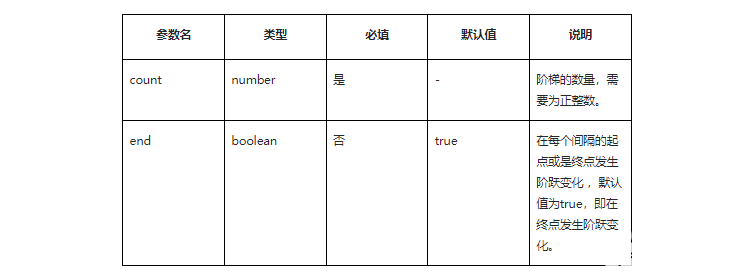
steps(count: number, end: boolean): Object
構造階梯曲線對象。
參數:
返回值:
曲線對象Object。
curves.cubicBezier
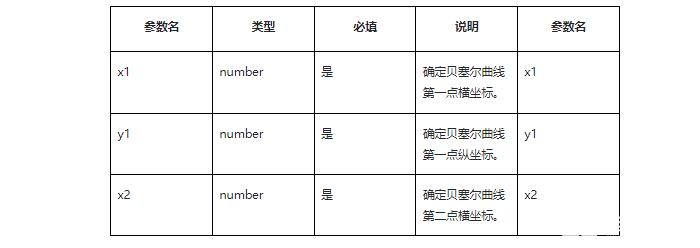
cubicBezier(x1: number, y1: number, x2: number, y2: number): Object
構造三階貝塞爾曲線對象,曲線的值必須處于0-1之間。
參數:
返回值:
曲線對象Object。
curves.spring
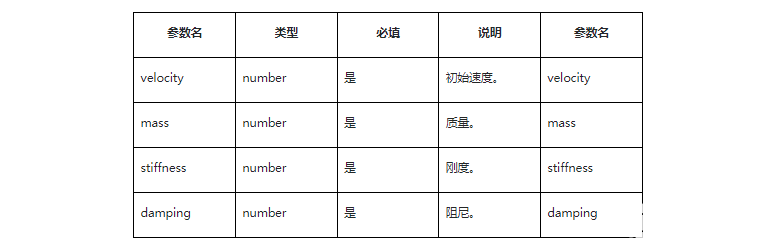
spring(velocity: number, mass: number, stiffness: number, damping: number): Object
構造彈簧曲線對象。
參數:
返回值:
曲線對象Object。
示例:
import Curves from '@ohos.curves'
@Entry
@Component
struct ImageComponent {
  @State widthSize: number = 200
  @State heightSize: number = 200
  build() {
    Column() {
      Text()
        .margin({top:100})
        .width(this.widthSize)
        .height(this.heightSize)
        .backgroundColor(Color.Red)
        .onClick(()=> {
          let curve = Curves.cubicBezier(0.25, 0.1, 0.25, 1.0);
          this.widthSize = curve.interpolate(0.5) * this.widthSize;
          this.heightSize = curve.interpolate(0.5) * this.heightSize;
        })
        .animation({duration: 2000 , curve: Curves.spring(0.25, 0.1, 0.25, 1.0)})
    }.width("100%").height("100%")
  }
}
復制
審核編輯:湯梓紅
聲明:本文內容及配圖由入駐作者撰寫或者入駐合作網站授權轉載。文章觀點僅代表作者本人,不代表電子發燒友網立場。文章及其配圖僅供工程師學習之用,如有內容侵權或者其他違規問題,請聯系本站處理。
舉報投訴
-
計算
+關注
關注
2文章
460瀏覽量
39999 -
曲線
+關注
關注
1文章
82瀏覽量
21452 -
HarmonyOS
+關注
關注
80文章
2153瀏覽量
36055
發布評論請先 登錄
相關推薦
熱點推薦
神經網絡加速器的雙線性插值上采樣
雙線性插值法:目標象素值根據這個源圖中虛擬的點四周的四個真實的點來按照一定的規律計算出來。像最鄰近插值法那樣由目標圖的坐標反推得到的源圖的的
發表于 10-29 06:36
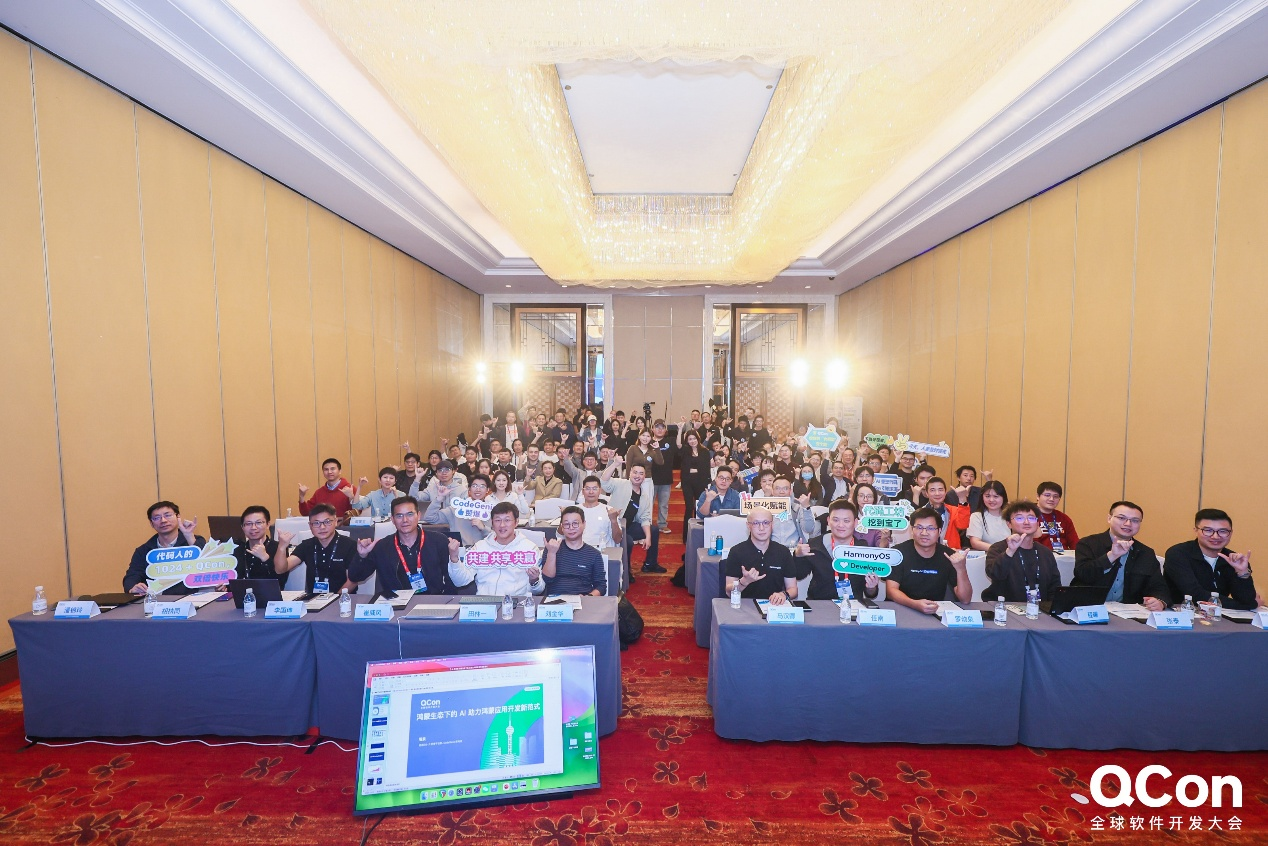
QCon·上海站HarmonyOS開發者技術分論壇:共探鴻蒙開發新機遇
當前,AI 技術重構開發邏輯、多設備協同成為技術主流,鴻蒙開發能力正迎來從“能用好用”到“實用便捷”的關鍵躍遷。10月24日,2025年QCon全球軟件開發大會上海站HarmonyOS
【EASY EAI Orin Nano開發板試用體驗】使用和LVGL的anim(簡易動畫)和animimg(圖像動畫)控件組合實現復雜的動畫功能
,還需要重新計算X軸和Y軸的起始位置,算法非常復雜,容易出錯,因此如果想要用一個anim變量實現多個變化,需要等待官方后續代碼更新。
引入坐標表,就可以讓obj沿著設定路徑進行anim動畫播放
發表于 08-09 21:37
【HarmonyOS 5】金融應用開發鴻蒙組件實踐
【HarmonyOS 5】金融應用開發鴻蒙組件實踐 ##鴻蒙開發能力 ##HarmonyOS SDK應用服務##鴻蒙金融類應用 (金融理財# 一、鴻蒙生態觀察 2024 年 1 月 1
【 HarmonyOS 5 入門系列 】鴻蒙HarmonyOS示例項目講解
【 HarmonyOS 5 入門系列 】鴻蒙HarmonyOS示例項目講解 ##鴻蒙開發能力 ##HarmonyOS SDK應用服務##鴻蒙金融類應用 (金融理財# 一、前言:移動
bindsheet+鍵盤在頁面跳轉時的bug及處理思路
? ##HarmonyOS 應用開發##
最近做的一個項目中,有這樣的一個需求
在A頁面中,點擊某一項目后,會彈出一個bindsheet,同時,會給TextInput組件自動加上焦點,目的是為了彈出
發表于 06-30 17:36
【HarmonyOS next】ArkUI-X休閑益智記憶翻牌【進階】
(animate);
}
animate();
項目開源地址:Gitee
跨平臺開發的核心在于理解并尊重平臺差異。通過本文方案,在華為設備上實現了98%的iOS體驗還原率。ArkUI-X的Web組件為多端適配提供了強大基礎,期待HarmonyOS next帶來更卓
發表于 06-28 22:12
【HarmonyOS next】ArkUI-X休閑益智消消樂【進階】
先看一下運行效果吧
HarmonyOS
H5與原生融合的多端開發實踐
技術亮點:通過ArkUI-X的Web組件將H5游戲無縫嵌入原生應用,實現一次開發、多端運行,覆蓋HarmonyOS
發表于 06-28 21:59
【HarmonyOS next】ArkUI-X休閑益智兒童拼圖【進階】
了開發成本,更重要的是確保了多端用戶體驗的一致性。今天我們就來聊聊這個項目的核心技術點,特別是拖動坐標計算和圖片剪影生成這兩個讓人\"又愛又恨\"的難點。
二、開發環境速覽
操作系統
發表于 06-28 21:41
HarmonyOS入門指南
1、文檔與教程 HarmonyOS開發文檔-應用開發導讀 OpenHarmony--應用開發導讀 倉頡編程語言官網 華為開發者博客 華為
華為正式啟動HarmonyOS 6開發者Beta
在2025年華為開發者大會(HDC)上,華為正式啟動HarmonyOS 6開發者Beta,并全面展示一年多以來與合作伙伴共建鴻蒙生態的創新成果。
HarmonyOS 代碼工坊的指尖開發,讓 APP 開發所見即所得
沙盤被直接搬入了移動設備本身。眼尖的開發者應該已經發現,最近華為應用市場“應用嘗鮮”專區里,上架了一款名為“HarmonyOS 代碼工坊”的新應用,下載量持續攀升。 開發者只需要下載“Harm

UI開發概述
,提供了針對UI范式語法的解析能力、跨語言調用支持的能力和TS語言高性能運行環境。
聲明式UI后端引擎后端引擎提供了兼容不同開發范式的UI渲染管線,提供多種基礎組件、布局計算、動效、交互事件,提供了狀態
發表于 06-24 06:36
HarmonyOS5云服務技術分享--ArkTS開發Node環境
? 你好呀,開發者小伙伴們!今天我們來聊聊如何在HarmonyOS(ArkTS API 9及以上)中玩轉云函數,特別是結合Node.js和HTTP觸發器的開發技巧。文章會手把手帶你從零開始,用最接地
發表于 05-22 17:21
HarmonyOS應用閃屏問題性能優化一
在開發調試過程中,有時會遇到應用出現非預期的閃動,這些閃動現象統稱為閃屏問題。這些閃屏問題觸發原因不同,表現形式不同,但都會對應用的體驗性和流暢度產生影響。
動畫過程中,應用連續點擊場景下的閃屏
發表于 05-15 14:53



 工商網監
工商網監
評論