


 如何將此ESP32 LORA模塊用作發(fā)送方和接收方

步驟1:操作(數(shù)據(jù)傳輸)
這是裝配體工作原理圖。
步驟2:使用的資源
1 Arduino Nano ATmega328
1 Arduino以太網(wǎng)模塊ENC28J60
1氣體傳感器模塊MQ2
1濕度和溫度傳感器DHT22( AM2302)
2330歐姆電阻
1 4k7歐姆電阻
1蜂鳴器5V
1個(gè)綠色LED
1紅色LED
跳線
步驟3:功能-發(fā)送方
1 ESP32 LORA Display
1氣體傳感器模塊MQ2
1濕度和溫度傳感器DHT22(AM2302)
1個(gè)4k7歐姆電阻器
跳線
第4步:使用的功能-接收器
1個(gè)ESP32 LORA OLED顯示屏
1個(gè)Arduino Nano ATmega328
1個(gè)用于Arduino的以太網(wǎng)模塊ENC28J60
2330 ohm r電阻器
1個(gè)蜂鳴器5V
1個(gè)綠色LED
1個(gè)紅色LED
跳線
步驟5:MQ-2氣體傳感器靈敏度
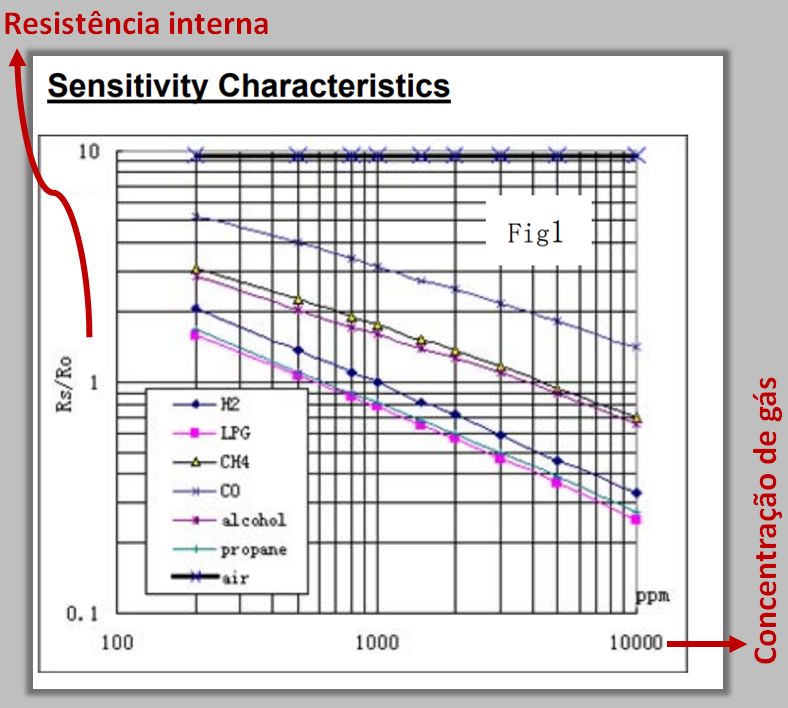
傳感器的電阻(Rs/Ro)根據(jù)現(xiàn)有的氣體濃度(ppm)更高或更低。此濃度可以通過(guò)引腳A0的輸出來(lái)顯示。
MQ-2氣體傳感器對(duì)氣體具有高靈敏度:
?LPG(液化石油氣);
?丙烷(C3H8);
?氫氣(H2);
?甲烷(CH4);
?燃料氣體,例如丙烷, CO,酒精和丁烷(用于打火機(jī))。
步驟6:發(fā)送器安裝--- Pinout ESP32 LORA OLED
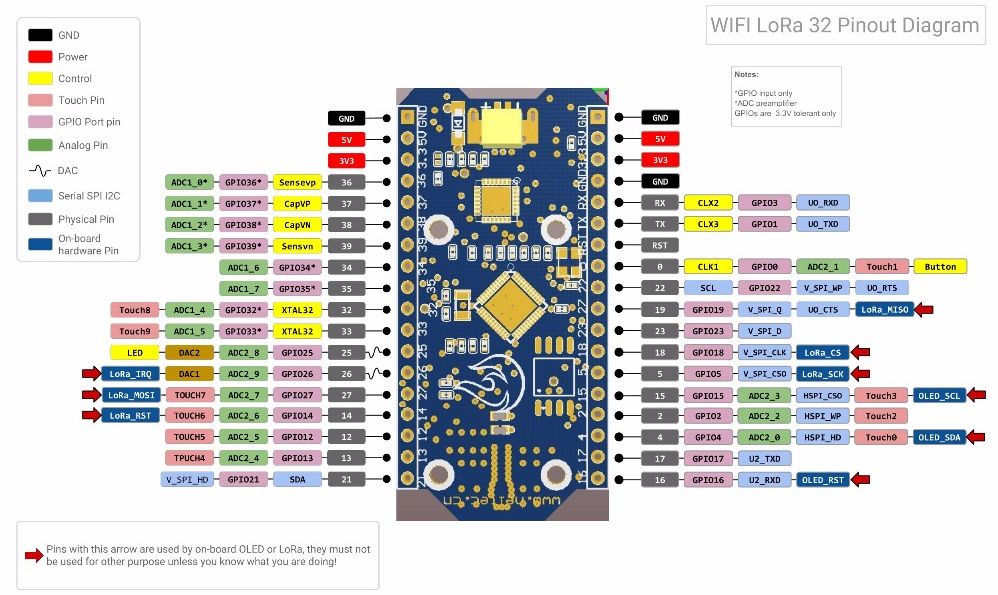
步驟7 :發(fā)送器電路

步驟8:發(fā)送器安裝
步驟9:安裝接收器---引腳排列Arduino Nano ATmega328

步驟10:接收器電路
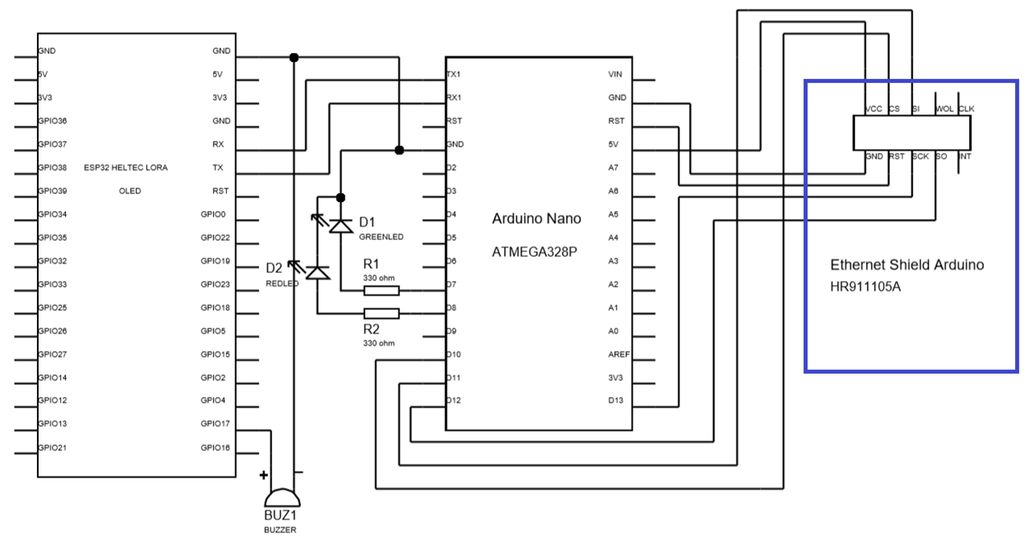
步驟11:接收器安裝
綠色LED指示Arduino已連接到以太網(wǎng)客戶端。
紅色LED指示已發(fā)送SMS。
發(fā)送SMS時(shí),Arduino已斷開連接,因此不再發(fā)送任何消息。
步驟12:DHT庫(kù)安裝
1。轉(zhuǎn)到草圖-》包含庫(kù)-》庫(kù)管理器。
2。搜索SimpleDHT,然后單擊“安裝”。
步驟13:發(fā)件人-代碼的組織
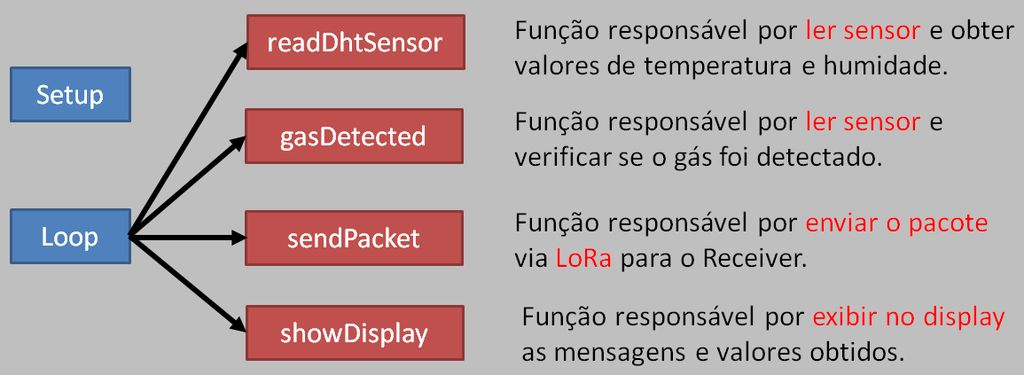
設(shè)置 》
循環(huán)
-readDhtSensor:負(fù)責(zé)讀取傳感器和獲取溫度和濕度值。
-gasDetected:負(fù)責(zé)讀取傳感器并驗(yàn)證是否已檢測(cè)到氣體的功能。
-sendPacket:負(fù)責(zé)通過(guò)LORA發(fā)送包裹的功能
-showDisplay:負(fù)責(zé)顯示在顯示屏上獲得的消息和值的功能。
步驟14:發(fā)件人代碼[包含和定義]
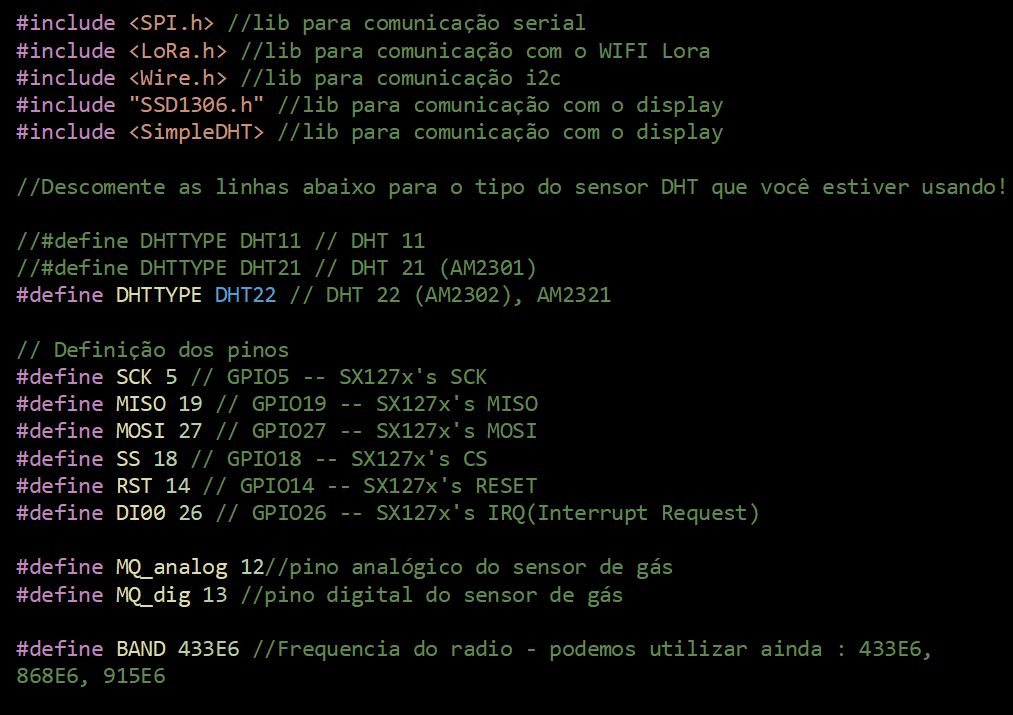
首先,我們將包含定義引腳的庫(kù)。
#include //serial peripheral interface (SPI) library
#include //wifi lora library
#include //communication i2c library
#include “SSD1306.h” //display communication library
#include //dht communication library
//Descomment the line below which dht sensor type are you using
//#define DHTTYPE DHT11 // DHT 11
//#define DHTTYPE DHT21 // DHT 21 (AM2301)
#define DHTTYPE DHT22 // DHT 22 (AM2302), AM2321
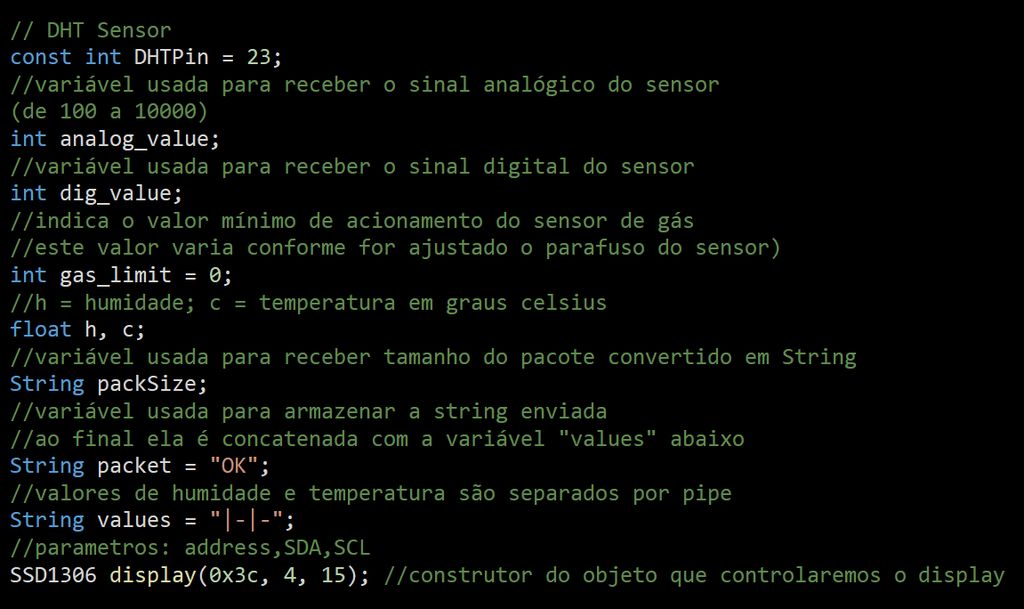
我們將處理
// DHT Sensor
const int DHTPin = 23;
int analog_value; //variable used to receive the analog signal from sensor (from 100 to 10000)
int dig_value; //variable used to receive the digital signal from sensor
int gas_limit = 0; //used to indicates the minimum value to active the gas sensor (that value changes as the sensor screw is adjusted)
//h = humidity; c = Celsius temperature
float h, c;
String packSize; //variable used to receive the size of package converted in string
String packet = “OK”; //part of packet, that informs the status of sensor. That variable will be concatenate with the string “values”
String values = “|-|-”; //humidity and temperature values, separated by pipe
//parameters: address,SDA,SCL
SSD1306 display(0x3c, 4, 15); //display object
SimpleDHT22 dht22;
// Pins definition
#define SCK 5 // GPIO5 -- SX127x‘s SCK
#define MISO 19 // GPIO19 -- SX127x’s MISO
#define MOSI 27 // GPIO27 -- SX127x‘s MOSI
#define SS 18 // GPIO18 -- SX127x’s CS
#define RST 14 // GPIO14 -- SX127x‘s RESET
#define DI00 26 // GPIO26 -- SX127x’s IRQ(Interrupt Request)
#define MQ_analog 12 //analog gas sensor pin
#define MQ_dig 13 //digital gas sensor pin
#define BAND 433E6 //Radio frequency, we can still use: 433E6, 868E6, 915E6
步驟15:發(fā)送方除了定義氣體傳感器的最小觸發(fā)值外,還帶有用于接收模擬和數(shù)字信號(hào)的變量的傳感器。代碼[設(shè)置]

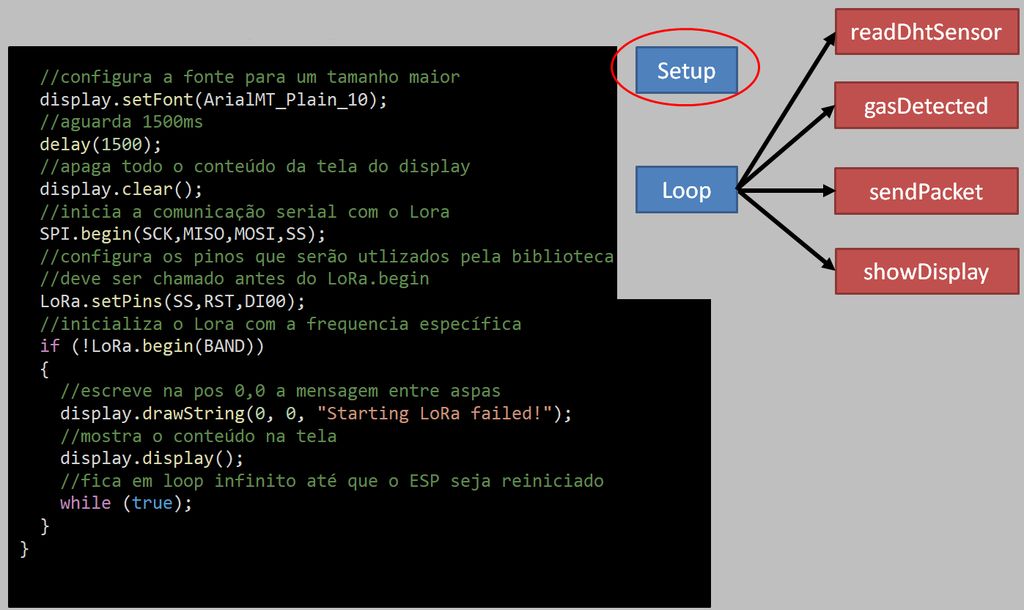
在設(shè)置中,我們將首先配置引腳和顯示。
void setup()
{
//set the humidity and temperature values with zero
h = c = 0;
//initialize the Serial with 9600b per second
Serial.begin(9600);
//configures analog pin as input
pinMode(MQ_analog, INPUT);
//configures digital pin as input
pinMode(MQ_dig, INPUT);
//configures oled pins as output
pinMode(16,OUTPUT);
//reset oled
digitalWrite(16, LOW);
//wait 50ms
delay(50);
//while the oled is on, GPIO16 must be HIGH
digitalWrite(16, HIGH);
//initializes the display
display.init();
//flip vertically the display
display.flipScreenVertically();
接下來(lái),我們將在顯示屏上定義打印特性,并開始與LORA進(jìn)行串行通信。然后,我們將繼續(xù)進(jìn)行配置。
//set display font
display.setFont(ArialMT_Plain_10);
//wait 1500ms
delay(1500);
//clear the display
display.clear();
//initializes serial interface
SPI.begin(SCK,MISO,MOSI,SS);
//set Lora pins
LoRa.setPins(SS,RST,DI00);
//initializes the lora, seting the radio frequency
if (!LoRa.begin(BAND))
{
//draw in the position 0,0 the message in between quotation marks
display.drawString(0, 0, “Starting LoRa failed!”);
//turns on the LCD display
display.display();
//do nothing forever
while (true);
}
}
步驟16:發(fā)件人代碼[循環(huán)]

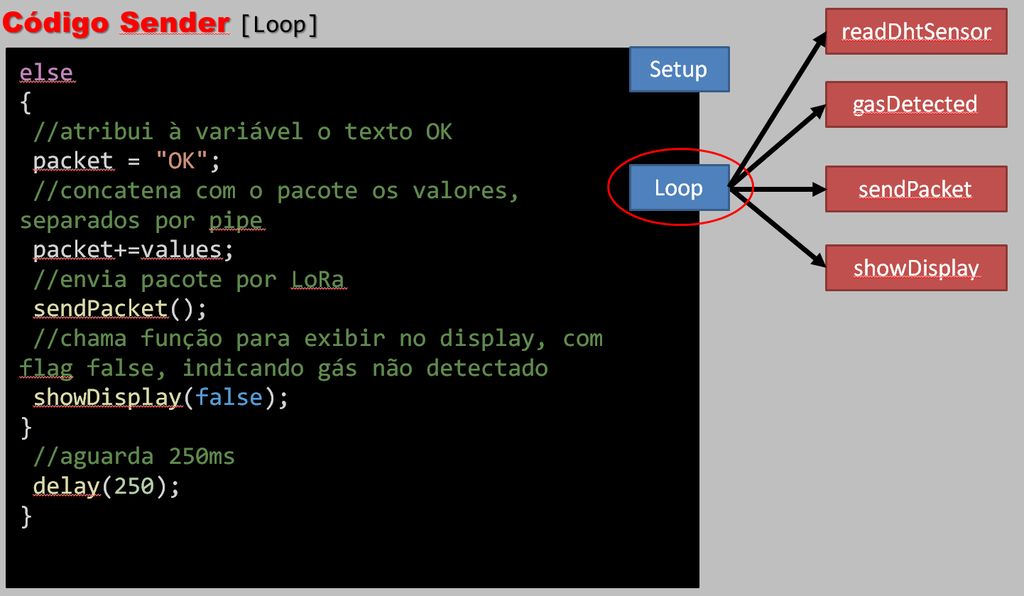
在循環(huán)中,我們還使用顯示器的特性,并指示讀取傳感器的步驟以及LORA的氣體檢測(cè)和警報(bào)發(fā)送的方法。
void loop()
{
//clear the display
display.clear();
//set the text alignment to left
display.setTextAlignment(TEXT_ALIGN_LEFT);
//sets the text font
display.setFont(ArialMT_Plain_16);
//draw in the position 0,0 the message in between quotation marks
display.drawString(0, 0, “Running.。.”);
//reads temperature sensor values
readDhtSensor();
//it concatenates on string the humidity and temperature values separated by pipe
values=“|”+String(h)+“|”+String(c);
//if the digital signal of sensor is lower, it means gas detected (inverse logic)
if(gasDetected())
{
//sets the value of the packet string to “ALARM”
packet = “ALARM”;
//it concatenates the packet with the values
packet+=values;
//sends package by LoRa
sendPacket();
//shows display, true = gas detected
showDisplay(true);
}
我們定義了將通過(guò)SMS發(fā)送的信息。
else
{
//sets the value of the packet string to “OK”
packet = “OK”;
//it concatenates the packet with the values
packet+=values;
//sends package by LoRa
sendPacket();
//shows display, false = no gas detected
showDisplay(false);
}
//waits 250ms
delay(250);
}
步驟17:發(fā)件人代碼[showDisplay]
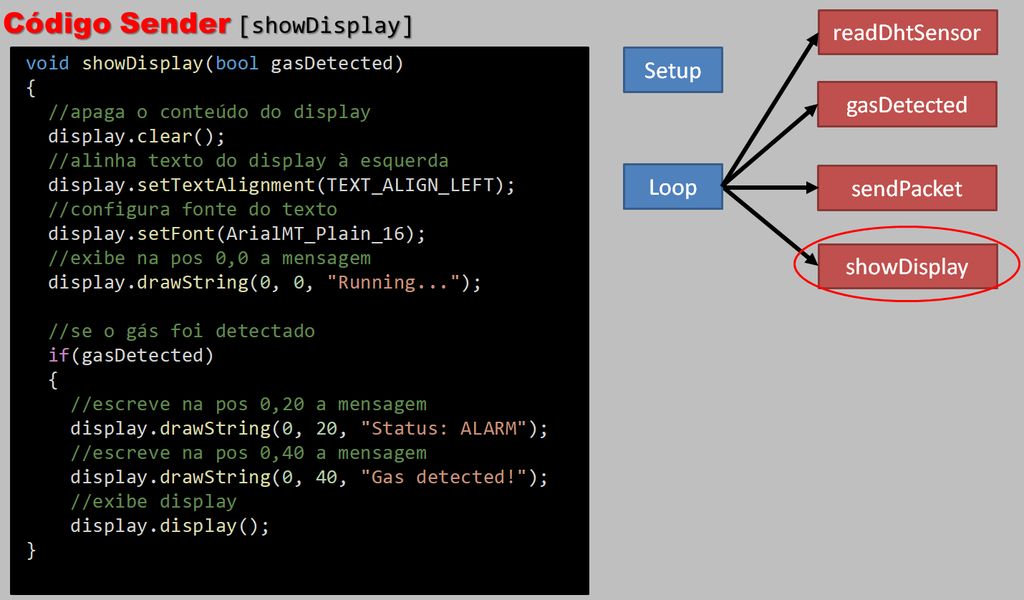
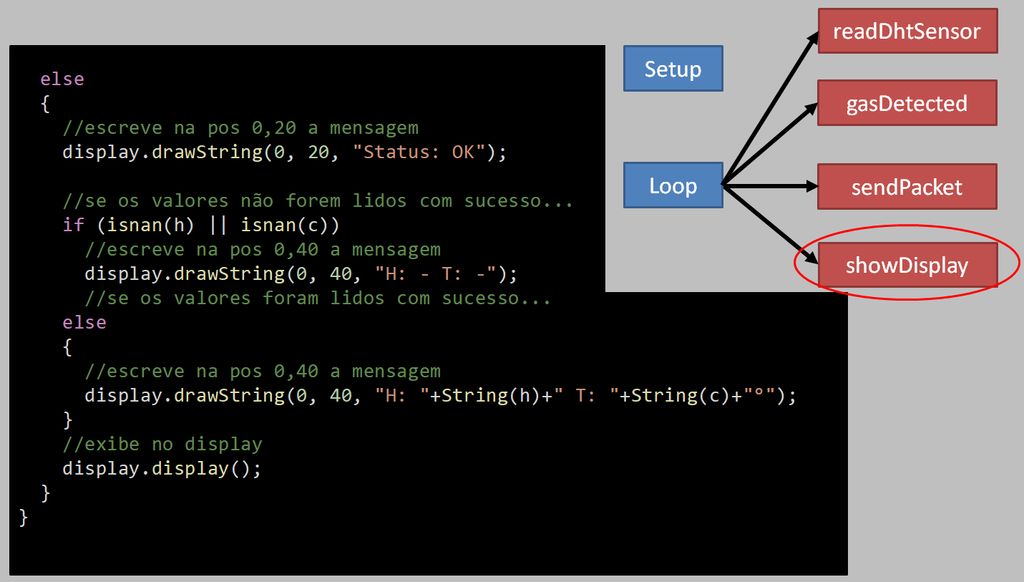
同樣,我們處理LORA顯示屏上的數(shù)據(jù)顯示。
void showDisplay(bool gasDetected)
{
//clear the display
display.clear();
//set the text alignment to left
display.setTextAlignment(TEXT_ALIGN_LEFT);
//sets the text font
display.setFont(ArialMT_Plain_16);
//draw in the position 0,0 the message in between quotation marks
display.drawString(0, 0, “Running.。.”);
//if flag = true
if(gasDetected)
{
//draw in the position 0,20 the message in between quotation marks
display.drawString(0, 20, “Status: ALARM”);
//draw in the position 0,40 the message in between quotation marks
display.drawString(0, 40, “Gas detected!”);
//turns on the LCD display
display.display();
}
else
{
//draw in the position 0,20 the message in between quotation marks
display.drawString(0, 20, “Status: OK”);
//draw in the position 0,40 the message in between quotation marks
display.drawString(0, 40, “H: ”+String(h)+“ T: ”+String(c)+“°”);
//turns on the LCD display
display.display();
}
}
步驟18:發(fā)件人代碼[gasDetected]
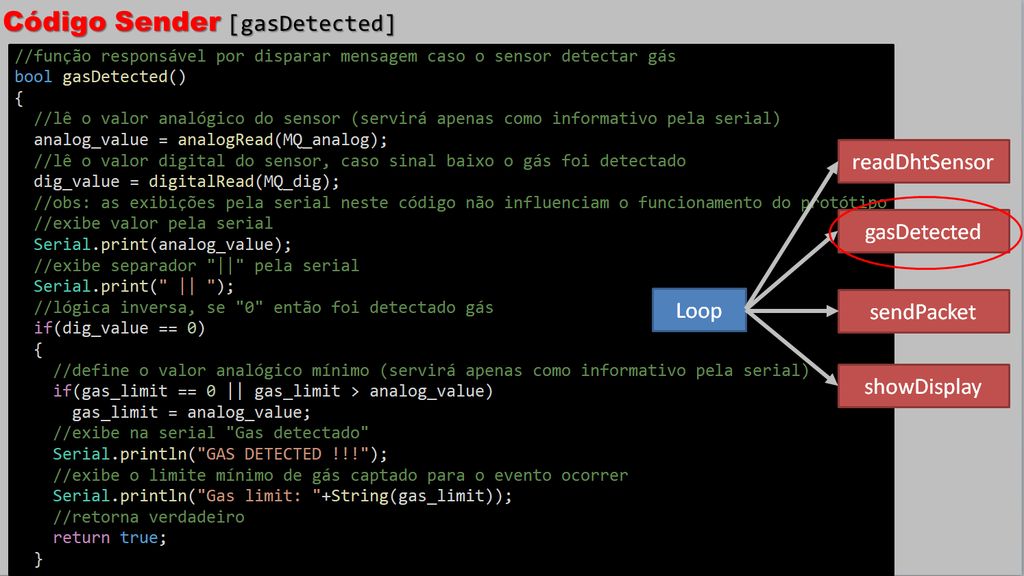
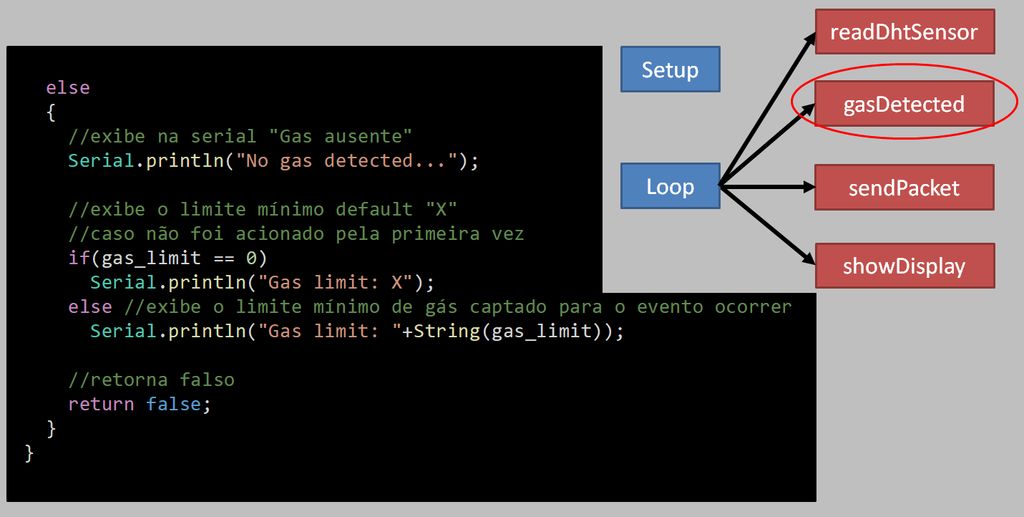
在這里,如果傳感器檢測(cè)到某種類型的氣體泄漏,我們具有觸發(fā)消息的功能。
bool gasDetected()
{
//reads the analog value of the sensor
analog_value = analogRead(MQ_analog);
//reads the digital value of the sensor
dig_value = digitalRead(MQ_dig);
//obs: the serial views in this code do not influence the operation of the prototype
//shows value to the serial
Serial.print(analog_value);
//shows tab “||” to the serial
Serial.print(“ || ”);
//inverse logic
if(dig_value == 0)
{
//sets the minimum analog value
if(gas_limit == 0 || gas_limit 》 analog_value)
gas_limit = analog_value;
//shows ‘gas detected’ to the serial
Serial.println(“GAS DETECTED !!!”);
//shows the minimum gas limit to the serial
Serial.println(“Gas limit: ”+String(gas_limit));
//gas detected
return true;
}
else
{
//shows ‘no gas detected’ to the serial
Serial.println(“No gas detected.。.”);
//if first time, shows ‘X’ to the serial
if(gas_limit == 0)
Serial.println(“Gas limit: X”);
else //shows gas limit to the serial
Serial.println(“Gas limit: ”+String(gas_limit));
//no gas detected
return false;
}
}
第19步:發(fā)送方代碼[readDhtSensor]
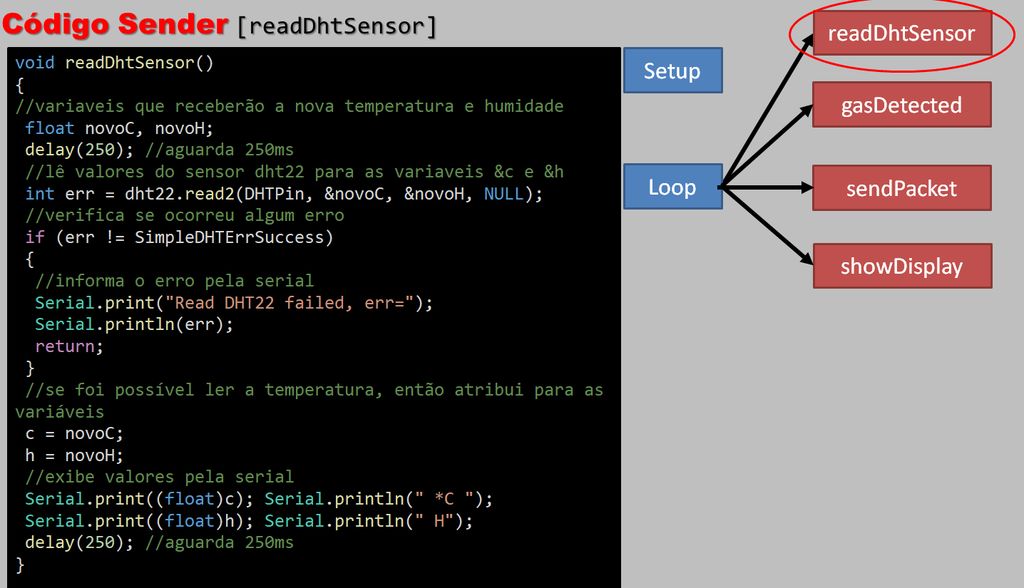
void readDhtSensor()
{
// declaration of variables that will receive the new temperature and humidity
float novoC, novoH;
//waits 250ms
delay(250);
//set dht22 sensor values tovariables &novoC and &novoH
int err = dht22.read2(DHTPin, &novoC, &novoH, NULL);
//checks for an error
if (err != SimpleDHTErrSuccess)
{
//shows error in the serial
Serial.print(“Read DHT22 failed, err=”);
Serial.println(err);
return;
}
//if no error
//sets the variable values
c = novoC;
h = novoH;
//shows values in the serial
Serial.print((float)c); Serial.println(“ *C ”);
Serial.print((float)h); Serial.println(“ H”);
//waits 250ms
delay(250);
}
第20步:發(fā)送方代碼[sendPacket]

最后,我們打開了一個(gè)程序包,以添加用于SMS發(fā)送的數(shù)據(jù)。
void sendPacket()
{
//starts a connection to write UDP data
LoRa.beginPacket();
//send packet
LoRa.print(packet);
//returns an int: 1 if the packet was sent successfully, 0 if there was an error
LoRa.endPacket();
}
責(zé)任編輯:wv
-
傳感器
+關(guān)注
關(guān)注
2576文章
55069瀏覽量
791553 -
蜂鳴器
+關(guān)注
關(guān)注
12文章
900瀏覽量
47773 -
ESP32
+關(guān)注
關(guān)注
26文章
1197瀏覽量
21801
發(fā)布評(píng)論請(qǐng)先 登錄
ESP32驅(qū)動(dòng)TFmini-S紅外激光測(cè)距ToF模塊進(jìn)行測(cè)距
ESP32 Wi-Fi 控制 LED 燈的原理

ESP32藍(lán)牙驅(qū)動(dòng)MAX98357對(duì)音頻音樂(lè)播放
樂(lè)鑫科技ESP32-S3開發(fā)板+超聲波霧化,給智能魚缸整點(diǎn)美學(xué)氛圍

VSCode + ESP-IDF環(huán)境下給ESP32-S3項(xiàng)目添加頭文件
ESP32-WROOM-32 技術(shù)規(guī)格書
ESP8266和ESP32開發(fā)板常見(jiàn)的2種下載方式
ESP32usart接收中斷求助
樂(lè)鑫ESP32-C6和ESP32-C61究竟該如何選擇?一文讀懂本質(zhì)區(qū)別

LoRa1120模塊與ESP32點(diǎn)對(duì)點(diǎn)LoRa通信實(shí)現(xiàn)實(shí)踐指南
ESP32用作經(jīng)典藍(lán)牙串口透?jìng)?b class='flag-5'>模塊與手機(jī)進(jìn)行串口通信
ESP32驅(qū)動(dòng)MFRC522 RFID模塊讀寫IC卡數(shù)據(jù)
ESP32-CAM帶OV2640攝像頭視頻顯示




 工商網(wǎng)監(jiān)
評(píng)論