


 如何在空中控制計算機

第1步:所需材料
跳躍Motion支持Python,Java,C ++,C#,Javascript。在本教程中,我們將使用Java。
因此,在開始制作程序之前,我們需要查看此構建所需的材料:
1。飛躍運動控制器(在此處購買)
2。面向Java開發人員的Eclipse IDE(在此處下載)
3。 Leap Motion設置文件(在此處下載)
4。 Leap Motion SDK(在此處下載)
5。 Java SE 7(在此處下載)(下載JDK和JRE )
( * Leap Motion庫僅適用于Java 6或Java 7 )
如果您不知道如何設置eclipse,那么我推薦此Java系列入門教程:在此處觀看
好,現在讓我們轉到涉及的步驟創建程序。
步驟2:軟件設置
跳躍運動支持多種編程語言,例如C ++,C#,Python,Java和Javascript。
在本教程中,我們將使用Java進行編程。
初始設置:
1。首先轉到https://www.leapmotion.com/setup并下載Leap Motion設置文件,然后安裝該應用程序。它會安裝所有內容,以將the動控制器連接到您的計算機。
2。接下來轉到https://developer.leapmotion.com/(開發人員門戶)并創建一個帳戶。然后下載Leap Motion SDK。
3。然后將zip文件中的所有文件提取到您選擇的任何文件夾中。
配置類路徑:
在此本教程將使用面向Java開發人員的Eclipse IDE。
1。打開Eclipse,然后單擊File》 New》 Java Project。
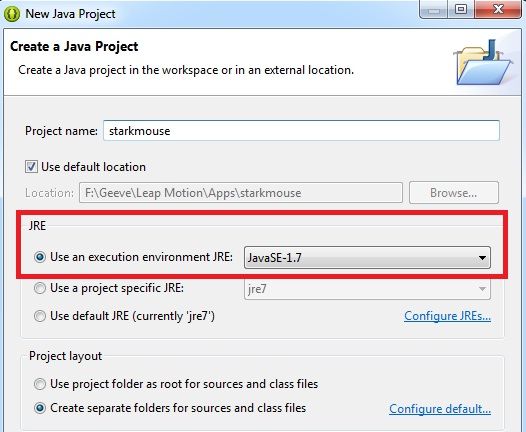
2。為項目命名,并確保將執行運行時環境JRE設置為Java SE 1.7,如圖所示。
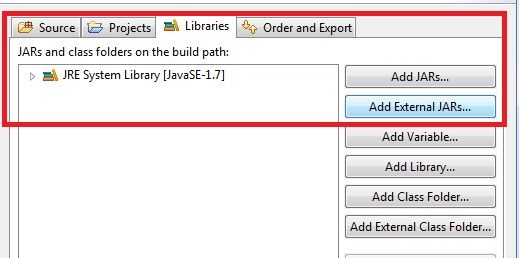
3。然后單擊“下一步”,打開“庫”選項卡,然后選擇“添加外部JAR”并導航到先前提取的文件夾。
4。然后打開LeapSDK文件夾并轉到libs文件夾并選擇LeapJava.jar文件。
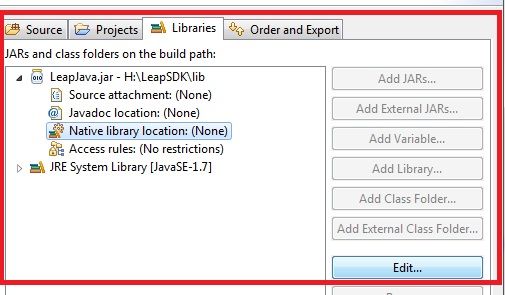
5。接下來,單擊LeapJava.jar旁邊的三角形下拉按鈕,然后從“下拉菜單”中單擊“本機庫位置”,然后單擊“編輯”,如圖所示。
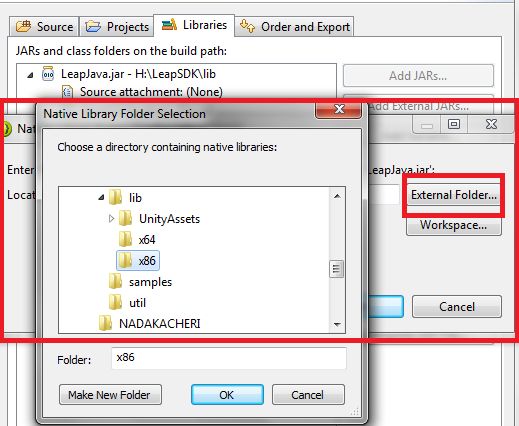
6。然后單擊“外部文件夾”,然后導航到LeapSDK文件夾》 lib》,然后根據您的操作系統選擇 x64 或 x86 文件夾,然后單擊“確定”,然后單擊“完成”。
我們現在在我們的項目中安裝了LeapMotion,現在開始進行一些編碼!
第3步:跳躍運動監聽器
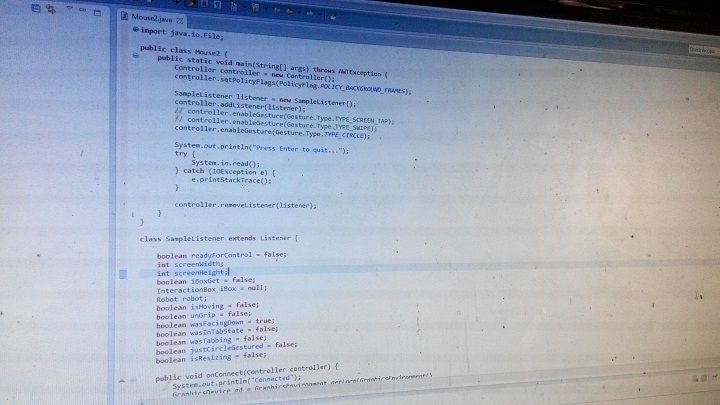
Now that we are done importing the libraries , let us start working on the project.
初始設置:
1。首先,我們需要在源文件夾中創建一個新類,單擊項目文件夾旁邊的三角形下拉箭頭。
2。在您的項目文件夾中,右鍵單擊src文件夾,轉到new》,然后單擊class創建一個新的Java類。
3。給班級起個名字,然后單擊完成。
現在,讓我們從代碼開始:
1。首先,我們創建一個Leap Motion偵聽器:(注意:導入必要的庫),偵聽的偵聽器是何時將Jump Motion控制器連接到計算機的。
package starkmouse;
import java.io.IOException;
import java.awt.AWTException;
import java.awt.GraphicsDevice;
import java.awt.GraphicsEnvironment;
import java.awt.MouseInfo;
import java.awt.Point;
import java.awt.Robot;
import java.awt.event.InputEvent;
import java.awt.event.KeyEvent;
import com.leapmotion.leap.*;
import com.leapmotion.leap.Controller.PolicyFlag;
public class leapmoues {
public static void main(String[] args) throws AWTException {
Controller controller = new Controller();
controller.setPolicyFlags(PolicyFlag.POLICY_BACKGROUND_FRAMES);
SampleListener listener = new SampleListener();
controller.addListener(listener);
// controller.enableGesture(Gesture.Type.TYPE_SCREEN_TAP);
// controller.enableGesture(Gesture.Type.TYPE_SWIPE);
controller.enableGesture(Gesture.Type.TYPE_CIRCLE);
System.out.println(“Press Enter to quit.。.”);
try {
System.in.read();
} catch (IOException e) {
e.printStackTrace();
}
controller.removeListener(listener);
}
}
class SampleListener extends Listener {
boolean readyForControl = false;
int screenWidth;
int screenHeight;
boolean iBoxGet = false;
InteractionBox iBox = null;
Robot robot;
boolean isMoving = false;
boolean unGrip = false;
boolean wasFacingDown = true;
boolean wasInTabState = false;
boolean wasTabbing = false;
boolean justCircleGestured = false;
boolean isResizing = false;
public void onConnect(Controller controller) {
System.out.println(“Connected”);
GraphicsDevice gd = GraphicsEnvironment.getLocalGraphicsEnvironment()
.getDefaultScreenDevice();
screenWidth = gd.getDisplayMode().getWidth();
screenHeight = gd.getDisplayMode().getHeight();
System.out.println(“Screen Resolution: X: ” + screenWidth + “, H: ”
+ screenHeight);
readyForControl = true;
try {
robot = new Robot();
robot.setAutoDelay(5);
} catch (AWTException e) {
// TODO Auto-generated catch block
e.printStackTrace();
}
}
步驟4:幀和手勢數據
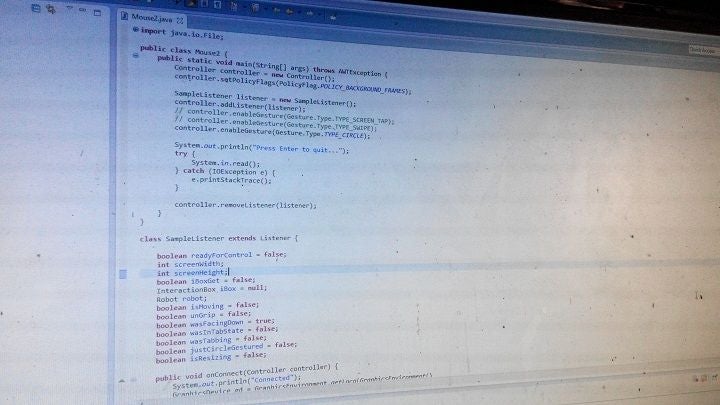
跳躍運動幀數據,其中包括手勢(圓形,捏,掌面朝下和所有其他手勢)
跳躍運動有兩個紅外攝像機和三個紅外LED。跳躍運動使用三個IR Led形成IR點圖案,從而形成3D數據收集,IR相機拍攝稱為幀的圖片。幀從跳躍運動設備發送到計算機,我們可以對其進行編程。
跳躍運動使用復雜的數學分析圖片和點定位,然后比較紅外拍攝的兩張圖片的數據相機并使用兩個2D表示形式獲得3D表示形式。
跳躍運動設備以300 fps的速度捕獲。然后,我們對發送到計算機的每個幀進行處理。
代碼:
public void onFrame(Controller controller) {
Frame frame = controller.frame(); // The latest frame
// Frame previous = controller.frame(1); //The previous frame
// System.out.println(“Frame available”);
if (!iBoxGet) {
iBox = frame.interactionBox();
iBoxGet = true;
System.out.println(“Interaction box set!”);
}
// Pointable furthestFront = frame.pointables().frontmost();
Hand rightHand = frame.hands().rightmost();
Vector palmV = rightHand.palmVelocity();
// System.out.println(“Velocity: X: ” + palmV.getX() + “, Y: ” +
// palmV.getY()
// + “, Z: ” + palmV.getZ());
Vector palmN = rightHand.palmNormal();
// System.out.println(“Normal: X: ” + palmN.getX() + “, Y: ”
// + palmN.getY() + “, Z: ” + palmN.getZ());
Point mouseLoc = MouseInfo.getPointerInfo().getLocation();
int currentMouseX = mouseLoc.x;
int currentMouseY = mouseLoc.y;
if (readyForControl && rightHand.confidence() 》 .15) {
if (!isMoving && !wasInTabState && frame.hands().count() 》 1) {
Hand leftHand = frame.hands().leftmost();
if (leftHand.pinchStrength() 》 .8
&& rightHand.pinchStrength() 》 .8) {
if (!isResizing) {
System.out.println(“Resizing.。.”);
robot.keyPress(KeyEvent.VK_ALT);
robot.keyPress(KeyEvent.VK_SPACE);
robot.keyRelease(KeyEvent.VK_SPACE);
robot.keyRelease(KeyEvent.VK_ALT);
robot.keyPress(KeyEvent.VK_S);
robot.keyRelease(KeyEvent.VK_S);
robot.keyPress(KeyEvent.VK_DOWN);
robot.keyPress(KeyEvent.VK_RIGHT);
robot.keyRelease(KeyEvent.VK_DOWN);
robot.keyRelease(KeyEvent.VK_RIGHT);
isResizing = true;
}
}else{
if(isResizing){
System.out.println(“Resizing complete!”);
robot.mousePress(InputEvent.BUTTON1_MASK);
robot.mouseRelease(InputEvent.BUTTON1_MASK);
isResizing = false;
}
}
}
// System.out.println(“Confidence: ” + rightHand.confidence());
if (rightHand.grabStrength() 》 .99 && !wasInTabState && !isResizing) {
if (!isMoving && palmN.getY() 《 .8) {
robot.keyPress(KeyEvent.VK_ALT);
robot.keyPress(KeyEvent.VK_SPACE);
robot.keyRelease(KeyEvent.VK_SPACE);
robot.keyRelease(KeyEvent.VK_ALT);
robot.keyPress(KeyEvent.VK_R);
robot.keyRelease(KeyEvent.VK_R);
robot.keyPress(KeyEvent.VK_ALT);
robot.keyPress(KeyEvent.VK_SPACE);
robot.keyRelease(KeyEvent.VK_SPACE);
robot.keyRelease(KeyEvent.VK_ALT);
robot.keyPress(KeyEvent.VK_M);
robot.keyRelease(KeyEvent.VK_M);
robot.keyPress(KeyEvent.VK_DOWN);
robot.keyRelease(KeyEvent.VK_DOWN);
isMoving = true;
}
// System.out.println(rightHand.grabStrength());
}
else {
// System.out.println(“Not grabbing”);
if (isMoving) {
robot.mousePress(InputEvent.BUTTON1_MASK);
robot.mouseRelease(InputEvent.BUTTON1_MASK);
isMoving = false;
if (palmN.getX() != 0 && palmN.getY() != 0 && palmN.getZ() != 0) {
if (palmN.getY() 《 -.1 && palmN.getZ() 》 -.8) {
if (currentMouseY 《= 8) {
robot.keyPress(KeyEvent.VK_WINDOWS);
robot.keyPress(KeyEvent.VK_UP);
robot.keyRelease(KeyEvent.VK_WINDOWS);
robot.keyRelease(KeyEvent.VK_UP);
}
else {
if (screenWidth - currentMouseX 《= 12) {
robot.keyPress(KeyEvent.VK_WINDOWS);
robot.keyPress(KeyEvent.VK_RIGHT);
robot.keyRelease(KeyEvent.VK_WINDOWS);
robot.keyRelease(KeyEvent.VK_RIGHT);
} else if (currentMouseX 《= 12) {
robot.keyPress(KeyEvent.VK_WINDOWS);
robot.keyPress(KeyEvent.VK_LEFT);
robot.keyRelease(KeyEvent.VK_WINDOWS);
robot.keyRelease(KeyEvent.VK_LEFT);
}
}
} else {
System.out.println(“Normal: X: ” + palmN.getX()
+ “, Y: ” + palmN.getY() + “, Z: ”
+ palmN.getZ());
robot.keyPress(KeyEvent.VK_ALT);
robot.keyPress(KeyEvent.VK_SPACE);
robot.keyRelease(KeyEvent.VK_SPACE);
robot.keyRelease(KeyEvent.VK_ALT);
robot.keyPress(KeyEvent.VK_N);
robot.keyRelease(KeyEvent.VK_N);
}
}
}
}
if (!isMoving && !isResizing) {
if (palmN.getY() 《 -.8 && palmN.getZ() 》 -.5) {
wasFacingDown = true;
wasTabbing = false;
if (wasInTabState) {
robot.keyPress(KeyEvent.VK_ENTER);
robot.keyRelease(KeyEvent.VK_ENTER);
wasInTabState = false;
}
} else if (palmN.getY() 》= .8 && wasFacingDown
&& !wasInTabState) {
System.out.println(“Alt tabbing”);
wasFacingDown = false;
wasInTabState = true;
wasTabbing = false;
robot.keyPress(KeyEvent.VK_ALT);
robot.keyPress(KeyEvent.VK_CONTROL);
robot.keyPress(KeyEvent.VK_TAB);
robot.delay(100);
robot.keyRelease(KeyEvent.VK_TAB);
robot.keyRelease(KeyEvent.VK_CONTROL);
robot.keyRelease(KeyEvent.VK_ALT);
try {
Runtime.getRuntime().exec(
“cmd /c start ” + “C:WindowSwitcher.lnk”);
} catch (IOException e) {
// TODO Auto-generated catch block
e.printStackTrace();
}
robot.delay(300);
} else if (wasInTabState && !wasFacingDown && !wasTabbing
&& palmN.getY() 《 .45) {
wasTabbing = true;
} else if (wasInTabState && !wasFacingDown && wasTabbing
&& palmN.getY() 》 .75) {
robot.keyPress(KeyEvent.VK_TAB);
robot.keyRelease(KeyEvent.VK_TAB);
wasTabbing = false;
}
}
/*
* if (!isMoving && !wasInTabState) { /* if(palmN.getZ() 《= -.7 &&
* rightHand.grabStrength() 《 .1){
* System.out.println(“Palm vertical velocity: ” +
* rightHand.palmVelocity().getY()); //float resultVerticalV =
* Math.round(Math.abs(rightHand.palmVelocity().getY()) - 1);
* //if(resultVerticalV 》 0){ robot.mouseWheel((int)
* Math.round(((rightHand.palmVelocity().getY()) / 500))); //}
* }else{
*/
if (!isMoving && !wasInTabState && frame.gestures().count() 》 0
&& frame.hands().count() == 1 && !isResizing) {
CircleGesture circleGesture = new CircleGesture(frame
.gestures().get(0));
// System.out.println(“Pinch strength: ” +
// rightHand.pinchStrength());
if (circleGesture.durationSeconds() 》 .5 && !justCircleGestured
&& rightHand.pinchStrength() 》 .8) {
System.out.println(“Closed a window!”);
robot.keyPress(KeyEvent.VK_ALT);
robot.keyPress(KeyEvent.VK_F4);
robot.keyRelease(KeyEvent.VK_F4);
robot.keyRelease(KeyEvent.VK_ALT);
justCircleGestured = true;
}
} else {
justCircleGestured = false;
}
float xSpeed = (palmV.getX() / 6);
float ySpeed = (palmV.getY() / 6);
// System.out.println(“xSpeed: ” + xSpeed + “, ySpeed: ” + ySpeed);
robot.mouseMove((int) (currentMouseX + xSpeed),
(int) (currentMouseY - ySpeed));
// }
}
}
}
步驟5:完成代碼!
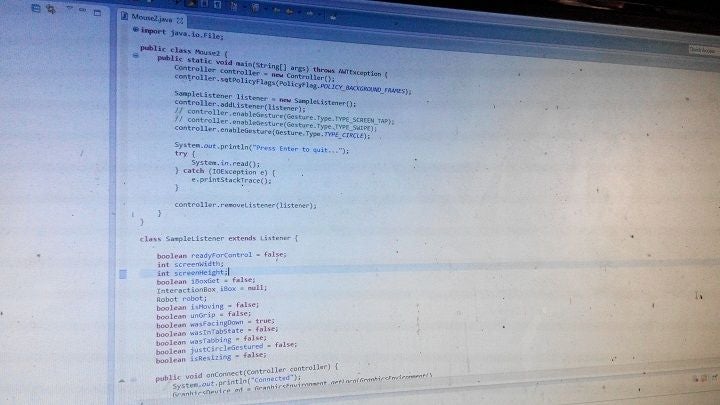
package starkmouse;
import java.io.IOException;
import java.awt.AWTException;
import java.awt.GraphicsDevice;
import java.awt.GraphicsEnvironment;
import java.awt.MouseInfo;
import java.awt.Point;
import java.awt.Robot;
import java.awt.event.InputEvent;
import java.awt.event.KeyEvent;
import com.leapmotion.leap.*;
import com.leapmotion.leap.Controller.PolicyFlag;
public class leapmoues {
public static void main(String[] args) throws AWTException {
Controller controller = new Controller();
controller.setPolicyFlags(PolicyFlag.POLICY_BACKGROUND_FRAMES);
SampleListener listener = new SampleListener();
controller.addListener(listener);
// controller.enableGesture(Gesture.Type.TYPE_SCREEN_TAP);
// controller.enableGesture(Gesture.Type.TYPE_SWIPE);
controller.enableGesture(Gesture.Type.TYPE_CIRCLE);
System.out.println(“Press Enter to quit.。.”);
try {
System.in.read();
} catch (IOException e) {
e.printStackTrace();
}
controller.removeListener(listener);
}
}
class SampleListener extends Listener {
boolean readyForControl = false;
int screenWidth;
int screenHeight;
boolean iBoxGet = false;
InteractionBox iBox = null;
Robot robot;
boolean isMoving = false;
boolean unGrip = false;
boolean wasFacingDown = true;
boolean wasInTabState = false;
boolean wasTabbing = false;
boolean justCircleGestured = false;
boolean isResizing = false;
public void onConnect(Controller controller) {
System.out.println(“Connected”);
GraphicsDevice gd = GraphicsEnvironment.getLocalGraphicsEnvironment()
.getDefaultScreenDevice();
screenWidth = gd.getDisplayMode().getWidth();
screenHeight = gd.getDisplayMode().getHeight();
System.out.println(“Screen Resolution: X: ” + screenWidth + “, H: ”
+ screenHeight);
readyForControl = true;
try {
robot = new Robot();
robot.setAutoDelay(5);
} catch (AWTException e) {
// TODO Auto-generated catch block
e.printStackTrace();
}
}
public void onFrame(Controller controller) {
Frame frame = controller.frame(); // The latest frame
// Frame previous = controller.frame(1); //The previous frame
// System.out.println(“Frame available”);
if (!iBoxGet) {
iBox = frame.interactionBox();
iBoxGet = true;
System.out.println(“Interaction box set!”);
}
// Pointable furthestFront = frame.pointables().frontmost();
Hand rightHand = frame.hands().rightmost();
Vector palmV = rightHand.palmVelocity();
// System.out.println(“Velocity: X: ” + palmV.getX() + “, Y: ” +
// palmV.getY()
// + “, Z: ” + palmV.getZ());
Vector palmN = rightHand.palmNormal();
// System.out.println(“Normal: X: ” + palmN.getX() + “, Y: ”
// + palmN.getY() + “, Z: ” + palmN.getZ());
Point mouseLoc = MouseInfo.getPointerInfo().getLocation();
int currentMouseX = mouseLoc.x;
int currentMouseY = mouseLoc.y;
if (readyForControl && rightHand.confidence() 》 .15) {
if (!isMoving && !wasInTabState && frame.hands().count() 》 1) {
Hand leftHand = frame.hands().leftmost();
if (leftHand.pinchStrength() 》 .8
&& rightHand.pinchStrength() 》 .8) {
if (!isResizing) {
System.out.println(“Resizing.。.”);
robot.keyPress(KeyEvent.VK_ALT);
robot.keyPress(KeyEvent.VK_SPACE);
robot.keyRelease(KeyEvent.VK_SPACE);
robot.keyRelease(KeyEvent.VK_ALT);
robot.keyPress(KeyEvent.VK_S);
robot.keyRelease(KeyEvent.VK_S);
robot.keyPress(KeyEvent.VK_DOWN);
robot.keyPress(KeyEvent.VK_RIGHT);
robot.keyRelease(KeyEvent.VK_DOWN);
robot.keyRelease(KeyEvent.VK_RIGHT);
isResizing = true;
}
}else{
if(isResizing){
System.out.println(“Resizing complete!”);
robot.mousePress(InputEvent.BUTTON1_MASK);
robot.mouseRelease(InputEvent.BUTTON1_MASK);
isResizing = false;
}
}
}
// System.out.println(“Confidence: ” + rightHand.confidence());
if (rightHand.grabStrength() 》 .99 && !wasInTabState && !isResizing) {
if (!isMoving && palmN.getY() 《 .8) {
robot.keyPress(KeyEvent.VK_ALT);
robot.keyPress(KeyEvent.VK_SPACE);
robot.keyRelease(KeyEvent.VK_SPACE);
robot.keyRelease(KeyEvent.VK_ALT);
robot.keyPress(KeyEvent.VK_R);
robot.keyRelease(KeyEvent.VK_R);
robot.keyPress(KeyEvent.VK_ALT);
robot.keyPress(KeyEvent.VK_SPACE);
robot.keyRelease(KeyEvent.VK_SPACE);
robot.keyRelease(KeyEvent.VK_ALT);
robot.keyPress(KeyEvent.VK_M);
robot.keyRelease(KeyEvent.VK_M);
robot.keyPress(KeyEvent.VK_DOWN);
robot.keyRelease(KeyEvent.VK_DOWN);
isMoving = true;
}
// System.out.println(rightHand.grabStrength());
} else {
// System.out.println(“Not grabbing”);
if (isMoving) {
robot.mousePress(InputEvent.BUTTON1_MASK);
robot.mouseRelease(InputEvent.BUTTON1_MASK);
isMoving = false;
if (palmN.getX() != 0 && palmN.getY() != 0
&& palmN.getZ() != 0) {
if (palmN.getY() 《 -.1 && palmN.getZ() 》 -.8) {
if (currentMouseY 《= 8) {
robot.keyPress(KeyEvent.VK_WINDOWS);
robot.keyPress(KeyEvent.VK_UP);
robot.keyRelease(KeyEvent.VK_WINDOWS);
robot.keyRelease(KeyEvent.VK_UP);
} else {
if (screenWidth - currentMouseX 《= 12) {
robot.keyPress(KeyEvent.VK_WINDOWS);
robot.keyPress(KeyEvent.VK_RIGHT);
robot.keyRelease(KeyEvent.VK_WINDOWS);
robot.keyRelease(KeyEvent.VK_RIGHT);
} else if (currentMouseX 《= 12) {
robot.keyPress(KeyEvent.VK_WINDOWS);
robot.keyPress(KeyEvent.VK_LEFT);
robot.keyRelease(KeyEvent.VK_WINDOWS);
robot.keyRelease(KeyEvent.VK_LEFT);
}
}
} else {
System.out.println(“Normal: X: ” + palmN.getX()
+ “, Y: ” + palmN.getY() + “, Z: ”
+ palmN.getZ());
robot.keyPress(KeyEvent.VK_ALT);
robot.keyPress(KeyEvent.VK_SPACE);
robot.keyRelease(KeyEvent.VK_SPACE);
robot.keyRelease(KeyEvent.VK_ALT);
robot.keyPress(KeyEvent.VK_N);
robot.keyRelease(KeyEvent.VK_N);
}
}
}
}
if (!isMoving && !isResizing) {
if (palmN.getY() 《 -.8 && palmN.getZ() 》 -.5) {
wasFacingDown = true;
wasTabbing = false;
if (wasInTabState) {
robot.keyPress(KeyEvent.VK_ENTER);
robot.keyRelease(KeyEvent.VK_ENTER);
wasInTabState = false;
}
} else if (palmN.getY() 》= .8 && wasFacingDown
&& !wasInTabState) {
System.out.println(“Alt tabbing”);
wasFacingDown = false;
wasInTabState = true;
wasTabbing = false;
robot.keyPress(KeyEvent.VK_ALT);
robot.keyPress(KeyEvent.VK_CONTROL);
robot.keyPress(KeyEvent.VK_TAB);
robot.delay(100);
robot.keyRelease(KeyEvent.VK_TAB);
robot.keyRelease(KeyEvent.VK_CONTROL);
robot.keyRelease(KeyEvent.VK_ALT);
try {
Runtime.getRuntime().exec(
“cmd /c start ” + “C:WindowSwitcher.lnk”);
} catch (IOException e) {
// TODO Auto-generated catch block
e.printStackTrace();
}
robot.delay(300);
} else if (wasInTabState && !wasFacingDown && !wasTabbing
&& palmN.getY() 《 .45) {
wasTabbing = true;
} else if (wasInTabState && !wasFacingDown && wasTabbing
&& palmN.getY() 》 .75) {
robot.keyPress(KeyEvent.VK_TAB);
robot.keyRelease(KeyEvent.VK_TAB);
wasTabbing = false;
}
}
/*
* if (!isMoving && !wasInTabState) { /* if(palmN.getZ() 《= -.7 &&
* rightHand.grabStrength() 《 .1){
* System.out.println(“Palm vertical velocity: ” +
* rightHand.palmVelocity().getY()); //float resultVerticalV =
* Math.round(Math.abs(rightHand.palmVelocity().getY()) - 1);
* //if(resultVerticalV 》 0){ robot.mouseWheel((int)
* Math.round(((rightHand.palmVelocity().getY()) / 500))); //}
* }else{
*/
if (!isMoving && !wasInTabState && frame.gestures().count() 》 0
&& frame.hands().count() == 1 && !isResizing) {
CircleGesture circleGesture = new CircleGesture(frame
.gestures().get(0));
// System.out.println(“Pinch strength: ” +
// rightHand.pinchStrength());
if (circleGesture.durationSeconds() 》 .5 && !justCircleGestured
&& rightHand.pinchStrength() 》 .8) {
System.out.println(“Closed a window!”);
robot.keyPress(KeyEvent.VK_ALT);
robot.keyPress(KeyEvent.VK_F4);
robot.keyRelease(KeyEvent.VK_F4);
robot.keyRelease(KeyEvent.VK_ALT);
justCircleGestured = true;
}
} else {
justCircleGestured = false;
}
float xSpeed = (palmV.getX() / 6);
float ySpeed = (palmV.getY() / 6);
// System.out.println(“xSpeed: ” + xSpeed + “, ySpeed: ” + ySpeed);
robot.mouseMove((int) (currentMouseX + xSpeed),
(int) (currentMouseY - ySpeed));
// }
}
}
}
步驟6:運行程序和結果:
現在我們已經完成了對Leap Motion控制器的編程,我們可以在Eclipse中運行該程序了。
責任編輯:wv
-
控制器
+關注
關注
114文章
17791瀏覽量
193176 -
JAVA
+關注
關注
20文章
3001瀏覽量
116434
發布評論請先 登錄
十進制計算機硬件體系結構及“獨值”量化邏輯運算革命(一)
龍芯主板讓工控計算機擁有安全可信的核心
工控機與普通計算機的核心差異解析

龍芯中科斬獲2025中國工業計算機大會兩項殊榮
貿澤電子開售全新Arduino UNO Q單板計算機
【作品合集】賽昉科技VisionFive 2單板計算機開發板測評
工業計算機的重要性

自動化計算機經過加固后有什么好處?
自動化計算機的功能與用途

工業計算機與商用計算機的區別有哪些

工業計算機如何設計用于沖擊和振動

一文帶你了解工業計算機尺寸
計算機網絡入門指南
如何在計算機上安裝麒麟操作系統Kylin V10 SP3
NVIDIA 宣布推出 DGX Spark 個人 AI 計算機



 工商網監
工商網監
評論