


 如何訓(xùn)練Wekinator控制Arduino

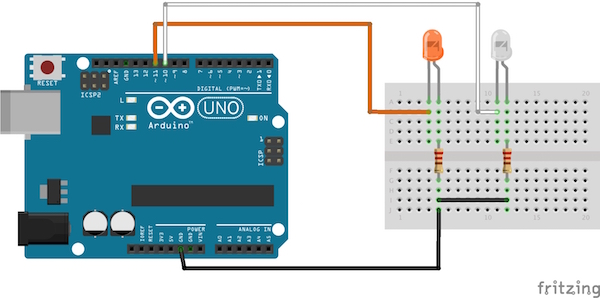
電路圖
將Arduino的引腳11連接到橙色LED的正極引線,通過220歐姆電阻將LED的負(fù)極引線連接到Arduino的地。類似地,通過220歐姆電阻將白色LED的正極引線連接到Arduino的引腳10和LED的負(fù)極引線連接到Arduino。
程序入門
首先,在Arduino IDE中加載下面為Arduino提供的代碼。然后上傳給定代碼以在IDE中處理。
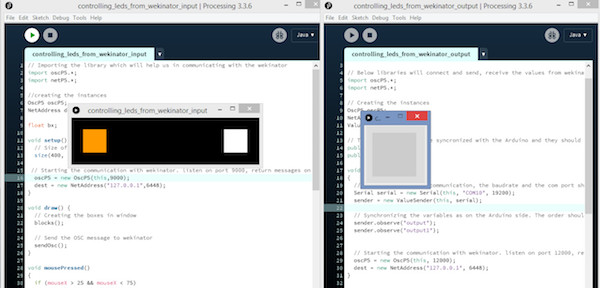
之后,打開Wekinator并將輸入更改為1并輸出為2并離開另一個選項(xiàng)。

點(diǎn)擊“下一步”,會出現(xiàn)一個新窗口。現(xiàn)在從處理的輸入窗口,單擊橙色框,在Wekinator中,在輸出-1框中輸入1,然后開始錄制半秒。

現(xiàn)在,單擊處理中的白色框,在Wekinator中,在輸出-1框中輸入0并在輸出-2框中輸入1并開始記錄半秒。

現(xiàn)在點(diǎn)擊“Train”,然后點(diǎn)擊“Run”。現(xiàn)在,當(dāng)您點(diǎn)擊橙色框時,連接到引腳11的LED將亮起,當(dāng)您單擊白色框時,連接到Arduino引腳10的LED將亮起。
Arduino代碼
代碼用注釋解釋。
#include //Including the library that will help us in receiving and sending the values from processing
ValueReceiver《2》 receiver; /*Creating the receiver that will receive up to 2 values.
Put the number of values to synchronize in the brackets */
/* The below two variables will be synchronized in the processing
and they should be same on both sides. */
int output;
int output1;
// Initializing the pins for led‘s
int orange_led = 11;
int white_led = 10;
void setup()
{
/* Starting the serial communication because we are communicating with the
Arduino through serial. The baudrate should be same as on the processing side. */
Serial.begin(19200);
pinMode(white_led, OUTPUT);
pinMode(orange_led, OUTPUT);
// Synchronizing the variables with the processing. The variables must be int type.
receiver.observe(output);
receiver.observe(output1);
}
void loop()
{
// Receiving the output from the processing.
receiver.sync();
// Matching the received output to light up led’s
if (output == 1)
{
digitalWrite(orange_led, HIGH);
}
else if (output == 0)
{
digitalWrite(orange_led, LOW);
}
if (output1 == 1)
{
digitalWrite(white_led, HIGH);
}
else if(output1 == 0)
{
digitalWrite(white_led, LOW);
}
}
處理代碼(輸入到Wekinator)
// Importing the library which will help us in communicating with the wekinator
import oscP5.*;
import netP5.*;
//creating the instances
OscP5 oscP5;
NetAddress dest;
float bx;
void setup() {
// Size of output window
size(400, 100, P3D);
// Starting the communication with wekinator. listen on port 9000, return messages on port 6448
oscP5 = new OscP5(this,9000);
dest = new NetAddress(“127.0.0.1”,6448);
}
void draw() {
// Creating the boxes in window
blocks();
// Send the OSC message to wekinator
sendOsc();
}
void mousePressed()
{
if (mouseX 》 25 && mouseX 《 75)
{
bx=1;
}
if (mouseX 》 325 && mouseX 《 375)
{
bx=2;
}
}
void sendOsc() {
OscMessage msg = new OscMessage(“/wek/inputs”);
msg.add((float)bx);
oscP5.send(msg, dest);
}
void blocks()
{
background(0);
fill(255, 155, 0);
rect(25, 25, 50, 50);
fill(255, 255, 255);
rect(325, 25, 50, 50);
}
處理代碼(Wekinator的輸出)
import vsync.*; // Importing the library that will help us in sending and receiving the values from the Arduino
import processing.serial.*; // Importing the serial library
// Below libraries will connect and send, receive the values from wekinator
import oscP5.*;
import netP5.*;
// Creating the instances
OscP5 oscP5;
NetAddress dest;
ValueSender sender;
// These variables will be syncronized with the Arduino and they should be same on the Arduino side.
public int output;
public int output1;
void setup()
{
// Starting the serial communication, the baudrate and the com port should be same as on the Arduino side.
Serial serial = new Serial(this, “COM10”, 19200);
sender = new ValueSender(this, serial);
// Synchronizing the variables as on the Arduino side. The order should be same.
sender.observe(“output”);
sender.observe(“output1”);
// Starting the communication with wekinator. listen on port 12000, return messages on port 6448
oscP5 = new OscP5(this, 12000);
dest = new NetAddress(“127.0.0.1”, 6448);
}
// Recieve OSC messages from Wekinator
void oscEvent(OscMessage theOscMessage) {
if (theOscMessage.checkAddrPattern(“/wek/outputs”) == true) {
// Receiving the output from wekinator
float value = theOscMessage.get(0).floatValue(); // First output
float value1 = theOscMessage.get(1).floatValue(); // Second output
// Converting the output to int type
output = int(value);
output1 = int(value1);
}
}
void draw()
{
// Nothing to be drawn for this example
}
-
Arduino
+關(guān)注
關(guān)注
190文章
6526瀏覽量
196935
發(fā)布評論請先 登錄
BTN9970/BTN9990電機(jī)控制盾牌:Arduino評估利器
探索用于Arduino的TLE94112ES直流電機(jī)控制盾牌
在Ubuntu20.04系統(tǒng)中訓(xùn)練神經(jīng)網(wǎng)絡(luò)模型的一些經(jīng)驗(yàn)
如何在 NuMaker-IoT-M467 板上使用 Arduino IDE 控制 Wi-Fi 模塊?
Arduino與LabVIEW聯(lián)合編程指南
OCR識別訓(xùn)練完成后給的是空壓縮包,為什么?
免費(fèi)分享Arduino入門+進(jìn)階(全套例程+書籍)




 工商網(wǎng)監(jiān)
評論