


 鴻蒙實戰開發:【瀏覽器制作】

瀏覽器
介紹
本示例使用[@ohos.systemparameter]接口和[Web組件]展示了一個瀏覽器的基本功能,展示網頁,根據頁面歷史棧前進回退等。
效果預覽
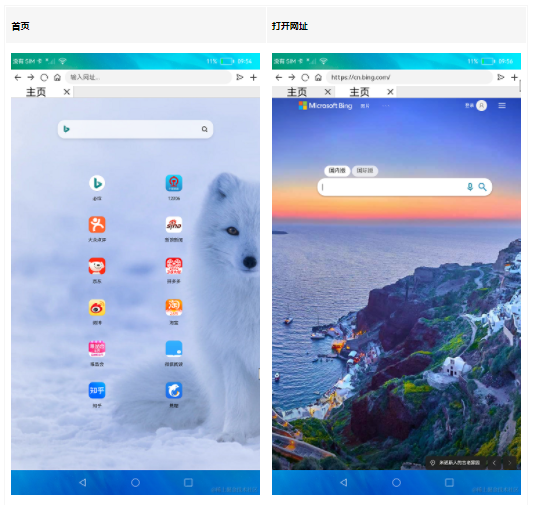
使用說明:
- 連接Wifi,啟動應用,展示默認頁面內容;
- 點擊默認頁面的圖標跳轉到對應網頁,或者在輸入框輸入網址,點擊右側跳轉按鈕跳轉到對應網頁;
- 點擊輸入框左側向右向左按鈕進行頁面的前進后退;
- 點擊主頁圖標回到主頁,點擊加號按鈕新建一個頁面。
工程目錄
entry/src/main/ets/
|---Application
|   |---AbilityStage.ets                        // 入口
|---pages
|   |---Index.ets                               // 首頁
|---common
|   |---PhoneLayout.ets                         // 窗口管理工具
|   |---TitleBar.ets                            // 導航欄
|---model
|   |---Logger.ts                               // 日志工具
|   |---Browser.ets                             // 瀏覽器實例
具體實現
- Web展示與歷史棧操作功能在Browser中,源碼參考[Browser.ets]
/*

 * Copyright (c) 2022 Huawei Device Co., Ltd.

 * Licensed under the Apache License, Version 2.0 (the "License");

 * you may not use this file except in compliance with the License.

 * You may obtain a copy of the License at

 *

 *     http://www.apache.org/licenses/LICENSE-2.0

 *

 * Unless required by applicable law or agreed to in writing, software

 * distributed under the License is distributed on an "AS IS" BASIS,

 * WITHOUT WARRANTIES OR CONDITIONS OF ANY KIND, either express or implied.

 * See the License for the specific language governing permissions and

 * limitations under the License.

 */

import Logger from './Logger'

import prompt from '@ohos.prompt';


export class WebObject {

  controller: WebController;

  isRegistered: boolean;

  constructor(controller: WebController, isRegistered: boolean) {

    this.controller = controller

    this.isRegistered = isRegistered

  }

}


@Observed

class WebKey {

  key: number;

  timestamp: number;


  constructor(key: number, timestamp: number) {

    this.key = key

    this.timestamp = timestamp

  }

}


export enum LoadingStatus {

  LOADING,

  END

}


const TAG: string = '[browser]'


export class Browser {

  inputValue: string = ""

  tabArrayIndex: number = 0

  progress: number = 0

  hideProgress: boolean = true

  loadingStatus: LoadingStatus = LoadingStatus.END


  webArray: Array< WebKey > = [new WebKey(0, new Date().getTime())]

  tabsController: TabsController = new TabsController()

  webControllerArray: Array< WebObject > = [new WebObject(new WebController(), false)]


  deleteTab(index: number) {

    Logger.info(TAG, `delete before tab index= ${index} controller length ${this.webControllerArray.length} tabArrayIndex= ${this.tabArrayIndex}`)

    this.webArray.splice(index, 1)

    this.webControllerArray.splice(index, 1)

    if (this.tabArrayIndex > index || this.tabArrayIndex === this.webArray.length) {

      this.tabArrayIndex -= 1

    }

    for (let i = index;i < this.webArray.length; ++i) {

      this.webArray[i].key -= 1

    }

    for (let i = 0;i < this.webArray.length; ++i) {

      Logger.info(TAG, `key ${this.webArray[i].key}, time=${this.webArray[i].timestamp}`)

    }

    Logger.info(`delete after tab index=${index}, controller length=${this.webControllerArray.length}, tabArrayIndex=${this.tabArrayIndex}`)

    this.tabsController.changeIndex(this.tabArrayIndex)

  }


  getWebArray() {

    return this.webArray

  }


  addTab() {

    if (this.webArray.length > 10) {

      prompt.showToast({

        message: '頁簽數量已滿'

      })

      return;

    }

    let webController: WebController = new WebController();

    let object = new WebObject(webController, false)

    this.webControllerArray.push(object)

    this.webArray.push(new WebKey(this.webArray.length, new Date().getTime()))

    this.tabArrayIndex = this.webArray.length - 1

    Logger.info(TAG, `add tab index= ${this.tabArrayIndex}`)

    setTimeout(() = > {

      this.tabsController.changeIndex(this.tabArrayIndex)

    }, 50)

  }


  setTabArrayIndex(tabArrayIndex: number) {

    this.tabArrayIndex = tabArrayIndex

  }


  getTabArrayIndex() {

    return this.tabArrayIndex

  }


  setInputVal(inputValue: string) {

    this.inputValue = inputValue

  }


  getInputVal() {

    return this.inputValue

  }


  loadUrl(addr: string) {

    addr = "https://" + addr;

    this.webControllerArray[this.tabArrayIndex].controller.loadUrl({ url: addr })

  }


  Back() {

    if (this.webControllerArray[this.tabArrayIndex].controller.accessBackward()) {

      this.webControllerArray[this.tabArrayIndex].controller.backward()

    }

  }


  Forward() {

    if (this.webControllerArray[this.tabArrayIndex].controller.accessForward()) {

      this.webControllerArray[this.tabArrayIndex].controller.forward()

    }

  }


  Refresh() {

    this.webControllerArray[this.tabArrayIndex].controller.refresh()

  }

}
-   加載網頁及刷新:使用WebController提供的loadUrl可以加載目標網址內容,使用refresh方法刷新頁面;
-   頁面前進后退功能:頁面在前進或者后退前使用accessForward/accessBackward查詢是否有歷史記錄,然后調用forward/backward進行前進/后退操作。
依賴
不涉及。
約束與限制
- 本示例僅支持標準系統上運行;
- 本示例需外接鼠標進行驗證;
- 本示例已適配API version 9版本SDK,版本號:3.2.11.9。
- 本示例不支持點擊tab頁簽,切換網頁并刷新頁面;
- 本示例涉及使用系統接口:[@ohos.systemparameter],需要手動替換Full SDK才能編譯通過。
- 本示例需要使用DevEco Studio 3.1 Beta2 (Build Version: 3.1.0.400, built on April 7, 2023)及以上版本才可編譯運行。
下載
如需單獨下載本工程,執行如下命令:
git init
git config core.sparsecheckout true
echo code/BasicFeature/Web/Browser/ > .git/info/sparse-checkout
git remote add origin https://gitee.com/openharmony/applications_app_samples.git
git pull origin master
審核編輯 黃宇
聲明:本文內容及配圖由入駐作者撰寫或者入駐合作網站授權轉載。文章觀點僅代表作者本人,不代表電子發燒友網立場。文章及其配圖僅供工程師學習之用,如有內容侵權或者其他違規問題,請聯系本站處理。
舉報投訴
-
瀏覽器
+關注
關注
1文章
1043瀏覽量
37145 -
鴻蒙
+關注
關注
60文章
2997瀏覽量
46100
發布評論請先 登錄
相關推薦
熱點推薦
VF2 Debian image 69 Web 瀏覽器失敗,怎么修復?
只需啟動并運行圖像 69。
$ ip 一個
顯示互聯網連接已建立良好。
單擊以運行默認的Web瀏覽器時,會彈出一條錯誤消息。
“無法執行默認 Web 瀏覽器。”
輸入/輸出錯誤。
有什么提示需要修復嗎?
發表于 03-24 06:54
無需安裝!在瀏覽器里就能玩轉ESP32/ESP8266,這個神器絕了!
使用教程)ESP32-運行網頁服務器(WebServer)-實用篇介紹扔掉繁瑣的桌面軟件,一個瀏覽器搞定所有ESP開發調試需求溫馨提示私信:ESPConnect即可獲取

M4-R1 開源鴻蒙(OpenHarmory)開發板丨串口調試助手實戰案例
支持與高集成度設計,成為開發者體驗與學習鴻蒙系統的理想平臺。無論是智慧家居、教學實驗,還是設備通信,M4-R1都能提供穩定可靠的開發環境。本次分享的實戰案例——串口

Microsoft Edge瀏覽器iOS端插件功能上線
在最新發布的 139 版本中,Microsoft Edge 瀏覽器 iOS 端正式支持插件功能!與此同時,Microsoft Edge 安卓端的插件數量已躍升至近 30 款。廣告攔截、雙語翻譯、資源下載……你的手機瀏覽器,也能擁有自定義的「超能力」。
亞馬遜云科技推出Amazon Nova Act SDK預覽版,加速瀏覽器自動化Agent落地
北京2025年8月5日 /美通社/ --?亞馬遜云科技日前宣布,推出Amazon Nova Act SDK有限預覽版,可快速幫助客戶將基于瀏覽器的Agent從原型部署至生產環境。該SDK可與亞馬遜云
微軟Microsoft Edge瀏覽器構筑立體式安全防線
在信息爆炸的今天,釣魚網站、詐騙廣告、隱私追蹤層出不窮。Microsoft Edge 瀏覽器為桌面與移動端用戶構筑了立體式安全防線。用七大安全護盾,保護你的上網安全。
鴻蒙5開發寶藏案例分享---一多開發實例(音樂)
各位開發者小伙伴們好呀!今天咱們來點硬核干貨!最近在鴻蒙文檔中心挖到一座“金礦”——官方竟然暗藏了100+實戰案例,從分布式架構到交互動效優化應有盡有!這些案例不僅藏著華為工程師的私房技巧,還直接
鴻蒙5開發寶藏案例分享---瀑布流優化實戰分享
鴻蒙瀑布流性能優化實戰:告別卡頓的寶藏指南!
大家好!最近在鴻蒙文檔里挖到一個 性能優化寶藏庫 ,原來官方早就準備好了各種場景的最佳實踐!今天重點分享「瀑布流加載慢丟幀」的解決方案,附完整代碼解析
發表于 06-12 17:41
鴻蒙5開發寶藏案例分享---埋點開發實戰指南
鴻蒙埋點開發寶藏指南:官方案例實戰解析,輕松搞定數據追蹤!
大家好呀!我是HarmonyOS開發路上的探索者。最近在折騰應用埋點時,意外發現了鴻蒙
發表于 06-12 16:30
鴻蒙5開發寶藏案例分享---切面編程實戰揭秘
鴻蒙切面編程(AOP)實戰指南:隱藏的寶藏功能大揭秘!
大家好!今天在翻鴻蒙開發者文檔時,意外發現了官方埋藏的「切面編程」寶藏案例!實際開發
發表于 06-12 16:21
鴻蒙5開發寶藏案例分享---應用架構實戰技巧
大家好! 今天咱們聊聊鴻蒙開發中那些“官方文檔提了但實際開發難找”的架構設計技巧。結合官方文檔,我會用 真實代碼案例+通俗講解 ,幫你把分層架構和線程通信落地到項目里,告別“理論會了,代碼不會
發表于 06-12 16:14
鴻蒙5開發隱藏案例分享---自由流轉的瀏覽進度接續
**?**鴻蒙開發隱藏案例大揭秘!手把手教你玩轉應用接續功能?
大家好呀~今天要跟大家分享一個超實用的鴻蒙開發技巧!之前總覺得鴻蒙的官方文檔
發表于 06-03 18:47
老電視如何安裝瀏覽器?
2017年購買的夏普老電視,1.5G+8G存儲,網上下的瀏覽器APK文件在電視內打開就彈出“解析程序包出現問題”。
未知來源選項已打開,存儲空間清空到只剩下三個應用(只占用300M左右),基本可
發表于 06-01 18:57
看點:華為首款鴻蒙電腦正式亮相 蘋果探索在瀏覽器中加入AI搜索功能
給大家帶來一些行業資訊: 華為首款鴻蒙電腦正式亮相 ?5月8日在鴻蒙電腦技術與生態溝通會上華為首款鴻蒙電腦正式亮相。同時華為智慧辦公將升級為鴻蒙辦公。



 工商網監
工商網監
評論